Custom ERP Development: Complete Guide, Process, Cost, Benefits & Best Practices


Custom ERP development is the process of building an ERP (enterprise resource planning) system around one company's specific workflows, teams, and goals, instead of using pre-built, off-the-shelf software. It typically costs $30,000 to $1 million or more and takes 6 to 30 months, depending on scope. Businesses choose it when standard ERP software can't support their processes, integrations, or growth plans.
Custom ERP development creates business software around specific workflows, teams, and operational needs. Unlike off-the-shelf ERP systems, it allows companies to build features and processes that match how their business actually works. During my ERP project work, I’ve found that the most important problems often appear before coding starts.
After reviewing workflows and approval processes across projects, I’ve seen how unclear responsibilities, duplicate data, and missing integrations can create issues later. I now begin ERP planning with workflow discovery, requirements mapping, and process validation before development.
This guide explains the custom ERP development process, including planning, design, development, testing, implementation, costs, timelines, and post-launch improvements.
About the Author
Written by: Mitu Das, SEO Specialist and Web Developer. I have worked in SEO and content writing since 2024, supporting e-commerce, SaaS, and service-based businesses. Alongside my SEO and content strategy work, I have contributed to ERP-related content and workflow research, focusing on custom ERP development, business process mapping, system requirements, integrations, and practical software solutions. My work focuses on SEO content writing, technical SEO, content strategy, web development, custom ERP solutions, and practical digital marketing.
Reviewed by: Senior Content Strategist at CyberCraft Bangladesh. Our content review process checks every article for factual accuracy, clarity, search intent alignment, SEO best practices, and practical usefulness before publication.
Published: August 25, 2026
Last Updated: September 3, 2026
I wrote this guide based on practical experience reviewing ERP workflows, mapping business processes, identifying approval and data gaps, and understanding the requirements involved in custom ERP projects. I have included practical observations from ERP discovery, development, testing, data migration, integration, deployment, and post-launch support to help businesses understand the real challenges, costs, timelines, and decisions involved in custom ERP development.
Key Takeaways
Custom ERP builds software around your business workflows, goals, and needs.
The choice between custom and off-the-shelf ERP depends on process complexity, budget, and growth plans.
Custom ERP can connect finance, HR, inventory, sales, procurement, CRM, and project teams in one system.
Cost typically ranges from $30,000 to $1 million or more, depending on scope.
Most mid-size projects take around 6 to 18 months. Large, complex systems can take longer.
A good ERP partner should offer discovery, design, development, testing, and ongoing support.
Plan for data transfer, integrations, security, and user training before you start.
Custom ERP pays off most when standard software can't support your workflows or growth.
What Is Custom ERP Development?
Custom ERP development means building a system around a company's own workflows, teams, tools, and goals. Off-the-shelf software asks a business to adapt. Custom ERP development flips that. It's made to match how the business actually runs. This means it can automate tasks, connect teams, centralize data, and support growth over time.
Our practical experience: During ERP discovery and planning work, we have seen that the initial problem is rarely the full problem. A business may come to us because inventory is difficult to track, but workflow mapping can reveal duplicate data entry, unclear approvals, and reporting gaps across other departments. After reviewing these workflows, we often adjust the proposed ERP modules before development begins. This experience is why we recommend mapping real business processes before choosing features or technology.
What Is an ERP System and Why Does It Matter?
An ERP system is software that connects core business tasks, such as finance, stock, HR, sales, buying, and project work, in one place. It matters because shared data cuts down on silos and automates repeat tasks. In turn, this gives teams better visibility and helps them make faster, smarter calls.
A modern ERP creates one shared source of data. Instead of sales, finance, stock, and HR teams working in separate tools, an ERP links their data in one place. This can cut duplicate data entry, improve reports, and make information easier to find.
For businesses with special needs, custom ERP offers more freedom. Teams can design workflows, permissions, dashboards, and automation around how they actually work. They don't need to force every team to fit one standard model.
In our ERP workflow reviews, we have found that the biggest problems are often between departments rather than inside a single module. For example, a sales order may need approval from finance before inventory can prepare the shipment. Mapping these handoffs helps us identify where automation, permissions, and notifications should be built into the ERP.
Metric | Value |
|---|---|
95% | |
Average cut in running costs | 23% |
$96B | |
Share of ERP systems now running on the cloud | ~70% |
Overall ERP project failure rate (Panorama Consulting, 2025) | 68% |
ERP projects finished on time and on budget (Gartner-cited data) | ~30–32% |
Source note: ERP statistics vary by study methodology, project type, and definition of success or failure. These figures should therefore be used as industry context rather than as guarantees for a specific ERP project.
Custom ERP vs. Off-the-Shelf ERP: Which Is Better?
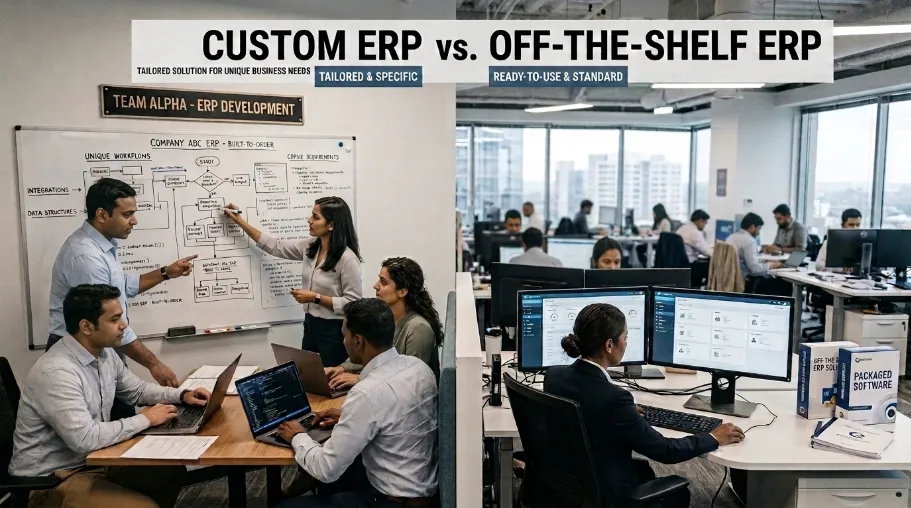
Custom ERP tends to work best for businesses with special workflows or complex needs, while off-the-shelf ERP works best when standard tools already fit and speed matters most. In the end, custom ERP vs. Off-the-shelf ERP comes down to your processes, budget, and growth plans.
The Case for Off-the-Shelf ERP
Big platforms such as SAP, Oracle, and Microsoft Dynamics work well for standard processes. If your workflows already match a platform's tools, an off-the-shelf ERP can get you live faster with proven features.
For companies with common needs, these systems offer a solid base for finance, stock, reports, buying, and daily tasks.
The Case for Custom ERP
Custom ERP pays off once standard software can no longer support a company's workflows, links, rules, or growth plans. A tailored system lets a business build around how it actually works, instead of reshaping key steps to fit generic software.
Makers with complex production steps, for instance, often need special manufacturing tools. Retailers, meanwhile, may need custom stock, sales, and multi-channel tools.
Even growing firms can gain from custom ERP for small business once old software starts to limit output or growth. A well-built system can give a business just what it needs, without extra clutter.
One pattern shows up again and again in discovery calls: businesses miss how much time their teams lose to manual workarounds. Copy-paste spreadsheets, month-end checks, and re-typing data all add up. This hidden cost is often the strongest case for going custom. Yet it rarely shows up until someone times the actual process.
A useful test is to measure the workaround instead of simply describing it. Track how many employees touch the process, how often data is re-entered, how long approvals take, and how frequently errors require correction. This gives the business a measurable basis for deciding whether customization is worth the investment.
The risk of getting this wrong is well proven. Panorama Consulting's 2025 study puts the overall ERP failure rate (projects that miss their goals) at 68%. That rate climbs to 73% for makers running custom, made-to-order lines. Cost overruns follow a similar path. Godlan's 2026 review of over 2,400 ERP builds found average budget overruns of 189% across sectors, rising to 215% in manufacturing. Separately, Gartner-cited data puts the share of ERP projects finished on time and on budget at just 30–32%. These numbers cover ERP projects broadly, not just custom builds. Still, they show why the planning steps below matter as much as the software itself.
The right ERP choice isn't really about custom vs. standard software. Instead, it's about picking a system that fits your business, backs your teams, and helps you hit your long-term goals.
Factors | Custom ERP | Off-the-shelf ERP |
|---|---|---|
Process fit | Built around your workflows | You adapt to the software |
Upfront cost | Higher initial investment | Lower to start |
Licensing | None, you own it | Recurring license fees |
Scalability | Scales exactly as needed | Limited to the vendor roadmap |
Integrations | Connects to any system | Pre-built connectors only |
Total cost (5 to 7 yrs) | Often lower over time | Fees and add-ons add up |
Time to deploy | Longer build timeline | Faster initial setup |
What Is an ERP System in Accounting?
An ERP system in accounting links money tasks with sales, buying, stock, payroll, and other business jobs. It centralizes financial data and automates transactions. As a result, it improves reports and gives leaders a live view of income, costs, and cash flow.
A full ERP accounting tool can cover the general ledger, bills, invoices, budgets, and expense tracking. It can also cover payroll links, buying checks, multi-currency support, and financial reports.
By linking accounting with other teams, ERP software can cut manual checks and keep data consistent.
What Are the Major ERP Platforms?
SAP S/4HANA
SAP S/4HANA is a big ERP platform built for firms with complex finance, operations, and supply-chain needs. It offers deep tools for large firms running complex processes.
Oracle ERP Cloud
Oracle Fusion Cloud ERP is a platform that covers finance, buying, project work, risk checks, and data analysis. It suits firms with complex business and money needs.
Microsoft Dynamics 365
Microsoft Dynamics 365 mixes ERP with business apps and links well with other Microsoft tools. It's a strong fit for firms already using Microsoft products.
Infor CloudSuite and Epicor ERP
Infor CloudSuite and Epicor ERP offer tools built for sectors like manufacturing, distribution, and retail. They work well when a firm's process closely matches their built-in models.
Want to know which ERP platform fits your business? Compare custom ERP vs. off-the-shelf ERP to see how these platforms stack up against a system built just for you.
How Does Custom ERP Development Work? A 7-Step Process

Custom ERP development typically follows a set path: discovery, design, build, links, testing, launch, and support. This path helps teams catch needs early, cut risk, test features, and roll out the new system step by step. Below is how each step tends to play out in real projects, including the parts that don't make it into most sales pitches.
1. Discovery and Requirements Analysis
Discovery maps out workflows, user needs, data, links, reports, and tech limits. This step lays the base for the whole project and helps avoid costly changes later.
In our experience, this step runs longer than clients expect. It often takes several weeks of watching staff, mapping edge cases, and checking the process guide against what actually happens on the floor. Skipping this step to "save time" is the single biggest cause of scope changes later on. This matches the wider research: Godlan's failure review links over 42% of ERP failures to poor change management, ahead of data-transfer issues and green project teams.
For example, during workflow reviews, we have found that a normal sales order can follow one approval path, while a discounted or urgent order follows another. Documenting these exceptions before development helps prevent missing requirements and reduces unnecessary changes later.
2. System Design and Architecture
System design sets the ERP's data structure, modules, user flow, security model, and links. A well-planned design keeps the system able to grow as needs change.
Before development begins, the team should review the proposed architecture with the business owner and technical stakeholders. At this stage, we typically look at data relationships, permissions, module dependencies, integration points, reporting needs, and future scaling requirements. Catching a structural issue here is usually easier than changing it after development has started.
3. Agile Development
Agile ERP development builds the system in small sprints, not all at once. Regular check-ins let teams test working features, give feedback, and catch bugs while they're still cheap to fix.
Projects tend to stay on budget when a business lead, not just an IT contact, joins sprint reviews from week one. If feedback only shows up at final testing, near the end of the build, rework costs climb fast. This risk is real and measured. Research pooled by Panorama Consulting links budget overruns mainly to poor staffing plans (about 38–40% of cases), scope creep (about 35%), and tech or data snags (about 34%). Early, hands-on sprint reviews tend to catch these issues before they pile up.
In practice, sprint reviews work best when users test working screens rather than reviewing feature lists. A finance user may spot an approval problem that a developer would not see, while a warehouse user may identify an inventory exception that was missing from the original requirements. This feedback should be recorded and prioritized before the next sprint.
4. Integration and Data Migration
Integration links the ERP to existing tools, such as CRM, online stores, payment, shipping, HR, or accounting platforms. Data migration then moves old records into the new system while keeping them accurate and linked.
Data migration is the step most likely to run over time. Old data is rarely as clean as it looks in a spreadsheet. As a result, fixing duplicate records or mismatched product codes often takes longer than teams plan for. Industry research often names poor data migration, along with weak change management, as a top cause of ERP failure. That's why it needs its own line item in the project plan, not a spot buried under general "integration" work.
Before migration, we recommend profiling the existing data for duplicates, missing values, inconsistent naming, inactive records, and mismatched IDs. A sample migration should then be tested before the full dataset is moved. This gives the team an opportunity to identify data-quality problems without putting the entire migration at risk.
5. Testing and Quality Assurance
ERP testing checks features, speed, security, links, data accuracy, and user flow before launch. User testing matters most here, since staff need to confirm the system actually works for their daily tasks.
What we see during ERP testing: Real users often identify problems that don't appear during developer testing. In our testing process, finance users may catch an approval or reporting issue, while warehouse users may uncover an inventory exception. We therefore test complete workflows with the people who will actually use them, rather than checking each feature in isolation.
6. Deployment and User Training
Launch rolls the ERP out to users step by step. Meanwhile, training helps staff learn new workflows and features. A phased rollout can cut disruption and make the switch easier.
A phased rollout can also make troubleshooting easier. One department, branch, or workflow can go live first while the team monitors errors, user feedback, and performance. Lessons from the first rollout can then be applied before expanding the system to the remaining users.
7. Ongoing Support and Maintenance
ERP support keeps going after launch through bug fixes, security patches, health checks, and new features. Before signing a deal, businesses should nail down response times, support costs, and service terms.
The first 60 to 90 days after launch are often when the real feedback shows up. It's not the test runs that reveal friction. It's staff using the system under real deadline pressure. This settling-in period is a known, common risk. Research from Panorama Consulting and Deloitte-linked studies found that about 51% of firms hit some kind of disruption at launch. Meanwhile, about 41% of firms fail to reach even half of their planned gains in year one. So it pays to plan time and patience for this window, just as much as for the build itself.
How Much Does Custom ERP Development Cost?
Custom ERP development typically costs $30,000 to $1 million or more. Mid-size projects often take 6 to 18 months. Large, complex systems can take 18 to 30 months. The final cost and time depend on modules, links, users, security needs, data transfer, and reports. For context, Panorama Consulting's data puts the average ERP build cost for a mid-size firm at about $450,000, or about $9,000 per user. That figure is a useful marker for where a custom build should land in the range below.
These ranges are planning estimates rather than fixed market prices. In a real project, the final estimate should be based on documented workflows, selected modules, user roles, integrations, data volume, security requirements, reporting needs, and deployment expectations. A development company that gives a precise quote before understanding these factors should be treated carefully.
Project Size | Typical Development Cost |
|---|---|
Small Business | $30,000–$80,000 |
Mid-market | $80,000–$250,000 |
Enterprise | $250,000–$1,000,000+ |
These are rough ranges, not fixed prices, based on the projects we've scoped for small and mid-size clients. Still, a full discovery step is needed for a real estimate. Not sure which budget tier fits you? See how custom ERP options compare to off-the-shelf pricing before you ask for quotes.
How Do You Evaluate a Custom ERP Development Company?
Choosing a custom ERP development company requires more than comparing prices. Before making a decision, learn how each provider handles discovery, architecture, development, testing, data migration, security, deployment, and ongoing maintenance.
Start by reviewing the development process rather than focusing only on the final feature list. A reliable process should explain how requirements are documented, how scope changes are handled, how users test the system, and how issues are resolved before launch.
You should also understand the provider's experience with integrations, data migration, security, and systems similar to yours. Case studies and technical documentation can help you understand how the company approaches projects with complex workflows.
The goal is not simply to find a development company. It is to understand which development approach, technical process, and support model best fit your business requirements.
Conclusion: What You Should Know About Custom ERP Development
Custom ERP development builds software around your business workflows, teams, and goals. A custom ERP is needed when standard software cannot support your workflows, reporting, integrations, or growth plans. Before starting, define requirements, map processes, plan data migration, and choose an experienced development partner. CyberCraft Bangladesh can help businesses plan, develop, test, and maintain custom ERP solutions based on their operational needs.
Frequently Asked Questions About Custom ERP Development
What Is Custom ERP Development?
Custom ERP development builds business software specifically around a company's workflows, teams, data, links, and goals. Unlike ready-made ERP software, custom ERP development lets a business control its features and build workflows a standard platform may not offer.
How Much Does Custom ERP Development Cost?
Custom ERP can cost about $30,000 to $1 million or more, based on scope and complexity. Small systems generally need less cash. Big platforms, though, can need much larger budgets due to extra modules, links, users, security, and data transfer needs.
How Long Does Custom ERP Development Take?
Most mid-size custom ERP projects take around 6 to 18 months. Large builds, though, can take 18 to 30 months or more. The timeline depends on the number of modules, links, data transfer needs, testing, and user count.
How Do I Choose Between Custom and Ready-Made ERP?
Pick custom ERP when your business has special workflows or needs that standard ERP can't support well. Pick ready-made ERP, instead, when the built-in features already fit and speed or lower upfront cost matter more than deep custom work.
What Are the Benefits of Custom ERP Software?
Custom ERP software can boost task automation, data control, links, reports, growth, and process control. Because the system is built around your own needs, teams can skip clutter and build workflows that match how they actually work.
What Modules Can a Custom ERP Include?
A custom ERP can include finance, HR, payroll, stock, buying, sales, CRM, project work, manufacturing, shipping, and reports, among others. The exact mix depends on your sector, workflows, users, and links.
Is Custom ERP Suitable for Small Businesses?
Custom ERP can suit small firms when standard software can't support key workflows, or when the firm expects fast growth. That said, smaller firms should still weigh build and upkeep costs against cheaper off-the-shelf options first.

I’m Mitu Das, a JavaScript developer, ERP product architect, and SEO specialist from Bangladesh. I work at CyberCraft Bangladesh, where I help build simple, scalable software, SaaS platforms, and business solutions. My goal is to create technology that helps companies save time, automate daily tasks, and grow faster. I enjoy combining development, product ideas, and SEO strategies to create useful digital solutions for modern businesses.
Writes about