E-commerce Website Development Process: A Practical Step-by-Step Guide (2026)


The e-commerce website development process is a seven-stage roadmap for planning, designing, building, testing, launching, and maintaining an online store. This guide walks you through each stage in order, from strategy and platform selection to UX design, development, SEO, quality assurance, and post-launch maintenance.
Use this guide to navigate the complete e-commerce website development process, understand what happens at each stage, compare Shopify, WooCommerce, and Adobe Commerce, estimate development costs, and identify the key tasks required before launch. You will also find practical examples, testing requirements, SEO considerations, B2B and B2C differences, and answers to common development questions.
The seven stages are strategy and planning, platform selection, design and UX, development and integration, content and SEO, testing and QA, and launch and maintenance. Follow them in sequence to reduce costly mistakes and build an e-commerce store that is secure, user-friendly, search-ready, and designed to support conversions.
Table of Contents
Key Takeaways
A Real Example: Why Process Beats Design Polish
What Are the 7 Stages of the E-Commerce Website Development Process?
Why the Process Matters More Than the Platform
Stage 1: Strategy and Planning
Stage 2: Platform Selection
Stage 3: Design and User Experience
Stage 4: Development and Integration
Stage 5: Content and SEO
Stage 6: Testing and Quality Assurance
Stage 7: Launch and Maintenance
How the Process Differs: B2B vs. B2C vs. Web3
Why This Process Is a Competitive Advantage
FAQ
References
Key Takeaways
Process matters more than platform. Shopify, WooCommerce, and Magento/Adobe Commerce all succeed or fail on execution. So, choose your platform after you set your business requirements, not before.
Most conversion problems start before design. In my audits, skipped customer research and loose MVP scope are the top cause of weak launches.
Checkout UX has a huge, measurable impact. Baymard Institute studied 50 independent reports. Average cart abandonment sits at 70.22%. Roughly a third of that comes from fixable usability issues.
Page speed is a revenue metric, not just a technical one. Google's mobile research found that bounce probability rises 123% as load time climbs from one second to ten. Conversion follows a similar curve.
Testing and launch monitoring prevent the costliest failures. Untested payment gateways, missing SSL on checkout, and blocked robots.txt files are common. They're also avoidable. Each one can quietly cost revenue in the first weeks after launch.
What Is the E-Commerce Website Development Process?
The e-commerce website development process is the step-by-step method of planning, designing, developing, testing, launching, and maintaining an online store. It typically includes defining business goals, researching customers, choosing an e-commerce platform, creating the website design, adding products and payment systems, optimizing security and performance, testing the store, and launching it for customers.
How Does the E-Commerce Website Development Process Work From Planning to Launch?
The e-commerce website development process involves planning, designing, developing, testing, and launching an online store. It starts by defining business goals, target customers, products, budget, and required features. Next, the right e-commerce platform is selected, followed by creating a mobile-friendly website design.
During development, essential features such as product pages, shopping carts, checkout, payment gateways, shipping, and customer accounts are integrated. Products, images, pricing, and SEO information are then added. Before launch, the website is tested for speed, security, mobile responsiveness, usability, and checkout performance.
Finally, the domain and hosting are configured, the store goes live, and its performance is monitored. A well-planned e-commerce website development process helps create a secure, user-friendly, SEO-ready online store that supports sales and long-term business growth.
A Real Example: Why Process Beats Design Polish
Here's a story I audited firsthand. A founder spent eighteen months saving to invest in her store. The agency she hired delivered something beautiful in the mockups. But three months after launch, the store was converting at 0.4%. That's far below the roughly 2.5% category average.
What my audit found: the real issues weren't about design. Nobody had mapped the customer journey before design began. Mobile checkout stretched across seven steps on a small screen. Product pages took six seconds to load on 4G. Worse, the payment gateway had never been tested on iOS Safari. And no sitemap had reached Google Search Console. By that point, the agency had moved on.
This story isn't unusual. I've seen variations of it across industries, budgets, and team sizes. So this guide isn't a theoretical framework. Instead, it's a practical account of what happens when each stage of the process is done right, and what it costs when it isn't.
Scope note: this guide is written from the perspective of small-to-mid-size direct-to-consumer and B2B builds, roughly $2,000 to $150,000 in project cost. Enterprise builds with dedicated engineering teams, multi-region compliance, or custom systems will diverge from some specifics here, even where the underlying principles still hold.
What Are the 7 Stages of the E-Commerce Website Development Process?
The e-commerce website development process breaks down into seven ordered stages. Together, they form a repeatable set of steps a team can follow from first brief to post-launch iteration:
Strategy and planning: define goals, understand your customer, and lock a tight MVP scope before design begins
Platform selection: choose Shopify, WooCommerce, Magento/Adobe Commerce, or a custom/headless build based on business requirements
Design and user experience: mobile-first design, page speed, and trust signals
Development and integration: frontend build, payment gateway integration, SSL, and product data structure
Content and SEO: product page copy, category page optimization, and technical SEO
Testing and quality assurance: cross-device, cross-payment-method testing before launch
Launch and maintenance: pre-launch verification, first-30-days monitoring, and ongoing iteration
Each stage is covered in full detail below, in the order a real project should follow them.
Why the Process Matters More Than the Platform

A well-run development process shapes performance, security, UX, and scalability more than any platform choice does. Why? Because the right process defines goals, features, design, and testing requirements before development begins. That's what actually reduces costly mistakes.
The Platform-First Mistake
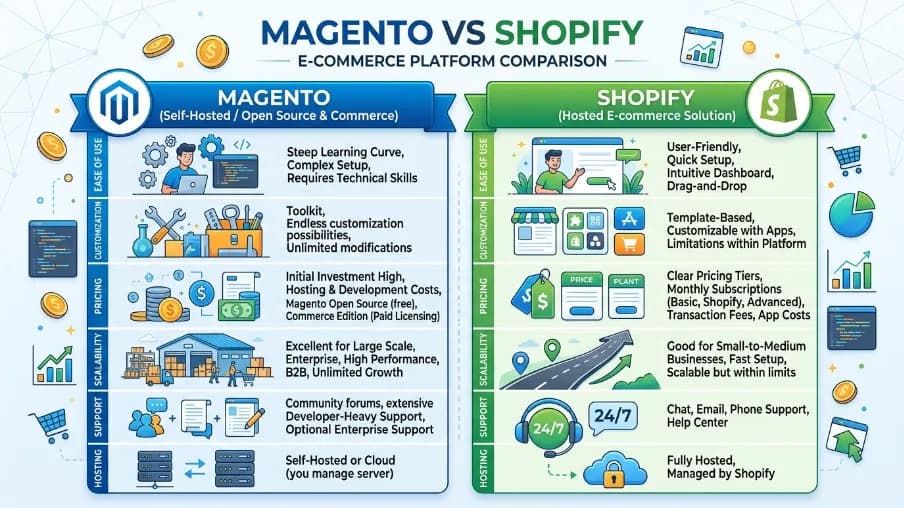
Most business owners spend their first research weeks comparing platforms: Shopify vs. WooCommerce, Magento vs. BigCommerce, custom vs. ready-made. Technology choice matters. But it's rarely the first question a business should answer. Whether you're weighing Shopify, WooCommerce, Adobe Commerce, or a fully custom build, one thing holds true. Success depends far more on strategy and customer understanding than on the platform itself.
In my own project history, I've seen Shopify stores fail and WooCommerce stores scale past seven figures. The platform was rarely the deciding factor. The process was.
For example, one founder I worked with had already picked his platform, hired a developer, and approved initial designs. Yet he couldn't clearly explain who his primary customers were or what they needed to feel confident buying. His developer had never asked. As a result, the store launched, drew decent traffic, and converted almost nobody. Six months later, we rebuilt the foundation from scratch.
What a Structured Process Actually Provides
A structured process gives you clear planning, fewer errors, and smoother project management. It ties business goals, customer behavior, design, technology, and long-term growth together, instead of treating them as separate, unrelated tasks.
This is what separates an experienced e-commerce development company from a general web developer: a repeatable process, run project to project, not improvisation. In short, the technology should serve the strategy, not define it.
Stage 1: Strategy and Planning
Strategy and planning is the first stage of the e-commerce website development process, and the one that decides how well every later stage goes. The most expensive mistakes in e-commerce happen before a single line of code gets written.
Take one supplement brand I worked with. They skipped formal planning. The founder wanted to move fast, so he briefed a developer straight from a rough-notes document and a Pinterest board. Eight months later, after a full build, they discovered the platform couldn't handle the subscription model their revenue plan depended on. The rebuild cost more than the original project. And this was entirely preventable.
Start with business goals, not a feature list: I ask every client for a number. Not "grow the business," but a specific order volume, conversion target, or revenue milestone. For instance, one furniture retailer defined success as fifty orders a month at a $400 average order value. That single constraint shaped every platform, design, and integration decision that followed: a high-trust, visually immersive experience, not a fast-browse catalog.
Understand your customers before you design for them: One outdoor clothing brand built its navigation around internal product taxonomy, not how customers actually searched. They had eleven top-level categories mirroring the warehouse, while shoppers were searching by activity: hiking, cycling, running. So we restructured the menu. Organic traffic rose 38% the following quarter.
Define your MVP scope tightly: Scope creep before launch is one of the most consistent budget killers. A sporting goods client started with sixty products across four categories. But by the time the brief was finalized, scope had ballooned. It grew to 340 products, eight categories, a loyalty program, a custom size guide, and live inventory from three warehouses. As a result, the timeline doubled and the budget nearly tripled. Worse, the loyalty program didn't even work at launch. Holding the line at sixty products would have meant going live three months earlier.
Know your budget range before any conversations: E-commerce website cost varies widely. A professionally configured Shopify store commonly runs in the low thousands for setup and theme customization. A mid-tier WooCommerce build with custom integrations often costs several times that. Meanwhile, a full B2B build on Magento or Adobe Commerce with ERP integration can climb into the tens of thousands. These are planning ranges, not quotes, so get itemized quotes from at least two providers before committing.
This isn't unique to e-commerce, either. The Project Management Institute's Pulse of the Profession research links unclear objectives and requirements to roughly 37% of project failures across industries. The subscription-platform mismatch above is a direct example of that pattern playing out. Similarly, PMI's research found that organizations with mature requirements-gathering practices waste far less budget on rework. That tracks with the sporting goods example above. A doubled timeline and a near-tripled budget both traced back to scope that was never locked down in writing.
Who needs to be involved: For a small-to-mid-size build, the core team is usually smaller than people expect. You need a project lead, often the founder or a marketing manager, who owns the goals and MVP scope. You need a designer for UX and visual direction. You need a developer or development team for the platform build and integrations. And you need someone accountable for content and SEO before launch, not after. Larger B2B or Magento/Adobe Commerce builds typically add a dedicated QA resource.
Where ERP or legacy-system integration is involved, add a systems or backend specialist too. Whoever fills these roles, one rule matters most. The same person should not both set the success metric in Stage 1 and grade their own work against it later. That split accountability is what catches scope creep and vague goals before they become a rebuild.
Stage 2: Platform Selection
Platform selection is the second stage of the e-commerce website development process. It starts with a clear list of requirements. That means expected order volume, catalog size, payment methods, shipping regions, and any systems the store needs to talk to. According to 2026 platform-detection data from BuiltWith and DemandSage, Shopify's share of tracked e-commerce sites sits at roughly 26%. WooCommerce follows closely at around 20%. Picking the wrong platform isn't just inconvenient; it's an expensive, disruptive problem. And it typically surfaces twelve to eighteen months after launch, right as the business starts to grow.
The WooCommerce-to-Shopify migration pattern: The most common migration I see runs from WooCommerce to Shopify. Here's the usual story: a business chose WooCommerce because it was cheaper, or an early developer recommended it. At low volume, it worked fine. But somewhere between fifty and two hundred orders a day, that changes. Hosting costs, security demands, and performance upkeep start eating into time that should go toward growth. This isn't an argument against WooCommerce, though; for content-led businesses, it's genuinely the right choice. So start from your business model, not a platform name.
When Shopify makes sense: Shopify suits most B2C projects where speed to market and reliable performance matter most. StoreLeads counted roughly 2.6 to 2.8 million live Shopify stores worldwide in 2026. For example, one fashion accessories brand I worked with went from brief to live in 22 days. They hit their first hundred orders within the first month.
When WooCommerce makes sense: StoreLeads puts live WooCommerce stores above 4.5 million worldwide as of 2026. That's ahead of Shopify on raw store count. Shopify, though, still leads on gross merchandise volume. WooCommerce suits businesses already running WordPress with real content operations, or those needing deep plugin-level customization. For instance, one photography equipment retailer ran a complex comparison tool and a subscription tutorial library alongside their store. WooCommerce, on properly managed hosting, handled it well. Notice the word managed, though: WooCommerce demands technical ownership that Shopify largely absorbs for you.
When Magento or Adobe Commerce makes sense: I've used these mainly for B2B and large-catalog retail. One industrial supplies company had roughly 40,000 SKUs and a dozen customer price tiers. Minimum-order-value logic varied by category. On top of that, they needed a legacy ERP sync twice daily. Magento was the only realistic option here. So before committing to a platform for B2B work, verify one thing first. Can it natively handle account-level pricing, quote workflows, approval routing, and net payment terms? These aren't easy bolt-ons later. Grand View Research projects the global B2B e-commerce market to reach roughly $36 trillion by 2026. That segment already outpaces consumer-facing B2C in total transaction value.
A note on Web3 e-commerce: I've worked on two Web3 projects: an NFT-gated early-access program and a token-based fan loyalty system. Both were technically complex. Both took longer and cost more than originally scoped. So budget generously, and choose partners who have actually shipped Web3 projects.
Stage 3: Design and User Experience
Design and user experience make up the third stage of the e-commerce website development process, and the stage where I've seen the most money spent for the least return. Usually, that's because it's treated as an aesthetic exercise rather than a conversion exercise. Good e-commerce UX design is where clarity, speed, and trust either come together, or quietly fall apart.
The average global e-commerce conversion rate sat at roughly 2.74% in 2026, per aggregated platform data. Consider a skincare brand whose analytics I reviewed. Its homepage won a regional design award, yet converted at just 0.8%, less than a third of the norm. Heat-map analysis showed why: most mobile visitors never scrolled past the hero banner, because it gave no clear sense of what the brand sold. In short, it was visually striking but functionally invisible.
Mobile-first design and responsive layouts. Roughly 59 to 60% of global e-commerce sales happen on mobile in 2026, projected to reach 67% by 2030 (Ringly.io). That same research puts mobile cart abandonment at 85.65%, well above desktop. So I specify mobile-first in every design brief: the design starts at the smallest screen width and expands upward from there. A genuinely mobile-friendly store adapts its layout, navigation, and checkout to the device. It doesn't just shrink a desktop design.
Clarity converts faster than aesthetics. A visitor lands and makes a trust decision within seconds: is this store for me? One outdoor furniture retailer had a homepage carousel rotating through four product lines with no supporting copy. As a result, new visitors had no context for who the brand was. So we swapped it for a single static hero, answering both questions at once. Homepage bounce rate dropped meaningfully within the first month.
Fast loading speed is a revenue line item. Google's mobile research, drawn from millions of page loads, found that bounce probability rises 123% as load time climbs from one second to ten. Separately, 53% of mobile users abandon a site taking longer than three seconds to load. And conversion rates fall roughly 4.4% for every added second between zero and five seconds.
For example, an apparel client I worked with cut mobile load time from over four seconds to under two. We did this through image optimization, lazy loading, and fewer redundant third-party scripts. Mobile conversion improved by a double-digit percentage within six weeks, in line with the published research. That said, I didn't run a controlled A/B test to isolate this one change. Other things shifted in the same window too. So I'm flagging that limit here, rather than overstating the result.
Trust signals must earn their place on the page. Baymard Institute's meta-analysis of dozens of studies puts average cart abandonment at 70.22%. Its checkout-usability research suggests large sites can gain roughly a 35% lift in conversion through better checkout design alone. Separately, 48% of shoppers abandon a cart specifically over unexpected extra costs revealed only at checkout.
In other words, that's as much a transparency problem as a trust-badge problem. Take one supplement brand whose checkout abandonment sat right at the industry average. The team assumed it was "normal," until session recordings showed users scrolling to the footer, looking for reassurance before they left. So we added an SSL badge, a money-back guarantee, and payment-processor logos to the checkout sidebar. Abandonment dropped noticeably on the same traffic, same products, same price. The only variable was visible trust.
Stage 4: Development and Integration
Development and integration form the fourth stage of the e-commerce website development process, the stage where plans become a store. Here's an honest account of what building an online shopping website actually involves. Why honest? Because the gap between what clients expect and what development requires is where most project friction lives.
Frontend development and e-commerce UI: On platform-based builds, frontend development means theme customization and JavaScript enhancements. Headless builds require a full frontend application layered on a separate e-commerce architecture.
For example, a kitchenware brand I worked with ran a headless build on Next.js, connected to a Shopify backend. It delivered sub-second load times and strong Core Web Vitals. Google's own PageSpeed Insights documentation sets the "good" thresholds. Largest Contentful Paint should sit under 2.5 seconds. Interaction to Next Paint should sit under 200 milliseconds. And Cumulative Layout Shift should sit under 0.1. These aren't just performance targets, either; they're SEO targets too.
Google confirmed Core Web Vitals as a direct ranking signal starting in June 2021. That build needed two dedicated frontend developers and a bigger ongoing maintenance budget than a standard Shopify theme. It was worth it at their volume, but not for a smaller store.
Shopping cart development and secure payment gateway integration: This is where the business logic actually lives: tax rules, shipping calculations, discount stacking, and real-time inventory. Payment gateway integration deserves more attention than it typically gets. For instance, a travel accessories brand's checkout worked flawlessly on Visa and Mastercard. Yet it was completely broken on American Express, a meaningful share of their target customers' preferred method. The bug sat for over a week before anyone tested a live Amex card in production. So test every payment method you plan to offer, live, across every device and browser combination in your primary market, before you announce launch.
E-commerce website security: Over 95% of web page loads now happen over HTTPS, according to Google's HTTPS Transparency Report. Starting with Chrome 154 in October 2026, Chrome will warn users by default before loading any public site without it. So SSL installation must be verified, not assumed. Security also extends to PCI-DSS compliance for stored payment data. The PCI Security Standards Council's version 4.0 requirements became fully mandatory on March 31, 2025.
They replaced the older v3.2.1 baseline that many smaller stores were still running against. This includes brute-force login protection and regular dependency patching too. I've reviewed WooCommerce stores where SSL was active on the homepage but missing from the checkout subdirectory. That means a security warning sat on the highest-stakes page for weeks before anyone noticed.
Product data structure and inventory management system integration: Early investment here pays the highest dividends. One fashion retailer had entered color inconsistently across the catalog. They used "navy," "Navy Blue," and "dark blue" for the same shade, with mixed free-text and structured-variant sizing. Eighteen months later, when they wanted filtered navigation, cleanup took weeks and briefly destabilized the live catalog. The lesson: the right structure at the start costs a couple of days. Fixing the wrong one later costs weeks. This is also where the store connects to inventory and order management systems. That connection keeps stock counts and shipment status accurate across every sales channel.
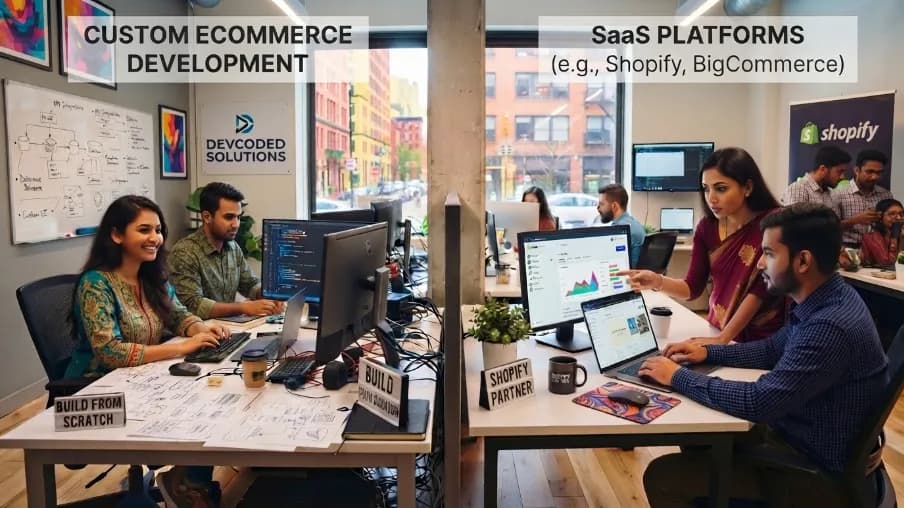
Custom e-commerce development vs. configuration: I've been asked to build custom features that already existed as off-the-shelf plugins, at a fraction of the cost. I've also seen businesses spend tens of thousands trying to force a SaaS platform to do something it was never built to do. So be wary of anyone who defaults to custom without exploring platform capabilities first. Equally, be wary of anyone who dismisses custom out of hand.
Stage 5: Content and SEO
Content and SEO make up the fifth stage of the e-commerce website development process, and it's the stage most often treated as an afterthought. I've worked on technically excellent builds that drew almost no organic traffic for a year after launch. Why? Content and e-commerce SEO got treated as post-launch tasks. On the flip side, I've also seen modest, technically imperfect builds win. They outperform more polished competitors, simply because the SEO groundwork was laid from day one. In other words, this stage is core to the process, not a task bolted on at the end.
Product page content and optimization: This is where most e-commerce SEO gets won or lost. For example, I once audited a garden equipment retailer's catalog. Most pages used manufacturer descriptions verbatim, and ranked poorly as a result. So we rewrote the highest-search-volume pages with original, benefit-led copy, informed by customer review language. Within a quarter, that batch moved from an average ranking outside page five to page one, with a matching lift in organic revenue. The takeaway: write for the customer standing in front of the product, not for the manufacturer's catalog.
Category page optimization: Category pages are often the highest-value SEO real estate on a store. Take one pet food retailer, whose category pages had only a thumbnail grid and no supporting copy. We added introductory text, tightened heading structure, and improved internal linking on the top pages. Within six months, most ranked on page one and became the primary driver of new customer purchases.
Technical SEO foundations: Roughly 81.5% of global search traffic is organic rather than paid, according to Capital One Shopping's 2026 research. That's why the technical foundation under your content matters as much as the writing itself. This weighting matters even more at the top of the results page. Semrush's 2023 State of Search study found the average organic result in position one captures roughly 22% of clicks on that query.
That's about ten times the click share of a page ten listing. And click share drops sharply after position three. Google also completed its shift to mobile-first indexing around the mid-2020s. In practice, that means it now crawls and ranks virtually all sites primarily on their mobile version. That's part of why the mobile page-speed thresholds in Stage 3 carry direct SEO weight, not just UX weight. The most common technical issue I see is duplicate content from faceted navigation. Here's why it happens.
A single category page can spin off hundreds of URL variants through filter combinations. Each variant can get crawled and indexed on its own, which dilutes the ranking signal for the real page. On one WooCommerce audit, forty real category pages were competing in search results against thousands of indexed filter-URL variants of themselves. Fixing canonical tags and robots directives around those filter URLs resolved it within a couple of development days.
Stage 6: Testing and Quality Assurance
Testing and quality assurance form the sixth stage of the e-commerce website development process, and the stage compressed most often when projects run over time. It's also the stage where compression costs the most.
A launch-day failure, and why it happened: One health and wellness brand launched on a Thursday evening, then emailed its list Friday morning. Within hours, a large share of checkout attempts failed. The cause: a conflict between the shipping rate app and the payment gateway, one that only showed up with real addresses in certain postcode ranges. The developer hadn't caught it, because they'd only ever tested with one address. Worse, no automated monitoring was in place, so the founder found out from a customer email rather than a dashboard alert.
What comprehensive testing and launch prep actually covers:
The complete purchase flow from homepage to order confirmation, tested on desktop Chrome, desktop Safari, desktop Firefox, mobile Safari (iOS), and mobile Chrome (Android)
The full checkout process, tested separately for guest and registered-account users
Customer account management: registration, password reset, order history, and saved-address editing
Every payment method offered, tested independently, in the live environment
Coupon codes: valid, expired, incorrectly entered, and applied to ineligible products
Inventory edge cases: one unit remaining, zero units, back-ordered, and how the storefront reflects each state
Addresses in every region or country you ship to
Session recordings (Hotjar, Microsoft Clarity), reviewed manually in the first 48 hours after launch, watching for rage clicks and checkout drop-off
Accessibility testing: This is worth including even where it isn't legally required. More than 1 in 4 U.S. adults report having a disability, according to CDC survey data. The W3C published WCAG 2.1 in June 2018, and it remains the accessibility benchmark most e-commerce audits are measured against today. One concrete, commonly missed bar: a contrast ratio of at least 4.5:1 between normal text and its background. So keyboard navigation, screen reader compatibility, and proper color contrast are baseline requirements, not edge cases. They belong in the testing checklist from the start, not added after a complaint.
Testing costs also scale the later you catch a problem. The widely cited IBM Systems Sciences Institute research on defect cost backs this up. It found that fixing a bug after release costs several times more than catching it during design or development. That's the same multiplier at work in the launch-day failure above. A shipping-and-payment-gateway conflict would have taken minutes to catch with a second test address. Instead, it cost a full day of lost orders and support time after go-live.
Stage 7: Launch and Maintenance
Launch and maintenance close out the e-commerce website development process, and open a new one. Launch isn't the end of the project. It's the first day you have real data. Everything before launch is a best guess about what customers want. Everything after is evidence.
Pre-launch verification should be a formal, screenshotted checklist, not a mental run-through. I've seen launches where someone was certain the SSL certificate was active. They were just as sure the sitemap was submitted and redirects were in place. Yet at least one of the three turned out to be wrong.
Confirm before you go live:
DNS has propagated, and SSL is active on every page, including checkout
Google Analytics is firing correctly (watch the real-time report while navigating the store yourself)
Search Console ownership and sitemap submission are in place
robots.txt isn't accidentally blocking pages you want indexed (staging environments are often set to block all crawlers, and teams forget to reverse it)
The first thirty days tell you more than any amount of pre-launch research: So monitor order completion rate, checkout abandonment by device, and page load time on your highest-traffic pages daily for the first two weeks. Check Search Console's coverage report weekly for new crawl errors. Review your payment gateway dashboard and order management system for unusual decline rates or fulfillment backlogs.
Ongoing maintenance should be budgeted from day one, not bolted on later. Take one outdoor sports retailer I work with, who runs a fortnightly cycle. Every two weeks, based on analytics, session recordings, and customer feedback, they ship the highest-impact change they can find. Compounded over eighteen months, that discipline, not a single redesign, produced most of their conversion gains. This cadence matters for search visibility too: Google's own documentation states it typically recrawls active, frequently updated sites more often than static ones. So check Search Console's coverage report weekly, as recommended above. It's the fastest way to catch a crawl or indexing regression before it costs a month of organic traffic.
How the Process Differs: B2B vs. B2C vs. Web3
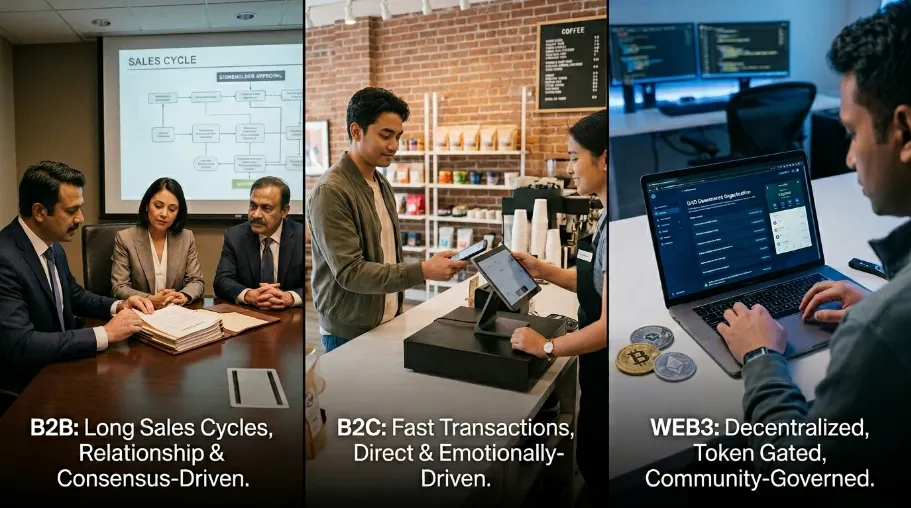
The seven stages apply to every build. But the weight of each one shifts depending on your model, and so does which e-commerce website features are worth prioritizing.
B2C e-commerce brings high traffic volumes, self-service purchasing, and decision cycles measured in minutes or seconds. Priorities here: mobile performance, checkout simplicity, brand storytelling, and conversion optimization. This segment sits behind the $6.88 trillion 2026 global sales figure cited earlier (Review42). It also includes the roughly 2.86 billion online shoppers SellersCommerce counted worldwide that same year.
B2B e-commerce works differently, and it's already the larger of the two by transaction value. Grand View Research projects the global B2B e-commerce market to reach roughly $36 trillion by 2026. That's a double-digit compound annual growth rate through the early 2030s, well ahead of consumer-facing B2C in total dollars moved. Take one industrial parts distributor I worked with, whose sales team spent much of its time manually producing custom quotes for repeat customers. We automated it with a quote-approval workflow and pricing-database integration. The project took several months. But it freed up sales capacity for new customer acquisition. That was the real result the business had been trying to buy.
Web3 e-commerce remains an emerging space. It's still a small fraction of overall e-commerce transaction volume as of 2026 by most industry tracking, though it's growing off a low base. So define the smallest viable Web3 feature, and test it on a small segment of your existing audience before scaling. Above all, pick a partner who has actually shipped Web3 projects recently, not just studied them.
How Much Does the E-Commerce Website Development Process Cost?
The e-commerce website development process typically costs $500 to $50,000+, depending on the project’s size, platform, design, features, and customization. A basic online store may cost $500–$3,000, while a professional custom e-commerce website can range from $3,000–$10,000+. Enterprise stores with advanced integrations, custom functionality, and complex systems may exceed $50,000.
E-Commerce Project Type | Estimated Cost | Suitable For |
|---|---|---|
Basic Online Store | $500–$3,000 | Small businesses |
Professional Shopify Store | $2,000–$8,000+ | Growing B2C brands |
Custom WooCommerce Store | $3,000–$15,000+ | Content-led/custom stores |
Advanced B2B Store | $10,000–$50,000+ | Wholesale businesses |
Enterprise E-Commerce | $50,000+ | Large catalogs & complex systems |
The final cost usually depends on UI/UX design, product management, payment gateway integration, shopping cart features, security, SEO, third-party integrations, hosting, and ongoing maintenance. For an accurate estimate, define the required features and technical requirements before development begins.
Why This Process Is a Competitive Advantage
A strong e-commerce website development process combines clear planning, efficient development, testing, and continuous improvement. At CyberCraft Bangladesh, we follow a structured approach to reduce mistakes, improve user experience, support faster launches, and build stores that grow beyond the initial launch.
The numbers show why this matters: global e-commerce conversion rates average around 2.74%, while cart abandonment reaches about 70.22%. Better checkout design can also significantly improve conversions. These figures highlight why e-commerce development should be treated as a process, not a checklist.
The key is simple: strategy before platform, platform before design, design before development, and testing before launch. Start by defining your success goals, then let real customer data guide continuous improvements.
FAQs About E-commerce Website Development Process
What is the e-commerce website development process?
The e-commerce website development process is the structured, seven-stage sequence businesses use to plan, design, build, test, launch, and maintain an online store: strategy and planning, platform selection, design and UX, development and integration, content and SEO, testing and QA, and launch and maintenance. Run in order, it's what separates stores built to convert from stores that only look finished.
How long does the e-commerce website development process take?
Three weeks to nine months, depending on platform, features, integrations, and scope. Simple Shopify stores often take three to six weeks. Custom WooCommerce projects may take eight to sixteen weeks. Larger B2B Magento or Adobe Commerce projects can take four to nine months. A clearly defined MVP usually reduces delays.
What should I look for in an e-commerce development package or quote?
Look for a clear list of design, product pages, integrations, revisions, testing, QA, launch support, and maintenance. Then compare at least two itemized quotes from an e-commerce development company before choosing one.
Is an SSL certificate really necessary for an e-commerce store?
Yes, for every store. It encrypts customer data, supports secure payment processing, and prevents browsers from displaying security warnings. So confirm HTTPS works across the entire site, especially product, cart, account, and checkout pages.
What's the difference between configuring a platform and custom e-commerce development?
Platform configuration uses existing themes, apps, and plugins to meet requirements. It's usually faster and more affordable. Custom development builds unique functionality from scratch. It makes sense when requirements like ERP synchronization or complex B2B pricing can't be handled with existing tools.
When does a single-product page make more sense than a full store?
Use a single-product page when you want to promote and sell one focused offer. It removes unnecessary navigation and comparisons, so visitors focus on one conversion goal. A full store is better when you need multiple products, higher average order value, cross-selling, or repeat purchases.
How much does e-commerce website development cost?
Basic Shopify projects may cost a few thousand dollars. Custom WooCommerce stores can cost several times more. Complex B2B Magento or Adobe Commerce projects with ERP integrations can reach tens of thousands. Note that hosting, apps, security, and ongoing maintenance should be budgeted separately.
Why do e-commerce stores fail after launch even with good design?
Common problems include poor customer journey research, complicated checkout, mobile performance issues, untested payment flows, and no ongoing monitoring. Good visual design matters, but it isn't enough on its own. Average cart abandonment sits at 70.22% industry-wide (Baymard), and mobile abandonment runs even higher, at 85.65% (Ringly.io). So a successful store also needs fast pages, simple navigation, reliable checkout, and continuous optimization.
What's the single highest-impact fix for a low-converting store?
There's no universal fix. But improving checkout usability and mobile page speed are strong starting points. Conversion rates fall by roughly 4.4% for every added second of mobile load time between zero and five seconds, according to Google's mobile research. And Baymard's checkout-usability studies suggest better checkout design alone can recover up to a 35% conversion lift on large sites. So test checkout on real devices, remove unnecessary steps, improve form usability, and optimize slow pages.
References
Baymard Institute: Cart Abandonment Rate Statistics (meta-analysis of independent studies; abandonment rate and checkout-design conversion uplift figures)
Centers for Disease Control and Prevention: Prevalence of Disabilities and Health Care Access (U.S. adult disability prevalence data)
W3C Web Accessibility Initiative: WCAG 2.1 Quick Reference (contrast ratio and other success criteria)
Grand View Research: global B2B e-commerce market size projection
Ringly.io: 2026 mobile e-commerce and cart abandonment analysis
Google HTTPS Transparency Report: HTTPS adoption share

I’m Mitu Das, a JavaScript developer, ERP product architect, and SEO specialist from Bangladesh. I work at CyberCraft Bangladesh, where I help build simple, scalable software, SaaS platforms, and business solutions. My goal is to create technology that helps companies save time, automate daily tasks, and grow faster. I enjoy combining development, product ideas, and SEO strategies to create useful digital solutions for modern businesses.
Writes about
Want this done for you?
Our team builds and ships exactly what this article describes. Send a message and we will reply with a scope.