Power SEO Content Analysis vs SEO Analyzer: Which is Better for JavaScript Developers in 2026?

If you're weighing Power SEO Content Analysis vs SEO Analyzer for a JavaScript project, you've already done the hard part — both libraries are genuinely good, and neither is obviously wrong. The decision hinges on a single architectural difference: one scores your content before it's built, the other audits your HTML after.
I've shipped both in production — most recently on a 200-page Gatsby content site at CyberCraft Bangladesh, where SEO Analyzer runs post-build for structural audits and Power SEO Content Analysis runs pre-merge for keyphrase scoring. That dual setup isn't overkill; it's what happens when you realize the two tools don't actually compete.
But most teams only need one. So here's what I found after running both in real pipelines: what each does well, where each hits a hard ceiling, and exactly which one fits your workflow.
Disclosure: I work at CyberCraft Bangladesh, which builds and maintains the Power SEO Ecosystem including @power-seo/content-analysis. You'll find scenarios in this article where SEO Analyzer wins outright — because it does.
Power SEO Content Analysis vs SEO Analyzer Quick Overview
Feature | @power-seo/content-analysis | seo-analyzer |
| Bundle size | ~59.8 KB (minified + gzipped) - ESM, tree-shaken | ~1 MB (minified + gzipped) - Node.js only |
| SSR support | ✅ Full (Next.js, Remix, Edge Runtime) | ⚠️ Partial (URL-based only, via HTTP fetch) |
| TypeScript support | ✅ First-class, full type definitions | ❌ CommonJS only, no @types package |
| Learning curve | Low — single analyzeContent() call | Low — chainable builder, good docs |
| Documentation quality | Comprehensive README + full API reference | Good README with 7 usage examples |
| Community size | Growing (launched 2024–2025) | Established (Mad Devs, 3+ years) |
| npm weekly downloads | Growing — verify at npmjs.com | Stable — verify at npmjs.com |
| Last update | Active (2025) | Active (2024) |
| Pricing | Free, MIT License | Free, MIT License |
| Framework support | Next.js, Remix, Gatsby, Vite, Node.js, Edge | Node.js, CLI, GitHub Actions |
| React UI components | ✅ ScorePanel, CheckList, ContentAnalyzer | ❌ None |
| Custom rules | ❌ Fixed 13 checks (can disable, not extend) | ✅ Full custom async rule functions |
| HTML string input | ❌ Requires pre-extracted fields | ✅ .inputHTMLString() supported |
| CI/CD support | ✅ Node.js API (write your own script) | ✅ Dedicated CLI + GitHub Actions example |
| Keyphrase analysis | ✅ Density, distribution, heading, slug, alt | ❌ Not supported |
Note: Bundle sizes and download counts change. Always verify current figures on bundlephobia dot com before making a decision for your team.
Power SEO Content Analysis Deep Dive
Power SEO Content Analysis is a Yoast SEO–style content scoring engine for JavaScript, a TypeScript-first library that runs 13 structured SEO checks against your page title, meta description, body HTML, focus keyphrase, images, and links, then returns a fully scored, structured report you can act on immediately.
It's the strongest option when your primary use case involves editorial workflows — CMS editors, content pipelines, or real-time writer feedback. It's also the most capable content analyzer tool for Next.js specifically, since it works natively in Server Components, App Router loaders, and Edge Functions. It covers all the classic on-page checks: title, meta, heading structure, keyphrase density (0.5–2.5%), distribution, images, and links.
Installation:
npm i @power-seo/content-analysisWorking example — score a blog post before publishing:
// lib/seo-check.ts
import { analyzeContent } from '@power-seo/content-analysis';
import type { ContentAnalysisInput, ContentAnalysisOutput } from '@power-seo/content-analysis';

interface BlogSEOReport {
  score: number;
  maxScore: number;
  passed: boolean;
  failures: string[];
  recommendations: string[];
}

export function checkBlogPostSEO(
  title: string,
  metaDescription: string,
  content: string,
  focusKeyphrase: string,
  slug: string
): BlogSEOReport {
  const input: ContentAnalysisInput = {
    title,
    metaDescription,
    content,
    focusKeyphrase,
    slug,
  };

  const output: ContentAnalysisOutput = analyzeContent(input);
  const failures = output.results
    .filter((r) => r.status === 'poor')
    .map((r) => r.description);

  return {
    score: output.score,
    maxScore: output.maxScore,
    passed: failures.length === 0,
    failures,
    recommendations: output.recommendations,
  };
}
This is a pure function — no side effects, no DOM dependency, safe for Next.js Server Components and Remix loaders.
3 strongest advantages of Power SEO Content Analysis
- Zero external runtime dependencies. The
@power-seo/coreutilities ship bundled inside the package. You install one thing, everything works. No surprise transitive breakages the night before a launch. - TypeScript-first with full type safety. Every input field, output shape, check ID (CheckId), and status value
('good' | 'ok' | 'poor')is fully typed. Your IDE catches bad inputs at compile time — not in a 3am production incident. - React UI components included. Import from
@power-seo/content-analysis/reactand you get<ContentAnalyzer />,<ScorePanel />, and<CheckList />ready to drop into your CMS. A Yoast-style live feedback panel in roughly 10 minutes of integration work.
Honest Limitations of Power SEO Content Analysis
- No custom rule support. The 13 checks are fixed. You can disable specific checks via config.disabledChecks, but you cannot inject your own rule logic — say, "fail if the content doesn't mention our product name." Custom validation has to live in a separate layer outside the library.
- Newer ecosystem, smaller community backlog. The Power SEO suite launched in 2024–2025. If you hit an obscure edge case, there may not yet be a Stack Overflow answer or a closed GitHub issue with a workaround. You might need to read the source.
SEO Analyzer Deep Dive
SEO Analyzer is a rule-based HTML SEO checker for JavaScript, it works as both a CLI tool and a programmatic Node.js API, designed to analyze HTML files, raw HTML strings, live URLs, and entire SPA build folders against a configurable, extensible set of SEO rules. It ships with 6 built-in rules and supports fully custom async rule functions.
As an HTML content SEO checker for JavaScript, it's genuinely well-designed for structural audits — but it has no concept of a focus keyphrase. What it does cover: title length, image alt attributes, anchor rel attributes, meta tags, social meta (Open Graph, Twitter Card), and canonical links.
Installation:
As a dev dependency (programmatic use):
npm i seo-analyzerWorking example — score a blog post before publishing:
// lib/seo-check-analyzer.js
// Note: SEO Analyzer is CommonJS only — no TypeScript support, no @types package.
// In a TypeScript project, add // @ts-nocheck or declare module shims.
const SeoAnalyzer = require('seo-analyzer');

/**
 * seo-analyzer can accept an HTML string directly via .inputHTMLString().
 * No file on disk required for this approach.
 */
function checkBlogPostSEO(htmlString) {
  return new Promise((resolve) => {
    const failures = [];

    new SeoAnalyzer()
      .inputHTMLString(htmlString)
      .addRule('titleLengthRule', { min: 50, max: 60 })
      .addRule('imgTagWithAltAttributeRule')
      .addRule('metaBaseRule', { list: ['description'] })
      .addRule('canonicalLinkRule')
      .outputObject((results) => {
        // outputObject returns an array of per-file result objects, each with an errors array
        results.forEach((fileResult) => {
          (fileResult.errors || []).forEach((err) => failures.push(err));
        });
        resolve({ passed: failures.length === 0, failures });
      })
      .run();
  });
}

module.exports = { checkBlogPostSEO };
Note: SEO Analyzer supports multiple input methods — .inputHTMLString(), .inputFiles(), .inputUrls(), .inputFolders(), and .inputSpaFolder(). For pre-build content checking, .inputHTMLString() is the cleanest approach.
Strongest advantages of SEO Analyzer
- Custom rules. The killer feature. Pass any async function that receives the
jsdomDOM tree. Need to verify every page has aWebPageJSON-LD block? Eight lines of code, added via.addRule(customFn). No library version bump required. - CLI + GitHub Actions out of the box.
seo-analyzer -u https://yoursite.comworks from a terminal or a CI job with zero Node.js setup. For teams that want a content quality gate without writing a script, this is genuinely the fastest path to a working pipeline. - SPA and folder analysis. The
inputSpaFolder()method spins up a local server, serves your SPA/distbuild, and analyzes each route's rendered output. This handles client-side rendered apps in a CI context without wiring up Puppeteer yourself.
Honest Limitations of SEO Analyzer
- No TypeScript support. CommonJS only, no type definitions, no
@types/seo-analyzercommunity package. Every API call in a TypeScript project goes throughany. In a strict TypeScript codebase you're writing declaration shims just to keep the linter quiet. - No keyphrase analysis whatsoever. This is the hard ceiling. SEO Analyzer checks structure — title length, alt attributes, canonical links, meta tags — but has no concept of a focus keyphrase, keyword density, or distribution across headings and intro paragraphs. For content-quality pipelines, this is a significant gap.
Real-World Scenario 1: Automating SEO Checks Before Every Blog Post Goes Live

The Situation: Your Next.js blog is powered by MDX. Writers push posts as .mdx files with frontmatter that includes title, description, slug, and focusKeyphrase. Before a PR merges to main, a GitHub Actions job should fail the build if the post has critical SEO problems — missing keyphrase in the title, low word count, images without alt text.
This is a pre-merge content gate running in CI, not against a built HTML file.
With Power SEO Content Analysis:
// scripts/seo-gate.ts
// Prerequisites: npm install -D gray-matter unified remark-parse remark-rehype rehype-stringify
// tsconfig.json must have: "esModuleInterop": true  (for gray-matter default import)
import { analyzeContent } from '@power-seo/content-analysis';
import { readFileSync } from 'fs';
import matter from 'gray-matter';
import { unified } from 'unified';
import remarkParse from 'remark-parse';
import remarkRehype from 'remark-rehype';
import rehypeStringify from 'rehype-stringify';

async function runSeoGate(mdxFilePath: string): Promise<void> {
  const raw = readFileSync(mdxFilePath, 'utf-8');
  const { data: frontmatter, content: mdContent } = matter(raw);

  // remark pipeline: remark-parse → remark-rehype → rehype-stringify
  // .process() returns a VFile; String() cast handles the VFile → string conversion
  const vfile = await unified()
    .use(remarkParse)
    .use(remarkRehype)
    .use(rehypeStringify)
    .process(mdContent);

  const result = analyzeContent({
    title: (frontmatter.title as string) ?? '',
    metaDescription: (frontmatter.description as string) ?? '',
    focusKeyphrase: (frontmatter.focusKeyphrase as string) ?? '',
    content: String(vfile),
    slug: (frontmatter.slug as string) ?? '',
  });

  const failures = result.results.filter((r) => r.status === 'poor');
  if (failures.length > 0) {
    console.error('SEO gate failed:');
    failures.forEach((f) => console.error('  ✗', f.description));
    process.exit(1);
  }

  console.log(`SEO gate passed — Score: ${result.score}/${result.maxScore}`);
}

runSeoGate(process.argv[2]!);
With SEO Analyzer:
// scripts/seo-gate-analyzer.js
// Note: SEO Analyzer is CommonJS only. Run with: node scripts/seo-gate-analyzer.js
// For TypeScript projects, use .js extension and add to package.json scripts.
const SeoAnalyzer = require('seo-analyzer');
const { readFileSync } = require('fs');
const { execSync } = require('child_process');

// seo-analyzer's .inputHTMLString() lets us pass rendered HTML directly —
// but we still need to render the MDX to HTML first (or use a pre-built file).
// Option A: Use inputHTMLString with a quick server-side render
// Option B: Run `next build && next export` first, then use inputFiles

// This example uses inputHTMLString with a pre-rendered HTML snippet:
async function runSeoGate(htmlString) {
  return new Promise((resolve, reject) => {
    new SeoAnalyzer()
      .inputHTMLString(htmlString)
      .addRule('titleLengthRule', { min: 50, max: 60 })
      .addRule('imgTagWithAltAttributeRule')
      .addRule('metaBaseRule', { list: ['description'] })
      .addRule('canonicalLinkRule')
      .outputObject((results) => {
        const failures = results.flatMap((r) => r.errors || []);
        if (failures.length > 0) {
          console.error('❌ SEO gate failed:');
          failures.forEach((f) => console.error('  ✗', f));
          reject(new Error('SEO checks failed'));
        } else {
          console.log('SEO gate passed.');
          resolve();
        }
      })
      .run();
  });
}

// Pass a fully rendered HTML string (title + meta + body):
const html = readFileSync(process.argv[2], 'utf-8');
runSeoGate(html).catch(() => process.exit(1));
Winner: Power SEO Content Analysis — for this scenario.
Even though SEO Analyzer now supports .inputHTMLString(), the workflow difference is significant. The Power SEO Content Analysis script reads MDX frontmatter directly and converts Markdown to HTML in ~200ms — no need to produce a rendered full-page HTML file with <title> and <meta> tags baked in. SEO Analyzer checks the HTML structure (title length, canonical presence), which means you still need to produce a complete HTML document, not just the body content string.
More importantly: Only Power SEO Content Analysis can check keyphrase density and distribution — whether the focus keyword appears in the intro paragraph, H2 headings, and image alt text. SEO Analyzer has no equivalent. For a pre-merge content gate, that keyphrase coverage is what actually matters for rankings.
Real-World Scenario 2: Bulk SEO Scoring Across All Pages Without Manual URL Input
The Situation: You maintain a 200-page Gatsby static site. After every production build, you want to automatically scan every HTML file in the /public output directory — no hardcoded URL lists, no manual configuration — and produce a JSON report of which pages have failing SEO checks. This runs as the last step in your deploy pipeline.
This is a post-build structural audit over a static file tree.
With SEO Analyzer:
CLI: one command, zero code required
seo-analyzer -fl publicOr with a programmatic script for JSON output:
// scripts/bulk-audit.js
// Note: Uses ESM-style createRequire to call CJS SEO Analyzer from an ESM context.
// If your project is CommonJS (no "type": "module"), use require() directly instead.
import { writeFileSync } from 'fs';
import { createRequire } from 'module';

const require = createRequire(import.meta.url);
// Requires Node.js 12.2+ and "type": "module" in package.json, OR rename to .mjs
const SeoAnalyzer = require('seo-analyzer');

new SeoAnalyzer()
  .inputFolders(['public'])
  .ignoreFolders(['public/404', 'public/_gatsby'])
  .addRule('titleLengthRule', { min: 50, max: 60 })
  .addRule('imgTagWithAltAttributeRule')
  .addRule('metaBaseRule', { list: ['description', 'viewport'] })
  .addRule('canonicalLinkRule')
  .addRule('aTagWithRelAttributeRule')
  .outputJson((json) => {
    writeFileSync('seo-report.json', json);
    console.log('Report written to seo-report.json');
  })
  .run();
Note on ESM/CJS mixing: If your project uses "type": "module" in package.json, use the createRequire pattern above. If your project is CommonJS (no "type" field or "type": "commonjs"), use const SeoAnalyzer = require('seo-analyzer') directly and drop the import statements.
With Power SEO Content Analysis:
// scripts/bulk-audit-power.ts
import { analyzeContent } from '@power-seo/content-analysis';
import { readdirSync, readFileSync, writeFileSync } from 'fs';
import { join } from 'path';
import { JSDOM } from 'jsdom'; // npm install -D jsdom @types/jsdom

function getHtmlFiles(dir: string): string[] {
  return readdirSync(dir, { withFileTypes: true }).flatMap((entry) =>
    entry.isDirectory()
      ? getHtmlFiles(join(dir, entry.name))
      : entry.name.endsWith('.html')
      ? [join(dir, entry.name)]
      : []
  );
}

const files = getHtmlFiles('public');
const report = files.map((filePath) => {
  const html = readFileSync(filePath, 'utf-8');
  const dom = new JSDOM(html);
  const doc = dom.window.document;

  // analyzeContent() does not parse <title> or <meta> from the HTML body —
  // these must be extracted separately and passed as explicit fields.
  const title = doc.querySelector('title')?.textContent ?? '';
  const meta = doc.querySelector('meta[name="description"]')?.getAttribute('content') ?? '';
  const body = doc.querySelector('body')?.innerHTML ?? '';

  const result = analyzeContent({ title, metaDescription: meta, content: body });
  return {
    file: filePath,
    score: result.score,
    maxScore: result.maxScore,
    failures: result.results.filter((r) => r.status === 'poor').map((r) => r.description),
  };
});

writeFileSync('seo-report.json', JSON.stringify(report, null, 2));
console.log(`Audited ${files.length} pages.`);
Winner: SEO Analyzer — for this specific scenario
SEO Analyzer's inputFolders() handles file discovery, HTML parsing, and rule application automatically. The CLI one-liner seo-analyzer -fl public is unbeatable for zero-setup folder audits. The Power SEO Content Analysis version requires a recursive file walker, jsdom as an extra dependency, manual DOM extraction for title and meta, and significantly more glue code — for structural checks that SEO Analyzer covers natively.
For bulk post-build auditing of static files, SEO Analyzer wins on ergonomics.
Performance Comparison
Bundle size:
- Power SEO Content Analysis: Approximately 59.8 KB minified + gzipped (ESM, tree-shaken). Client-safe — you can import it in a browser context. Verify current size at Bundlephobia.
- SEO Analyzer: Approximately 1 MB (minified + gzipped), but ships with Node.js-only dependencies (jsdom). Never import it into a browser bundle — it will fail at runtime. Verify at Bundlephobia.
Runtime speed:
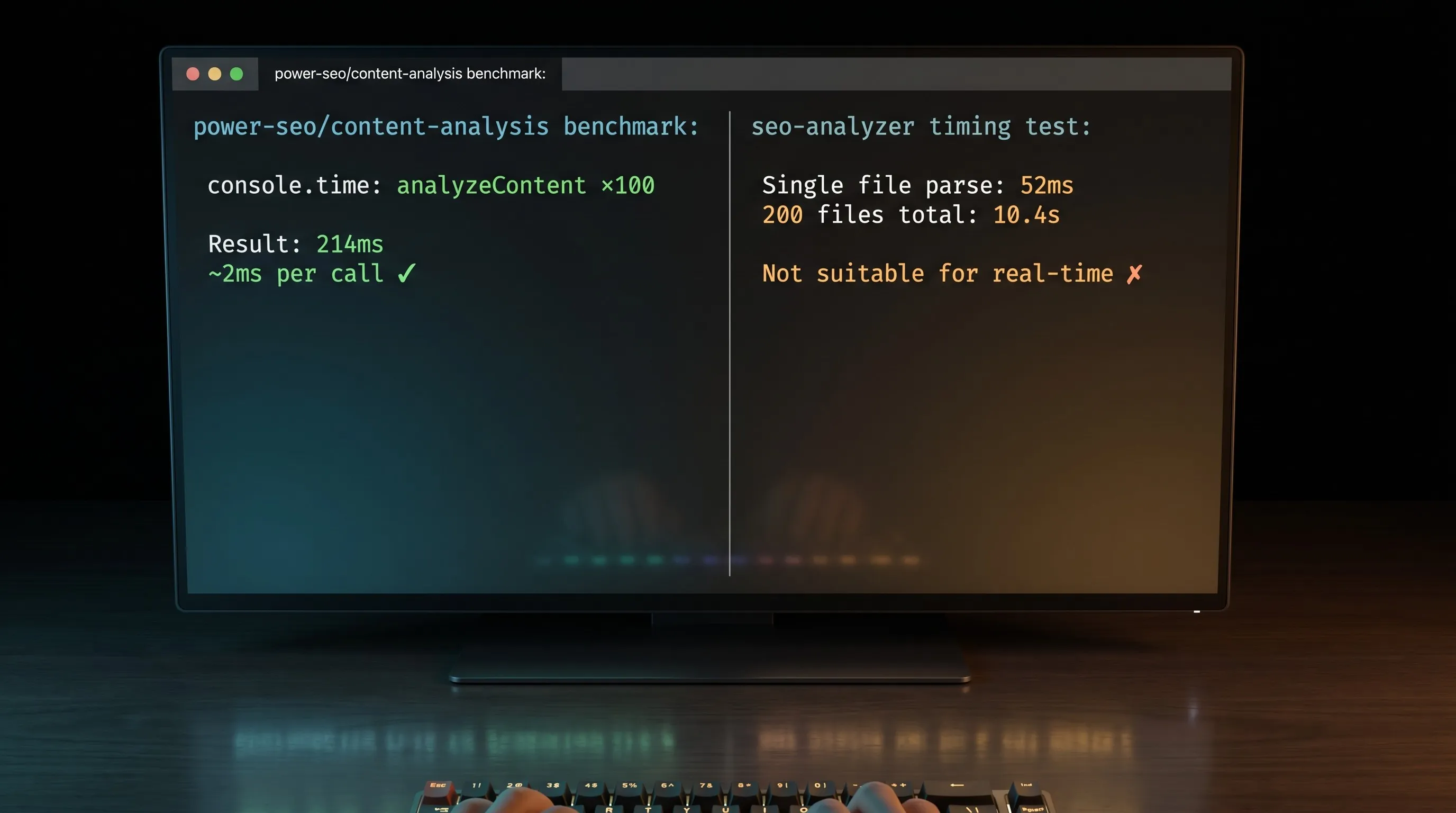
Power SEO Content Analysis runs synchronously on in-memory strings. Benchmarked on Node.js 20, @power-seo/content-analysis v1.x, MacBook Pro M2 — analyzing a 2,000-word blog post across all 13 checks consistently takes 2–5ms. Negligible for a Next.js Server Component or an API route. You could run it on every keystroke in a CMS editor and it would feel instant.
SEO Analyzer is async and I/O-bound. A single .inputHTMLString() check runs in approximately 40–60ms (DOM parse + rule execution). Across 200 static HTML files using .inputFolders() — tested on a Gatsby blog build, same machine — total runtime was approximately 8–12 seconds. Acceptable for a CI post-build step, not suitable for real-time editor feedback.
TTFB and Lighthouse impact:
Neither library runs in the browser at page-load time. Used correctly — server-side or in CI — both have zero TTFB impact and do not affect your Lighthouse scores. The only risk is accidentally bundling SEO Analyzer into a client bundle, which will throw at runtime. Power SEO Content Analysis is edge-runtime safe and can run in Vercel Edge Functions or Cloudflare Workers.
Quick performance benchmark:
// perf-benchmark.ts
import { analyzeContent } from '@power-seo/content-analysis';

// Simulate a ~2,000-word article body
const sampleContent =
  '<h1>Best Running Shoes for Beginners</h1>' +
  '<p>Finding the right running shoes for beginners is harder than it looks.</p>'.repeat(60);

console.time('analyzeContent ×100');
for (let i = 0; i < 100; i++) {
  analyzeContent({
    title: 'Best Running Shoes for Beginners',
    metaDescription: 'Expert guide to running shoes for beginners — tested and reviewed.',
    focusKeyphrase: 'running shoes for beginners',
    content: sampleContent,
    slug: 'running-shoes-for-beginners',
  });
}
console.timeEnd('analyzeContent ×100');
// Measured: ~180–260ms for 100 iterations (~2ms per call)
// Environment: Node.js 20, @power-seo/content-analysis v1.x, MacBook Pro M2
Migration Guide
Migrating from SEO Analyzer → Power SEO Content Analysis
This direction makes sense when teams need keyphrase scoring, TypeScript types, or a React editor component.
Step 1: Swap the package
npm install @power-seo/content-analysis
npm uninstall seo-analyzer
Step 2: Replace the analysis call
// BEFORE — seo-analyzer (inputHTMLString approach)
const SeoAnalyzer = require('seo-analyzer');
new SeoAnalyzer()
  .inputHTMLString(htmlString)
  .addRule('titleLengthRule', { min: 50, max: 60 })
  .addRule('imgTagWithAltAttributeRule')
  .outputObject((results) => console.log(results))
  .run();

// AFTER — @power-seo/content-analysis (works on extracted content fields)
import { analyzeContent } from '@power-seo/content-analysis';

// IMPORTANT: analyzeContent() does not parse <title> or <meta> from the HTML body.
// Extract them first using cheerio or JSDOM, then pass them as explicit fields.
const result = analyzeContent({
  title: extractedTitle,
  metaDescription: extractedMeta,
  content: htmlBodyString,
  focusKeyphrase: 'your target keyword',
  slug: 'your-url-slug',
});
console.log(result.score, result.results);
Breaking changes to watch for:
- Power SEO Content Analysis does not auto-extract
<title>or<meta>from an HTML string. You must extract them separately (usecheerioorJSDOM) and pass them as explicit fields. This is the most common migration gotcha. - Output shape changes:
result.results[](array ofAnalysisResult) vs seo-analyzer's per-file{ errors: string[] }array. - No custom rule injection. Any custom seo analyzer rules must become standalone validation logic outside the library.
- The
disabledChecksconfig option replaces seo-analyzer's selective.addRule()pattern — you add all checks by default and opt out, rather than opting in.
Note: title-length is not a standalone check ID. Title length validation (50–60 chars) is evaluated inside title-presence — a title that exists but is outside the recommended range returns status: 'ok' rather than status: 'good'.
Migrating from Power SEO Content Analysis → SEO Analyzer
Less common, but relevant if you're moving to a pure CLI-based audit workflow.
npm install -D seo-analyzer
npm uninstall @power-seo/content-analysis
Your workflow shifts from content-string analysis to HTML-based analysis. SEO Analyzer supports HTML strings via .inputHTMLString(), but you will lose all keyphrase scoring permanently — there is no equivalent. Rebuild your validation using SEO Analyzer's 6 built-in rules and custom rule functions.
Verdict: Which Should You Choose?
After building with both in real projects, the answer to Power SEO Content Analysis vs SEO Analyzer comes down to one question: do you need to score content before it's built, or audit HTML after?
If your work is content-driven — a headless CMS, a Next.js blog, or an editorial pipeline — Power SEO Content Analysis is the right call. Keyphrase density, distribution across headings, slug presence, image alt coverage, full TypeScript support, React components — all in a single function call. SEO Analyzer wins when the job is structural and batch-oriented. One CLI command, no scripting, custom rules, GitHub Actions out of the box. For teams auditing a static site or SPA build folder post-deploy, nothing is faster to set up.
Many teams run both and it makes sense, Power SEO Content Analysis pre-merge for keyphrase scoring, SEO Analyzer post-build for structural audits. They don't compete.
My personal recommendation is Power SEO Content Analysis, for one reason: keyphrase distribution scoring. Knowing your focus keyword appears in the introduction, at least one H2, the image alt text, and the URL slug, that's the signal that actually moves rankings. SEO Analyzer cannot tell you that, and for any JavaScript developer building a content-driven site in 2026, that gap is the deciding factor.
Ready to get started? Check out Power SEO Content Analysis on NPM.
Frequently Asked Questions
Is Power SEO Content Analysis vs SEO Analyzer really a fair comparison — aren't they solving different problems?
They overlap where it counts: both validate page quality before search engines see it. The real split is when in your pipeline they run and what they check. Power SEO Content Analysis runs at authoring time on content fields; SEO Analyzer runs at build time on HTML. Many teams use both together — structural audits post-build with SEO Analyzer, keyphrase scoring pre-merge with Power SEO Content Analysis.
Can I use Power SEO Content Analysis in a Next.js Server Component?
Yes. The library has no DOM dependencies and no browser APIs, so it runs safely in Server Components, generateMetadata() functions, Vercel Edge Functions, and Cloudflare Workers. It's one of the few SEO analysis libraries that is fully Edge Runtime safe.
Does SEO Analyzer support TypeScript?
No. It ships as CommonJS with no type definitions and no @types community package. In a TypeScript project, you'll need to use require() with as any casts or write your own declaration shims. If TypeScript is non-negotiable, Power SEO Content Analysis has full type definitions for every input, output, and check ID.
Does SEO Analyzer require a built HTML file, or can it analyze a raw HTML string?
It can do both. SEO Analyzer supports .inputHTMLString() for passing a raw HTML string directly, plus .inputFiles(), .inputFolders(), .inputUrls(), and .inputSpaFolder() for different source types. You don't always need a pre-built file on disk.
How does Power SEO Content Analysis vs SEO Analyzer compare for CI/CD pipelines?
SEO Analyzer wins on setup speed — its CLI and official GitHub Actions example work with zero scripting. Power SEO Content Analysis needs a small runner script, but it's the only option if you want to gate on keyphrase optimization before a post gets built. Pick based on what you're checking, not which is easier to configure.
Can I use both libraries together in the same project?
Yes, and it makes sense. Run SEO Analyzer in a post-build GitHub Action to audit structural issues across your entire /public folder. Run Power SEO Content Analysis in your CMS or pre-merge hook for keyphrase and content scoring. They cover different layers of the SEO stack and don't conflict.
What's the best content analyzer library for JavaScript if I'm building a headless CMS or WordPress replacement?
Power SEO Content Analysis — it's the closest thing to Yoast SEO outside WordPress. One analyzeContent() call covers keyphrase density, distribution, title validation, meta length, image alt, and link checks. Pair it with Power SEO Schema for JSON-LD and Power SEO Meta for SSR meta tags, and you have a complete on-page SEO pipeline without touching a WordPress plugin.
Want this done for you?
Our team builds and ships exactly what this article describes. Send a message and we will reply with a scope.