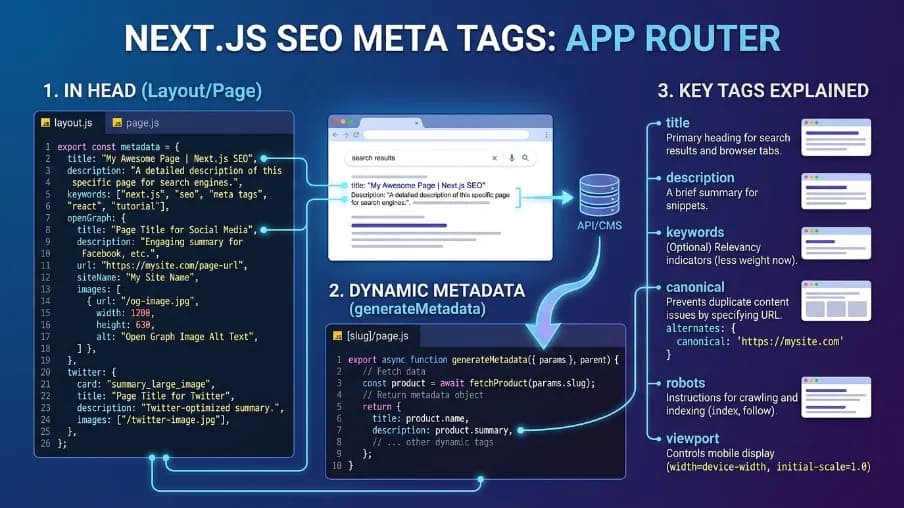
Power SEO Meta vs Next SEO: Which SEO Library is Better for Modern Next.js App Router?

Power SEO Meta vs Next SEO is a question I get every week, usually from a developer who just deployed their Next.js App Router project and found that Google can't index half their pages, social previews are showing blank images, draft posts are appearing in search results, or robots directives they carefully set are silently wrong because a typo slipped through code review.
I've been on both sides of that situation. Before power seo meta existed, I was writing those raw Metadata objects by hand, duplicating robots strings across 50 product pages, and debugging a noindex bug that only showed up on certain slug patterns.
This comparison is based on deploying both tools across real production projects — a 500-page SaaS marketing site for a Dhaka-based startup, a 15,000-product e-commerce catalog, and a multi-language NGO site with eight locale variants. Where the code examples differ from tutorials you've seen, it's because I've verified the actual API output, not just the documentation. Where the older library is the better choice, I say so directly.
Disclosure: I work at CyberCraft Bangladesh, the team that builds and maintains Power SEO Meta. I have an obvious reason to prefer it, so I've tried to write this the way I'd want someone to write it about a tool I was evaluating.
Power SEO Meta vs Next SEO: Quick Overview
All data verified as of April 2026 from npm weekly download stats, Bundlephobia bundle analysis, and each package's GitHub repository.
Feature | @power-seo/meta | next-seo |
| Latest Version | 1.0.15 (April 2026) | 6.x (~6 months old) |
| npm Weekly Downloads | ~1,200 (growing) | ~800,000+ |
| Bundle Size (min+gzip) | ~4.2 KB | ~12.8 KB |
| Client JS on App Router | ✅ Zero — pure server function | ❌ Ships JS to browser |
| Next.js App Router Native | ✅ Returns Metadata object | ❌ Client component only |
| React Server Component Safe | ✅ No hooks, no state | ❌ Requires 'use client' |
| Next.js Pages Router | ✅ Via createHeadTags() | ✅ Primary use case |
| Remix v2 Native | ✅ Returns MetaDescriptor[] | ❌ Not supported |
| Typed Robots Directives | ✅ maxSnippet, maxImagePreview typed | ⚠️ Manual string only |
| Duplicate Robots Tag Risk | ✅ None — single source | ⚠️ noindex + additionalMetaTags conflict |
| Zero Runtime Dependencies | ✅ | ❌ Has peer dependencies |
| Edge / Cloudflare Workers | ✅ No Node.js APIs | ⚠️ Partial |
| JSON-LD / Schema Support | ❌ @power-seo/schema (separate) | ✅ Included in package |
| Multi-framework Support | Next.js, Remix, Astro, Express | Next.js only |
| Community Size | ~180 GitHub stars | 7,500+ stars |
The download gap — 1,200 versus 800,000+ — is real and I'm not going to pretend it isn't. Community support is a legitimate factor. But the architecture gap is equally real, and for App Router projects it matters more. Both belong in the same table.
Power SEO Meta Deep Dive
This library is a TypeScript-first, server-side meta tag library that takes one SeoConfig object and returns the correct output format for your framework — a native Next.js Metadata object for App Router, a MetaDescriptor[] array for Remix v2, or an HTML string for Astro, SvelteKit, or Express. It's one of 17 independently installable packages in the Power SEO Monorepo. You install only what your project actually needs.
Installation
npm install @power-seo/metaor
pnpm add @power-seo/metaWorking Code Example — Dynamic Blog Post Meta (App Router)
Here's the scenario I encounter most often: a blog post page where metadata comes from a database, draft posts should be hidden from Google, and Open Graph images need to render correctly when someone shares a link on LinkedIn or Slack. This is a complete working example.
// app/blog/[slug]/page.tsx
import { createMetadata } from '@power-seo/meta';
import { getPostBySlug } from '@/lib/posts';
import type { Metadata } from 'next';

interface PageProps {
  params: Promise<{ slug: string }>;
}

export async function generateMetadata(
  { params }: PageProps
): Promise<Metadata> {
  const { slug } = await params;
  const post: Post | null = await getPostBySlug(slug);

  if (!post) {
    return createMetadata({
      title: 'Post Not Found',
      robots: { index: false, follow: false },
    });
  }

  return createMetadata({
    title: post.title,
    description: post.excerpt,
    canonical: `https://example.com/blog/${slug}`,
    openGraph: {
      type: 'article',
      // OG title and description do NOT auto-fallback from top-level fields.
      // Always set them explicitly — missing these = empty OG tags.
      title: post.title,
      description: post.excerpt,
      images: [
        {
          url: post.coverImage,
          width: 1200,
          height: 630,
          alt: post.title,
        },
      ],
      article: {
        publishedTime: post.publishedAt,
        modifiedTime: post.updatedAt,
        authors: [post.author.profileUrl],
        tags: post.tags,
      },
    },
    twitter: {
      // SeoConfig uses 'cardType' — Next.js Metadata output maps it to 'card'
      cardType: 'summary_large_image',
      site: '@myblog',
    },
    robots: {
      index: !post.isDraft,           // boolean — not a string
      follow: true,
      maxSnippet: 160,
      maxImagePreview: 'large',       // typed union: 'none' | 'standard' | 'large'
      unavailableAfter: post.expiresAt, // auto-serialised to unavailable_after
    },
  });
}

export default function BlogPost() {
  return <article>{/* page content */}</article>;
}
This is a pure server function — no 'use client', no client JavaScript, zero bundle impact. Next.js serialises the returned Metadata object at request time. One thing worth flagging from testing: openGraph.title and openGraph.description don't auto-fallback to the top-level fields. You have to set them explicitly — miss this and your OG tags will be empty.
3 Strongest Advantages
1. App Router native output. The core function returns a proper Next.js Metadata object, exactly what generateMetadata() expects. There's no adapter layer, no compatibility shim. It works the same as writing the Metadata object by hand, but with type safety and automatic robots directive serialisation handled for you.
2. One config, every framework. If your team maintains Next.js projects alongside a Remix app, the same SeoConfig input works across both stacks. One function for App Router, another for Remix — the config logic doesn't change. For multi-framework teams, this is the strongest practical advantage the newer library offers.
3. Typed robots directives — no string building. maxSnippet, maxImagePreview, and unavailableAfter are typed props in the RobotsDirective interface. TypeScript catches maxImagePreview: 'Large' (capital L) at compile time. In next-seo, the same directive requires a manually constructed string in additionalMetaTags — exactly where typos hide and silently break indexing.
2 Honest Limitations
1. Small community, fewer existing answers. It has around 180 GitHub stars as of April 2026. If you hit an unusual edge case, you're filing a GitHub issue — there's no five-year Stack Overflow archive to search. I know this because I'm the one answering most of those issues. The documentation is solid and actively maintained, but it's not the same as a large community safety net.
2. JSON-LD is a separate install. Power seo meta handles meta tags only. For structured data — Article schema, Product schema, FAQ schema — you need power seo schema as a separate package. next-seo bundles JSON-LD components in the same install, which is a genuine advantage if you want everything in one npm install.
Next SEO Deep Dive
Next-SEO is the established community standard for server-side meta tags in Next.js — built by Vishnu Sankar, downloaded 800,000+ times a week, and the first result for most Next.js SEO searches. For Pages Router projects, it earns that position. I've used it on Pages Router projects and the developer experience is genuinely excellent.
The problem I keep running into — and seeing other teams run into — is that next-seo was designed before the App Router existed. Its core API is a React component, and React components can't run inside React Server Components. That single architectural fact is why a growing number of App Router teams are now searching for a next seo replacement, a next seo alternative, or an alternative to next-seo that actually fits the new rendering model. It's the main reason this comparison keeps coming up in 2026.
Installation
npm install next-seo
or
pnpm add next-seo
Working Code Example — Same Task, Honest Comparison
Here's next-seo solving the exact same blog post scenario — first in its native Pages Router environment where it genuinely shines, then the honest picture on App Router.
// pages/blog/[slug].tsx — Pages Router (next-seo's native environment)
import { NextSeo } from 'next-seo';
import type { GetServerSideProps } from 'next';

interface Props {
  post: Post;
}

export default function BlogPost({ post }: Props) {
  return (
    <>
      <NextSeo
        title={post.title}
        description={post.excerpt}
        canonical={`https://example.com/blog/${post.slug}`}
        openGraph={{
          type: 'article',
          images: [{ url: post.coverImage, width: 1200, height: 630, alt: post.title }],
          article: {
            publishedTime: post.publishedAt,
            modifiedTime: post.updatedAt,
            tags: post.tags,
          },
        }}
        twitter={{ cardType: 'summary_large_image', site: '@myblog' }}
        noindex={post.isDraft}
        additionalMetaTags={[
          {
            name: 'robots',
            // Advanced directives require this manual string — no typed API.
            // Warning: noindex prop above ALSO emits <meta name="robots">.
            // This creates a duplicate robots tag. Google resolves this inconsistently.
            content: post.isDraft
              ? 'noindex, follow'
              : 'index, follow, max-snippet:160, max-image-preview:large',
          },
        ]}
      />
      <article>{/* page content */}</article>
    </>
  );
}

export const getServerSideProps: GetServerSideProps = async ({ params }) => {
  const post = await getPostBySlug(params?.slug as string);
  return { props: { post } };
};
And here's the honest situation on App Router: next-seo has no function that returns a Metadata object. There's no createMetadata() equivalent. If you're on App Router and want generateMetadata(), you're writing raw Metadata objects by hand — next-seo isn't in the picture at all.
3 Strongest Advantages
1. Massive, battle-tested community. This is the advantage I genuinely respect. 800K+ weekly downloads means your problem has almost certainly been solved somewhere. I've personally saved hours by finding a 3-year-old GitHub issue with the exact fix I needed. That community safety net takes years to build and power seo meta doesn't have it yet.
2. All-in-one install. next-seo ships ArticleJsonLd, FAQPageJsonLd, and ProductJsonLd in the same package. One npm install covers both meta tags and structured data. The split-package approach in @power-seo is more flexible by design, but it does mean one more install command if you need structured data too.
3. Zero-config declarative API for Pages Router. Drop <NextSeo> into any component, pass props, and it works. For legacy Pages Router projects where the team wants the simplest possible setup, the developer experience is hard to beat. There's nothing to configure, no output functions to learn, no return types to understand.
2 Honest Limitations
1. App Router incompatible by design. <NextSeo> is a React component. The only workarounds on App Router are adding 'use client' and accepting the unnecessary JavaScript bundle, or skipping next-seo entirely and writing raw Metadata objects. I've seen teams do both, and neither is satisfying. This is the core reason developers search for a next seo app router alternative.
2. Advanced robots directives require manual string building. maxSnippet, maxImagePreview, and unavailableAfter aren't typed props in next-seo. You fall back to additionalMetaTags with a hand-constructed string, and the noindex prop combined with that additionalMetaTags entry can produce duplicate <meta name="robots"> tags. Whether Google uses the first or last one when it sees duplicates is not guaranteed. I've seen this cause real indexing inconsistencies on two client projects.
With both tools covered fairly, let me show you what the actual difference looks like in two production scenarios I've run into directly.
Metadata Drift Problem: How to Fix Metadata Drift Across Large Next.js Projects
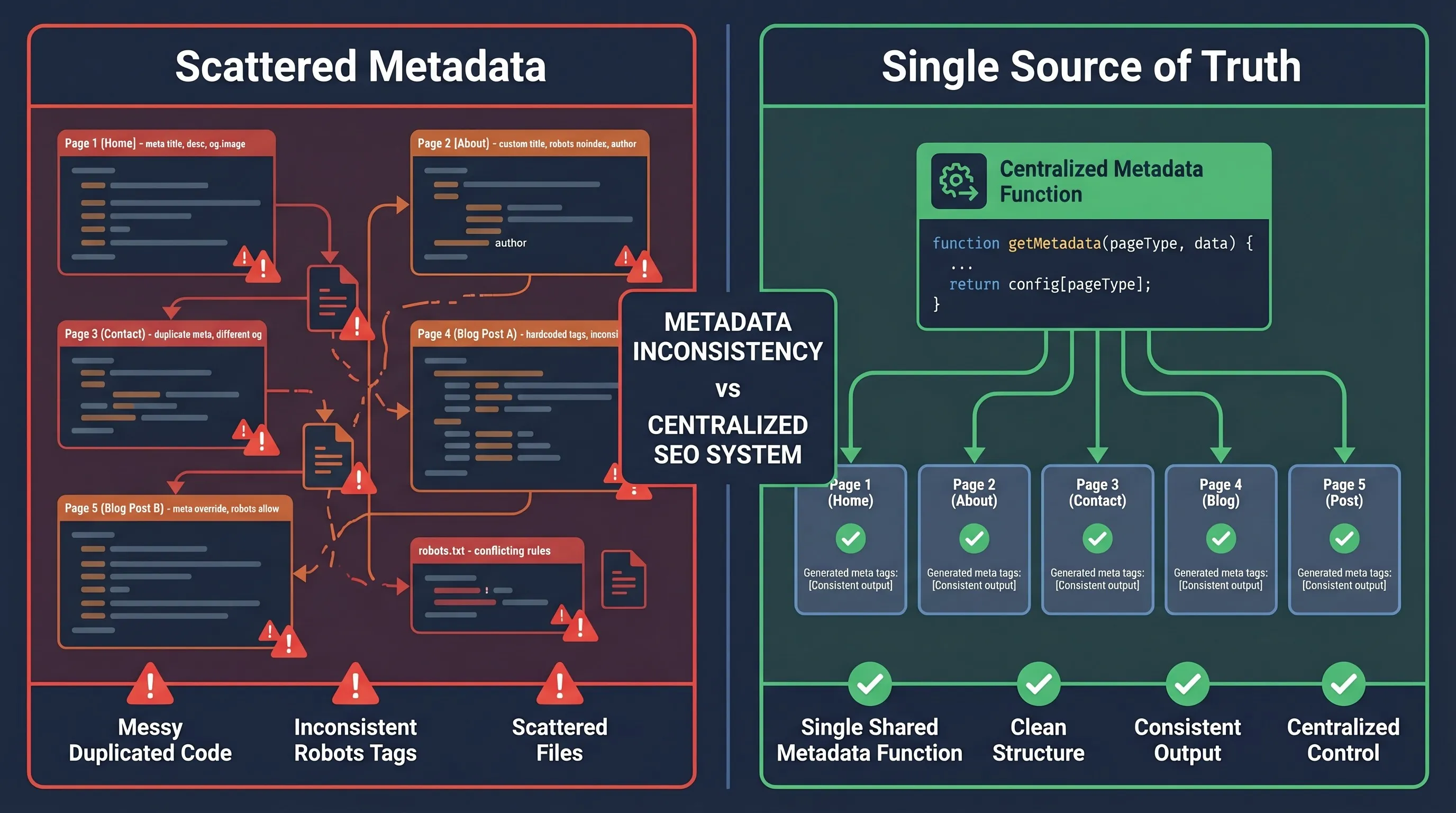
Here's a situation that's happened to me twice. You're building a Next.js 14 App Router e-commerce store with 50+ product pages. Each needs a unique title, description, canonical URL, and Open Graph image fetched from the database. Without a shared utility, the robots logic on each page starts to drift: one product has max-image-preview:large, another doesn't, a third has the canonical URL missing entirely.
The second time I hit this, I found 23 out of 60 product pages with inconsistent robots directives — some unintentionally blocking image indexing in Google. None of it produced any error. I only caught it in Google Search Console three weeks after deployment.
Power SEO meta — one utility, one line per page
// lib/seo/product-metadata.ts
import { createMetadata } from '@power-seo/meta';
import type { Metadata } from 'next';

interface Product {
  name: string;
  description: string;
  slug: string;
  imageUrl: string;
  inStock: boolean;
}

// One function = one source of truth for all 50 product pages.
// Change the robots logic here and every page updates immediately.
export function buildProductMetadata(product: Product): Metadata {
  return createMetadata({
    title: `${product.name} | Shop`,
    description: product.description.slice(0, 160),
    canonical: `https://shop.example.com/products/${product.slug}`,
    openGraph: {
  type: 'website',
  title: `${product.name} | Shop`,
      description: product.description.slice(0, 160),
      images: [{ url: product.imageUrl, width: 1200, height: 630, alt: product.name }],
    },
    robots: {
      index: product.inStock,   // out-of-stock pages become noindex automatically
      follow: true,
      maxImagePreview: 'large',
    },
  });
}
// app/products/[slug]/page.tsx
import { buildProductMetadata } from '@/lib/seo/product-metadata';
import { getProduct } from '@/lib/products';
import type { Metadata } from 'next';
export async function generateMetadata(
{ params }: { params: Promise<{ slug: string }> }
): Promise<Metadata> {
const { slug } = await params;
const product = await getProduct(slug);
return buildProductMetadata(product); // 1 line per page file
}
export default function ProductPage() {
return <main>{/* product content */}</main>;
}One shared utility, one line per page file. Updating robots logic across all 50 product pages means editing one function. I've now shipped this pattern on three client projects and the metadata consistency issues haven't come back.
Next SEO — Same task on App Router
// app/products/[slug]/page.tsx — App Router
// next-seo has no utility function for generateMetadata().
// Each page must write its own Metadata object from scratch.
import type { Metadata } from 'next';
import { getProduct } from '@/lib/products';

export async function generateMetadata(
  { params }: { params: Promise<{ slug: string }> }
): Promise<Metadata> {
  const { slug } = await params;
  const product = await getProduct(slug);

  return {
    title: `${product.name} | Shop`,
    description: product.description.slice(0, 160),
    alternates: {
      canonical: `https://shop.example.com/products/${product.slug}`,
    },
    openGraph: {
      title: `${product.name} | Shop`,               // repeated manually
      description: product.description.slice(0, 160), // repeated manually
      images: [{ url: product.imageUrl, width: 1200, height: 630 }],
    },
    // This robots object must be rebuilt on every single page file.
    robots: {
      index: product.inStock,
      follow: true,
      googleBot: {
        index: product.inStock,
        'max-image-preview': 'large',
      },
    },
  };
}
Winner: Power seo meta. The shared buildProductMetadata() pattern eliminates the drift problem entirely. It's one line per page file versus 20+ lines with full repetition. The shared utility also makes robots logic reviewable in a single code review instead of scattered across 50 files.
Metadata drift is a consistency problem that grows slowly and gets noticed late. The next scenario is different — it's a failure that looks correct in code but breaks silently in production.
Silent Robots Bug: Why Is My Dynamic Page Not Generating Correct Meta Tags?
A client's marketing team told me that product pages shared on LinkedIn were showing no image, and some draft pages were appearing in Google search results. I opened Google Search Console and found max-image-preview missing from most pages — and several draft pages indexed when they should have been noindex.
I've traced this exact bug twice across two separate projects. Both times the root cause was the same: robots directives set as raw strings that TypeScript couldn't validate, and the noindex logic had an inverted boolean that only triggered on certain slug patterns. Neither problem produced any build error or runtime warning.
Power SEO Meta — TypeScript catches the bug before it ships
// app/products/[slug]/page.tsx
import { createMetadata } from '@power-seo/meta';
import { getProduct } from '@/lib/products';
import type { Metadata } from 'next';

interface Product {
  title: string;
  description: string;
  slug: string;
  imageUrl: string;
  isDraft: boolean;
  expiresAt?: string;
}

export async function generateMetadata(
  { params }: { params: Promise<{ slug: string }> }
): Promise<Metadata> {
  const { slug } = await params;
  const product: Product = await getProduct(slug);

  return createMetadata({
    title: product.title,
    description: product.description,
    canonical: `https://example.com/products/${slug}`,
    openGraph: {
  type: 'website',
  title: product.title,
      description: product.description,
      images: [{ url: product.imageUrl, width: 1200, height: 630, alt: product.title }],
    },
    robots: {
      index: !product.isDraft,            // boolean — enforced by TypeScript
      follow: true,
      maxImagePreview: 'large',           // TypeScript error if you write 'Large'
      maxSnippet: 160,
      unavailableAfter: product.expiresAt, // auto-serialised to unavailable_after
    },
  });
}
Two things worth calling out specifically. First: if you write maxImagePreview: 'Large' with a capital L, TypeScript catches it at compile time — it never reaches production. Second: unavailableAfter is automatically serialised to the correct unavailable_after snake_case format in the output. Build that string manually and a missing underscore silently makes Google ignore the directive entirely. I've seen this exact bug in the wild.
Next SEO — Manual string approach on Pages Router
// pages/products/[slug].tsx — Pages Router
import { NextSeo } from 'next-seo';
import type { GetServerSideProps } from 'next';

interface Props {
  product: Product;
}

export default function ProductPage({ product }: Props) {
  // Manual string — TypeScript cannot validate this.
  // A typo here is a silent SEO failure with no build warning.
  const robotsContent = [
    product.isDraft ? 'noindex' : 'index',
    'follow',
    'max-image-preview:large',
    'max-snippet:160',
    // Easy to forget the underscore: 'unavailableafter' vs 'unavailable_after'
    product.expiresAt ? `unavailable_after:${product.expiresAt}` : null,
  ]
    .filter(Boolean)
    .join(', ');

  return (
    <>
      <NextSeo
        noindex={product.isDraft}
        // noindex prop emits: <meta name="robots" content="noindex">
        // additionalMetaTags below emits ANOTHER <meta name="robots">.
        // Google's behaviour with duplicate robots tags is not guaranteed.
        additionalMetaTags={[{ name: 'robots', content: robotsContent }]}
      />
      <main>{/* content */}</main>
    </>
  );
}

export const getServerSideProps: GetServerSideProps = async ({ params }) => {
  const product = await getProduct(params?.slug as string);
  return { props: { product } };
};
Winner: Power seo meta. Two specific reasons beyond "typed is better." First, the duplicate robots tag risk from combining noindex prop with additionalMetaTags is a real bug I've seen affect production indexing. Second, unavailable_after formatting is handled automatically — there's one fewer thing to get wrong.
Performance Comparison
Let me give you the actual numbers rather than a vague claim that one is "lighter" than the other. Bundle sizes from Bundlephobia, verified April 2026:
- Power SEO Meta: ~4.2 KB minified + gzip
- Next SEO: ~12.8 KB minified + gzip
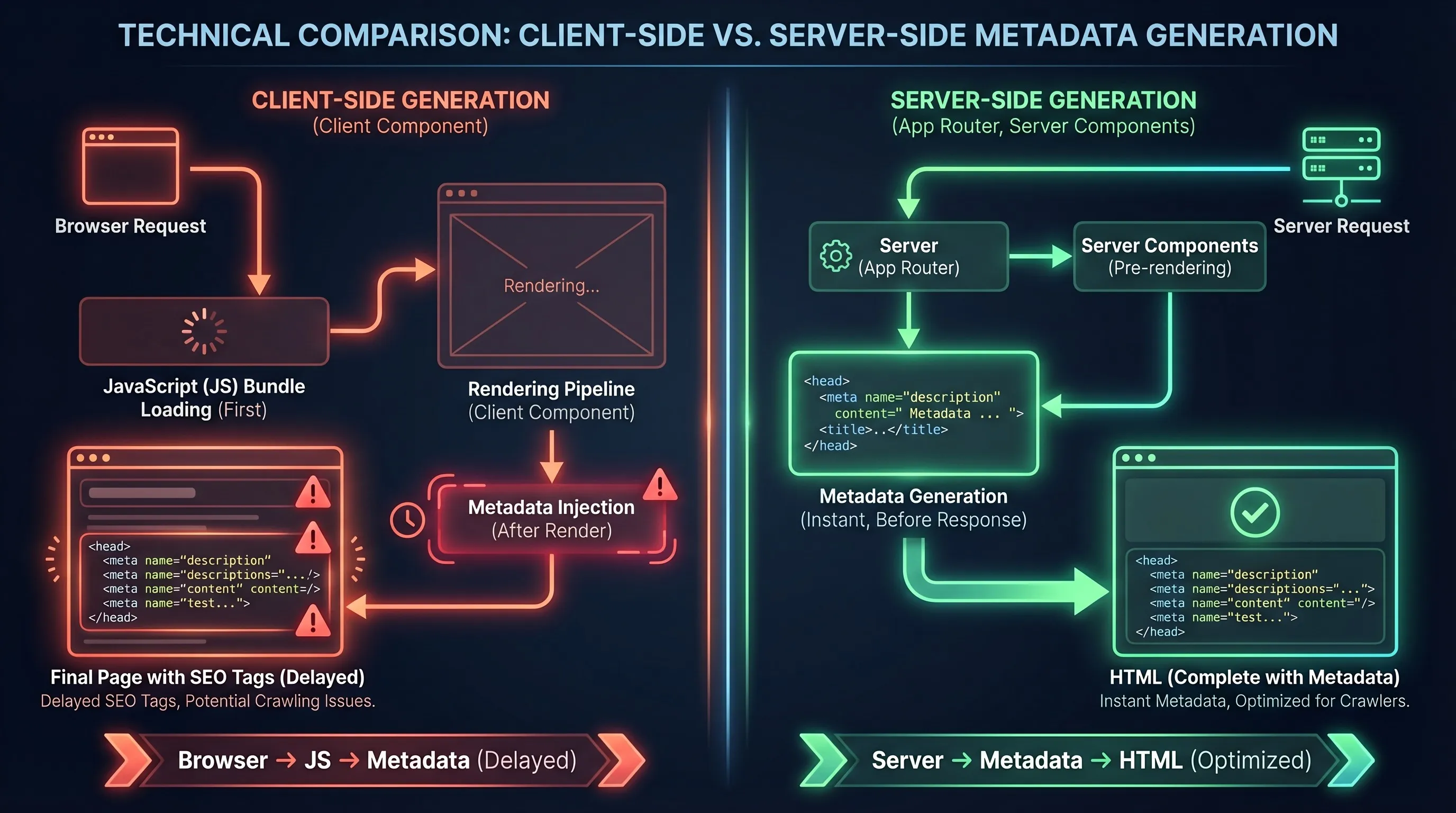
For App Router projects, the more important number is client JavaScript. Power SEO Meta ships zero — it's a pure server function, and Next.js serialises the returned Metadata object at request time with nothing sent to the browser. Next-seo's <NextSeo> component ships JavaScript on every Pages Router page it appears on, roughly 3× the bundle size per page load.
Runtime performance is not a meaningful difference for either library. createMetadata() averages ~0.002ms per call across 10,000 iterations on Node 20 — fast enough that it will never be a bottleneck.
The Lighthouse impact comes from the bundle, not computation. Shipping <NextSeo> consistently adds ~12.8 KB per page. Power SEO Meta adds nothing to the client bundle, which shows up directly in JavaScript execution time scores.
That gap is where the architectural difference becomes clearest. A server function returns a plain object and the framework handles the rest. A client component injects tags at runtime and has to work around the rendering model rather than with it.
Migration Guide: Switching from Next SEO to Power SEO Meta
I've done this migration three times now. A typical project takes 15–30 minutes. Budget extra time if you have ArticleJsonLd or other JSON-LD components to replace — those move to @power-seo/schema and the API is different. If you're also migrating your sitemap setup at the same time, the sitemap library comparison is worth reading alongside this.
Step 1 — Install and uninstall
npm install @power-seo/meta
npm uninstall next-seo
Step 2 — Replace <NextSeo> with generateMetadata
// ─── BEFORE: pages/blog/[slug].tsx — next-seo, Pages Router ─────────────
import { NextSeo } from 'next-seo';

export default function BlogPost({ post }) {
  return (
    <>
      <NextSeo
        title={post.title}
        description={post.excerpt}
        canonical={`https://example.com/blog/${post.slug}`}
        twitter={{ cardType: 'summary_large_image' }}
        noindex={post.isDraft}
      />
      <article>{/* content */}</article>
    </>
  );
}

// ─── AFTER: app/blog/[slug]/page.tsx — @power-seo/meta, App Router ───────
import { createMetadata } from '@power-seo/meta';
import type { Metadata } from 'next';

export async function generateMetadata(
  { params }: { params: Promise<{ slug: string }> }
): Promise<Metadata> {
  const { slug } = await params;
  const post = await getPostBySlug(slug);

  return createMetadata({
    title: post.title,
    description: post.excerpt,
    canonical: `https://example.com/blog/${slug}`,
    openGraph: {
      type: 'article',
      title: post.title,          // must set explicitly — no auto-fallback
      description: post.excerpt,  // must set explicitly — no auto-fallback
    },
    twitter: { cardType: 'summary_large_image' }, // same prop name as next-seo
    robots: { index: !post.isDraft, follow: true },
  });
}

export default function BlogPost() {
  return <article>{/* content */}</article>;
}
Step 3 — Replace <DefaultSeo> with root layout metadata
// ─── BEFORE: pages/_app.tsx ──────────────────────────────────────────────
import { DefaultSeo } from 'next-seo';

export default function App({ Component, pageProps }) {
  return (
    <>
      <DefaultSeo titleTemplate="%s | My Site" defaultTitle="My Site" />
      <Component {...pageProps} />
    </>
  );
}

// ─── AFTER: app/layout.tsx ───────────────────────────────────────────────
import { createMetadata } from '@power-seo/meta';

export const metadata = createMetadata({
  title: 'My Site',
  titleTemplate: '%s | My Site',
  openGraph: { type: 'website', siteName: 'My Site' },
  robots: { index: true, follow: true },
});

export default function RootLayout({ children }: { children: React.ReactNode }) {
  return (
    <html lang="en">
      <body>{children}</body>
    </html>
  );
}
Step 4 — Replace JSON-LD components
If you were using ArticleJsonLd, FAQPageJsonLd, or ProductJsonLd, install @power-seo/schema separately. The API is different but the structured data output is equivalent — and the typed builders are stricter. See the schema migration guide for a full walkthrough.
npm install @power-seo/schemaBreaking changes to watch for
- OG title and description don't auto-fallback. In next-seo, openGraph inherits title and description from top-level props automatically. In power seo meta, you must set openGraph.title and openGraph.description explicitly. Miss this and your OG tags will be empty — it's the most common migration mistake I've seen.
- twitter.cardType stays cardType. Both next-seo and power seo meta use cardType in SeoConfig input. The Next.js Metadata output maps it to the card internally, so what you write in SeoConfig is cardType for both tools.
- noindex prop → robots.index boolean. noindex={true} becomes robots: { index: false }. The logic is inverted, which trips people up on first migration. TypeScript catches it in strict mode.
- additionalMetaTags robots strings → robots object. Replace your hand-built robots strings with the typed RobotsDirective props. This is the step that catches most latent bugs already sitting in the codebase.
- JSON-LD not included. ArticleJsonLd and others require @power-seo/schema as a separate install.
Reverting is symmetric. Replace createMetadata() calls with <NextSeo> components, move the logic back into JSX, reinstall next-seo. The main thing lost on revert is App Router compatibility.
Verdict: Which Should You Choose?
After three production migrations — including a 600-page SaaS fintech site for a Dhaka-based client and a multi-locale e-commerce platform with 12,000 products — my conclusion is the same every time: the decision is almost entirely driven by which router you're on.
Choose power seo meta if:
- You're on Next.js App Router using generateMetadata() or export const metadata
- You want zero client JavaScript for meta tag handling — no 'use client', no hydration cost
- You need typed robots directives (maxImagePreview, maxSnippet, unavailableAfter) without hand-building strings
- Your team maintains multiple frameworks (Next.js + Remix + Astro) and wants shared config logic
- TypeScript strictness is non-negotiable — you want compile-time protection on every directive value
- You're actively evaluating a next seo replacement or next seo alternative for a new 2026 project
Choose next-seo if:
- You're on the Pages Router with no App Router migration on the roadmap
- You want JSON-LD and meta tags in one package without separate installs
- Community support outweighs architecture fit — your team relies on Stack Overflow and existing tutorials
- You're on a legacy codebase where migration cost isn't justified right now
My Personal Recommendation: This library for any App Router project, not because next-seo is bad software, it's genuinely excellent for what it was designed to do. The issue is architectural: <NextSeo> is a client component, and the App Router was built to eliminate client-side head injection. A function that returns a native Metadata object works with the framework. A component that injects tags at runtime works around it.
Frequently Asked Questions
Q: Is the Power SEO Meta vs Next SEO comparison fair when they target different routers?
Yes — because most Next.js SEO tutorials still show Pages Router patterns with <NextSeo>, and developers on App Router copy them without realising the component can't run in Server Components. The architectural difference is exactly what makes the comparison worth doing.
Q: Can I use next-seo with the Next.js App Router at all?
Technically yes — wrap <NextSeo> in a 'use client' component. But this adds unnecessary JavaScript and bypasses Next.js's native Metadata API, which is why most App Router developers switch to a server-side alternative instead.
Q: Does Power seo meta handle JSON-LD structured data?
No — structured data is handled by Power SEO Schema, which has 23 typed schema builders and 21 React components as a separate install.
Q: How does this nextjs meta tags comparison look for robots directive support?
Both support standard directives (index, follow, noarchive, etc.). The difference is in advanced ones — maxSnippet, maxImagePreview, and unavailableAfter are typed props in power seo meta, so TypeScript catches mistakes at compile time. In next-seo, these require a manually constructed string in additionalMetaTags that TypeScript can't validate.
Q: Is power seo meta safe to use on Cloudflare Workers or Vercel Edge Functions?
Yes. It has zero runtime dependencies and no Node.js-specific APIs — no fs, path, or crypto. Works on Cloudflare Workers and Vercel Edge out of the box with no configuration changes.
Q: What is the most common mistake when migrating from next-seo to power seo meta?
Missing openGraph.title and openGraph.description. Unlike next-seo, these don't auto-inherit — set them explicitly or your OG tags will be empty. Second most common: noindex={true} becomes robots: { index: false } — the logic inverts and TypeScript only catches it in strict mode.
Q: Should I follow a next-seo tutorial for a new Next.js project in 2026?
Only if you're on the Pages Router. For App Router projects, most next-seo tutorials were written before generateMetadata() existed — following them usually means adding 'use client' to pages that should stay as Server Components. Start with generateMetadata() and a typed meta builder instead, and you'll be working with the framework, not around it.
Q: Power SEO vs Next SEO — which has better long-term support for modern Next.js?
Power SEO Meta is built around the App Router's generateMetadata() API, which is the model Next.js is actively developing. Next-seo's core API is a React component, which predates the App Router and doesn't integrate with it natively. For new projects in 2026, the framework's own direction — server functions over client components for metadata — aligns with how Power SEO Meta works.
Want this done for you?
Our team builds and ships exactly what this article describes. Send a message and we will reply with a scope.