Power-SEO vs Next-SEO: Best Next.js SEO Library Comparison (2026)


Power-SEO vs Next-SEO is the most important comparison any Next.js developer should make before choosing an SEO library in 2026. Power-SEO is a complete SEO toolkit for audits, automation, and AI search optimization, while Next-SEO mainly handles metadata and schema management in Next.js projects.
Most teams ask this question only after launching, when Google Search Console reports missing structured data, broken canonical tags, or pages that simply refuse to rank. But the real question isn't just which library works. It's which Next.js SEO library fits your project's scale, your team's workflow, and your long-term SEO goals.
This guide breaks down both tools honestly, with real code examples and real-world scenarios, so you can make the right call before writing a single line of SEO code. Both libraries aim to simplify Server-Side SEO in Next.js, but they take very different approaches to solving the same problem.
Disclosure: Power-SEO is built and maintained by our team at CyberCraft Bangladesh. We created it after running into real scaling and SEO limitations on large Next.js projects, the same problems this article covers. This comparison is based on hands-on experience with both libraries, and where Next-SEO is the stronger choice, we've said so.
Key Takeaways
Next-SEO: single lightweight package (~11–12 KB), simple React-component API, huge community, but limited to metadata + JSON-LD only. See it on npm.
Power-SEO: modular ecosystem (17 packages) covering metadata, schemas, redirects, sitemaps, and audits. More powerful but newer, with a smaller community.
Migrations at scale: Power-SEO wins thanks to its built-in, typed redirect engine.
Rich content/schema-heavy sites: slight edge to Power-SEO via
schemaGraph(), which combines multiple schema.org types on one page.Metadata handling: both libraries ultimately feed into Next.js's native App Router metadata API, so understanding that system helps regardless of which tool you pick.
Performance: both are server-side/build-time tools capable of 100/100 Lighthouse SEO scores.
Choose Next-SEO for blogs, portfolios, and marketing sites needing fast, simple setup.
Choose Power-SEO for large apps (10,000+ pages), complex redirects, strict TypeScript, or an all-in-one SEO toolkit.
Note: article is written by Power-SEO's own team, so it's a useful comparison but worth a second opinion for full neutrality.
Power-SEO vs Next-SEO Quick Overview
When I compared Power-SEO vs Next-SEO, I found that Next-SEO works well for simple metadata and schema needs, but Power-SEO gives me a more complete SEO toolkit with audits, redirects, sitemaps, and advanced optimization features.
Feature | Power-SEO | Next-SEO |
Bundle structure | Modular packages | Single package |
Bundle size | Depends on installed modules | ~11–12 KB (minified + gzipped) |
SSR support | Native (Next.js / Remix / Node) | Yes |
TypeScript support | Full TypeScript-first | Good but partial typing |
Learning curve | Moderate | Very easy |
Documentation | Growing ecosystem docs | Mature documentation |
Community size | Small but expanding | Large open-source community |
npm weekly downloads | Smaller but increasing | ~300k+ downloads |
Last update | Active development | Active |
Pricing | Open source (MIT) | Open source |
Framework support | Next.js, Remix, Node, Edge | Mostly Next.js / React |
JSON-LD support | Typed builders + validation | JSON-LD components |
Sitemap generation | Built-in package | Requires separate tools |
Redirect engine | Built-in module | Not included |
Robots.txt support | Built-in module | Requires next-sitemap |
Open Graph support | Full OG + Twitter | Full OG + Twitter |
App Router support | Native | Yes (v6+) |
What Is Power-SEO?
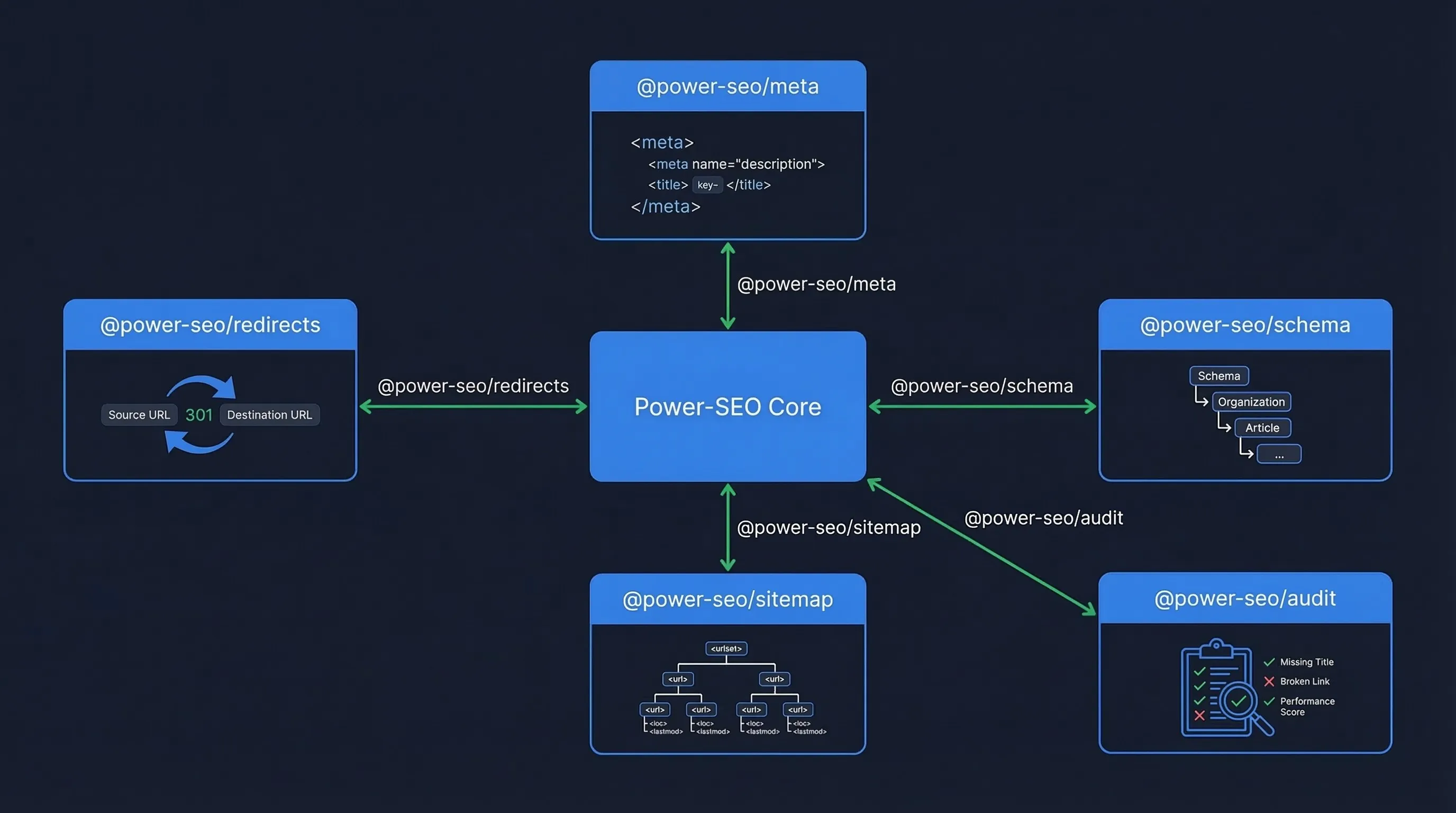
Power-SEO is a modular ecosystem of 17 TypeScript-first SEO packages for React and Next.js, designed to cover everything from metadata and structured data to audits, redirects, analytics, and sitemap generation. Instead of relying on a single monolithic solution, developers can install only the modules they need, resulting in smaller bundles and better tree-shaking. Whether you're looking for a modern alternative to the next-seo package, exploring the next-seo npm ecosystem, or evaluating a flexible next-seo library for large-scale applications, Power-SEO provides a composable approach that aligns with Next.js SEO best practices 2026 while keeping your codebase lightweight, maintainable, and future-ready.
Installation
npm install @power-seo/meta @power-seo/schemaThese two packages cover most Next.js metadata and Next.js JSON-LD schema tasks. If you're searching for the best npm package for Next.js SEO, this modular install approach is one of Power-SEO's biggest advantages over a single bundled dependency.
Working Code Example (Next.js SEO Setup)
import { createMetadata } from '@power-seo/meta'

import { article, toJsonLdString } from '@power-seo/schema'
type Props = {
  title: string
  description: string
  slug: string
}
export function generateMetadata({ title, description, slug }: Props) {
  return createMetadata({
    title,
    description,
    canonical: `https://example.com/blog/${slug}`,
    openGraph: {
      type: 'article',
      images: [
        {
          url: 'https://example.com/og-image.jpg',
          width: 1200,
          height: 630
        }
      ]
    },
    robots: {
      index: true,
      follow: true
    }
  })
}
export default function BlogPost() {
  const schema = article({
    headline: "Next.js SEO Guide",
    datePublished: "2026-01-10",
    author: { name: "Jane Developer" }
  })
  return (
    <>
      <script
        type="application/ld+json"
        dangerouslySetInnerHTML={{ __html: toJsonLdString(schema) }}
      />
      <article>Blog content</article>
    </>
  )
}
This Example Handles:
- Next.js canonical URL
- Next.js Open Graph tags
- Server-Side SEO Next.js
- Next.js JSON-LD schema
Strongest Advantages of Power-SEO
Full SEO Ecosystem: Power-SEO isn't just a Next.js SEO npm package, it includes tools for:
Structured data
Redirects
Sitemap generation
SEO audits
Analytics integration
TypeScript-First Architecture: Every package ships with native TypeScript definitions, preventing runtime errors and enforcing schema validation at compile time. For developers building Server-Side SEO Next.js systems, that reliability matters.
Modular Design: The ecosystem contains 17 separate packages, meaning you only install what your project needs. That simplicity is why many developers consider it the best Next.js SEO library for beginners.
For Example:
@power-seo/meta
@power-seo/schema
@power-seo/sitemap
@power-seo/redirects
Power-SEO Honest Limitations
While Power-SEO offers a modular and flexible approach, it does come with a few drawbacks. Since the ecosystem is relatively new compared to older tools, community tutorials and Stack Overflow answers are still somewhat limited. On top of that, beginners may initially find its modular structure a bit overwhelming compared to a single, all-in-one solution like the Next SEO library for Next.js.
With that in mind, let's shift our focus and see how Next-SEO handles the same SEO tasks. As a widely adopted Next SEO library for Next.js, it provides a simpler, centralized API for managing metadata, Open Graph tags, Twitter Cards, and structured data. It's also a popular choice for developers looking for a practical Next.js JSON-LD guide, thanks to its built-in support for adding structured data with minimal configuration. These capabilities highlight several Next.js SEO advantages 2026, including streamlined metadata management, improved maintainability, and easier implementation of modern SEO best practices.
What Is Next-SEO?
Next-SEO is a popular open-source Next.js SEO library that provides React components for managing metadata, Open Graph tags, Twitter cards, and structured data inside Next.js applications.
Unlike larger SEO ecosystems, Next-SEO focuses on one goal: making SEO configuration easy for React developers. Instead of manually writing <meta> tags or injecting JSON-LD scripts, developers use simple React components that automatically generate the correct markup.
Because of this simplicity, many teams consider it one of the most widely adopted modern Next.js SEO tools for small to medium projects. For developers building SEO in plain React apps rather than Next.js, a similar comparison exists between Power-SEO React vs React-helmet, which focuses more on client-side head management and TypeScript safety.
Installation
Installation is simple and works with both the Pages Router and App Router.
npm install next-seoOnce installed, developers can start managing metadata and structured data directly inside React components.
Working Code Example (Next.js SEO Setup)
The example below demonstrates how a developer might implement Next.js metadata, canonical URLs, Open Graph tags, and structured data for a blog article.
import { NextSeo, ArticleJsonLd } from "next-seo"
type Props = {
  title: string
  description: string
  slug: string
}
export default function BlogPost({ title, description, slug }: Props) {
  const url = `https://example.com/blog/${slug}`
  return (
    <>
      <NextSeo
        title={title}
        description={description}
        canonical={url}
        openGraph={{
          url,
          title,
          description,
          type: "article",
          images: [
            {
              url: "https://example.com/og-image.jpg",
              width: 1200,
              height: 630,
              alt: title
            }
          ]
        }}
      />
      <ArticleJsonLd
        url={url}
        title={title}
        images={["https://example.com/og-image.jpg"]}
        datePublished="2026-01-10"
        authorName="Jane Developer"
        publisherName="Example Blog"
      />
      <article>{/* blog content */}</article>
    </>
  )
}
This single component setup handles several key SEO elements:
Next.js canonical URL
Next.js Open Graph tags
Next.js JSON-LD schema
basic server-side SEO metadata for Next.js
For many projects, this level of functionality is enough to ensure search engines correctly interpret page content.
Strongest Advantages of Next-SEO
Extremely Simple API: Next-SEO’s biggest strength is its simplicity. Most pages require only one component <NextSeo /> to configure metadata. This makes it one of the easiest Next.js SEO tools for developers who want quick implementation without learning a large API.
Large Community and Ecosystem: Because the library has existed for several years, it has strong community adoption. There are many tutorials, GitHub discussions, and StackOverflow solutions available, which lowers the learning curve for new developers.
Fast Setup for Smaller Projects: For blogs, landing pages, or SaaS marketing sites, Next-SEO can be implemented in minutes. Developers often use it alongside tools like next-sitemap for Next.js sitemap generation and robots.txt management.
Next-SEO Honest Limitations
Limited Feature Scope: Next-SEO focuses only on metadata and structured data. It does not include features such as redirects, SEO audits, analytics integrations, or advanced content analysis. Developers usually pair it with other tools to build a full SEO setup.
Less Type-Safe Structured Data: Although Next-SEO provides many JSON-LD components, most configurations rely on manual object properties rather than fully typed schema builders. This means developers must ensure schema correctness themselves to avoid validation errors.
Real-World Scenario 1: E-Commerce Store Migration
Imagine Shop Dhaka, a Bangladeshi e-commerce store built with Next.js. After a few years of growth, their product catalog has expanded to more than 80,000 pages. The original site architecture used numeric IDs in URLs:
/product/12345This structure worked early on, but it’s not ideal for SEO. Product URLs with readable slugs generally perform better in search results and are easier for users to understand and share. So the engineering team decides to migrate to a new structure:
/shop/wireless-headphonesHowever, migrations like this are risky. Thousands of backlinks already point to the old URLs. If redirects are not handled correctly, Google may treat the new pages as entirely different content, causing rankings to drop and valuable link equity to disappear. This is exactly the kind of situation where choosing between Power-SEO and Next-SEO starts to matter for teams running large Next.js applications.
The migration requires three technical guarantees:
permanent 301 redirects from old URLs to new ones
predictable redirect pattern matching for thousands of products
a way to test redirects before deploying to production
Power-SEO Implementation
Power-SEO includes a dedicated redirect engine that allows developers to define redirect rules once and reuse them across frameworks. Instead of manually editing Next.js configuration files, the team can create a centralized redirect configuration.
import { createRedirectEngine } from '@power-seo/redirects'
const engine = createRedirectEngine({
  rules: [
    {
      source: '/product/:id(\\d+)',
      destination: '/shop/:id',
      statusCode: 301
    }
  ]
})
const result = engine.match('/product/12345')
console.log(result)
/*
{
  resolvedDestination: '/shop/12345',
  statusCode: 301
}
*/
This system supports regex patterns, glob matching, and named parameters, which means a single rule can safely redirect tens of thousands of product pages. Because the engine runs as plain TypeScript, developers can also test redirects in CI pipelines before deployment.
Next-SEO Implementation
Next-SEO focuses primarily on metadata, Open Graph tags, and structured data. Redirect management is outside its scope, so developers must rely on native Next.js configuration instead.
// next.config.js
module.exports = {
  async redirects() {
    return [
      {
        source: '/product/:id',
        destination: '/shop/:id',
        permanent: true
      }
    ]
  }
}
This works well for small projects, but it lacks built-in tools for validating redirect logic, sharing rules across frameworks, or testing redirect patterns programmatically.
Winner: Power-SEO
For a large e-commerce migration, Power-SEO clearly wins. The reason is its dedicated redirect engine, which provides typed rules, reusable configuration, and automated pattern matching. These capabilities significantly reduce the risk of SEO damage during large site migrations.
Real-World Scenario 2: Recipe & Food Blog Platform
Consider Ranna Ghor, a Bangladeshi recipe and cooking blog built with Next.js. Think of it as a Bengali version of All Recipes. The site publishes hundreds of recipes, cooking tutorials, and food articles every month. Their primary growth strategy is to generate organic traffic from Google Search.
For recipe websites, ranking isn’t only about keywords. Google often displays rich results such as recipe cards, ratings, FAQs, breadcrumbs, and article snippets directly in search results. To qualify for those features, developers must implement an accurate Next.js JSON-LD schema, along with proper Next.js metadata management and Open Graph tags.
This is where the differences between Power-SEO and Next-SEO start to show up in real projects. Both libraries provide ways to generate structured data, but their implementation approaches are slightly different.
Power-SEO Implementation
Power-SEO uses typed builder functions for schema creation. Instead of manually writing JSON-LD, developers generate schemas using strongly typed APIs.
import {
  recipe,
  breadcrumbList,
  faqPage,
  schemaGraph,
  toJsonLdString
} from "@power-seo/schema"
const graph = schemaGraph([
  recipe({
    name: "Chicken Biryani",
    author: { name: "Chef Karim" },
    recipeIngredient: ["Rice", "Chicken", "Spices"],
    recipeInstructions: ["Cook rice", "Prepare chicken", "Combine ingredients"]
  }),
  breadcrumbList([
    { name: "Home", url: "https://rannaghar.com" },
    { name: "Recipes", url: "https://rannaghar.com/recipes" },
    { name: "Chicken Biryani" }
  ]),
  faqPage([
    { question: "How long does biryani take to cook?", answer: "About 45 minutes." },
    { question: "Can I use basmati rice?", answer: "Yes, basmati rice works best." }
  ])
])
export default function RecipePage() {
  return (
    <script
      type="application/ld+json"
      dangerouslySetInnerHTML={{ __html: toJsonLdString(graph) }}
    />
  )
}
A key advantage here is schemaGraph(), which combines multiple schema types into a single structured document. This ensures search engines parse all schemas correctly when multiple rich result types exist on one page. Developers also benefit from compile-time validation, which helps catch missing schema fields before deployment.
Next-SEO Implementation
Next-SEO approaches structured data differently. Instead of builder functions, it provides pre-built React components for common schema types.
import { RecipeJsonLd, BreadcrumbJsonLd, FAQPageJsonLd } from "next-seo"
export default function RecipePage() {
  return (
    <>
      <RecipeJsonLd
        name="Chicken Biryani"
        authorName="Chef Karim"
        ingredients={["Rice", "Chicken", "Spices"]}
        instructions={[
          "Cook rice",
          "Prepare chicken",
          "Combine ingredients"
        ]}
      />
      <BreadcrumbJsonLd
        itemListElements={[
          { position: 1, name: "Home", item: "https://rannaghar.com" },
          { position: 2, name: "Recipes", item: "https://rannaghar.com/recipes" },
          { position: 3, name: "Chicken Biryani" }
        ]}
      />
      <FAQPageJsonLd
        mainEntity={[
          {
            questionName: "How long does biryani take to cook?",
            acceptedAnswerText: "About 45 minutes."
          }
        ]}
      />
    </>
  )
}
This component-based approach is straightforward and easy for React developers to adopt.
Winner: Slight Edge to Power-SEO
Both libraries handle structured data well, so this scenario is actually pretty close. However, Power-SEO slightly edges out Next-SEO for large content platforms. The main reason is schema composition. Using schemaGraph() makes it easier to manage multiple schemas on a single page, something recipe sites often require. If you're evaluating the next-seo npm package for a content-heavy project, it's an excellent choice for straightforward implementations, but Power-SEO offers greater flexibility as your structured data needs grow. Many developers comparing the next-seo package Next.js ecosystem appreciate its simplicity, while advanced teams often prefer Power-SEO for more complex SEO architectures. This also highlights an important difference in the broader Next.js vs WordPress SEO discussion: Next.js provides far more control over technical SEO and structured data, but it often requires more deliberate configuration than WordPress plugins.
Performance Comparison: Power-SEO vs Next-SEO
When choosing between libraries, performance is often a major concern for developers. Metadata tools may look lightweight, but they can still affect bundle size, rendering time, and even Lighthouse scores if implemented poorly. In this Power-SEO vs Next-SEO comparison, performance mainly depends on three factors: bundle size, runtime execution, and how each library integrates with Server-Side SEO Next.js.
Bundle Size
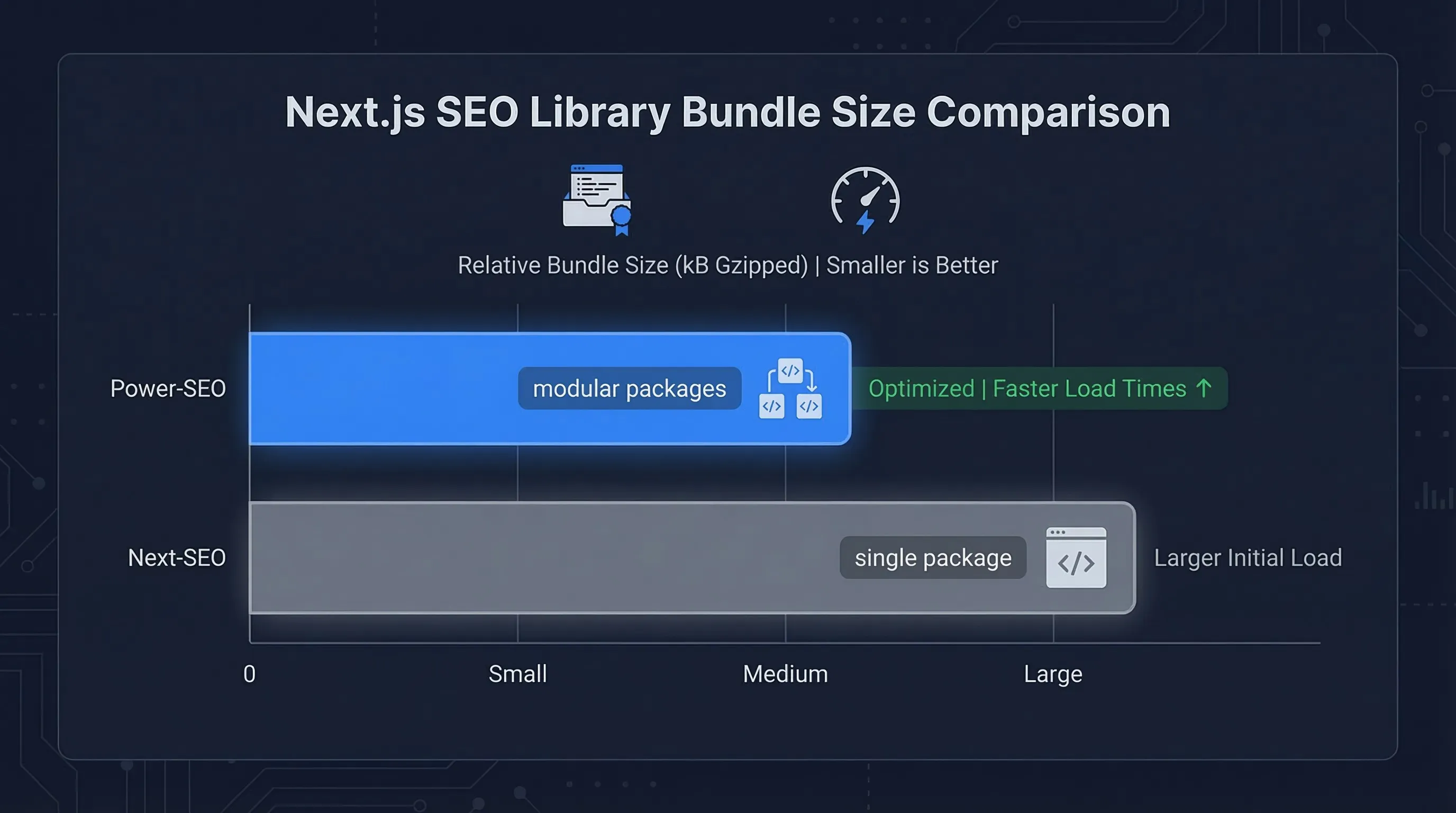
Bundle size is usually the first metric developers check when evaluating modern Next.js SEO tools. Next-SEO ships as a single package — metadata, Open Graph helpers, and JSON-LD utilities all included. According to Bundlephobia, it weighs roughly 11–12 KB gzipped, which is reasonable for what it offers.
Power-SEO, in contrast, follows a modular architecture. Instead of one large dependency, developers install only what they need, keeping bundles lean and fully tree-shakeable. As a result, projects that use multiple Power-SEO modules often end up with a smaller combined footprint than a single monolithic package.
For Example:
npm install @power-seo/meta @power-seo/schemaEach module typically adds only a few kilobytes to the bundle because the packages are fully tree-shakeable. This means unused functionality is removed during the build process. For large applications with many SEO features, such as Next.js sitemap generation, redirects, and schema builders, the modular approach often results in a smaller overall bundle.
Runtime Speed
Both libraries primarily run during server-side rendering or at build time, making them ideal SEO tools for Next.js developers who want zero client-side overhead. As a Next.js SEO package npm, both are installable in seconds, but their feature depth differs significantly once you move beyond basic metadata. Here’s a simple benchmark example showing metadata generation timing:
import { performance } from "perf_hooks"
const start = performance.now()
for (let i = 0; i < 1000; i++) {
  JSON.stringify({
    title: "Next.js SEO Test",
    description: "Testing metadata generation performance"
  })
}
const end = performance.now()
console.log("Execution time:", end - start)
Lighthouse SEO Score Impact
Proper implementation of metadata and structured data directly affects Lighthouse SEO scores. Features such as Next.js canonical URL, Open Graph tags, and Next.js JSON-LD schema help search engines correctly interpret pages. In practice, both Power-SEO and Next-SEO can achieve 100/100 Lighthouse SEO scores when configured properly.
Migration Guide
If you're currently using one library and considering switching, migrating between the two is usually straightforward. Both tools help manage metadata, structured data, and overall server-side SEO in Next.js applications. The biggest difference is architectural: Next-SEO relies on React components, while Power-SEO uses builder functions and framework-aware helpers.
Below is a practical step-by-step migration guide for both directions in the Power-SEO vs Next-SEO transition.
Migrating from Next-SEO → Power-SEO
Step 1: Install the required Power-SEO packages.
npm install @power-seo/meta @power-seo/schemaStep 2: Replace <nextseo /> components with metadata builder functions.
Before (Next-SEO):
import { NextSeo } from "next-seo"
export default function BlogPost() {
  return (
    <>
      <NextSeo
        title="Next.js SEO Guide"
        description="Learn modern SEO techniques for Next.js"
        canonical="https://example.com/blog/seo-guide"
      />
      <article>Content</article>
    </>
  )
}
After (Power-SEO):
import { createMetadata } from "@power-seo/meta"
export function generateMetadata() {
  return createMetadata({
    title: "Next.js SEO Guide",
    description: "Learn modern SEO techniques for Next.js",
    canonical: "https://example.com/blog/seo-guide"
  })
}
export default function BlogPost() {
  return <article>Content</article>
}
This approach integrates directly with the Next.js App Router metadata API, which keeps SEO logic inside the server layer rather than client-side components.
Migrating from Power-SEO → Next-SEO
If you prefer a simpler React component approach, you can move back to Next-SEO.
Install the library:
npm install next-seoBefore (Power-SEO):
createMetadata({
  title: "Recipe Page",
  description: "Best biryani recipe"
})
After (Next-SEO):
import { NextSeo } from "next-seo"
<NextSeo
  title="Recipe Page"
  description="Best biryani recipe"
/>
Which Is the Best Next.js SEO Library for Your Project?
For most Next.js projects in 2026, Power-SEO is a strong choice for automated metadata, structured data, audits, and scalable SEO optimization.
The best npm package for Next.js SEO depends on your project's scale. For blogs, portfolios, or marketing sites, Next-SEO is the right call. Fast setup, simple API, and a large community mean you'll spend less time configuring and more time building. For e-commerce stores, SaaS products, or large content platforms, the Power-SEO vs Next-SEO comparison becomes clear: Power-SEO makes more sense when you need a complete SEO ecosystem.
With redirects, sitemaps, schema validation, and audits built together, it saves you from stitching together five separate packages.
Verdict: Which Should You Choose?
For most small projects and blogs, Next-SEO is genuinely the right call. It's simpler, has years of community answers behind it, and gets out of your way faster than any alternative.
Power-SEO makes sense when you outgrow that, when you need redirects, schema validation, sitemaps, and audits in one place, and stitching together five separate packages is no longer acceptable.
Choose Next-SEO When:
You're building a blog, portfolio, or marketing landing page
Your team prefers React component-based APIs
You want the fastest possible setup with minimal configuration
You need proven documentation and community support
Your project only requires metadata and basic structured data
Choose Power-SEO When:
You're managing 10,000+ pages with complex URL migrations
You need built-in redirect management with pattern matching
You need typed Next.js JSON-LD schema builders with compile-time validation
You want sitemaps, audits, and redirects from one ecosystem
You're building on Remix or need framework-agnostic SEO tools
TypeScript strict mode is part of your codebase standards
Frequently Asked Questions About Power-SEO vs Next-SEO
Q. What is the difference between Power-SEO vs Next-SEO?
Next-SEO handles metadata and JSON-LD. Power-SEO offers 17 modular packages for metadata, schemas, sitemaps, redirects, and audits.
Q. Is Next-SEO still good in 2026?
Yes. Next-SEO is a simple and reliable choice for metadata, Open Graph, and structured data.
Q. Is Power-SEO a good Next-SEO alternative?
Yes. Power-SEO is better for larger projects needing advanced SEO features like audits, redirects, and sitemaps.
Q. Which is better for JSON-LD in Next.js?
Both support JSON-LD. Power-SEO adds type safety and schema validation for more accuracy.
Q. Can Next-SEO create sitemaps and robots.txt?
No. Next-SEO focuses on metadata and structured data. Power-SEO includes sitemap and robots support.
Q. Which is better for large Next.js apps?
Power-SEO is better for large apps because it combines multiple SEO tools in one ecosystem.
Q. Which is the best npm package for Next.js SEO?
Choose Next-SEO for simple SEO needs and Power-SEO for a complete Next.js SEO toolkit.

I’m Mitu Das, a JavaScript developer, ERP product architect, and SEO specialist from Bangladesh. I work at CyberCraft Bangladesh, where I help build simple, scalable software, SaaS platforms, and business solutions. My goal is to create technology that helps companies save time, automate daily tasks, and grow faster. I enjoy combining development, product ideas, and SEO strategies to create useful digital solutions for modern businesses.
Writes about
Want this done for you?
Our team builds and ships exactly what this article describes. Send a message and we will reply with a scope.