
Next.js SEO Meta Tags: Mistake That Cost 3 Weeks of Traffic

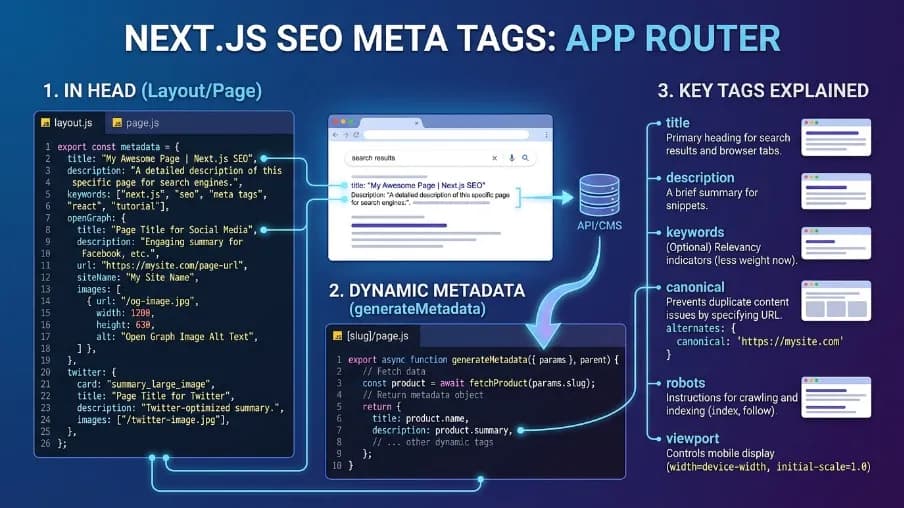
Next.js SEO meta tags are HTML elements that help search engines and social platforms understand, index, and display Next.js pages correctly. This guide explains what Next.js SEO meta tags are, how to add them, and how to configure them for static and dynamic pages. You’ll learn how to set titles, meta descriptions, canonical URLs, robots directives, Open Graph, Twitter Cards, JSON-LD structured data, and hreflang. It also covers metadataBase, generateMetadata(), title templates, and practical checks to perform before launching a Next.js website. For the App Router, the guide focuses on Next.js’s Metadata API and shows how these metadata features work in real page configurations.
About the Author
Written by: Mitu Das, SEO Specialist and Web Developer. I have worked in SEO and content writing since 2024, focusing on technical SEO, React, Next.js, JavaScript SEO, metadata, structured data, and website performance. I combine SEO and web development to create search-friendly websites and practical content strategies.
Reviewed by: Senior Content Strategist at CyberCraft Bangladesh. Our review process checks technical accuracy, search intent, SEO best practices, and practical usefulness.
Published: June 25, 2026
Last Updated: September 20, 2026
I wrote this Next.js SEO meta tags guide based on practical experience with Next.js applications, focusing on metadata, canonical URLs, robots directives, Open Graph, JSON-LD, dynamic metadata, and hreflang implementation.
Table of Contents
Key Takeaways
What Next.js SEO Meta Tags Actually Do
What Is MetadataBase for Next.js SEO Meta Tags?
How Do You Add Static SEO Meta Tags in Next.js?
How Do You Add Dynamic Metadata in Next.js?
How Does the Title Template Pattern Work?
Why Are Robots Directives Important in Next.js SEO?
How Do You Add JSON-LD Structured Data in Next.js?
Cross-Framework Metadata
Hreflang for Multi-Language Sites
Pre-Launch Checklist
FAQs
Key Takeaways
Setting up Next.js SEO meta tags correctly starts with
metadataBasein the root layout, which turns a relative Open Graph path into a working absolute URL. Skipping it is a common, silent cause of broken link previews.Dynamic routes need an explicit not-found guard, or missing content can get indexed with default metadata instead of proper Next.js SEO meta tags.
Advanced robots directives like
maxSnippetandmaxImagePreviewhave no field in the nativeMetadatatype, so they're a frequent gap in Next.js SEO meta tags setups.JSON-LD isn't part of the Metadata API. It's rendered as a
<script>tag inside the page component itself, separately from your other Next.js SEO meta tags.Hreflang setups need an
x-defaultentry, or your Next.js SEO meta tags for international audiences are structurally incomplete.
What Next.js SEO Meta Tags Actually Do
Next.js SEO meta tags are HTML elements that tell search engines and social platforms what a page is about and how it should appear. They include titles, descriptions, canonical URLs, robots directives, Open Graph, Twitter Cards, hreflang, and structured data. Next.js manages many of these through its Metadata API.
The main types you'll configure as part of any Next.js SEO meta tags setup: title tag, meta description, canonical URL, robots directives, Open Graph tags, Twitter Card tags, hreflang tags, and JSON-LD structured data.
What Is MetadataBase for Next.js SEO Meta Tags?
The metadataBase property defines the base URL Next.js uses to resolve relative URLs in your metadata. For example, setting it to https://example.com allows /og-image.jpg to become an absolute Open Graph URL. In the App Router, you typically configure metadataBase in the root layout before adding page-specific Next.js SEO meta tags.
The first Next.js SEO meta tags decision you make, before writing a single title or description, is setting metadataBase in the root layout:
// app/layout.tsx
import type { Metadata } from 'next';

export const metadata: Metadata = {
  metadataBase: new URL(
    process.env.NEXT_PUBLIC_SITE_URL ?? 'https://example.com'
  ),
  title: {
    template: '%s | Example Site',
    default: 'Example Site',
  },
  description: 'The home of Example Site.',
};

export default function RootLayout({
  children,
}: {
  children: React.ReactNode;
}) {
  return (
    <html lang="en">
      <body>{children}</body>
    </html>
  );
}
The relative image paths this resolves follow the Open Graph protocol specification, the underlying standard that platforms like Facebook, LinkedIn, and Slack all read from when generating a link preview based on your Next.js SEO meta tags.
How Do You Add Static SEO Meta Tags in Next.js?
You can add static Next.js SEO meta tags in an App Router page by exporting a metadata object typed with Next.js's Metadata type. This works well for pages where the title, description, canonical URL, and other metadata remain consistent. Next.js then generates the corresponding HTML elements in the page <head>.
The native pattern for Next.js SEO meta tags, no dependencies:
// app/about/page.tsx
import type { Metadata } from 'next';

export const metadata: Metadata = {
  title: 'About',
  description: 'Learn about our team, our mission, and why we built this.',
  alternates: {
    canonical: 'https://example.com/about',
  },
  openGraph: {
    type: 'website',
    images: [
      { url: '/og-about.jpg', width: 1200, height: 630, alt: 'About our team' },
    ],
  },
  twitter: {
    card: 'summary_large_image',
  },
  robots: {
    index: true,
    follow: true,
  },
};
Google's own guidance on writing descriptive title elements recommends distinct, concise text on every page rather than boilerplate, and warns that vague or repeated titles are among the most common reasons Google rewrites what your Next.js SEO meta tags show in search results.
The source material also proposes a wrapper library for this, @power-seo/meta, shown here exactly as written, though the package isn't actually published on npm.
For developers who want reusable solutions for technical SEO, Power SEO open-source SEO tools provide options for managing metadata and other SEO requirements across JavaScript applications. These tools can complement Next.js's native Metadata API when you need a more reusable approach to common SEO tasks.
npm install @power-seo/meta// app/about/page.tsx
import { createMetadata } from '@power-seo/meta';
export const metadata = createMetadata({
title: 'About',
description: 'Learn about our team, our mission, and why we built this.',
canonical: 'https://example.com/about',
openGraph: {
type: 'website',
images: [
{ url: '/og-about.jpg', width: 1200, height: 630, alt: 'About our team' },
],
},
twitter: { card: 'summary_large_image' },
robots: { index: true, follow: true },
});How Do You Add Dynamic Metadata in Next.js?
Use generateMetadata() when metadata depends on dynamic content, such as a blog post, product, category, or other database record. The function can fetch the page data and return a Metadata object containing the appropriate title, description, canonical URL, Open Graph information, and robots directives for that specific URL.
Dynamic routes need generateMetadata(), which is where most real Next.js SEO meta tags bugs live:
// app/blog/[slug]/page.tsx
import { createMetadata } from '@power-seo/meta';
import { getPost } from '@/lib/posts';

export async function generateMetadata({
  params,
}: {
  params: { slug: string };
}) {
  const post = await getPost(params.slug);

  // Critical: handle missing data explicitly
  if (!post) {
    return {
      title: 'Post Not Found',
      robots: { index: false, follow: false },
    };
  }

  return createMetadata({
    title: post.title,
    description: post.excerpt,
    canonical: `https://example.com/blog/${params.slug}`,
    openGraph: {
      type: 'article',
      images: [
        {
          url: post.coverImage,
          width: 1200,
          height: 630,
          alt: post.title,
        },
      ],
      article: {
        publishedTime: post.publishedAt,
        modifiedTime: post.updatedAt,
        authors: [post.author.url],
        tags: post.tags,
      },
    },
    robots: {
      index: !post.isDraft,
      follow: true,
      maxSnippet: 160,
      maxImagePreview: 'large',
    },
  });
}
Google's documentation on controlling snippets explains that Google primarily builds snippets from on-page content but falls back to the meta description when it better describes the page, which is why the description field in your Next.js SEO meta tags still matters even though it isn't a direct ranking factor.
How Does the Title Template Pattern Work?
The Next.js title template pattern lets you create consistent page titles while keeping each page's title unique. You can define a template such as %s | Example Site, then provide a page-specific title like Pricing. Next.js combines them when rendering the page, while absolute titles can bypass the template.
A practical pattern in any Next.js SEO meta tags setup at scale:
// app/pricing/page.tsx
export const metadata = createMetadata({
  title: 'Pricing',
  description: 'Simple, transparent pricing for every team size.',
  canonical: 'https://example.com/pricing',
});
// Renders in Google as: "Pricing | Example Site"
To break out of the template entirely:
export const metadata = createMetadata({
  title: { absolute: 'Try Example Site Free for 14 Days' },
  canonical: 'https://example.com/trial',
});
// Renders exactly as written, template ignored
Why Are Robots Directives Important in Next.js SEO?
Robots directives control how search engines index and process your pages. In Next.js, you can configure directives such as index, follow, maxSnippet, and maxImagePreview. These controls are useful for managing indexing and search-result presentation, particularly for temporary pages, restricted content, or pages requiring specific crawling instructions.
A time-limited sale page example, one of the more advanced controls available in Next.js SEO meta tags:
robots: {
  index: true,
  follow: true,
  maxSnippet: 200,
  maxImagePreview: 'large',
  unavailableAfter: '2025-12-31T00:00:00Z',
}
The full syntax and accepted values for these directives, including max-snippet, max-image-preview, and unavailable_after, are documented in Google's robots meta tag reference.
How Do You Add JSON-LD Structured Data in Next.js?
You add JSON-LD structured data in Next.js by creating a Schema.org object and rendering it inside a <script type="application/ld+json"> element. JSON-LD sits outside the Metadata API but complements your Next.js SEO meta tags by giving search engines structured information about content such as articles, products, organizations, or events.
JSON-LD sits outside the Metadata API but complements your Next.js SEO meta tags:
// app/blog/[slug]/page.tsx
export default async function BlogPost({
  params,
}: {
  params: { slug: string };
}) {
  const post = await getPost(params.slug);

  const jsonLd = {
    '@context': 'https://schema.org',
    '@type': 'Article',
    headline: post.title,
    description: post.excerpt,
    image: post.coverImage,
    datePublished: post.publishedAt,
    dateModified: post.updatedAt,
    author: {
      '@type': 'Person',
      name: post.author.name,
      url: post.author.url,
    },
    publisher: {
      '@type': 'Organization',
      name: 'Example Site',
      logo: {
        '@type': 'ImageObject',
        url: 'https://example.com/logo.png',
      },
    },
  };

  return (
    <>
      <script
        type="application/ld+json"
        dangerouslySetInnerHTML={{ __html: JSON.stringify(jsonLd) }}
      />
      <article>
        <h1>{post.title}</h1>
      </article>
    </>
  );
}
Validate the output with Google's Rich Results Test, which checks a live URL or a raw code snippet against the structured data types Google currently supports for rich results.
Cross-Framework Metadata
If your Next.js SEO meta tags setup needs to extend to other frameworks in a monorepo, the same concepts carry over.
Remix v2:
// app/routes/blog.$slug.tsx
import { createMetaDescriptors } from '@power-seo/meta';
import type { MetaFunction } from '@remix-run/node';

export const meta: MetaFunction<typeof loader> = ({ data }) => {
  if (!data?.post) return [{ title: 'Post Not Found' }];

  return createMetaDescriptors({
    title: data.post.title,
    description: data.post.excerpt,
    canonical: `https://example.com/blog/${data.post.slug}`,
    openGraph: {
      type: 'article',
      images: [{ url: data.post.coverImage, width: 1200, height: 630 }],
    },
    robots: { index: true, follow: true, maxSnippet: 160 },
  });
};
Astro, SvelteKit, Express, or Fastify:
import { createHeadTags } from '@power-seo/meta';

const headHtml = createHeadTags({
  title: 'My Page',
  description: 'A page about something great.',
  canonical: 'https://example.com/my-page',
  robots: { index: true, follow: true },
});

// Inject headHtml directly inside your <head>
Programmatic testing or CI assertions:
import { createHeadTagObjects } from '@power-seo/meta';

const tags = createHeadTagObjects({
  title: 'My Page',
  description: 'A page about something great.',
  canonical: 'https://example.com/my-page',
  robots: { index: true, follow: true },
});

expect(tags).toContainEqual({
  tag: 'link',
  attrs: { rel: 'canonical', href: 'https://example.com/my-page' },
});
Whatever the framework, the underlying goal behind good Next.js SEO meta tags is the same one Google describes in its guidance on consolidating duplicate URLs: pointing search engines at a single, absolute canonical for every piece of content so ranking signals don't split across near-duplicate versions.
Hreflang for Multi-Language Sites
International Next.js SEO meta tags need one more field:
export const metadata = createMetadata({
  title: 'Home',
  description: 'Welcome to Example Site.',
  canonical: 'https://example.com/en/',
  languageAlternates: [
    { hrefLang: 'en', href: 'https://example.com/en/' },
    { hrefLang: 'fr', href: 'https://example.com/fr/' },
    { hrefLang: 'de', href: 'https://example.com/de/' },
    { hrefLang: 'x-default', href: 'https://example.com/' },
  ],
});
Google's documentation on localized versions of a page specifies that every URL in an hreflang set must reference the full set reciprocally, including a self-reference, and that x-default is the value reserved for visitors who don't match any listed language or region.
Pre-Launch Checklist
Run this before shipping any page's Next.js SEO meta tags:
metadataBaseis set in the root layout via an environment variable.Every page has a unique title and description, with an absolute canonical URL.
Dynamic routes return
noindexexplicitly when data is missing.Open Graph images are tested in the Facebook Sharing Debugger and LinkedIn Post Inspector before launch.
All hreflang setups include
x-default.Core Web Vitals are checked, since Google's Core Web Vitals guidance confirms LCP, INP, and CLS are measured as part of page experience and feed into tools like Search Console.
Get these six things right and your Next.js SEO meta tags stop being an invisible liability and start doing the job they're meant to: helping the right people find, click, and share your pages.
Conclusion
Next.js SEO meta tags are metadata elements that help search engines and social platforms understand and display your pages. In the App Router, you can manage them with the Metadata API, metadata, and generateMetadata(). A complete setup should cover unique titles and descriptions, metadataBase, canonical URLs, robots directives, Open Graph, JSON-LD, and hreflang. For dynamic pages, generate metadata from the page data and handle missing content explicitly. Before launch, test the rendered metadata and verify that each page publishes the information you intended.
FAQs About Next.js SEO Meta Tags
What is metadataBase and why do I need it?
metadataBase is the base URL you set once in your root layout, so Next.js can convert relative image paths into absolute URLs. Without it, Open Graph and Twitter Card images defined as relative paths like /og.jpg fail silently on social platforms, showing no preview at all. It's the single most common cause of broken link previews in Next.js SEO meta tags setups, and it produces no build error when missing.
What's the difference between export const metadata and generateMetadata()?
export const metadata works for static pages whose title and description never change. generateMetadata() is an async function for dynamic routes that fetch data first, such as blog posts or products, and it returns the same Metadata object shape. It should always include a not-found guard that returns noindex when the requested data doesn't exist, so missing content never gets indexed as a real page.
Do I need a canonical URL on every page?
Yes, on every public page. Without a canonical tag, search engines may index multiple URL variants of the same content, such as versions with and without trailing slashes, or with tracking query parameters like ?ref=twitter, and split your ranking signal across all of them instead of consolidating it onto one preferred URL. A self-referencing canonical is good practice even on pages with no known duplicates.
Why can't I set max-snippet directly in the Metadata type?
Next.js's native Metadata type has no typed field for advanced robots directives like max-snippet or max-image-preview. You have to compose them manually as a raw string inside metadata.other, formatted exactly as Google's robots meta tag syntax expects. A single formatting mistake there fails silently, producing no TypeScript error and no warning, so the directive is simply ignored in the rendered HTML.
Do I need an x-default hreflang entry?
Yes. The x-default entry tells Google which URL to serve when a visitor's language or region doesn't match any of your other declared alternates. Without it, your international Next.js SEO meta tags setup is structurally incomplete, and Google may show the wrong language version to some visitors by default, since there's no fallback URL specified in the hreflang set for unmatched cases.

I’m Mitu Das, a JavaScript developer, ERP product architect, and SEO specialist from Bangladesh. I work at CyberCraft Bangladesh, where I help build simple, scalable software, SaaS platforms, and business solutions. My goal is to create technology that helps companies save time, automate daily tasks, and grow faster. I enjoy combining development, product ideas, and SEO strategies to create useful digital solutions for modern businesses.
Writes about