Next.js SEO: Complete Guide to Ranking Apps in 2026

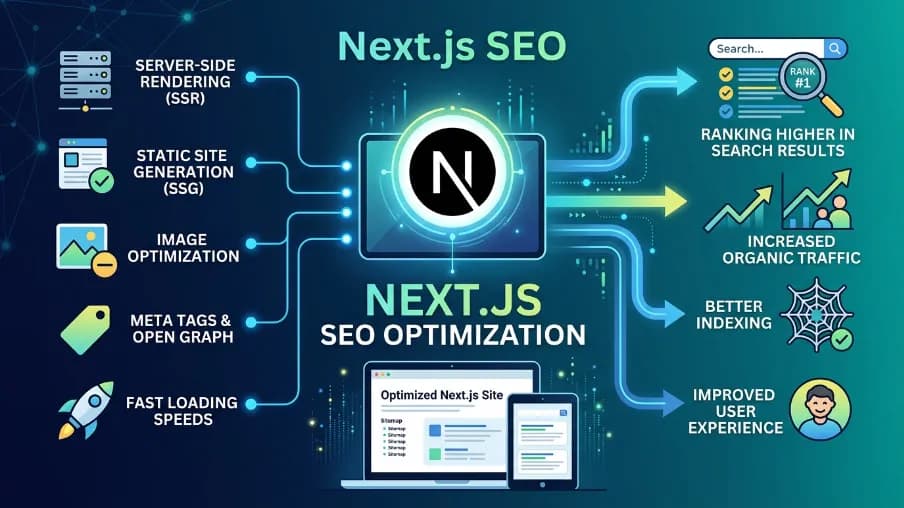
If you've ever built a React app and then watched it struggle in Google Search, you already know the pain. JavaScript-heavy sites have historically been a nightmare for SEO, crawlers couldn't read the content, meta tags were missing, and performance was all over the place. Next.js SEO changes that equation completely, but only if you know how to use it right.
I've spent years working on Next.js SEO projects ranging from small blogs to large e-commerce platforms, and I want to share practical ways to boost SEO with Next.js, the best methods for optimizing SEO that I've actually used in production. This isn't a surface-level overview; we're going deep on rendering strategies, Next js SEO meta tags, structured data, Core Web Vitals, and the real-world tooling that makes a difference in 2026.
Here's what you'll walk away with: a complete understanding of why Next.js optimises websites better than plain React for search, a practical SEO Best Practices with Next.js playbook you can start applying today, and a reliable Next js SEO checklist to help you implement each strategy step by step.
What Is SEO in Next.js
Before diving into Next.js SEO best practices 2026, it's worth being precise about what SEO in Next.js actually means.
Next.js SEO is the combination of technical and content practices that make Next.js applications crawlable, indexable, and rankable by search engines like Google and Bing. It covers everything from how pages are rendered and delivered, to how meta tags are structured, to how fast the page loads for real users.
What makes Next.js SEO different from general React SEO is the framework's built-in rendering flexibility. You're not locked into one delivery model, you can mix server-side rendering, static generation, and incremental static regeneration across different routes in the same application. That flexibility is one of the core Next js SEO benefits, because the right approach genuinely depends on the page type.
Next.js SEO also benefits from first-party tooling. The built-in <Image> component handles Core Web Vitals improvements automatically, the file-based router creates clean URL structures without extra configuration, and the next.config.js redirects API gives you typed, testable redirect rules. None of this is magic, but it removes the friction that makes React SEO so painful in plain single-page apps.
Is Next.js Good for SEO in 2026
The short answer is yes, and the gap over plain React has only widened with recent App Router improvements. Next.js SEO remains one of the strongest combinations in modern web development.
Plain React apps are single-page applications (SPAs). When Googlebot visits a SPA, it often sees a nearly empty HTML document with a <div id="root"> and a pile of JavaScript bundles. The bot has to execute that JavaScript, wait for content to render, and then try to index it. Google has gotten better at this, but it's still slower, less reliable, and worse for crawl budget than receiving pre-rendered HTML immediately, one of the clearest Next.js SEO advantages over React for SEO.
Next.js SEO solves this by giving you server-side rendering and static generation out of the box. When a crawler or a real user visits your page, they receive complete HTML with the actual content already in it, no JavaScript execution required for the initial read.
Beyond rendering, Next.js SEO gives you:
- A file-based routing system that naturally produces clean, crawlable URLs
- Built-in image optimization that directly improves Core Web Vitals
- Automatic code splitting so each page only loads what it needs
- Native support for generating sitemaps, handling redirects, and managing dynamic SEO in Next.js through data-driven metadata
React SEO is genuinely hard without a framework like Next.js. With it, the hardest Next.js SEO problems are already solved, you just need to use the tools correctly.
Understanding Next.js Rendering Strategies for SEO
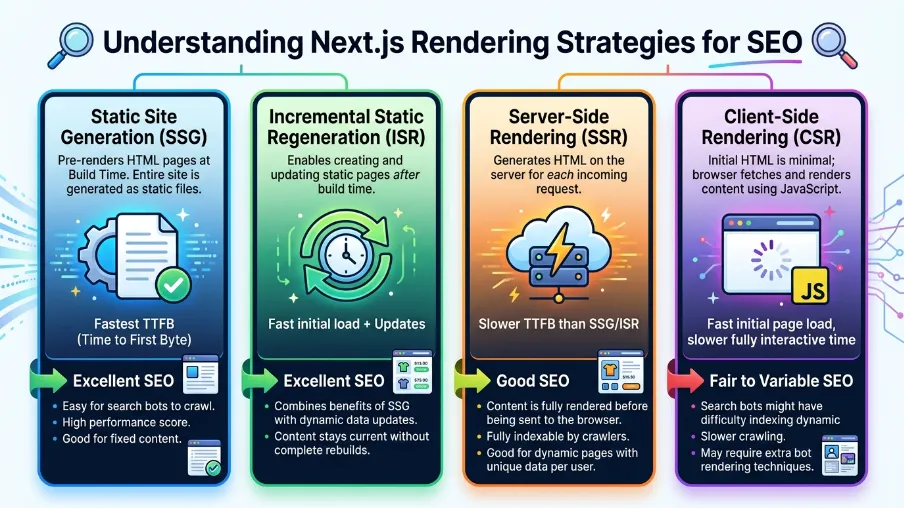
This is the part that confuses most developers, so let's break it down clearly. Next.js SEO performance lives or dies on your rendering strategy. Next.js offers four rendering approaches, and choosing the right one for each page is the single most important Next.js SEO decision you'll make, true whether you're on the App Router or the older Pages Router.
Server-Side Rendering (SSR)
SSR in Next.js means the server generates the HTML for every request, right when the user or bot asks for it. The page content is always fresh, pulled from your data sources at request time. This is what people mean by dynamic SEO in Next.js: content and metadata generated per-request rather than baked in at build time.
Best for: Pages where content changes frequently and must be up to date for every visit, product pages with live inventory counts, personalized dashboards, or news articles that update constantly.
SEO benefit: Crawlers receive fully rendered HTML instantly. There's no client-side JavaScript dependency for the initial page content, which means faster indexing and more reliable crawling. This is a core reason Next.js SEO outperforms plain React SEO in most audits.
The trade-off is performance, every request hits your server, so response times depend on how fast your data layer is.
Static Site Generation (SSG)
With Next.js SSG, pages are generated at build time and served as static HTML files, typically delivered via a CDN, making them extremely fast.
Best for: Blog posts, documentation, marketing pages, and any content that doesn't change between deployments.
SEO benefit: Static pages are the gold standard for Next.js SEO performance. The HTML is pre-rendered, served instantly from CDN edge nodes, and there's essentially no Time to First Byte (TTFB) penalty. SSR vs. SSG for Next.js SEO comes down to freshness vs. speed, and SSG wins on speed every time.
The limitation is that you need to rebuild the site whenever content changes. Fine for a 100-page blog; not practical for a 100,000-page e-commerce catalog, which is where ISR comes in.
Incremental Static Regeneration (ISR)
Next.js ISR is the sweet spot in a Next.js SEO strategy. Pages are statically generated but can be revalidated in the background after a specified time interval, rebuilt every 60 seconds, every hour, or once a day without requiring a full site rebuild.
Best for: Content that changes occasionally but doesn't need to be real-time, e-commerce product pages, frequently updated blog posts, news article archives.
SEO benefit: You get the performance of static HTML with the freshness guarantees that matter for indexing. A product page that was last crawled shows your current price, not whatever it was three days ago. For most Next.js SEO strategies, ISR is the default answer for content-heavy pages.
Client-Side Rendering (CSR)
CSR is what plain React does by default. The HTML shell is delivered, then JavaScript renders the content in the browser. For Next.js SEO purposes, CSR is the weakest option. Avoid it for any content you want indexed, reserve it for behind-authentication pages, dashboards, and content that genuinely doesn't need to rank.
The biggest mistake in Next.js SEO audits: teams defaulting to CSR because it's the most familiar pattern from plain React development. It feels the same to build, but it undermines everything else you're doing for SEO.
Next.js App Router SEO Best Practices (2026)
The App Router (Next.js 13+, and carried forward through the 14 and 15 releases) changed how metadata and dynamic SEO in Next.js work, and it remains the recommended approach going into 2026.
Static and Dynamic Metadata
Static metadata is exported directly from a page or layout file:
import type { Metadata } from 'next';

export const metadata: Metadata = {
  title: 'Best Running Shoes for Beginners 2026 Guide',
  description: 'Discover the best running shoes for beginners with our expert guide.',
  robots: {
    index: true,
    follow: true,
  },
  openGraph: {
    type: 'article',
    images: [{ url: 'https://example.com/og.jpg', width: 1200, height: 630 }],
  },
};
Dynamic metadata uses generateMetadata() for pages that depend on data, the mechanism behind dynamic SEO in Next.js on the App Router:
import type { Metadata } from 'next';

export async function generateMetadata({ params }: { params: { slug: string } }): Promise<Metadata> {
  const post = await getPost(params.slug);
  return {
    title: post.title,
    description: post.excerpt,
    openGraph: {
      type: 'article',
      images: [{ url: post.coverImage, width: 1200, height: 630 }],
    },
  };
}
Using a Dedicated Package for Meta Management
For more control over your Next.js SEO meta tags, pixel-accurate title validation, or a shared config across frameworks, the @power-seo/meta package is worth considering. It's an example of the kind of next-seo-style tooling with App Router support that's emerged around Next.js: it accepts a single SeoConfig object and outputs the correct format for the Next.js App Router, Remix, or any generic SSR framework:
import { createMetadata } from '@power-seo/meta';

export const metadata = createMetadata({
  title: 'My Page',
  description: 'A page about something great.',
  canonical: 'https://example.com/my-page',
  robots: { index: true, follow: true, maxSnippet: 150, maxImagePreview: 'large' },
  openGraph: {
    type: 'article',
    images: [{ url: 'https://example.com/og.jpg', width: 1200, height: 630 }],
  },
  twitter: { card: 'summary_large_image', site: '@mysite' },
});
What's useful here for Next.js SEO is that it handles advanced robots directives like maxSnippet, maxImagePreview, and unavailableAfter that the native Next.js Metadata type doesn't fully cover.
Title Length and Pixel Width
Character count is a rough proxy for title length, but Google actually truncates based on pixel width, not characters, a detail most Next.js SEO guides skip. A title with wide characters like "W" and "M" can be truncated at 50 characters, while a title with narrow characters can fit comfortably at 65.
The validateTitle() function from @power-seo/core measures real pixel width using Arial font metrics, the same font Google uses for SERP rendering, and returns charCount, pixelWidth, and a severity flag (info, warning, error). Build this into your workflow and you'll stop getting SERP truncations.
Structured Data: An Underused Next.js SEO Advantage
Structured data (JSON-LD) tells Google exactly what your content is and unlocks rich results like star ratings, FAQ dropdowns, breadcrumbs, and recipe cards. It's one of the highest-leverage Next.js SEO tactics available, and a surprising number of developers either skip it or implement it incorrectly.
Adding JSON-LD in Next.js
The correct way to add JSON-LD in the Next.js App Router is with dangerouslySetInnerHTML inside a <script> tag:
import { article, toJsonLdString } from '@power-seo/schema';

export default function BlogPost({ post }) {
  const schema = article({
    headline: post.title,
    description: post.excerpt,
    datePublished: post.publishedAt,
    dateModified: post.updatedAt,
    author: { name: post.author.name, url: post.author.profileUrl },
    image: { url: post.coverImage, width: 1200, height: 630 },
  });

  return (
    <>
      <script
        type="application/ld+json"
        dangerouslySetInnerHTML={{ __html: toJsonLdString(schema) }}
      />
      <article>{/* page content */}</article>
    </>
  );
}
One important security detail: toJsonLdString() from @power-seo/schema escapes <, >, and & to their Unicode equivalents (\u003c, \u003e, \u0026). This prevents a schema string value like </script> from breaking out of the surrounding script tag. If you're writing JSON-LD manually, apply this escaping yourself.
Combining Multiple Schemas with @graph
Google recommends placing all your page schemas in a single @graph document rather than multiple separate <script> tags:
import { article, breadcrumbList, organization, schemaGraph, toJsonLdString } from '@power-seo/schema';

const graph = schemaGraph([
  article({ headline: 'My Post', datePublished: '2026-01-01', author: { name: 'Jane Doe' } }),
  breadcrumbList([
    { name: 'Home', url: 'https://example.com' },
    { name: 'Blog', url: 'https://example.com/blog' },
    { name: 'My Post' },
  ]),
  organization({ name: 'Acme Corp', url: 'https://example.com' }),
]);
@power-seo/schema covers 23 schema types, Article, BlogPosting, FAQPage, Product, LocalBusiness, Event, Recipe, HowTo, VideoObject, and more, with TypeScript types that catch missing required fields at compile time rather than silently in production.
Validating Schema in Your Pipeline
The validateSchema() function checks required fields and returns structured issues without throwing. Add this as part of a Next.js SEO audit in CI:
import { article, validateSchema } from '@power-seo/schema';

const schema = article({ headline: 'Incomplete Article' });
const result = validateSchema(schema);

if (!result.valid) {
  const errors = result.issues.filter((i) => i.severity === 'error');
  errors.forEach((i) => console.error(` ✗ [${i.field}] ${i.message}`));
  process.exit(1);
}
This kind of check saves you from deploying pages with broken schema that was supposed to be earning rich results.
SEO in Next.js Best Practices for Core Web Vitals
Google uses Core Web Vitals as a ranking signal. In practice, Largest Contentful Paint (LCP), Cumulative Layout Shift (CLS), and Interaction to Next Paint (INP) directly affect your Next.js SEO performance, and Next.js has built-in tools to address all three.
Image Optimization
The <Image> component in Next.js is one of the most impactful Next.js SEO tools in the framework. It handles:
- Automatic WebP/AVIF conversion (smaller files, faster LCP)
- Responsive sizing via
srcSetgeneration - Lazy loading for below-fold images
- Reserved space for images to prevent layout shift (CLS)
A common mistake: applying loading="lazy" to hero images or above-the-fold images. This delays LCP significantly because the browser waits to start downloading the image. For your primary hero image, always use priority on the Next.js <Image> component (which sets fetchpriority="high" and removes lazy loading).
If you're running a Next.js SEO audit programmatically, @power-seo/images catches this, the auditLazyLoading() function flags above-fold images with loading="lazy" as an error-severity issue specifically because of LCP regression risk.
Dynamic Sitemap Generation in Next.js
A properly structured sitemap is a foundational Next.js SEO requirement. In the App Router, you can generate one dynamically at app/sitemap.ts (or an API route like app/sitemap.xml/route.ts):
import { generateSitemap } from '@power-seo/sitemap';

export async function GET() {
  const urls = await fetchUrlsFromCms();
  const xml = generateSitemap({
    hostname: 'https://example.com',
    urls,
  });
  return new Response(xml, {
    headers: { 'Content-Type': 'application/xml' },
  });
}
For large projects with 50,000+ URLs, splitSitemap() automatically chunks URLs at the spec limit and generates a sitemap index:
import { splitSitemap } from '@power-seo/sitemap';

const { index, sitemaps } = splitSitemap({
  hostname: 'https://example.com',
  urls: largeUrlArray,
});
Redirects and Canonical URLs
Redirect chains and missing canonical tags are two of the most common issues turned up in a Next.js SEO audit. Next.js handles redirects in next.config.js:
// next.config.js
const { toNextRedirects } = require('@power-seo/redirects');
const { rules } = require('./redirects.config');

module.exports = {
  async redirects() {
    return toNextRedirects(rules);
  },
};
Defining rules in a shared redirects.config.ts file lets you test them programmatically in CI, before deploying:
import { createRedirectEngine } from '@power-seo/redirects';
import { rules } from './redirects.config';

const engine = createRedirectEngine(rules);
const match = engine.match('/old-about');
// { resolvedDestination: '/about', statusCode: 301 }
Content Quality Signals: Beyond Technical SEO
Technical Next.js SEO gets you in the game. Content quality keeps you there. Google's quality raters and ranking algorithms evaluate content depth, readability, keyphrase relevance, and E-E-A-T (Experience, Expertise, Authoritativeness, Trustworthiness). Strong Next.js SEO requires both layers.
Programmatic Content Analysis
If you're running a CMS or content pipeline on top of Next.js, you can run content analysis automatically before pages publish. @power-seo/content-analysis is a Yoast-style scoring engine that evaluates:
- Keyphrase density (target 0.5–2.5%)
- Keyphrase presence in title, H1, first paragraph, and image alt text
- Word count (minimum 300, recommended 1,000+)
- Heading structure
- Internal and external link presence
import { analyzeContent } from '@power-seo/content-analysis';

const output = analyzeContent({
  title: 'Next.js SEO Best Practices',
  metaDescription: 'Learn how to optimize your Next.js app for search engines.',
  focusKeyphrase: 'next.js seo',
  content: htmlString,
});

const failures = output.results.filter((r) => r.status === 'poor');
if (failures.length > 0) {
  failures.forEach((r) => console.error(' ✗', r.description));
  process.exit(1);
}
Readability Scoring
Readability is an underappreciated Next.js SEO signal. Content that's hard to read has higher bounce rates, and bounce rate correlates with lower rankings even if Google officially denies using it as a direct signal.
@power-seo/readability runs five algorithms: Flesch Reading Ease, Flesch-Kincaid Grade Level, Gunning Fog, Coleman-Liau, and ARI. For most Next.js SEO content, target a Flesch Reading Ease score between 60 and 70, readable for a broad audience without feeling dumbed down.
AI-Assisted Meta Description Generation
If you're generating pages at scale, writing unique meta descriptions manually isn't feasible. @power-seo/ai provides LLM-agnostic prompt builders for meta description generation that work with any provider, OpenAI, Claude, Gemini, or whatever you're running:
import { buildMetaDescriptionPrompt, parseMetaDescriptionResponse } from '@power-seo/ai';

const prompt = buildMetaDescriptionPrompt({
  title: 'Best Coffee Shops in New York City',
  content: 'Explore the top 15 coffee shops in NYC...',
  focusKeyphrase: 'coffee shops nyc',
});

// Send to your LLM...
const result = parseMetaDescriptionResponse(rawResponse);
console.log(`"${result.description}" — ${result.charCount} chars`);
console.log(`Valid: ${result.isValid}`);
The parser handles character count validation and returns a single optimized candidate targeting 120–158 characters, the range Google reliably displays without truncating.
Internal Linking: The Signal Most Developers Ignore
Internal links pass authority between pages and help Google understand your site's topical structure. Most developers obsess over external backlinks and ignore internal linking entirely. That's a mistake.
You can analyze your internal link graph programmatically:
import { buildLinkGraph, findOrphanPages, analyzeLinkEquity } from '@power-seo/links';

const graph = buildLinkGraph(sitePages);
const orphans = findOrphanPages(graph);
const equityScores = analyzeLinkEquity(graph);
Orphan pages have zero inbound internal links, invisible to crawlers that start from your homepage and follow links. They exist in your sitemap but receive essentially no crawl attention. If you have orphan pages you want to rank, add internal links to them from relevant existing pages.
The suggestLinks() function from @power-seo/links goes further, analyzing page titles and content to find thematically related pages that should be linking to each other but currently aren't, particularly useful on larger sites where manually identifying linking opportunities isn't practical.
Measuring Your Next.js SEO Results
Executing a Next.js SEO strategy without measuring results is guesswork. You need data to know what's working and what to prioritize next.
Google Search Console is the primary source of truth for Next.js SEO performance. @power-seo/search-console gives you a typed TypeScript client for the GSC API:
import { createTokenManager, createGSCClient, querySearchAnalyticsAll } from '@power-seo/search-console';

const client = createGSCClient({
  siteUrl: 'https://example.com',
  auth: tokenManager,
});

const rows = await querySearchAnalyticsAll(client, {
  startDate: '2026-01-01',
  endDate: '2026-01-31',
  dimensions: ['query', 'page'],
});
From this data, @power-seo/analytics gives you the correlation between audit scores and traffic, trend direction analysis, anomaly detection for traffic drops, and position bucket grouping:
import { mergeGscWithAudit, correlateScoreAndTraffic } from '@power-seo/analytics';

const insights = mergeGscWithAudit(gscPages, auditResults);
const result = correlateScoreAndTraffic(insights);

console.log(`Pearson r: ${result.correlation.toFixed(3)}`);
This is the question every Next.js SEO project eventually needs to answer: does improving the technical audit score actually increase traffic? This function gives you a data-backed answer specific to your site.
Next.js SEO Checklist (2026)
.webp)
A condensed Next js SEO checklist to run against any route before it ships:
- Rendering strategy: SSG or ISR by default; SSR only for genuinely real-time content; CSR never for indexable pages.
- Metadata: unique title and description per page, generated statically or via
generateMetadata()for dynamic SEO in Next.js. - Title pixel width: validated, not just character-counted.
- Structured data: JSON-LD present, escaped correctly, combined into a single
@graph, and validated in CI. - Images:
<Image>component used everywhere;priorityon hero/above-fold images; noloading="lazy"above the fold. - Sitemap: generated dynamically, split if over the URL limit, submitted in Search Console.
- Redirects: no chains, all rules tested in CI.
- Canonical tags: set on every indexable page, especially paginated and filtered views.
- Content quality: keyphrase in title/H1/first paragraph, readable (Flesch 60–70), 300+ words minimum.
- Internal links: no orphan pages; related content cross-linked.
- Core Web Vitals: LCP, CLS, and INP checked against real-user data, not just lab scores.
- Search Console: connected, monitored, and correlated against audit scores over time.
Next.js SEO Is a Systematic Practice
Next.js SEO is excellent not because the framework magically makes your pages rank, but because Next.js removes the fundamental obstacles that make React SEO hard in the first place. You get server-rendered HTML, fast static delivery, image optimization, and a structured approach to routing and metadata. The Next.js SEO foundation is genuinely strong going into 2026.
But the framework only takes you so far. What separates Next.js SEO projects that rank from ones that don't is systematic attention to every layer: rendering strategy matched to content type, pixel-accurate meta tags, validated structured data, fast Core Web Vitals, readable content with proper keyphrase treatment, and a healthy internal link structure.
Start with rendering strategy. Audit each route type and make sure it's using SSG or ISR where possible instead of defaulting to SSR or CSR. Then audit your meta tags and add structured data to your most important page types. Run a Core Web Vitals check on your highest-traffic pages. Build content analysis into your CMS workflow.
Each improvement compounds. A faster page with better meta tags, rich-results-eligible schema, and solid internal linking doesn't just rank better in isolation, it earns more clicks, holds users longer, and generates the behavioral signals Google uses to confirm it deserves its position.
Frequently Asked Questions
What is SEO in Next.js?
SEO in Next.js refers to the technical and content practices that make Next.js applications crawlable, indexable, and rankable by search engines. It benefits from the framework's built-in server-side rendering, static generation, image optimization, and structured routing, which naturally support strong SEO without heavy configuration.
Is Next.js better for SEO than plain React?
Yes, significantly. Plain React apps are client-side rendered by default, meaning search engines receive empty HTML that requires JavaScript execution to populate with content. Next.js pages are pre-rendered on the server or at build time, delivering complete HTML to crawlers immediately, resulting in faster indexing, better crawl efficiency, and more reliable ranking of page content.
What rendering strategy is best for Next.js SEO?
It depends on the page type. Use SSG for content that rarely changes, like blog posts and landing pages, since it delivers the fastest response times. Use ISR for content that changes periodically, such as product pages and news archives. Use SSR only for content that must be real-time on every request. Avoid client-side rendering for anything you want indexed.
How do I add structured data to a Next.js app for SEO?
Add a <script type="application/ld+json"> tag to your page component using dangerouslySetInnerHTML, and make sure to escape special characters to prevent XSS vulnerabilities. Libraries like @power-seo/schema handle escaping automatically and provide builder functions for 23 schema types. For multiple schemas on one page, combine them into a single @graph document for optimal Google parsing.
Why does my Next.js site have poor Core Web Vitals?
Common causes include unoptimized images (missing explicit dimensions cause CLS; lazy-loaded hero images delay LCP), too much JavaScript loading eagerly, and slow server response times. Use the Next.js <Image> component with the priority prop on above-fold images, implement ISR or SSG where possible to reduce server response times, and audit your third-party scripts.
Does the App Router change SEO best practices?
The App Router changes how you implement SEO, metadata objects and generateMetadata() replace the old next/head approach, but the underlying principles (fast rendering, valid structured data, healthy Core Web Vitals, clean internal linking) are unchanged. Most next-seo-style tooling built for the Pages Router now has App Router support as well.

I’m Mitu Das, a JavaScript developer, ERP product architect, and SEO specialist from Bangladesh. I work at CyberCraft Bangladesh, where I help build simple, scalable software, SaaS platforms, and business solutions. My goal is to create technology that helps companies save time, automate daily tasks, and grow faster. I enjoy combining development, product ideas, and SEO strategies to create useful digital solutions for modern businesses.
Writes about
Want this done for you?
Our team builds and ships exactly what this article describes. Send a message and we will reply with a scope.