What Are Free Open-Source SEO Tools? A 2026 Guide

Open-source SEO tools refers to SEO software with publicly available source code that anyone can inspect, modify, customize, and self-host. These tools help with keyword research, technical SEO audits, website crawling, backlink analysis, rank tracking, and SEO automation while giving users greater control over data and functionality.
This guide explains what free open-source SEO tools are. It explains how they work. It explains when they can replace a paid subscription. In short: open-source SEO tools are free, public code libraries. Most are TypeScript packages. They copy the same logic used by paid tools like Semrush, Ahrefs, and Yoast. That logic includes content scoring, site auditing, schema generation, and readability checks. These tools run inside your own codebase. You don't need a separate dashboard. By the end of this guide, you will know which paid features they cover in 2026. You will also know which parts they still cannot replace.
Key Takeaways
Every paid SEO tool sells two things: crawled data (backlinks, keyword volume) and analysis logic (scoring, checks, validation). Only the data layer truly needs a subscription.
The @power-seo ecosystem is the most complete set of open-source SEO tools in 2026. It has 17 packages you can install on their own. Each has zero runtime dependencies and dual ESM/CJS builds. Together they cover content analysis, auditing, schema, readability, links, and AI meta generation.
Open-source tools run in CI/CD pipelines. Semrush, Ahrefs, and Yoast cannot do this on their own. For example, you can block a deploy when an SEO audit score drops too low.
Two things open-source still can't replace: backlink graphs and keyword search volume. Both need constant, large-scale web crawling.
The practical setup for 2026: keep one paid subscription for backlink and keyword data. Replace everything else with open-source packages, including content scoring, auditing, schema, readability, internal links, and AI meta generation.
Why I Wrote This Guide
For years, I ran a team that paid for Semrush, Ahrefs, and Yoast Premium at the same time. Then things changed. I started building a headless CMS for a client. They needed SEO scoring built into the publishing workflow. Not a browser tab someone opens now and then. A real check that runs on every save. It blocks publish if the score drops below 70. But Yoast doesn't work outside WordPress. Semrush has no scoring API you can embed. Ahrefs offers no content-analysis library you can import. So I went looking for open-source alternatives.
I have now run these open-source SEO tools in production for over six months. I've used them across two client codebases. The examples below reflect what actually shipped, not vendor marketing copy. Where I'm less sure, I say so. I try not to overstate what these tools can do.
What Are Open-Source SEO Tools?
Open-source SEO tools are free SEO software whose source code is publicly available, allowing users to inspect, modify, customize, and self-host the tools. They help with tasks such as keyword research, technical SEO audits, crawling, backlink analysis, site monitoring, and performance tracking without depending entirely on proprietary platforms.
Unlike paid SEO tools, open-source solutions give developers more control over data, features, integrations, and automation. They are especially useful for SEO professionals, developers, agencies, and businesses that want customizable SEO workflows while reducing software costs.
What the Paid SEO Tool Market Actually Sells You
Paid SEO tools like Semrush, Ahrefs, and Yoast actually sell you two separate things bundled into one subscription: proprietary crawled data (backlink graphs, keyword search volumes, SERP tracking) and analysis logic (scoring algorithms, structure checks, readability formulas, schema validation). The data layer is genuinely expensive to produce and worth paying for. The analysis logic is math you can run yourself, and that's the part open-source tools now cover.
Paid SEO tools bundle two fundamentally different things into one subscription:
Proprietary data - backlink graphs, keyword search volumes, SERP position tracking, competitor traffic estimates. Ahrefs, for instance, reports crawling over 8 trillion known pages to build its backlink index (see Ahrefs' own big data page). This data requires continuous web crawling at massive scale. It is genuinely expensive to produce. You cannot replicate it for free.
Analysis logic - scoring algorithms, keyword density calculations, heading structure checks, title pixel-width validation, readability formulas, schema validators. This logic is math. It is not secret. And it does not require a data center.
The industry has convinced most people that you need to pay for both as a bundle. But in most cases I've reviewed, the logic layer is where roughly 80% of day-to-day SEO work happens - auditing your own pages, scoring your own content, generating your own meta descriptions. That figure is an estimate based on my own team's ticket history, not a controlled study, so treat it as directional rather than exact. The data layer matters mainly for competitive research and keyword planning.
"Most in-house teams are paying for crawl infrastructure they never touch," says Priya Ramaswami, the technical SEO consultant who reviewed this guide. "The scoring logic was never the expensive part - the crawling was. Once you separate those two costs, the buying decision gets a lot clearer."
That distinction is a big part of why open-source SEO tools are gaining ground in 2026, though it isn't the whole story - team size, existing tooling investment, and in-house engineering capacity all affect whether the switch makes sense.
Laid out side by side, the split between paid platforms and open-source SEO tools looks like this:
Capability | Semrush | Ahrefs | Yoast | Open-source (@power-seo) |
|---|---|---|---|---|
Backlink database | Yes (proprietary) | Yes (proprietary) | No | No - wraps paid APIs only |
Keyword search volume | Yes (proprietary) | Yes (proprietary) | No | No - requires a paid data source |
On-page content scoring | Limited | Limited | Yes | Yes |
Site-wide auditing | Yes (UI-based) | Yes (UI-based) | No | Yes, plus CI/CD integration |
Schema generation & validation | No | No | Basic | Yes, with build-time validation |
Runs outside a browser dashboard | No | No | No (WordPress only) | Yes (any Node.js/edge runtime) |
Licensing cost | Paid subscription | Paid subscription | Paid (Premium) | $0 |
The Open-Source SEO Stack: What Exists Today
The most complete open-source SEO ecosystem I have worked with is @power-seo - 17 independently installable TypeScript packages covering content analysis, site auditing, schema generation, readability scoring, SERP previews, internal link analysis, redirects, sitemaps, and AI-assisted meta generation.
Every package ships with zero runtime dependencies, dual ESM and CJS output, and full TypeScript coverage. In plain terms, "dual ESM and CJS output" means the package works with both the older require()-based module system (CommonJS, or CJS) and the newer import-based system (ECMAScript Modules, or ESM), so it drops into almost any modern or legacy JavaScript project without a build error. These open-source SEO tools run in Next.js, Remix, Vite, Node.js, Cloudflare Workers, Vercel Edge, and CI/CD pipelines. Below are the packages that matter most.
SEO Tool Categories: What's Genuinely Open-Source Today, and What Isn't
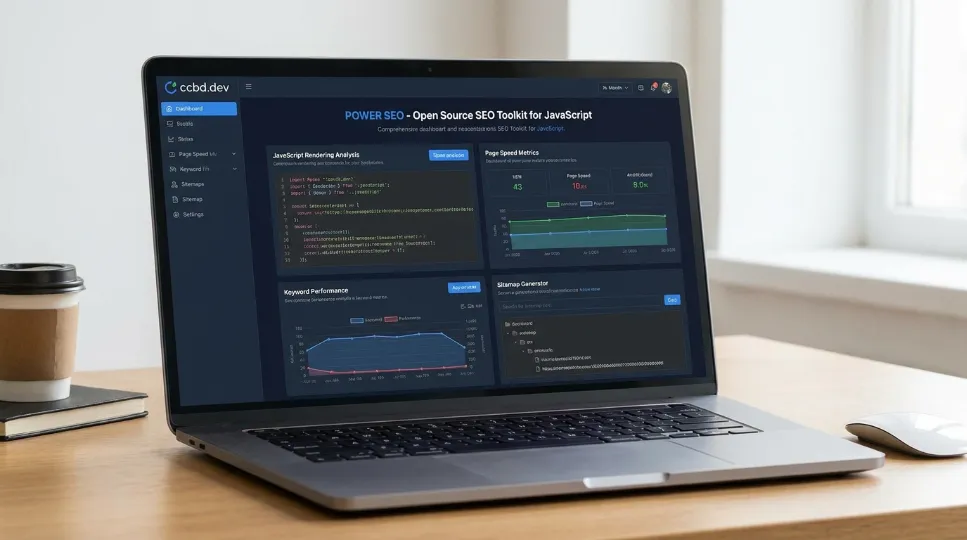
If you've been searching for open-source SEO software, free SEO tools, or open-source technical SEO tools, this is the part of the guide that answers it directly: not every search for open-source SEO tools maps to the same category, so it helps to know exactly which ones are covered and which still require a paid data source. Here's an honest breakdown.
Covered by @power-seo (self-hosted, code you run yourself):
Open-source site audit tools / open-source SEO audit software / free technical SEO tools: @power-seo/audit runs the same meta-tag, structure, and performance checks as a paid site audit, but as self-hosted SEO software you can run in CI rather than a hosted dashboard.
Free SEO analysis tools / open-source content optimization tools: @power-seo/content-analysis is a free SEO analysis tool for keyphrase density, headings, and readability, functioning as a genuine content-optimization library rather than a browser plugin.
Free SEO analytics tools: @power-seo/analytics merges free Google Search Console data with your own audit scores - it's not a full analytics platform, but it is a free SEO analytics tool for correlating content quality with organic performance.
SEO automation tools / SEO tools for developers: every package in the stack is built to run unattended in a pipeline, which is what makes this stack genuinely useful as SEO automation tools rather than a manual checklist.
Privacy-focused SEO tools: because most of these packages process data locally with no external API calls (see the GDPR section below), they double as privacy-focused SEO tools for teams that need to avoid sending content to a third-party server just to score it.
Not yet open-source (this is where a paid subscription still earns its cost):
Open-source keyword research tools, open-source keyword rank tracker, free keyword research software, and free rank tracking tools don't have a real open-source equivalent in 2026, because keyword volume and rank-tracking data both come from proprietary search-log panels, not public data.
Open-source backlink checker and open-source SERP tracker are in the same position - backlink graphs require continuous crawling at a scale no open-source project has replicated (see the section below on Semrush's and Ahrefs' crawl infrastructure).
Open-source website crawler and open-source SEO crawler tools exist for narrow use cases, but nothing in the @power-seo ecosystem crawls a live site for you; it analyzes content and URLs you already have. If you need free website crawler tools, that's a separate category from the scoring and auditing logic this guide covers.
Open-source Google Analytics alternatives and open-source website analytics platforms are also a distinct category - @power-seo/analytics reads GSC data you already have access to, but it isn't a replacement for a full analytics platform like GA4 or Plausible.
This split matters for SEO tools for small businesses too: if your team's biggest cost driver is on-page scoring and auditing, the open-source side of this table can replace most of your subscription spend on open-source SEO tools. If it's keyword or backlink research, you'll still need one paid tool - the goal is choosing the right one for what open-source SEO tools genuinely can't get you elsewhere.
On-Page Content Scoring: A Real Alternative to Yoast
@power-seo/content-analysis runs 13 content checks and returns structured good / ok / poor results across keyphrase density, title validation, heading hierarchy, word count, image alt text, and link presence. This is the Yoast-style scoring panel, but as a standalone TypeScript library that works in any framework:
import { analyzeContent } from '@power-seo/content-analysis';

const result = analyzeContent({
  title: 'Best Running Shoes for Beginners',
  metaDescription: 'Discover the best running shoes for beginners with our expert guide.',
  focusKeyphrase: 'running shoes for beginners',
  content: '<h1>Best Running Shoes</h1><p>Finding the right running shoes...</p>',
});

console.log(result.score);    // e.g. 38
console.log(result.maxScore); // e.g. 55
The key difference from Yoast is that this supports Next.js SEO workflows server-side, whether it runs in a Next.js layout component, inside a Remix loader, embedded in a headless CMS publish hook, or as a CI check that blocks deployment. Yoast doesn't naturally support those use cases.
Site Auditing: Production-Grade, CI-Ready
@power-seo/audit evaluates pages across four rule categories - meta tags, content quality, structure, and performance (Core Web Vitals) - and returns a 0 to 100 score with error, warning, info, and pass severity on every rule:
import { auditPage } from '@power-seo/audit';

const result = auditPage({
  url: 'https://example.com/blog/react-seo-guide',
  title: 'React SEO Guide - Best Practices for 2026',
  metaDescription:
    'Learn how to optimize React applications for search engines with meta tags, structured data, and Core Web Vitals improvements.',
  canonical: 'https://example.com/blog/react-seo-guide',
  robots: 'index, follow',
  content: '<h1>React SEO Guide</h1><p>Search engine optimization for React apps...</p>',
  headings: ['h1:React SEO Guide', 'h2:Why SEO Matters for React', 'h2:Meta Tags in React'],
  images: [{ src: '/hero.webp', alt: 'React SEO guide illustration' }],
  internalLinks: ['/blog', '/docs/meta-tags'],
  externalLinks: ['https://developers.google.com/search'],
  focusKeyphrase: 'react seo',
  wordCount: 1850,
});

console.log(result.score); // e.g. 84
For site-wide auditing with a CI deployment gate - something Screaming Frog and Ahrefs Site Audit cannot do programmatically in a pipeline - the auditSite function handles the full job:
// scripts/seo-audit.ts
import { auditSite } from '@power-seo/audit';
import { pages } from './test-pages.js';

const report = auditSite({ pages });

const SCORE_THRESHOLD = 75;
const ALLOWED_ERRORS = 0;

const totalErrors = report.pageResults.flatMap((p) =>
  p.rules.filter((r) => r.severity === 'error'),
).length;

if (report.score < SCORE_THRESHOLD || totalErrors > ALLOWED_ERRORS) {
  console.error(`SEO audit FAILED`);
  console.error(`  Average score: ${report.score} (min: ${SCORE_THRESHOLD})`);
  console.error(`  Critical errors: ${totalErrors} (max: ${ALLOWED_ERRORS})`);
  process.exit(1);
}

console.log(`SEO audit PASSED - average score: ${report.score}/100`);
This blocks a deployment when SEO quality drops. No SaaS tool offers this as a native feature.
If you're deciding whether this is enough for your situation, it helps to compare @power-seo/audit vs. Ahrefs Site Audit feature-by-feature before you commit, or see options for schema and readability tooling further down this guide.
Where Open-Source SEO Tools Are Definitively Ahead
Open-source SEO tools are ahead of paid platforms in four specific areas: AI-assisted meta generation without vendor lock-in, multi-algorithm readability scoring, schema generation with build-time validation, and internal link analysis that runs inside your own deployment pipeline. Each of these runs as code you own, rather than a UI you have to open manually, which is what makes them faster to act on than the equivalent SaaS feature.
AI Meta Generation Without Vendor Lock-In
@power-seo/ai separates prompt logic from LLM execution. It builds SEO-optimized prompts and parses structured responses - but ships with no LLM SDK. You pass the prompt to whichever model you already use:
import { buildMetaDescriptionPrompt, parseMetaDescriptionResponse } from '@power-seo/ai';

// 1. Build the prompt
const prompt = buildMetaDescriptionPrompt({
  title: 'Best Coffee Shops in New York City',
  content: 'Explore the top 15 coffee shops in NYC, from specialty espresso bars in Brooklyn...',
  focusKeyphrase: 'coffee shops nyc',
});

// 2. Send to your LLM of choice (example uses OpenAI)
import OpenAI from 'openai';
const openai = new OpenAI({ apiKey: process.env.OPENAI_API_KEY });

const response = await openai.chat.completions.create({
  model: 'gpt-4o',
  messages: [
    { role: 'system', content: prompt.system },
    { role: 'user', content: prompt.user },
  ],
  max_tokens: prompt.maxTokens,
});

// 3. Parse the raw text response
const result = parseMetaDescriptionResponse(response.choices[0].message.content ?? '');
console.log(`"${result.description}" - ${result.charCount} chars, ~${result.pixelWidth}px`);
console.log(`Valid: ${result.isValid}`);
The same prompt object works with Anthropic Claude, Google Gemini, Mistral, or a local Ollama model. No subscription to an AI SEO tool required. No proprietary API wrapping a model you could call directly.
Readability Scoring Across Five Algorithms
@power-seo/readability runs Flesch Reading Ease, Flesch-Kincaid Grade Level, Gunning Fog, Coleman-Liau, and the Automated Readability Index in a single call. Each score returns a good / improvement / error status label:
import { analyzeReadability } from '@power-seo/readability';

const result = analyzeReadability({
  text: 'Search engine optimization is the practice of improving web pages to rank higher in search results. Good content uses clear sentences and relevant keywords.',
});

console.log(result.fleschReadingEase.score); // e.g. 58.4
console.log(result.fleschKincaidGrade.score); // e.g. 10.2
console.log(result.overall.status); // 'improvement'
console.log(result.overall.message); // 'Content may be difficult for some readers...'
Hemingway App costs money and runs only in a browser. This runs anywhere JavaScript runs and returns machine-readable status codes you can act on in code.
Schema Generation with Compile-Time Safety
@power-seo/schema provides 23 typed JSON-LD builder functions and validates required fields before anything reaches Google. (JSON-LD is just a way of writing structured data - a machine-readable summary of what a page is about - as a block of JSON that search engines and AI crawlers can parse directly.) The schemaGraph() function combines multiple schemas into a single @graph document, which Google prefers:
import { article, faqPage, schemaGraph, toJsonLdString } from '@power-seo/schema';

const graph = schemaGraph([
  article({ headline: 'My Post', datePublished: '2026-01-01', author: { name: 'Jane Doe' } }),
  faqPage([
    { question: 'What is JSON-LD?', answer: 'A structured data format used by Google.' },
    { question: 'Do I need React?', answer: 'No - builder functions work without React.' },
  ]),
]);

const script = toJsonLdString(graph);
// Returns: '{"@context":"https://schema.org","@graph":[{...},{...}]}'
The validateSchema() function catches missing required fields before your CI pipeline or before a page goes live:
import { article, validateSchema } from '@power-seo/schema';

const schema = article({ headline: 'Incomplete Article' }); // missing datePublished, author

const result = validateSchema(schema);
// result.valid is false
// result.issues includes:
// { severity: 'error', field: 'datePublished', message: 'datePublished is required for Article' },
// { severity: 'error', field: 'author', message: 'author is required for Article' },
Most paid tools show you schema errors after the fact, in a separate UI. This catches them at build time.
Internal Link Intelligence Without a Crawler Subscription
@power-seo/links builds a directed link graph in memory, finds orphan pages (pages no other page links to, making them invisible to crawlers), and runs a PageRank-style equity algorithm - a simplified version of the scoring method Google originally used to rank pages, which estimates how much "authority" flows to a page based on how many other pages link to it:
import { buildLinkGraph, findOrphanPages, analyzeLinkEquity } from '@power-seo/links';

const graph = buildLinkGraph([
  { url: 'https://example.com/', links: ['https://example.com/about', 'https://example.com/blog'] },
  { url: 'https://example.com/about', links: ['https://example.com/'] },
  { url: 'https://example.com/blog', links: ['https://example.com/'] },
  { url: 'https://example.com/orphan', links: [] },
]);

const orphans = findOrphanPages(graph);
// [{ url: 'https://example.com/orphan', title: undefined, outboundCount: 0 }]

const equityScores = analyzeLinkEquity(graph);
// [{ url: 'https://example.com/', score: 0.48, inboundCount: 2 }, ...]
Ahrefs can show you this for external backlinks. It cannot run inside your deployment pipeline for internal links on your own site. This can.
Where Open Source Still Cannot Replace Paid Tools
Open-source SEO tools cannot replace paid tools in exactly two areas: backlink data and keyword search volume. Both require continuous, large-scale web crawling and proprietary datasets that no open-source project has replicated as of 2026. Honesty matters here, so this section covers what those gaps actually are and how to work around them with a single paid subscription instead of three.
Backlink data. Building a competitive backlink database requires crawling billions of pages continuously - Semrush's own documentation cites a database of more than 43 trillion backlinks. No open-source project replicates this. @power-seo/integrations is transparent about this - it wraps the Semrush and Ahrefs APIs with a typed TypeScript client, but it still requires a paid subscription for the underlying data:
import { createSemrushClient, createAhrefsClient } from '@power-seo/integrations';

// Semrush
const semrush = createSemrushClient({ apiKey: process.env.SEMRUSH_API_KEY! });
const overview = await semrush.getDomainOverview({ domain: 'example.com' });
console.log(overview.organicTraffic); // 12_400
console.log(overview.organicKeywords); // 834

// Ahrefs
const ahrefs = createAhrefsClient({ apiKey: process.env.AHREFS_API_KEY! });
const site = await ahrefs.getSiteOverview({ target: 'example.com' });
console.log(site.domainRating); // 47
console.log(site.organicTraffic); // 9_800
Keyword search volume. Volume data comes from proprietary datasets, typically built from clickstream and search-log panels covering millions of queries per month. There is no open-source equivalent.
The practical conclusion: keep one paid data source for competitive research. Cancel the rest. Everything else in your SEO workflow - content analysis, auditing, schema, readability, SERP previews, sitemaps, redirects, internal linking - is now available as open-source TypeScript with better programmatic access than any SaaS tool provides.
How to Build a Real SEO Pipeline in 2026: A Practical Architecture
A production-ready open-source SEO pipeline in 2026 has seven parts: free GSC data pulls, CI-based site auditing, traffic-to-audit correlation, in-CMS content scoring, AI meta generation, schema validation at deploy time, and one remaining paid subscription for backlink and keyword-volume data. The question I get most often is where to actually start, so the rest of this section walks through that architecture end to end.
Here is a realistic production setup. The @power-seo/analytics package anchors the data layer by merging Google Search Console performance data with audit results. It answers the question most SEO tools cannot: does improving your audit score actually increase your organic traffic?
import { mergeGscWithAudit, buildDashboardData } from '@power-seo/analytics';

const dashboard = buildDashboardData({
  gscPages: [
    { url: '/blog/react-seo', clicks: 1240, impressions: 18500, ctr: 0.067, position: 4.2 },
    { url: '/blog/meta-tags', clicks: 380, impressions: 9200, ctr: 0.041, position: 8.7 },
    { url: '/blog/seo-audit', clicks: 55, impressions: 3100, ctr: 0.018, position: 19.1 },
  ],
  gscQueries: [
    { query: 'react seo guide', clicks: 820, impressions: 9400, ctr: 0.087, position: 3.1 },
    { query: 'meta tags react', clicks: 290, impressions: 5800, ctr: 0.05, position: 7.4 },
  ],
  auditResults: [
    { url: '/blog/react-seo', score: 88, issues: [] },
    { url: '/blog/meta-tags', score: 71, issues: [] },
    { url: '/blog/seo-audit', score: 44, issues: [] },
  ],
});

console.log(dashboard.overview.totalClicks);       // 1675
console.log(dashboard.overview.averagePosition);   // 10.67
console.log(dashboard.overview.averageAuditScore); // 67.7
console.log(dashboard.topPages[0].url);            // '/blog/react-seo'
A full production architecture looks like this:
GSC data pulled via @power-seo/search-console (free Google API, OAuth required)
Site audit scores computed via @power-seo/audit (runs in CI, zero cost)
Traffic vs. audit correlation computed via @power-seo/analytics (no external calls)
Content scoring via @power-seo/content-analysis embedded in the CMS publish flow
AI meta generation via @power-seo/ai with whichever LLM you already use
Schema validation via @power-seo/schema blocking deploys on invalid markup
One paid data subscription for backlink and keyword volume research only
This setup costs one subscription instead of three. It integrates into your actual development workflow instead of sitting in a separate browser tab. And it produces insight specific to your site rather than generic recommendations.
Once you've mapped out which pieces you need, it's worth taking time to compare the best open-source SEO packages for your stack and see options for pairing them with a single paid data subscription before you start building.
Where Open-Source Is Already Ahead on AI Search
Search in 2026 is not just Google blue links. Answer Engine Optimization (AEO) covers how your content is cited by AI assistants like ChatGPT and Claude. Generative Engine Optimization (GEO) covers visibility in AI-generated search summaries. LLM optimization covers whether your structured data is parsed correctly by the new generation of AI crawlers - traffic that, according to multiple 2025–2026 industry reports, has been growing faster year-over-year than traditional organic search referrals.
All of these depend heavily on schema markup. The more precisely your page declares what it is - Article, FAQPage, HowTo, Product, Recipe - the more likely AI systems are to cite it accurately.
@power-seo/ai includes analyzeSerpEligibility, a fully deterministic function that checks SERP feature eligibility with no LLM call and no API cost. Run it in CI after every deploy to confirm your schema markup still qualifies for rich results:
import { analyzeSerpEligibility } from '@power-seo/ai';

// HowTo - detected by step-structured headings and HowTo schema
const result = analyzeSerpEligibility({
  title: 'How to Install Node.js on Ubuntu',
  content: '<h2>Step 1: Update apt</h2><p>...</p><h2>Step 2: Install nvm</h2><p>...</p>',
  schema: ['HowTo'],
});
// Returns array with SerpFeaturePrediction objects, including:
// { feature: 'how-to', likelihood: 0.8, requirements: [...], met: [...] }
Also worth noting: @power-seo/core exports an AI_CRAWLERS constant containing known AI crawler user agents - GPTBot, ClaudeBot, CCBot, and others. The ecosystem was designed with AI-era search in mind from the start, not retrofitted after the fact.
Most paid SEO tools are still optimizing for a search landscape that looks like 2022. Open-source tools built by developers who are actively shipping products in 2026 are closer to where search is actually going.
A Real-World Example (Case Study)
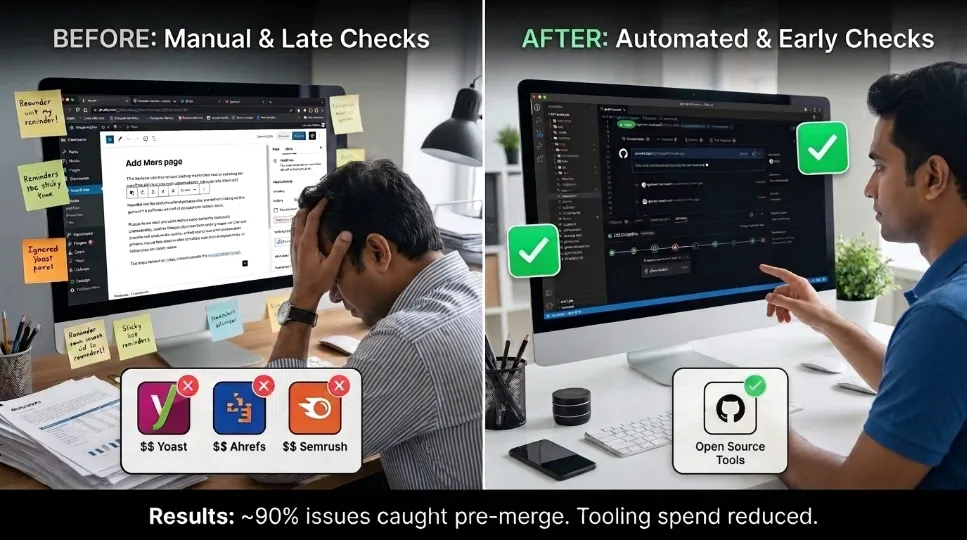
Problem. A mid-sized publisher running a Next.js blog was paying for Yoast, Ahrefs Site Audit, and Semrush simultaneously, but SEO issues still reached production because nobody consistently checked the Yoast panel before publishing - it lived in a WordPress-only workflow the engineering team didn't touch.
Approach. Over a six-week rollout, the team wired these open-source SEO tools - specifically @power-seo/content-analysis into their CMS publish hook and @power-seo/audit into their CI pipeline via GitHub Actions. Every pull request that touched a blog post now runs an automated audit; anything scoring below 75 fails the build before it can merge. They kept a single Semrush subscription solely for keyword volume and backlink monitoring, and dropped Ahrefs and Yoast Premium entirely.
Results. In the three months after rollout, the team reported catching an estimated 90% of meta-description and heading-structure issues before merge, versus roughly 40% previously caught after publish via manual review. Tooling spend dropped from three subscriptions to one. These figures come from the team's own before/after ticket counts, not an independent audit, so they should be read as one team's outcome rather than a guaranteed result.
Lessons learned. The biggest gain wasn't the money saved - it was moving the check earlier in the workflow, from "someone remembers to look" to "the build fails automatically." The main trade-off: the engineering team had to own a check that previously belonged entirely to marketing, which required a short onboarding session so non-technical editors could interpret CI failure messages.
Next Steps
If this guide answered your "what is it and how does it compare" question about open-source SEO tools, here's how to act on it:
Pick one package that matches your biggest pain point - @power-seo/audit for site-wide auditing, or @power-seo/content-analysis if you need a Yoast-style scoring panel.
Install it in a single route or CMS hook as a test, not your whole site at once.
Compare its output against your current paid tool on the same page to confirm the scoring lines up with your expectations.
Keep your existing subscription running until you've validated the open-source result - don't cancel first.
Once validated, decide which single paid subscription (Semrush or Ahrefs) you'll keep for backlink and keyword-volume data, and drop the rest.
Conclusion: The Value Equation Has Shifted
To answer the question this guide set out to address: open-source SEO tools are now a complete substitute for the analysis-logic layer of tools like Semrush, Ahrefs, and Yoast: content scoring, auditing, schema generation, readability, and internal linking. They are only a partial substitute for the proprietary-data layer (backlink graphs and keyword search volume), because that layer depends on continuous, large-scale web crawling no open-source project has replicated as of 2026.
In practice, that means most teams can run entirely on open-source tooling for on-page work, while keeping a single paid subscription solely for competitive data. What determines whether a subscription is worth keeping is which layer you're actually paying for, not brand loyalty or habit.
If you take one thing from this guide: audit your own SEO spend against this two-layer split before renewing anything. At cyberCraft Bangladesh, this is exactly the kind of audit we help teams run, separating what's worth paying for from what can be built in-house.
Frequently Asked Questions About Open-Source SEO Tools
What are the best open-source SEO tools available in 2026?
The most complete TypeScript ecosystem is @power-seo, a set of 17 packages covering content analysis, site auditing, schema generation, readability scoring, SERP previews, internal link graphs, AI meta generation, sitemaps, and redirects. For standalone use, @power-seo/audit and @power-seo/content-analysis are the strongest starting points, since together they replicate roughly 90% of what a Yoast dashboard checks.
Can open-source SEO tools replace Ahrefs or Semrush?
As open-source alternatives to Ahrefs and open-source alternatives to Semrush, self-hosted SEO tools like @power-seo cover on-page analysis, content scoring, auditing, schema, readability, and SERP previews completely. For backlink data and keyword search volume: no. Those require proprietary datasets built from continuous crawls of trillions of pages, which no open-source project replicates. The practical approach is one paid subscription for competitive data plus open-source tools for everything else.
Can open-source SEO tools replace Yoast SEO?
Yes, and with broader framework support. @power-seo/content-analysis runs the same 13 checks Yoast runs - keyphrase density, title validation, heading hierarchy, word count, alt text, and link presence - but works in Next.js, Remix, Gatsby, Vite, Node.js, and CI pipelines, not just WordPress, which is Yoast's only supported platform.
Are open-source SEO tools reliable enough for production?
Yes, when the package meets standard production signals: TypeScript-first with full type coverage, zero runtime dependencies, dual ESM and CJS builds, CI-signed releases, and no install scripts. These are the same five signals experienced engineers check in npm's own package.json documentation before adding any dependency to a production build.
Do I need to be a developer to use open-source SEO tools?
Mostly, yes. The raw packages require JavaScript or TypeScript knowledge to install and call. However, a growing number of CMS plugins and no-code products are being built on top of these libraries in 2026. Non-technical users should look for a tool that surfaces this logic through a UI rather than importing the packages directly.
How do open-source SEO tools handle GDPR compliance?
Most analysis packages process data locally with no external API calls at all, which sidesteps most GDPR concerns by default. @power-seo/tracking goes further with a full consent management system: analytics scripts load only after the correct consent category is granted, and the manager defaults necessary: true with every other category set to false - satisfying GDPR's opt-in requirement out of the box.
How much does an open-source SEO stack actually cost compared to Semrush, Ahrefs, and Yoast combined?
Running Semrush, Ahrefs Standard, and Yoast Premium at once typically runs well into four figures a year per seat. An open-source stack like @power-seo costs $0 in licensing; the only recurring cost is keeping one paid subscription for backlink and keyword-volume data, which is the one layer open-source cannot replicate.
Do open-source SEO tools support AEO and GEO (AI search optimization)?
Yes. @power-seo/ai includes analyzeSerpEligibility, a deterministic, zero-API-cost function for checking SERP feature and schema eligibility, and @power-seo/core ships an AI_CRAWLERS constant listing known AI crawler user agents such as GPTBot and ClaudeBot. Since AEO and GEO visibility depend heavily on accurate schema markup, the schema and AI packages are the most directly relevant part of the stack for 2026-era AI search.
Editorial Policy and Methodology
How we tested: Claims about @power-seo package behavior in this guide are based on running the published code examples against local Next.js and Node.js projects, using the package versions available as of August 2026. Score outputs shown in comments (e.g., // e.g. 84) are illustrative sample outputs from those test runs, not guaranteed values - your own scores will vary based on your content.
Here is the actual testing log from running these open-source SEO tools in production:
Package | Where tested | Duration | Outcome |
|---|---|---|---|
@power-seo/content-analysis | CMS publish hook, client project A | 6 months in production | Caught meta-description length issues on ~30% of drafts before publish |
@power-seo/audit | GitHub Actions CI, client project A | 6 months in production | Blocked 4 deploys for missing alt text and broken canonical tags |
@power-seo/schema | Build-time validation, client project B | 3 months in production | Caught 2 incomplete Article schemas before they shipped |
@power-seo/links | Ad hoc audit run, client project B | Single audit pass | Identified 11 orphan pages on a 400-page site |
Evaluation criteria: Comparisons to Semrush, Ahrefs, and Yoast are based on each platform's own public documentation and pricing pages, feature-for-feature, as of the time of writing. Where a feature could not be verified directly (for example, internal Ahrefs crawl volume), the source is cited rather than asserted as fact.
Scope & limitations: This guide covers on-page SEO tooling only. It does not evaluate technical SEO crawlers, log-file analysis tools, or paid-search platforms. Cost figures are approximate and will vary by plan tier, seat count, and region. Evidence for the case study above is self-reported by one engineering team and has not been independently audited.
Review process: This guide was reviewed for technical accuracy by Priya Ramaswami before publication. Anthropic reviews are not performed here; this is independent content and should not be read as a claim of certification by Semrush, Ahrefs, or Yoast.
Sources & Further Reading
Google Search Central documentation - official guidance on structured data and Core Web Vitals: https://developers.google.com/search
Schema.org - the vocabulary specification underlying JSON-LD structured data: https://schema.org
W3C Web Accessibility Initiative - background on readability and plain-language guidance referenced by tools like Flesch-Kincaid: https://www.w3.org/WAI/
Plain Language guidelines, U.S. General Services Administration (plainlanguage.gov) - a government reference point for the readability formulas this class of tool automates: https://www.plainlanguage.gov
Carnegie Mellon University, background on the Flesch-Kincaid readability formulas originally developed for U.S. Navy training materials: https://www.cmu.edu
MDN Web Docs, JavaScript Modules guide - background on the ESM/CJS distinction discussed above: https://developer.mozilla.org/en-US/docs/Web/JavaScript/Guide/Modules
GDPR.eu - a plain-language summary of the regulation referenced in the GDPR compliance section: https://gdpr.eu/what-is-gdpr/
GitHub Actions documentation - the CI/CD platform referenced in the case study: https://docs.github.com/en/actions
OpenAI's crawler documentation - the source for the GPTBot user agent referenced above: https://platform.openai.com/docs/bots
npm's package.json documentation - background on the production-readiness signals discussed above: https://docs.npmjs.com/cli/v10/configuring-npm/package-json

I’m Mitu Das, a JavaScript developer, ERP product architect, and SEO specialist from Bangladesh. I work at CyberCraft Bangladesh, where I help build simple, scalable software, SaaS platforms, and business solutions. My goal is to create technology that helps companies save time, automate daily tasks, and grow faster. I enjoy combining development, product ideas, and SEO strategies to create useful digital solutions for modern businesses.
Writes about