
Power-SEO Schema vs Next-SEO: Which Is the Better JSON-LD Library for Next.js in 2026?


Power-SEO Schema vs Next-SEO refers to the difference between a structured data solution and a metadata management tool. Power-SEO Schema helps developers create advanced JSON-LD schemas for rich results, including Article, FAQ, Product, and Breadcrumb data. Next-SEO focuses mainly on managing page titles, descriptions, Open Graph tags, and Twitter cards in Next.js.
If you're adding structured data to a Next.js project in 2026, you've probably already looked at Next-SEO. The Power-SEO Schema vs Next-SEO question comes up when next-seo starts feeling limiting no @graph support, no built-in validation, no schema building outside React.
This comparison looks at both honestly. What each does well, where each falls short, and which fits your setup, App Router, CI validation, or bundle constraints.
For a broader look at the full package comparison including meta tags and Open Graph, see our Power-SEO vs Next-SEO comparison, this article focuses specifically on the structured data layer.
Disclosure: Power-SEO Schema is developed by CyberCraft Bangladesh, the same team that publishes this blog. To keep this comparison honest, we tested both libraries against identical real-world tasks, and every limitation of Power-SEO Schema listed here reflects actual gaps we encountered during development. Where Next-seo is the stronger choice and there are genuine cases, we have said so explicitly. Read this comparison with that context in mind.
Key Takeaways: Power-SEO Schema vs Next-SEO
Power-SEO Schema focuses on advanced JSON-LD management with TypeScript support, schema validation, and
@graphsupport for complex structured data. Learn more about structured data best practices from Google Search Central Structured Data Guidelines.Next-SEO provides a complete SEO toolkit that combines meta tags, Open Graph, Twitter Cards, and JSON-LD in one package. See the official documentation at Next-SEO GitHub Repository.
Choose Power-SEO Schema for Next.js App Router, schema-heavy projects, CI validation, and reusable structured data workflows.
Choose Next-SEO for simple SEO setups, faster implementation, and a mature developer ecosystem.
Both tools can improve SEO when implemented correctly. Always test structured data using Google Rich Results Test and monitor results in Google Search Console.
What is the difference between Power-SEO Schema and Next-SEO?
Power-SEO Schema vs Next-SEO refers to the difference between two SEO tools used in React and Next.js projects. Power-SEO Schema focuses only on structured data (JSON-LD), while Next-SEO handles both metadata and JSON-LD. Developers choose Power-SEO Schema for modern, TypeScript-first schema management, while Next-SEO is better for an all-in-one SEO solution.
When should developers choose Power-SEO Schema vs Next-SEO?
Power-SEO Schema is a better choice over Next-SEO when developers need a dedicated, TypeScript-first solution for managing JSON-LD structured data in React and Next.js applications. Power-SEO Schema vs Next-SEO is the better choice for projects focused on rich results, schema automation, reusable structured data components, and modern SEO workflows without handling unrelated meta tag features. For developers comparing Power-SEO Schema vs Next-SEO, Power-SEO Schema provides a cleaner, schema-focused approach for structured data management.
Can I use Power-SEO Schema with Next.js projects instead of Next-SEO?
Yes, you can use Power-SEO Schema vs Next-SEO as a comparison when deciding which library fits your Next.js project. If your main requirement is structured data (JSON-LD), Power-SEO Schema is an excellent choice. It provides a modern, TypeScript-first approach for adding schema markup such as Article, Breadcrumb, FAQ, and Organization data.
In the Power-SEO Schema vs Next-SEO comparison, remember that Next-SEO also manages meta titles, descriptions, Open Graph tags, and Twitter cards. If you replace Next-SEO with Power-SEO Schema, you'll need a separate metadata solution to handle those SEO features.
Power-SEO Schema vs Next-SEO Quick Overview
Criteria | Power-SEO Schema | Next-SEO |
npm weekly downloads | New (early growth phase) | ~460,000+ |
GitHub stars | New project | 8,200+ |
Latest version | Active development | 7.2.0 |
Bundle size (minified) | Tree-shakeable per schema type | ~46.2 KB minified (full package) |
Tree-shaking | ✅ Full ("sideEffects": false) | ⚠️ Supported (App Router server components exclude unused code automatically) |
SSR support | ✅ Next.js App Router, Remix, Edge | ✅ Next.js (Pages Router focus) |
TypeScript support | ✅ Full .d.ts, zero @types/ needed | ✅ Full |
App Router native | ✅ Yes | ⚠️ Partial — JSON-LD components work natively, but <NextSeo> meta component requires generateMetadata() in App Router |
Schema builder functions | ✅ 23 typed builders | ⚠️ React components only |
Built-in schema validation | ✅ validateSchema() with structured issues | ❌ None |
@graph support | ✅ schemaGraph() built-in | ❌ Not supported |
Works without React | ✅ Yes (pure TypeScript) | ❌ No |
Learning curve | Low–Medium | Low |
Documentation quality | Good (GitHub Wiki, 38+ pages) | Excellent (mature, battle-tested) |
Framework support | Next.js, Remix, Vite, Edge, Node | Next.js primarily |
Meta tag management | Separate @power-seo/meta package | ✅ Built-in (core feature) |
Pricing | Free, MIT | Free, MIT |
Power-SEO schema Deep Dive
Power-SEO Schema is a TypeScript-first, framework-agnostic library built for Next.js, Remix, and Edge environments. It generates Google-compliant schema.org JSON-LD markup using typed builder functions with zero runtime dependencies beyond @power-seo/core.
Installation
npm install @power-seo/schemaWorking Code Example: Article Schema in Next.js App Router
The example below combines three schemas into a single schemaGraph() call. This produces one <script> tag instead of three — the format Google recommends for multi-schema pages.
// app/blog/[slug]/page.tsx
import {
  article,
  breadcrumbList,
  organization,
  schemaGraph,
  toJsonLdString,
  validateSchema,
} from '@power-seo/schema';

interface PageProps {
  params: { slug: string };
}

export default async function BlogPost({ params }: PageProps) {
  const post = await fetchPost(params.slug); // your data-fetching logic

  const articleSchema = article({
    headline: post.title,
    description: post.excerpt,
    datePublished: post.publishedAt,
    dateModified: post.updatedAt,
    author: { name: post.author.name, url: post.author.url },
    image: { url: post.coverImage, width: 1200, height: 630 },
  });

  const breadcrumbs = breadcrumbList([
    { name: 'Home', url: 'https://example.com' },
    { name: 'Blog', url: 'https://example.com/blog' },
    { name: post.title },
  ]);

  // Combine everything into one @graph — Google parses all schemas
  const graph = schemaGraph([articleSchema, breadcrumbs]);

  // Validate before rendering — catches missing required fields
  const { valid, issues } = validateSchema(articleSchema);
  if (!valid) {
    console.warn('Schema issues:', issues.map((i) => i.message));
  }

  return (
    <>
      <script
        type="application/ld+json"
        dangerouslySetInnerHTML={{ __html: toJsonLdString(graph) }}
      />
      <article>{/* page content */}</article>
    </>
  );
}
The Strongest Advantages of Power-SEO Schema
Runtime-validated, compile-time-safe schema building. Every builder function is fully typed. Pass the wrong value type and TypeScript catches it instantly, no guessing which fields Google requires. The
validateSchema()utility adds a second layer: it checks required fields at runtime and returns structured issues with severity, field, and message, making it perfect for CI pipelines.True @graph support with
schemaGraph(). Most tools render separate<script>tags per schema type. Google sometimes misses schemas when multiple<script type="application/ld+json">tags exist on the same page.schemaGraph()wraps everything into a single @graph document, the format Google's documentation explicitly recommends for pages with multiple schemas.Works completely without React. All 23 builder functions are pure TypeScript, no DOM required. You can use them in Node.js scripts, CI validators, Cloudflare Workers, Remix loaders, or any SSR context. The React components (via
/reactsubpath) are opt-in, not the only path.
Honest Limitations
Early ecosystem. Power-seo schema is a newer project. The community is smaller, Stack Overflow answers are sparse, and you'll rely more on the GitHub Wiki than community Q&A. For teams that need battle-tested community support, this is a real cost.
Structured data only. The package handles JSON-LD, that's it. If you also need meta tags and Open Graph, you need
@power-seo/metaas a separate install. This modular approach is a strength architecturally but adds setup steps for developers who want an all-in-one solution.
Next-SEO Deep Dive
Next-SEO is the most widely adopted SEO library in the Next.js ecosystem, with 460,000+ weekly downloads and 8,200+ GitHub stars. For teams looking for a next-seo alternative for structured data, it's worth understanding exactly what next-seo covers before switching; it handles meta tags, Open Graph, Twitter Cards, and JSON-LD through a single, unified API.
Installation
npm install next-seoWorking Code Example: The Same Article Schema Task
The same task using next-seo renders separate <script> tags per schema type. Notice that Organization has no built-in component — it requires manual JSON.
// app/blog/[slug]/page.tsx
import { ArticleJsonLd, BreadcrumbJsonLd } from 'next-seo';

interface PageProps {
  params: { slug: string };
}

export default async function BlogPost({ params }: PageProps) {
  const post = await fetchPost(params.slug);

  return (
    <>
      {/* Separate <script> tags — Google may not parse both */}
      <ArticleJsonLd
        type="Article"
        url={`https://example.com/blog/${params.slug}`}
        title={post.title}
        images={[post.coverImage]}
        datePublished={post.publishedAt}
        dateModified={post.updatedAt}
        authorName={post.author.name}
        description={post.excerpt}
      />
      <BreadcrumbJsonLd
        itemListElements={[
          { position: 1, name: 'Home', item: 'https://example.com' },
          { position: 2, name: 'Blog', item: 'https://example.com/blog' },
          { position: 3, name: post.title },
        ]}
      />
      <article>{/* page content */}</article>
    </>
  );
}
Notice that ArticleJsonLd and BreadcrumbJsonLd each render their own <script> tag — they cannot be combined into a single @graph document without custom wrapper code.
The Strongest Advantages of Next-SEO
Massive community and documentation. Four years of Stack Overflow answers, GitHub Discussions, and blog tutorials make next-seo the safe, predictable choice. If something breaks, someone has already solved it. The README is thorough, and the schema prop API is mostly self-documenting.
Meta tags and JSON-LD in one package. The
<NextSeo>component (for Pages Router) and thegenerateMetadatapattern (for App Router) cover title, description, Open Graph, Twitter Card, and robots directives. You don't need a separate package for meta management.Low learning curve. If you've used
<meta>tags before, next-seo's prop API is immediately intuitive. Schema components like<ArticleJsonLd>map directly to the fields you'd write by hand, no abstraction to decode, no builder pattern to learn.
Honest Limitations
No
@graphsupport. next-seo renders one <script> tag per schema component. On pages with Article + Breadcrumb + Organization schemas, that's three separate<script type="application/ld+json">blocks. Google's documentation recommends combining them into one@graphdocument, and next-seo gives you no built-in way to do this.No built-in schema validation. There is no
validateSchema()equivalent. If you pass aproduct()schema missing required fields like offers, next-seo renders it silently, you won't find out until Google Search Console flags the page days later. In a CI/CD workflow, this is a real gap.
Real Scenario 1: Defining Schema Tags in a Next.js 13.4+ App Router Project
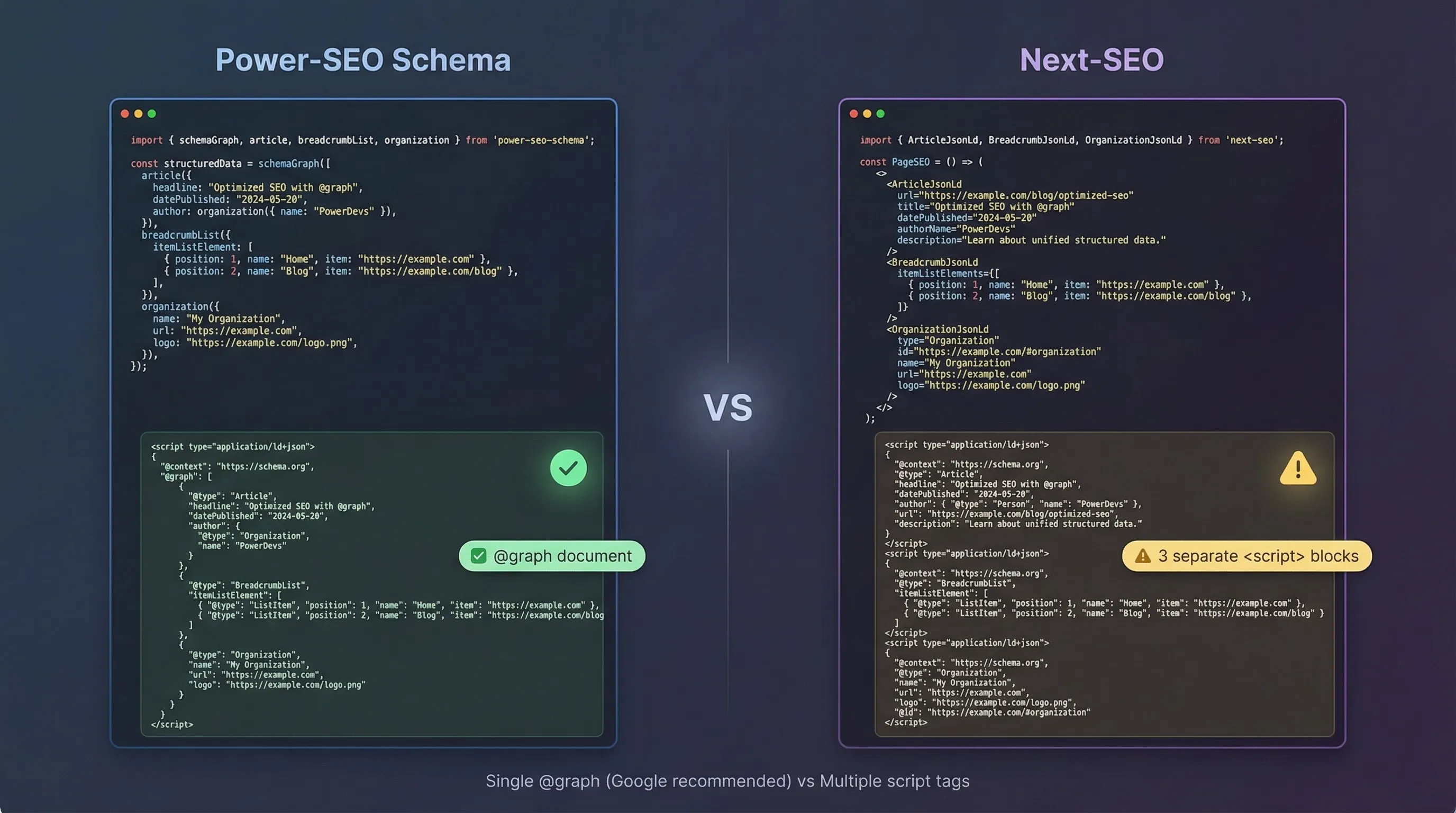
The situation: You're building a blog platform. Every post page needs an Article schema, a Breadcrumb schema, and an Organization publisher schema, all optimized for Google's rich results. You're on Next.js 13.4+ App Router (not Pages Router).
This is where the App Router distinction really matters. next-seo's <NextSeo> component was designed for the Pages Router and relies on React's <head> management approach. In the App Router, you manage meta tags via generateMetadata(), and JSX-rendered <script> tags work directly inside Server Components.
Power-seo Schema (App Router — Server Component)
All three schemas combined into one schemaGraph() call. TypeScript validates every prop at build time — no silent errors.
// app/blog/[slug]/page.tsx
import { article, breadcrumbList, organization, schemaGraph, toJsonLdString } from '@power-seo/schema';

export default async function BlogPage({ params }: { params: { slug: string } }) {
  const post = await getPost(params.slug);

  const graph = schemaGraph([
    article({
      headline: post.title,
      datePublished: post.publishedAt,
      author: { name: post.author.name, url: post.author.profileUrl },
      image: { url: post.ogImage, width: 1200, height: 630 },
    }),
    breadcrumbList([
      { name: 'Home', url: 'https://example.com' },
      { name: 'Blog', url: 'https://example.com/blog' },
      { name: post.title },
    ]),
    organization({ name: 'My Blog', url: 'https://example.com' }),
  ]);

  return (
    <>
      <script type="application/ld+json" dangerouslySetInnerHTML={{ __html: toJsonLdString(graph) }} />
      <main>{/* content */}</main>
    </>
  );
}
Result: 1 <script> block, @graph format, all three schemas combined. TypeScript validates every prop at build time.
Next-seo (App Router — same task)
The same page in next-seo requires three separate components. Organization has no built-in support, so it falls back to raw JSON with no type safety.
// app/blog/[slug]/page.tsx
import { ArticleJsonLd, BreadcrumbJsonLd } from 'next-seo';

export default async function BlogPage({ params }: { params: { slug: string } }) {
  const post = await getPost(params.slug);

  return (
    <>
      {/* 3 separate <script> tags — no @graph */}
      <ArticleJsonLd
        type="Article"
        url={`https://example.com/blog/${params.slug}`}
        title={post.title}
        images={[post.ogImage]}
        datePublished={post.publishedAt}
        authorName={post.author.name}
        description={post.excerpt}
      />
      <BreadcrumbJsonLd
        itemListElements={[
          { position: 1, name: 'Home', item: 'https://example.com' },
          { position: 2, name: 'Blog', item: 'https://example.com/blog' },
          { position: 3, name: post.title },
        ]}
      />
      {/* Organization: no built-in component — write raw JSON */}
      <script
        type="application/ld+json"
        dangerouslySetInnerHTML={{
          __html: JSON.stringify({
            '@context': 'https://schema.org',
            '@type': 'Organization',
            name: 'My Blog',
            url: 'https://example.com',
          }),
        }}
      />
      <main>{/* content */}</main>
    </>
  );
}
Result: 3 separate <script> blocks. No @graph. Organization schema requires manual JSON — no typed builder, no validation.
For App Router projects needing multiple schema types in @graph format, power-seo schema requires less boilerplate. If your page uses a single schema type or you're already on Pages Router, next-seo's component API is equally effective with less setup overhead.
The @graph advantage is clear for multi-schema pages. But what happens before your code even reaches production?
Real-World Scenario 2: Correct Structured Data JSON-LD in Next.js 13 App Router
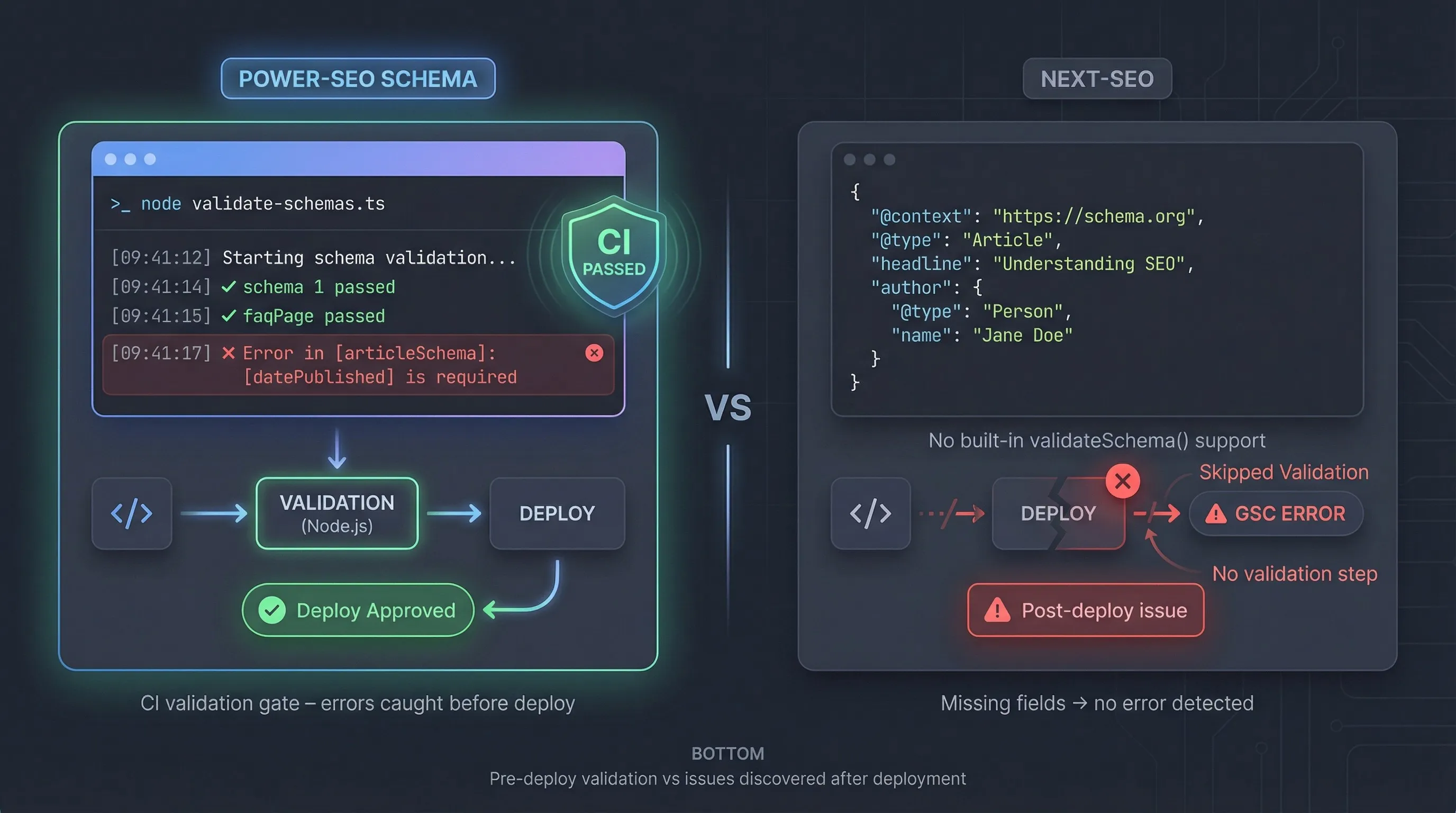
The situation: You're running a CI/CD pipeline. Before every deployment, you want to validate that every page's JSON-LD is complete, no missing datePublished, no empty author fields. You also need the schema to work in a Node.js script (not just in a browser/React context).
This scenario tests whether the library can operate outside a React rendering tree, and whether it has any validation story.
Power-seo schema (CI Validation Gate)
This script runs in Node.js with no React dependency. It catches missing required fields before deployment and exits with a non-zero code if validation fails — ready to drop into any CI pipeline.
// scripts/validate-schemas.ts — runs in Node.js, no React
import { article, faqPage, validateSchema } from '@power-seo/schema';

const pageSchemasToCheck = [
  article({
    headline: 'How to Brew Coffee',
    datePublished: '2026-01-15',
    author: { name: 'Jane Doe' },
  }),
  article({
    headline: 'Coffee Grinder Guide',
    // datePublished intentionally missing — will be caught
  }),
  faqPage([
    { question: 'What grind size for espresso?', answer: 'Fine grind.' },
  ]),
];

let exitCode = 0;

for (const schema of pageSchemasToCheck) {
  const { valid, issues } = validateSchema(schema);
  if (!valid) {
    const errors = issues.filter((i) => i.severity === 'error');
    errors.forEach((e) => console.error(`✗ [${e.field}] ${e.message}`));
    exitCode = 1;
  }
}

process.exit(exitCode);
// Output:
// ✗ [datePublished] datePublished is required for Article
This runs in a standard Node.js script, no browser or React render needed.
Next-seo (same task — CI validation)
Next-seo has no programmatic validation API. The closest workaround is manual JSON with a third-party validator — no built-in CI integration.
// next-seo does not expose builder functions or a validateSchema utility.
// The only way to validate is to render React components and inspect the output.
// There is no official CI validation story for structured data in next-seo.

// The closest workaround is writing raw JSON and validating manually:
const schema = {
  '@context': 'https://schema.org',
  '@type': 'Article',
  headline: 'Coffee Grinder Guide',
  // datePublished missing — no library catches this
};

// You'd need a third-party validator or Google's Rich Results Test
// next-seo provides no programmatic validation API
For built-in CI validation without extra tooling, power-seo schema has a clear advantage — validateSchema() runs in Node.js and drops into a pre-deploy script without additional setup. Next-seo teams can achieve similar results using Google's Rich Results Test or custom of validators, but these require extra integration work.
Power-SEO Schema vs Next-SEO: Performance Comparison
Bundle size is where the two tools diverge most sharply, but the numbers require context before drawing conclusions.
Understanding the scope difference first
Next-seo's 46.2 KB minified figure covers its entire feature set: meta tags, Open Graph, Twitter Cards, and JSON-LD combined. Power-seo schema's 5.2 KB covers structured data only — meta tag management is a separate package. Comparing these raw numbers directly is misleading because they don't represent the same scope.
A fairer comparison depends on your use case:
JSON-LD only: If you need structured data without meta tag management, power-seo schema's 5.2 KB minified (1.9 KB gzipped) is the lighter choice — and it drops further with tree-shaking since only the schema types you import enter your bundle.
JSON-LD + meta tags combined: Next-seo's 46.2 KB covers both in a single install. To match that with power-seo, you'd install both
@power-seo/schemaand@power-seo/meta— their combined size is still smaller, but the single-package convenience of next-seo is a real factor.
Tree-shaking behavior
Power-seo schema ships with "sideEffects": false on every export. Import only articles and toJsonLdString, and only those two functions enter your bundle, unused schema types are eliminated entirely at build time. In App Router, Next.js automatically excludes unused server-side code from the client bundle, which partially offsets next-seo's larger baseline size in modern setups.
Runtime performance
For TTFB and Lighthouse scores, the impact of either library is indirect. JSON-LD renders server-side and does not affect JavaScript execution on the client, so neither library contributes to Total Blocking Time. The difference shows up in JavaScript bundle analysis, smaller schema imports mean smaller total JS payload, which matters most for mobile users and Core Web Vitals on low-end devices.
Both libraries render JSON-LD synchronously with no async operations. Runtime speed is effectively equal, sub-millisecond in both cases.
Quick bundle size check against your own build:
npx bundlephobia-cli next-seo
npx bundlephobia-cli @power-seo/schema
Bottom line: For JSON-LD only with strict bundle budgets, power-seo schema's tree-shakeable architecture has the clear size advantage. For teams who want meta tags and JSON-LD in a single package, next-seo's combined footprint is more justified than the raw KB comparison suggests.
Migration Guide
Migrating from Power-SEO Schema vs Next-SEO
Step 1 — Install
npm install @power-seo/schema
npm uninstall next-seo
# only after migration is complete
Step 2 — Replace components with builder functions
// Before (next-seo)
import { ArticleJsonLd } from 'next-seo';
<ArticleJsonLd
  type="Article"
  url="https://example.com/post"
  title="My Post"
  images={['https://example.com/og.jpg']}
  datePublished="2026-01-15"
  authorName="Jane Doe"
  description="A great post."
/>

// After (@power-seo/schema)
import { article, toJsonLdString } from '@power-seo/schema';
const schema = article({
  headline: 'My Post',
  image: { url: 'https://example.com/og.jpg' },
  datePublished: '2026-01-15',
  author: { name: 'Jane Doe' },
  description: 'A great post.',
});
<script type="application/ld+json" dangerouslySetInnerHTML={{ __html: toJsonLdString(schema) }} />
Step 3 — Migrate BreadcrumbJsonLd
// Before
import { BreadcrumbJsonLd } from 'next-seo';
<BreadcrumbJsonLd itemListElements={[{ position: 1, name: 'Home', item: 'https://example.com' }]} />

// After
import { breadcrumbList, toJsonLdString } from '@power-seo/schema';
const crumbs = breadcrumbList([{ name: 'Home', url: 'https://example.com' }]);
<script type="application/ld+json" dangerouslySetInnerHTML={{ __html: toJsonLdString(crumbs) }} />
Step 4 — Combine into @graph (optional but recommended)
import { schemaGraph, toJsonLdString } from '@power-seo/schema';
const graph = schemaGraph([articleSchema, breadcrumbSchema]);
<script type="application/ld+json" dangerouslySetInnerHTML={{ __html: toJsonLdString(graph) }} />
Breaking changes to watch for:
authorName(string) in next-seo becomesauthor: { name: string; url?: string }in @power-seo/schemaimages(string array) becomesimage: { url: string; width?: number; height?: number }
Migrating from Power-SEO Schema back to Next-SEO
Reverse the steps above. Convert builder function calls to React component JSX. Replace toJsonLdString(schema) with the matching <XxxJsonLd> component. Drop schemaGraph() and render separate component instances.
Power-SEO Schema vs Next-SEO: Which Should You Choose?
Power-SEO Schema vs Next-SEO depends on your project's needs. Power-SEO Schema is best for advanced JSON-LD structured data, while Next-SEO focuses on metadata management for Next.js. Neither is universally better.
Choose next-seo if you want meta tags and JSON-LD in one package, you're on Pages Router, or community support and documentation maturity matter more than @graph output. If you're already using next-seo with simple schema needs, there's no strong reason to migrate.
Choose power-seo schema if you're on App Router, need CI validation, or manage multiple schema types per page. For new App Router projects, pairing it with @power-seo/meta gives a complete, validated SEO setup.
Both are free, actively maintained, and production-ready. The decision comes down to your router version and how much schema complexity your pages actually have. For the sitemap side of the same setup, see our Power SEO Sitemap vs Next Sitemap comparison.
Frequently Asked Questions About Power-SEO Schema vs Next-SEO
What is Power-SEO Schema vs Next-SEO?
Power-SEO Schema vs Next-SEO refers to the difference between a dedicated structured data library and a general SEO package. Power-SEO Schema focuses on creating JSON-LD schema markup for rich search results, while Next-SEO manages page metadata and also provides basic structured data components.
Does Google penalize multiple JSON-LD script tags?
No. Google does not penalize multiple JSON-LD script tags. However, using a single @graph structure is often recommended when combining multiple schema types on one page.
Can Power-SEO Schema and Next-SEO work together during migration?
Yes. They can run together during a phased migration. However, avoid using both libraries for the same schema type on the same page to prevent duplicate structured data.
How long does JSON-LD take to appear in Google Search Console?
Usually, JSON-LD changes appear after Google re-crawls the page, which can take around 1–2 weeks. You can request faster indexing through Google Search Console.
Is Power-SEO Schema tree-shakeable?
Yes. Power-SEO Schema is fully tree-shakeable with named exports, allowing you to import only the schema types and functions your project needs.
Which has better TypeScript support: Power-SEO Schema or Next-SEO?
Power-SEO Schema provides stronger TypeScript support with fully typed schema definitions and validation. It covers 23 schema types without requiring additional type packages.
How do I add JSON-LD schema in Next.js App Router without a library?
You can add JSON-LD manually using a script tag with JSON.stringify() inside a Server Component. However, a typed schema library helps avoid validation, security, and formatting issues.
Sources:
Google Search Central – Introduction to Structured Data
https://developers.google.com/search/docs/appearance/structured-data/intro-structured-dataGoogle Search Central – General Structured Data Guidelines
https://developers.google.com/search/docs/appearance/structured-data/sd-policiesGoogle Rich Results Test
https://search.google.com/test/rich-resultsSchema.org Official Documentation
https://schema.org/docs/documents.htmlSchema.org Validator
https://validator.schema.org/Next.js Metadata API Documentation
https://nextjs.org/docs/app/building-your-application/optimizing/metadataNext.js generateMetadata API Reference
https://nextjs.org/docs/app/api-reference/functions/generate-metadataNext.js JSON-LD Guide
https://nextjs.org/docs/app/guides/json-ldNext-SEO Official GitHub Repository
https://github.com/garmeeh/next-seonpm Next-SEO Package Page
https://www.npmjs.com/package/next-seo

I’m Mitu Das, a JavaScript developer, ERP product architect, and SEO specialist from Bangladesh. I work at CyberCraft Bangladesh, where I help build simple, scalable software, SaaS platforms, and business solutions. My goal is to create technology that helps companies save time, automate daily tasks, and grow faster. I enjoy combining development, product ideas, and SEO strategies to create useful digital solutions for modern businesses.
Writes about
Want this done for you?
Our team builds and ships exactly what this article describes. Send a message and we will reply with a scope.
Related Blogs

Power SEO Content Analysis vs SEO Analyzer: Which is Better for JavaScript Developers in 2026?
Apr 25, 2026

Power SEO Audit vs Next SEO: Which TypeScript SEO Audit Tool Should You Actually Use in 2026
Apr 18, 2026

Power-SEO React vs React-Helmet: Which is Better for React SEO Library in 2026?
Apr 4, 2026