I ranked a keyword through Power SEO in about 6 hours, and this real-world case study shows how I did it. If you are evaluating Power SEO as an SEO optimization tool, I share my experience with its content analysis and readability features, the results I observed, and the tool’s pros and cons. You will also learn how Power SEO compares with other SEO solutions, which features make it useful for JavaScript websites, and whether this free, open-source toolkit fits your workflow. I published an article targeting “Small Flat Interior Design in Dhaka” on October 27, 2026, at 12:51 PM. At 6:29 PM, my incognito Google search from Dhaka showed the article in the first position on the first page. Explore the evidence and limitations to decide whether Power SEO is worth trying for your own website.
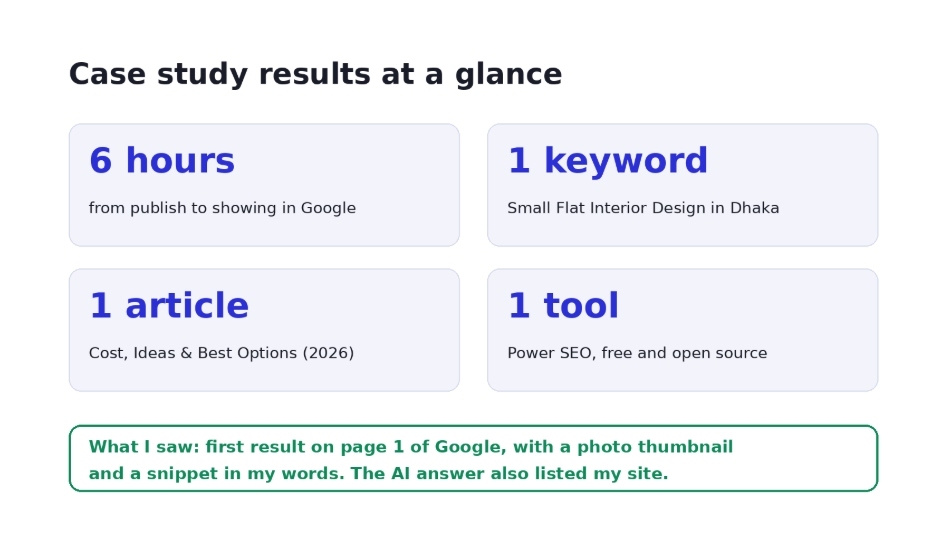
Case Study: Results at a Glance
Business: Nusaiba Construction & Technology (Dhaka)
My role: SEO Specialist
Keyword: Small Flat Interior Design in Dhaka
Article published: October 27, 2026, 12:51 PM
Google check: October 27, 2026, 6:29 PM (incognito, from Dhaka)
Position: First page, first position in my incognito check
Result: I ranked a keyword through Power SEO. The article showed as the first result on Google's first page. The AI answer also used my site as a source.
I ranked a keyword through Power SEO in 6 hours and reached first page, first position for Small Flat Interior Design in Dhaka Results at a glance. I ranked a keyword through Power SEO in about 6 hours.
Power SEO Case Study: Keyword Ranking in 6 Hours
Why I Tested Power SEO for Keyword Ranking
Nusaiba Construction & Technology works in construction, interior design, project management, and other areas. Many of our readers live in small flats in Dhaka. They want to know the cost, the best ideas, and the best options before they hire anyone.
So I wrote one article for them: “Small Flat Interior Design in Dhaka: Cost, Ideas & Best Options (2026).” This is the page where I ranked a keyword through Power SEO.
Power SEO Ranking Test: The Challenge
People say, “SEO takes months.” Often that is true. New pages can wait days or weeks to show in Google.
I wanted to test a simple question. If the page is useful, clean, and well optimized, can Google show it fast? I ranked a keyword through Power SEO to find out. So I ran a small keyword ranking case study. One keyword, one article, one tool.
Power SEO Test Goals and Success Criteria
My goal was small and clear. It was a simple Power SEO keyword ranking test:
Rank one keyword: Small Flat Interior Design in Dhaka
Do it with one article
Use one free tool
Aim to rank Google first page first position for the keyword
Check the result on the same day
Show you exactly how I ranked a keyword through Power SEO
Why I Chose Power SEO
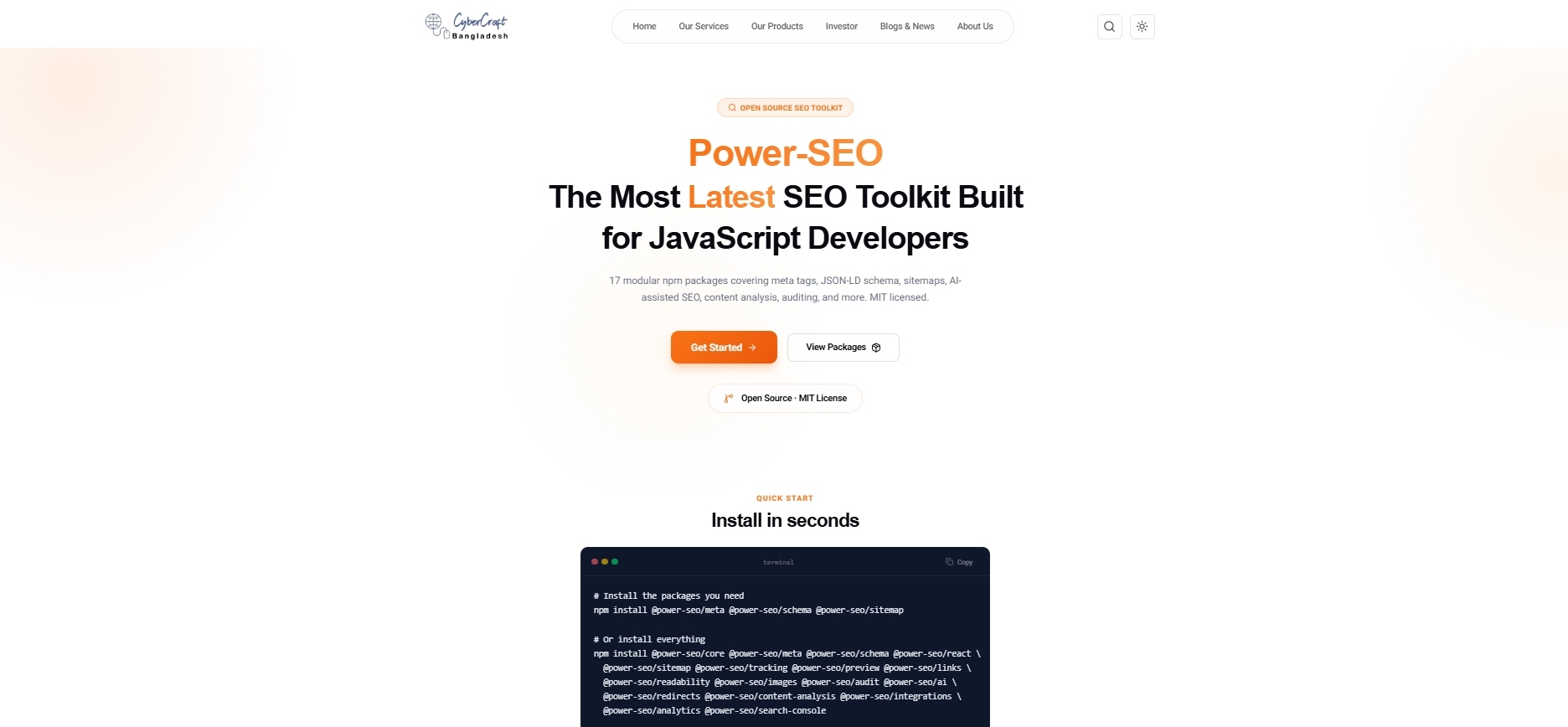
Power SEO is an open source SEO toolkit for JavaScript, built for developers and SEO teams. It was built by CyberCraft Bangladesh. It has 17 modular npm packages. You install only what you need. It is MIT licensed, so it is free to use.
Here is why it was a good fit when I ranked a keyword through Power SEO. It covers a lot:
Meta tags and Open Graph. Helpers for Next.js App Router, Remix, and generic SSR. They cover Twitter Cards, canonical URLs, hreflang, and robots rules.
JSON-LD structured data. A type-safe builder with 23 schema types, such as Article, FAQ, Product, Breadcrumb, and LocalBusiness.
Sitemaps and Search Console. XML sitemaps with image, video, and news support. Plus a Google Search Console client.
Content analysis. Power SEO content analysis is a Yoast-style engine with scores and checks.
Readability scoring. It uses Flesch-Kincaid, Gunning Fog, Coleman-Liau, and ARI.
Image SEO. It checks alt text quality, lazy loading, and image formats.
Link analysis. It finds orphan pages and scores internal link equity.
SERP preview. It shows how your title and description may look in Google.
Auditing. You can run an SEO audit with Power SEO to check site health, with meta, content, structure, and performance rules.
AI-assisted SEO. LLM-agnostic prompt templates for titles, meta descriptions, and keyphrases.
Many people ask if the Power SEO SEO tool is hard to use. It is not. You pick a package, import it, and go. It also works as a technical SEO optimization tool, with sitemaps, redirects, and schema. And for your draft, think of it as a Power SEO keyword optimization tool that checks your page before you publish.
It is also built for speed. It is tree-shakeable. It has full TypeScript support. The meta and schema packages run on the server, so they add zero client JavaScript.
And it is not just a demo. Power SEO already runs on CyberCraft Bangladesh in production. That site uses its meta, schema, sitemap, and tracking packages on every page.
The 17 Power SEO packages. I used content analysis and readability in this test.
Power SEO Features: Benefits for SEO Teams
Power SEO offers modular tools for content analysis, readability, metadata, structured data, and technical SEO auditing. These features can help developers review important SEO elements before publishing a page.
If you are comparing SEO tools, consider whether you need developer-focused packages or a visual platform with built-in reporting. In my test, I used content analysis and readability checks to review my article before publication.
My Process, Step by Step
Step 1: Pick one clear keyword
Every time I ranked a keyword through Power SEO, I started with one clear goal. This time I picked "Small Flat Interior Design in Dhaka." People search for it a lot. Many people here live in small flats. They want cost, ideas, and real options. It also fits our interior design service.
Step 2: Write for the reader first
If you ask how to optimize content for SEO, start with the reader. I did not write for Google first. I wrote for a person with a small flat. I used short sentences and easy words. I answered real questions:
How much does it cost?
What ideas save space?
Which option is best?
Step 3: Check the draft with Power SEO
Next, I used the Power SEO content analysis and readability checks on my draft. They show a score and tell you what to fix. This is simple SEO keyword optimization. It is also the core of how I ranked a keyword through Power SEO.
I checked:
Keyword in the title
Keyword in the first paragraph
Heading structure
Meta description
Sentence length and reading ease
If you want to try the same toolkit, the install is simple:
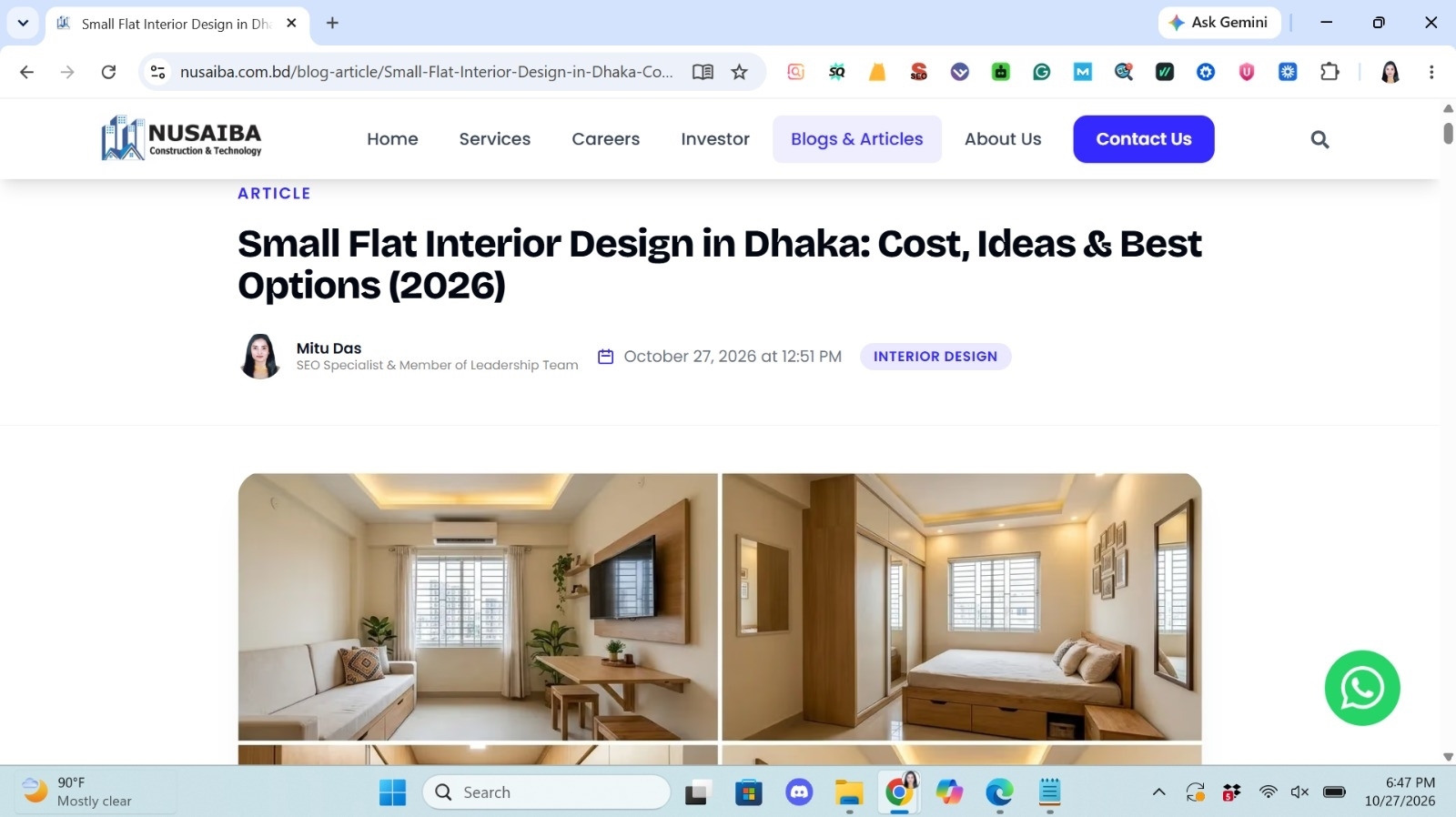
On the live page, you can see my name and role under the title. This helps with trust. Google calls it E-E-A-T: experience, expertise, authority, and trust.
This is the page where I ranked a keyword through Power SEO. Published on October 27, 2026 at 12:51 PM
Step 5: Add real images
I did not skip images. The article opens with clear photos of small flat rooms. They show a living area and a bedroom with built-in storage. Good images keep readers on the page. They also help image search. They were part of the page when I ranked a keyword through Power SEO.
Step 6: Publish and wait
I published the article on October 27, 2026, at 12:51 PM. Then I waited. I did not touch it. I checked Google later to see if I had really ranked a keyword through Power SEO.
Ranked a Keyword Through Power SEO: Case Study Results
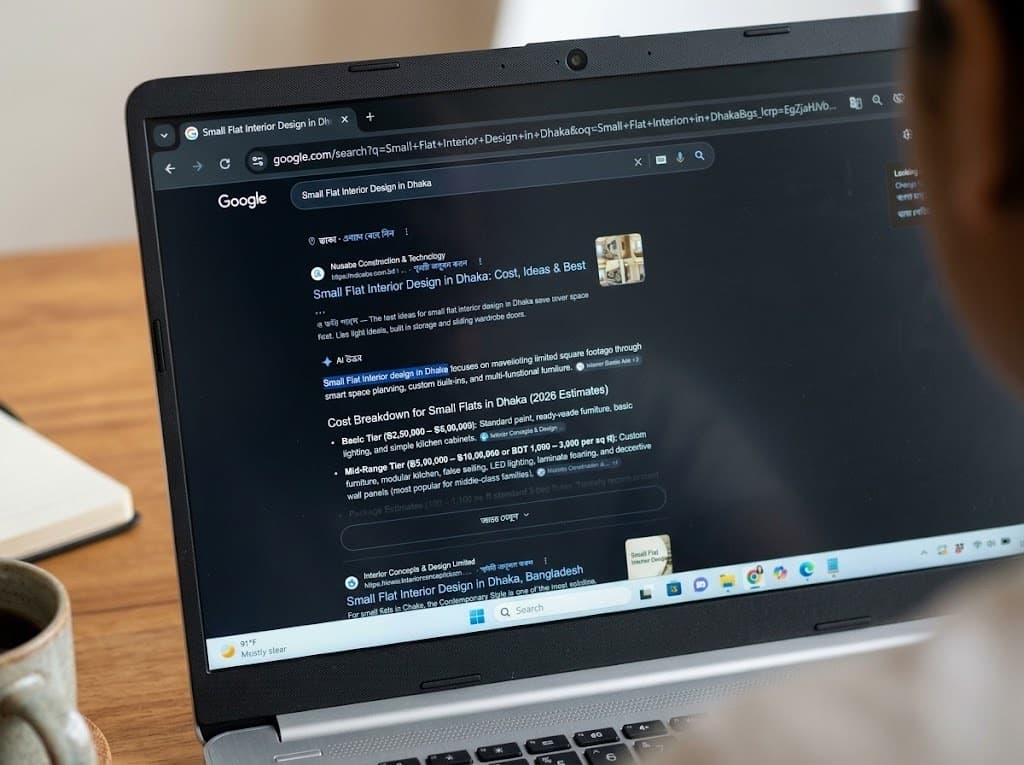
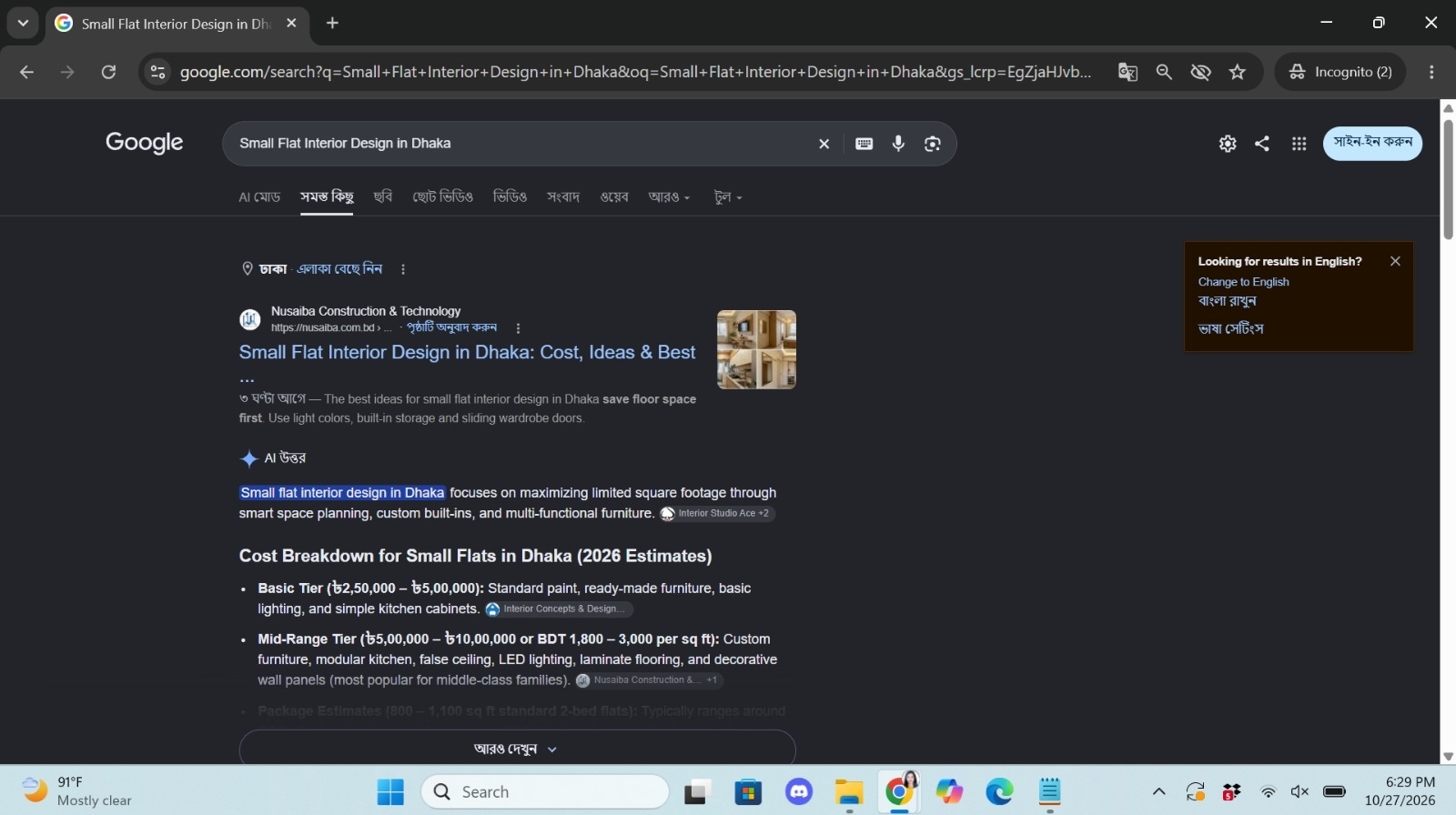
At 6:29 PM, I opened an incognito window. I searched for "Small Flat Interior Design in Dhaka."
Here is the proof that I ranked a keyword through Power SEO:
My article was on the first page, in the first position. In my incognito check, it was the first result. It showed Nusaiba Construction & Technology with the page title and a photo thumbnail.
Google showed "3 hours ago" next to my snippet. So Google had already seen the page.
The snippet used my own words. It said to save floor space first, and to use light colors, built-in storage, and sliding wardrobe doors.
The AI answer used my site as a source. In the cost section, my site appeared next to the mid-range cost details.
That is how I ranked a keyword through Power SEO in 6 hours. It is keyword ranking in 6 hours from one article, and it shows real keyword ranking improvement on day one. For this keyword, I did rank Google first page first position in my check.
Timeline showing publication at 12:51 PM and Google's first-page ranking at 6:29 PM, a gap of about six hours.
Power SEO Performance: What May Have Helped
I cannot say there is only one reason. But I believe these things helped:
A clear topic. One page, one main keyword.
Helpful content. Real costs, real ideas, real options.
Clean on-page SEO. Title, meta, headings, images.
Content analysis. Power SEO helped me catch small mistakes before I published.
Easy reading. Short sentences and simple words.
Trust signals. Real author, real company, real site.
Key Benefits and Lessons from the Power SEO Test
Here is what I learned when I ranked a keyword through Power SEO:
A small fix before you publish is better than a big fix after.
Content analysis shows problems you may not see yourself.
Readable content wins. Short sentences help both people and search engines.
One keyword per page keeps the topic clear.
Fast results are possible, but they need a strong page first. That is the main lesson from how I ranked a keyword through Power SEO.
What You Should Know (Being Honest)
I want to be fair with you. A case study should show the limits too.
This was one keyword. It is not a promise for every keyword.
Google results change. They can move up or down.
First position in my check does not mean first position for everyone. Results can differ by place, device, and time.
Competition matters. A hard keyword will take more time, even if you ranked a keyword through Power SEO once.
I checked in incognito from Dhaka. Your results may look different in another place.
Power SEO does not rank pages by itself. When I ranked a keyword through Power SEO, I still needed good content. The tool helps you build a clean, optimized page.
Power SEO Pros and Cons
Pros
Free and open-source toolkit with an MIT license.
Modular packages for different SEO tasks.
Content analysis and readability checks.
Developer-focused tools for JavaScript websites.
Cons
Requires technical knowledge for installation and integration.
Does not guarantee Google rankings.
Some features need separate packages and configuration.
One ranking experiment cannot establish long-term performance.
Power SEO Pricing: Is It Free?
Power SEO is an MIT-licensed open-source toolkit. You can use its published packages without a toolkit license fee, although development, hosting, and maintenance may still cost money.
Review the available features and packages before deciding whether Power SEO fits your workflow. You can explore the Power SEO open-source SEO toolkit to learn more.
My recommendation: Consider Power SEO if you work with JavaScript websites and want modular SEO utilities. If you prefer a no-code workflow, compare it with visual SEO platforms before choosing.
How to Use Power SEO for Keyword Ranking
Want to repeat how I ranked a keyword through Power SEO? Follow this plan to improve Google keyword rankings and rank Google first page first position:
Pick one keyword with a clear search goal.
Write for the reader. Use easy words.
Run content analysis and readability checks with Power SEO.
Fix your meta tags, headings, and images.
Add schema, like Article or FAQ, with the JSON-LD builder.
Make sure your sitemap is ready.
Publish.
Check Google after a few hours, then after a few days.
Future Power SEO Tests and Performance Tracking
I will keep testing. Next, I want to see if I can repeat how I ranked a keyword through Power SEO. Here is my plan:
Track this keyword for the next 7 days
Check if the position stays stable
Test two or three more keywords
Share the results here
Power SEO Review: Is It Worth Using?
My article appeared in the first position of Google's first page during an incognito check about six hours after publication. I used Power SEO's content analysis and readability checks as part of my workflow, but this single test does not prove that the tool alone caused the ranking.
Power SEO is worth considering if you need free, open-source SEO utilities for a JavaScript website. Review its features, technical requirements, and limitations before adopting it.
Want to evaluate it for your own project? Explore the Power SEO toolkit, select the packages you need, and monitor your rankings over the following days.
Frequently Asked Questions About Ranked a Keyword Through Power SEO
How did you rank a keyword in 6 hours?
I ranked a keyword using Power SEO by writing a helpful article, checking the draft with Power SEO content analysis and readability tools, and fixing the on-page SEO elements before publishing. I published the article at 12:51 PM on October 27, 2026. At 6:29 PM, my incognito Google search from Dhaka showed it in the first position.
Can you rank Google first page first position in 6 hours?
Yes, it happened in my test for one keyword, “Small Flat Interior Design in Dhaka.” My article appeared in the first position on Google's first page during an incognito search about six hours after publication. However, rankings vary by location, device, competition, and time. This result does not guarantee similar outcomes for other keywords.
Can you really rank a keyword in 6 hours?
Yes, a page can appear in Google search results quickly, as my experiment demonstrated. I observed a first-position result approximately six hours after publishing my article. However, one observation does not establish a repeatable ranking strategy. Results depend on factors such as search competition, content relevance, website authority, and Google's indexing and ranking systems.
What is Power SEO?
Power SEO is a free, open-source SEO toolkit for JavaScript developers and SEO teams. It provides modular npm packages for metadata, structured data, sitemaps, content analysis, readability, image SEO, link analysis, and auditing. Developers can install the packages relevant to their projects instead of using every feature. It supports several JavaScript development workflows.
Is Power SEO free?
Yes, Power SEO is an open-source toolkit released under the MIT license. You can use its published packages without paying a toolkit license fee. However, development, hosting, integration, and maintenance may still involve costs. Before installing it, review the package documentation and choose the features that fit your website and technical requirements.
Which frameworks does Power SEO support?
Power SEO provides tools for JavaScript projects, including React, Next.js, Remix, Astro, and Node.js workflows. The appropriate package depends on your framework and the feature you need. For example, metadata management and React components have different implementation requirements. Check the current documentation before installing a package to confirm compatibility with your project.
Does Power SEO rank my site by itself?
No, Power SEO does not independently guarantee or produce Google rankings. It helps developers and SEO teams check and implement SEO elements such as metadata, structured data, content quality, and technical settings. Rankings also depend on relevance, competition, website quality, and other factors. In my case study, the toolkit supported my workflow, but I cannot attribute the result to the tool alone.
How can you improve keyword rankings fast?
To improve keyword rankings, choose a relevant keyword, create useful content that satisfies search intent, and optimize your title, meta description, headings, and images. Check technical SEO issues, add appropriate structured data, and ensure search engines can discover your page. Track rankings over time and update the content based on evidence rather than expecting immediate results.
Is Power SEO good for on-page SEO?
Power SEO can help with on-page SEO through its content analysis, readability, and metadata-related packages. These tools help developers review page elements before publishing, but they cannot guarantee higher rankings. It may suit JavaScript websites that need modular SEO utilities. Evaluate its features against your workflow and verify the results with real performance data.
Code copied to clipboard
Share:
About the Author
Mitu DasWeb Developer & SEO Specialist
2+ years experienceNorth South University
I’m Mitu Das, a JavaScript developer, ERP product architect, and SEO specialist from Bangladesh. I work at CyberCraft Bangladesh, where I help build simple, scalable software, SaaS platforms, and business solutions. My goal is to create technology that helps companies save time, automate daily tasks, and grow faster. I enjoy combining development, product ideas, and SEO strategies to create useful digital solutions for modern businesses.