SEO API Integration for Next.js: The Complete Developer Guide (2026)


SEO API integration for Next.js is the process of connecting a Next.js website to SEO-related APIs or tools to automatically manage, generate, validate, or analyze search engine optimization data. It helps developers generate dynamic SEO content such as titles, meta descriptions, canonical URLs, Open Graph tags, and schema markup based on real-time page or product data.
SEO API integration for Next.js allows developers to connect external SEO services with a Next.js application and use SEO data programmatically. Depending on the API, this can include keyword research, rankings, backlinks, search performance, domain metrics, and other SEO information. Developers can use this data to build SEO dashboards, automate reports, monitor websites, and support dynamic SEO workflows.
@power-seo/integrations makes this process easier by providing a consistent TypeScript interface for the Semrush and Ahrefs REST APIs. As part of the Power SEO open-source SEO tool, it includes a shared HTTP client that handles rate limiting, pagination, and error normalization automatically. This gives developers a simpler way to manage SEO API integration in Next.js projects. Zero runtime dependencies beyond fetch. Runs in Node.js 18+, Deno, Bun, and modern edge runtimes.
About the Author
Written by: Mitu Das, SEO Specialist and Web Developer. I have worked in SEO and content writing since 2024, focusing on technical SEO, React, Next.js, JavaScript SEO, metadata, structured data, and SEO API integration for Next.js.
Reviewed by: Senior Content Strategist at CyberCraft Bangladesh. Our review process checks technical accuracy, SEO best practices, search intent, and practical usefulness.
Published: June 11, 2026
Last Updated: September 20, 2026
I wrote this guide based on practical experience with Next.js SEO workflows, including SEO API integration for Next.js, Semrush and Ahrefs APIs, server-side API calls, authentication, rate limiting, pagination, and error handling.
Key Takeaways
SEO API integration for Next.js connects SEO data APIs with your application to automate SEO workflows.
@power-seo/integrationsprovides a TypeScript-first interface for both Semrush and Ahrefs APIs.It includes built-in rate limiting, automatic pagination, retries, and consistent error handling.
The package works with Next.js Server Components, Route Handlers, SSR, and edge runtimes using native
fetch.Semrush can support keyword research, domain analysis, backlinks, keyword difficulty, and related keyword discovery.
What is SEO API integration for Next.js? (Official Overview)
SEO API integration for Next.js is the process of connecting external SEO services or APIs to a Next.js application to automate tasks such as keyword research, search performance monitoring, metadata management, backlink analysis, and technical SEO auditing. Instead of manually collecting SEO data or managing every optimization task separately, developers can use APIs to bring SEO functionality directly into their applications. This makes it easier to build data-driven SEO workflows, monitor website performance, and manage optimization tasks programmatically.
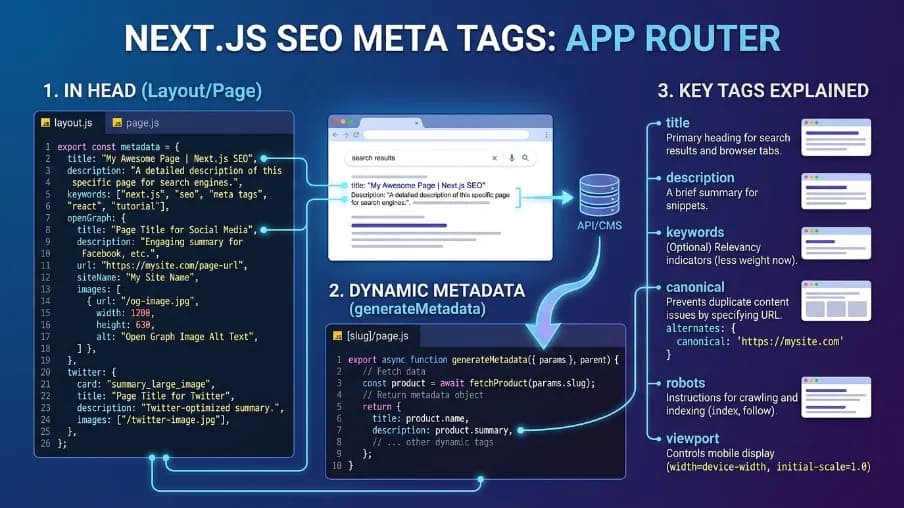
For example, Next.js provides a built-in Metadata API that supports static and dynamically generated metadata, including page titles, descriptions, canonical URLs, and Open Graph information. Developers can also integrate external SEO APIs to retrieve keyword data, track rankings, and automate reporting.
Power SEO, a free open-source SEO toolkit from CyberCraft Bangladesh, can also help developers build SEO workflows in JavaScript and TypeScript applications through its specialized packages for metadata, technical audits, structured data, and SEO integrations.
How does SEO API integration improve Next.js SEO?

SEO API integration for Next.js improves SEO by automating and centralizing metadata, structured data, canonical URLs, and other search-related signals across dynamic pages. With Next.js, an SEO API can feed page-specific SEO data into the Metadata API or server-rendered HTML, helping ensure that search engines receive consistent titles, descriptions, canonical URLs, and structured data. Google recommends valid HTML metadata and notes that server-side or pre-rendering is beneficial because it helps crawlers access content efficiently.
For measurable performance, Google’s current Core Web Vitals targets are LCP ≤ 2.5 seconds, INP ≤ 200 ms, and CLS ≤ 0.1 at the 75th percentile. An SEO API does not automatically improve these metrics, but integrating SEO data efficiently on the server can help avoid unnecessary client-side processing. You can measure the actual impact using PageSpeed Insights, Search Console, and the PageSpeed Insights API rather than claiming a fixed percentage improvement.
Which SEO APIs can be integrated with Next.js?
SEO APIs that can be integrated with Next.js include Google Search Console API, Google Indexing API, PageSpeed Insights API, Semrush API, and Ahrefs API. These APIs can help automate search-performance reporting, technical SEO checks, keyword research, page-speed monitoring, and other SEO workflows. Next.js also provides its built-in Metadata API for managing static and dynamic metadata.
You can integrate SEO APIs with Next.js for automated metadata, keyword data, SERP analysis, backlink data, and SEO auditing. For example, I can connect SEO data services such as Semrush, Ahrefs, DataForSEO, or Google Search Console APIs to a Next.js application, depending on the specific SEO workflow. Next.js also provides its own Metadata API and generateMetadata() for dynamically managing titles, descriptions, canonicals, and other metadata.
For structured data, I recommend using Google’s official Search Central guidance rather than relying on unsupported API claims; Google reported measurable results from structured-data implementations, including a 25% higher CTR for Rotten Tomatoes pages in one case study.
Measurement tip: I would validate the implementation with Google Search Console and the Rich Results Test, then compare performance before and after deployment, as Google recommends.
Why Use @power-seo/integrations for SEO API Integration in Next.js?
I choose @power-seo/integrations when I want reliable, TypeScript-first SEO data integration without repeatedly writing API, retry, and rate-limit logic.
Here's the honest comparison:
Feature | @power-seo/integrations | semrush-sdk | ahrefs-client | Custom fetch |
|---|---|---|---|---|
Semrush API client | Yes | Yes | No | Manual |
Ahrefs API client | Yes | No | Partial | Manual |
Rate limiting | Yes | Partial | No | Manual |
Auto-pagination | Yes | No | No | Manual |
Shared HTTP client | Yes | No | No | — |
Consistent error handling | Yes | Partial | No | Manual |
TypeScript-first | Yes | No | No | — |
Tree-shakeable | Yes | No | No | — |
When building Next.js SEO workflows, the biggest wins from Power SEO are immediately clear: auto-pagination means you receive a flat result array without tracking offsets manually, and IntegrationApiError gives you a consistent error shape across both providers with status, provider, message, and retryable fields.
Installation
npm install @power-seo/integrations
yarn add @power-seo/integrations
pnpm add @power-seo/integrations
Quick Start
import { createSemrushClient, createAhrefsClient } from '@power-seo/integrations';

// Semrush
const semrush = createSemrushClient({ apiKey: process.env.SEMRUSH_API_KEY! });
const overview = await semrush.getDomainOverview({ domain: 'example.com' });
console.log(overview.organicTraffic); // 12_400
console.log(overview.organicKeywords); // 834

// Ahrefs
const ahrefs = createAhrefsClient({ apiKey: process.env.AHREFS_API_KEY! });
const site = await ahrefs.getSiteOverview({ target: 'example.com' });
console.log(site.domainRating); // 47
console.log(site.organicTraffic); // 9_800
Both clients are separate named exports. Import only what you need. Tree-shaking ensures unused API code never ends up in your bundle.
Using the Semrush Client
import { createSemrushClient } from '@power-seo/integrations';
import type { SemrushDomainOverview, SemrushKeywordData } from '@power-seo/integrations';

const semrush = createSemrushClient(
  process.env.SEMRUSH_API_KEY!,
  { rateLimitPerMinute: 10, maxRetries: 3 },
);

// Domain overview — traffic, keywords, backlinks
const overview: SemrushDomainOverview = await semrush.getDomainOverview('example.com', 'us');
// { domain, organicTraffic, paidTraffic, organicKeywords, paidKeywords, backlinks, authorityScore }

// Organic keywords
const keywords = await semrush.getOrganicKeywords('example.com', { limit: 100, offset: 0 });
// { data: SemrushKeywordData[], total, offset, limit, hasMore }

// Backlinks
const backlinks = await semrush.getBacklinks('example.com', { limit: 100, offset: 0 });
// { data: SemrushBacklinkData[], total, offset, limit, hasMore }

// Keyword difficulty
const difficulty = await semrush.getKeywordDifficulty(['react seo'], 'us');
// [{ keyword, difficulty, searchVolume, cpc, competition, results }]

// Related keywords
const related = await semrush.getRelatedKeywords('react seo', 'us');
// [{ keyword, searchVolume, cpc, competition, results, relatedTo }]
The rateLimitPerMinute config keeps you inside Semrush's API quota automatically. No manual throttle logic needed.
Using the Ahrefs Client
import { createAhrefsClient } from '@power-seo/integrations';
import type { AhrefsSiteOverview, AhrefsOrganicKeyword } from '@power-seo/integrations';

const ahrefs = createAhrefsClient(
  process.env.AHREFS_API_TOKEN!,
  { rateLimitPerMinute: 5, maxRetries: 3 },
);

// Site overview — DR, organic traffic, backlinks
const overview: AhrefsSiteOverview = await ahrefs.getSiteOverview('example.com');
// { domain, domainRating, urlRating, organicTraffic, organicKeywords, backlinks, referringDomains, trafficValue }

// Organic keywords with positions
const keywords = await ahrefs.getOrganicKeywords('example.com', { limit: 200, offset: 0 });
// { data: AhrefsOrganicKeyword[], total, offset, limit, hasMore }

// Backlinks with anchor text
const backlinks = await ahrefs.getBacklinks('example.com', { limit: 100, offset: 0 });
// { data: AhrefsBacklink[], total, offset, limit, hasMore }

// Keyword difficulty
const kd = await ahrefs.getKeywordDifficulty(['react seo']);
// [{ keyword, difficulty, searchVolume, cpc, clicks, globalVolume }]

// Referring domains
const domains = await ahrefs.getReferringDomains('example.com', { limit: 50, offset: 0 });
// { data: AhrefsReferringDomain[], total, offset, limit, hasMore }
Ahrefs' strength is backlink and Domain Rating data. The getReferringDomains method is particularly useful for link building workflows inside Next.js admin dashboards.
Using the Shared HTTP Client Directly
If you need to call any REST API with the same rate limiting and pagination behavior, the underlying client is also exported directly:
import { createHttpClient } from '@power-seo/integrations';

const http = createHttpClient({
  baseUrl: 'https://api.example.com',
  auth: { type: 'bearer', token },
  rateLimitPerMinute: 60,
  maxRetries: 3,
  timeoutMs: 30_000,
});

const data = await http.get<MyResponseType>('/endpoint', { query: 'param' });
AuthStrategy supports two patterns: { type: 'bearer', token: string } for Authorization headers, and { type: 'query', paramName: string, value: string } for query parameter auth.
Error Handling
Both clients throw IntegrationApiError for non-2xx responses. Here's the pattern to use in your Next.js Route Handlers:
import { createSemrushClient, IntegrationApiError } from '@power-seo/integrations';

const semrush = createSemrushClient({ apiKey: 'your-key' });

try {
  const data = await semrush.getDomainOverview('example.com');
} catch (err) {
  if (err instanceof IntegrationApiError) {
    console.error(`API error ${err.status}: ${err.message}`);
    console.error('Provider:', err.provider);
    console.error('Retryable:', err.retryable);
  } else {
    throw err;
  }
}
The retryable flag is especially useful. If true, you can safely retry the request. If false, retrying won't help and you should surface the error to the user or your monitoring system.
All Available Types
import type {
  HttpClientConfig,
  HttpClient,
  PaginatedResponse,
  SemrushConfig,
  SemrushDomainOverview,
  SemrushKeywordData,
  SemrushBacklinkData,
  SemrushRelatedKeyword,
  SemrushClient,
  AhrefsConfig,
  AhrefsSiteOverview,
  AhrefsOrganicKeyword,
  AhrefsBacklink,
  AhrefsReferringDomain,
  AhrefsClient,
} from '@power-seo/integrations';
Full type coverage across every request parameter and response field. No any anywhere in your codebase.
Real-World Use Cases for SEO API Integration in Next.js

I use SEO API integration for Next.js when a website needs SEO data to update dynamically across many pages. It is especially useful for eCommerce stores, SaaS platforms, publishers, and SEO dashboards.
Dynamic metadata: Pull product, service, or content data from an API and generate page titles, descriptions, canonicals, and Open Graph metadata with Next.js Metadata API.
Programmatic SEO pages: Combine API data with dynamic Next.js routes to create location, product, service, or keyword-focused landing pages at scale.
Keyword research dashboards: Connect keyword APIs to display search volume, keyword difficulty, rankings, and related terms inside a custom Next.js dashboard.
Competitor monitoring: Import competitor keyword, backlink, and ranking data and track changes from one Next.js interface.
Automated structured data: Use API data to generate JSON-LD for products, articles, organizations, and other supported entities. Google recommends testing structured data with its Rich Results Test.
SEO performance tracking: Connect APIs with Google Search Console or other data sources to monitor impressions, clicks, CTR, indexed pages, and ranking changes over time.
Large content platforms: For thousands of dynamically generated pages, API-driven metadata reduces repetitive manual SEO work while keeping page information synchronized with the underlying data.
A measurement-first approach is important: I would compare organic clicks, impressions, CTR, indexed URLs, and rankings before and after implementation. I would not claim that an SEO API automatically improves rankings because Google evaluates many technical and content signals. Google also recommends checking JavaScript-rendered pages to ensure important content is accessible to Search.
Where Should SEO API Calls Run in Next.js?
For SEO API integration for Next.js, I recommend running SEO API calls on the server, preferably in Server Components or server-side data-fetching functions. This keeps API keys private and allows SEO data such as metadata, keywords, or structured data to be available during server rendering. Next.js confirms that Server Components run on the server and support server-side data fetching. Next.js data fetching documentation
Google explains that JavaScript pages go through crawling, rendering, and indexing. So, keeping important SEO data available during server rendering can make your implementation more reliable for search engines. Google JavaScript SEO basics
My practical rule: keep authenticated SEO API calls server-side, cache or revalidate results where appropriate, and send only the required SEO output to the browser. Never expose third-party SEO API keys through Client Components.
Common SEO API Integration Mistakes in Next.js
From my experience with SEO API integration for Next.js, the biggest mistakes happen when developers treat SEO data like normal client-side content. I always verify the server-rendered HTML, metadata, canonical URLs, structured data, API failures, and HTTP status codes before considering an integration production-ready.
Client-only SEO rendering: Critical metadata should be available in the rendered HTML. Google recommends server-side or pre-rendering because JavaScript rendering has limitations.
Duplicate metadata: Avoid multiple titles, descriptions, or conflicting canonical URLs. Google notes that conflicting canonical signals can produce unexpected results.
Blindly trusting API responses: I validate API data and add fallbacks for missing titles, descriptions, canonicals, or structured data.
Exposing API keys: Keep SEO API credentials on the server and never expose private keys in browser-side JavaScript.
Incorrect canonical URLs: Generate one consistent canonical URL for each indexable page.
Skipping structured-data testing: I validate generated JSON-LD with Google's Rich Results Test before deployment.
Ignoring HTTP status codes: A missing page should return a real
404, not a200response containing an error message. Google identifies this as a common soft-404 issue.Not measuring the result: I monitor API response time, error rates, metadata completeness, indexing coverage, and Search Console performance rather than assuming the integration works.
My practical approach: After implementation, I inspect the actual HTML response and test important URLs through Google's URL Inspection Tool. Google specifically recommends URL Inspection and the Rich Results Test for checking rendered content and JavaScript SEO issues.
Final Thoughts
SEO API integration for Next.js allows developers to connect external SEO data with applications, dashboards, reporting systems, and automated workflows. The implementation can use an official SDK, a third-party library, or direct HTTP requests depending on the API and project requirements.
A reliable implementation should keep credentials server-side, handle rate limits and API errors, process paginated responses, and cache data where appropriate. For SEO-related output, developers should also verify the resulting HTML, metadata, structured data, canonical URLs, and HTTP status codes.
Libraries such as @power-seo/integrations can simplify integrations with supported SEO providers, but the underlying principles remain the same regardless of the client or API being used.
FAQs About SEO API Integration for Next.js
1. What is SEO API Integration for Next.js?
SEO API integration for Next.js connects external SEO data APIs to a Next.js application, allowing developers to retrieve and manage search-related information programmatically. It can provide keyword rankings, search volume, backlinks, domain metrics, and organic search data for SEO dashboards, reporting systems, and automated workflows.
2. Why use SEO API Integration for Next.js?
SEO API integration for Next.js helps developers automate SEO data collection, monitor keyword rankings, and build customized analytics dashboards. Instead of manually exporting reports, applications can retrieve SEO metrics through API requests, helping teams streamline reporting, track performance changes, and make data-informed optimization decisions.
3. Which SEO APIs can be integrated with Next.js?
Next.js supports integration with SEO data providers such as Semrush, Ahrefs, and Google Search Console. Developers can connect these services through REST APIs, server-side functions, Route Handlers, or backend services. The available SEO metrics depend on each provider's API capabilities, subscription requirements, and access permissions.
4. How do I integrate an SEO API with Next.js?
To integrate an SEO API with Next.js, obtain API credentials, store them securely in environment variables, and make authenticated requests from server-side code or Route Handlers. Process the API responses and display the required SEO data in your application. Avoid exposing private API keys in client-side components.
5. What SEO data can I retrieve through a Next.js SEO API integration?
A Next.js SEO API integration can retrieve keyword rankings, search volume, keyword difficulty, backlinks, referring domains, organic keywords, and domain metrics. The available data depends on the provider and API endpoint. Developers can use these metrics to build SEO dashboards, monitor search performance, and support keyword research.
Sources
Google Search Central – JavaScript SEO basics. How Google crawls, renders, and indexes JavaScript-driven pages.
web.dev – How the Core Web Vitals thresholds were defined. The research behind the LCP, INP, and CLS "good" thresholds.
Next.js Docs – generateMetadata. Official reference for the Metadata API and dynamic metadata generation.
Google Search Central – Rich Results Test. Tool for validating structured data/JSON-LD before deployment.
Google Search Central – URL Inspection Tool. Checking how Googlebot renders and indexes a specific URL.
Google Developers – PageSpeed Insights API. Programmatic access to Core Web Vitals and Lighthouse performance data.

I’m Mitu Das, a JavaScript developer, ERP product architect, and SEO specialist from Bangladesh. I work at CyberCraft Bangladesh, where I help build simple, scalable software, SaaS platforms, and business solutions. My goal is to create technology that helps companies save time, automate daily tasks, and grow faster. I enjoy combining development, product ideas, and SEO strategies to create useful digital solutions for modern businesses.
Writes about
Want this done for you?
Our team builds and ships exactly what this article describes. Send a message and we will reply with a scope.