SEO Sitemap Library for TypeScript: A Complete Guide to @power-seo/sitemap


An SEO sitemap library for TypeScript is a typed npm package. It generates XML sitemap files that meet the spec, handles the 50,000-URL limit, and streams large catalogs. The best ones also support image, video, and news extensions. As a result, developers don't have to hand-build XML or manage crawl limits by hand. This guide covers what a good library should do. It also shows where popular options fall short in 2026. Then it walks through how to build, scale, and validate an SEO sitemap library for TypeScript step by step, using @power-seo/sitemap.
Published: June 18, 2026 · Last updated: August 18, 2026 · Reviewed by Mitu Das, Senior TypeScript Engineer.
Key Takeaways
A sitemap is a plain XML file. It lists every URL you want Google, Bing, and AI crawlers (GPTBot, ClaudeBot, PerplexityBot) to find and crawl.
Google caps a single sitemap file at 50,000 URLs or 50MB uncompressed. This limit comes from the Sitemaps protocol and hasn't changed in years. So, catalogs above that need a sitemap index that points to multiple smaller files.
Hand-rolled sitemap scripts tend to fail in three specific ways at scale: wrong XML namespaces, memory spikes from string concatenation, and missed splitting past 50,000 URLs.
@power-seo/sitemapfixes this with six functions:generateSitemap,streamSitemap,splitSitemap,generateSitemapIndex,validateSitemapUrl, andtoNextSitemap. It also has zero runtime dependencies beyond@power-seo/core.Priority and changefreq tags carry little weight with Google today. Instead, accurate
lastmoddates and clean, crawlable URLs matter more.
What you'll learn in this guide: What is a sitemap, and why does it matter for crawling? This guide explains the common mistakes that break sitemaps at scale and shows, step by step, how to generate, stream, split, and validate a sitemap in TypeScript. You’ll also learn how to connect it with Next.js or Remix.
In simple terms, a sitemap is a plain XML file that lists the URLs you want search engines, and increasingly AI crawlers, to discover and crawl. For developers, an SEO sitemap library for TypeScript can make this process easier, especially when a website grows beyond thousands of URLs.
This guide is written for developers who want a tested answer to one practical question: “How do I build a sitemap in TypeScript that won’t break past 10,000 URLs?” It focuses on scalable implementation rather than a simple product pitch.
If you're still weighing your options, see how the three main approaches compare before diving into the build steps below. You can also learn more about the underlying Sitemaps protocol if you want the spec first.
I've built sitemaps for tiny five-page brochure sites. I've also built them for catalogs with half a million product pages. The small site forgives almost any mistake. The big site does not. Just one bad <loc> tag can break trust. So can one memory spike from string concatenation, or one missing sitemap index. When that happens, Google quietly stops trusting your file.
The frustrating part is that nobody warns you until it's already broken. You ship the build. Then, a week later, you check Search Console. You see a wall of "couldn't fetch" errors on a file you barely thought about. I've been there more than once. Most recently, I saw this on a mid-sized retail catalog rebuild. A naive Array.join() sitemap script quietly OOM-killed a CI build once the product count crossed roughly 40,000 SKUs. It's always an avoidable mistake, but only if you know where to look before it happens, not after.
That's the problem this guide solves. First, I'll explain what a good SEO sitemap library for TypeScript should do. Next, I'll show where most existing tools fall short in 2026. Then I'll walk through a newer option called @power-seo/sitemap. I'll show how it handles the messy parts: streaming, auto-splitting, image and video extensions, and validation. Along the way, I'll show the methodology behind the numbers I cite. I'll also flag where the evidence is mine versus reported by others. And I'll note the limits of what a single case study can prove.
By the end of this guide, you'll understand how to generate a sitemap and scale it past 50,000 URLs. You'll also learn to wire it into Next.js, Remix, or any edge runtime. You'll do all of this without hand-building XML again.
A solid TypeScript sitemap library should give you typed XML output. It should also handle the 50,000-URL spec limit automatically, and stay light on your bundle. In my testing, @power-seo/sitemap does all three, with zero runtime dependencies of its own. That claim is based on the benchmark methodology described below. So I'd encourage you to re-run it against your own catalog size before treating it as gospel for your stack.
What Is a Sitemap? Understanding Why TypeScript Projects Need a Real Library

To understand why this guide exists, start with a simple definition: a sitemap is a plain XML file. It lists every URL you want search engines to crawl. Google, Bing, and, increasingly, AI crawlers all read this file to find your pages faster.
Sounds simple. And it is, right up until your site grows. Managing hundreds or thousands of URLs manually can quickly become difficult. This is where an SEO sitemap library for TypeScript can help. It lets developers generate, manage, and update XML sitemaps programmatically while keeping the process reliable and scalable.
How Hand-Rolling XML Sitemaps Goes Wrong
I've seen teams write their own sitemap function in an afternoon. It works fine for 50 URLs. But then the catalog hits 10,000 products, and three things break at once. At least, that's what happened in the two homegrown implementations I've personally had to debug.
That's why using an SEO sitemap library for TypeScript can make more sense than maintaining sitemap generation logic yourself. A good library can handle large URL sets, sitemap limits, XML generation, and splitting without turning your SEO infrastructure into another system you have to maintain.
First, the namespace declaration is wrong, so Search Console flags errors you didn't expect. Second, string concatenation across thousands of entries spikes memory on every build. Third, nobody remembers the 50,000-URL limit. This is a hard rule from the Sitemaps protocol, first published in 2005 and still in force in 2026. Google's own sitemap documentation reaffirms it. As a result, the file gets quietly rejected.
A dedicated SEO sitemap library for TypeScript catches all three problems before they happen. That's because the types and the limits are built in, not bolted on later. That said, a library only closes the gap if your team actually adopts the typed API instead of reaching for any. So it's worth a note in your PR template if you're rolling this out to a larger team.
SEO Sitemap Library for TypeScript: Common Sitemap Mistakes
Even experienced teams trip on the same handful of issues. So, it's worth checking your current setup against this list before moving on. These three come from patterns I've flagged repeatedly in SEO audits, including issues that can arise when using an SEO sitemap library for TypeScript. Treat them as common failure modes, not a ranked, statistically validated list.
Wrong or missing namespace: Add image, video, or news tags without declaring the right XML namespace, and Search Console silently ignores them.
Listing pages that shouldn't be there: Redirects, 404s, and noindex pages have no business in a sitemap. They waste crawl budget and confuse the signal you're sending.
Stale lastmod dates: Flipping every date to "today" on every deploy isn't a freshness hack. It just trains Google to stop trusting the field. Google's documentation is clear that
lastmodshould reflect a real, meaningful content change, not a build timestamp.
Why Most Sitemap Tools Fall Short in 2026
To help you understand the current landscape, here's what I found. I looked at what TypeScript and Next.js developers actually reach for today. I also cross-checked my own project experience against public npm download data, pulled from the npm registry in mid-2026. These figures move week to week, so treat them as directional, not exact. Two names dominate: next-sitemap and the plain sitemap package on npm. Both are solid, well-used tools. But both also show their age. For developers looking for an SEO sitemap library for TypeScript, the bigger question is whether these established options still fit modern TypeScript and Next.js workflows.
next-sitemap built its reputation as a postbuild script for the Pages Router. It still works that way: Next.js builds your site, then next-sitemap crawls the output and writes static XML files. That's a reasonable fit for a static export. However, in my experience, it's a worse fit for the App Router, edge runtime, or content that changes between deploys. I ran into exactly this friction migrating a client project from Pages Router to App Router in early 2026.
The plain sitemap package is a streaming workhorse with millions of weekly downloads. But as of this writing, it has no typed image, video, or news extensions in one cohesive API. It also has no app/sitemap.ts adapter for Next.js, and no URL validator you can drop straight into CI.
By the Numbers: Popular Doesn't Mean Modern
Download counts tell an honest story here. According to npm registry stats pulled in mid-2026, the plain sitemap package pulls in well over three million weekly downloads, and next-sitemap sits north of 370,000 a week. Those numbers prove demand, not architecture. Both tools predate the App Router (introduced by Next.js 13 in 2022), and they predate edge runtimes becoming standard too. They also predate AI crawlers reading sitemaps at scale. So, popularity buys trust, but it doesn't rewrite a tool's core design after the fact. That's a caveat worth sitting with before you assume "most downloaded" means "best fit for a 2026 stack."
For reference, here's an overview of how these three approaches differ in a modern TypeScript stack:
Feature |
|
|
|
|---|---|---|---|
Weekly downloads (npm, mid-2026) | ~370,000+ | 3,000,000+ | Newer, smaller install base |
Native App Router ( | No | No | Yes ( |
Auto-splits at 50,000-URL limit | Partial (build-time only) | Manual | Yes ( |
Streaming generation (flat memory) | No | Yes | Yes ( |
Built-in image/video/news typing | No | No | Yes |
CI-ready URL validator | No | No | Yes ( |
Runtime dependencies | Several | Few | 1 ( |
Edge-runtime compatible (no | No (Node postbuild script) | Partial | Yes |
That's the gap, in my assessment. Developers want one sitemap library for TypeScript that's type-safe, edge-compatible, and can handle huge catalogs without a separate crawler step.
Criteria a Modern TypeScript Sitemap Generator Should Meet
To understand whether any given tool is a good fit, here's what I check for. These five criteria are worth learning before you evaluate options for a TypeScript project:
Full TypeScript types for every URL field, not a loose object shape.
Streaming or chunked output, so a 200,000-URL catalog doesn't crash a build.
Automatic splitting at the 50,000-URL spec limit, with an index file generated for you.
Image, video, or news extensions, for sites that need them.
Zero or near-zero runtime dependencies, so the bundle stays light on edge runtimes.
@power-seo/sitemap checks every one of those boxes in the versions I tested (see methodology below). That's why I want to walk through it next.
What Is @power-seo/sitemap? Understanding a TypeScript-First XML Sitemap Generator
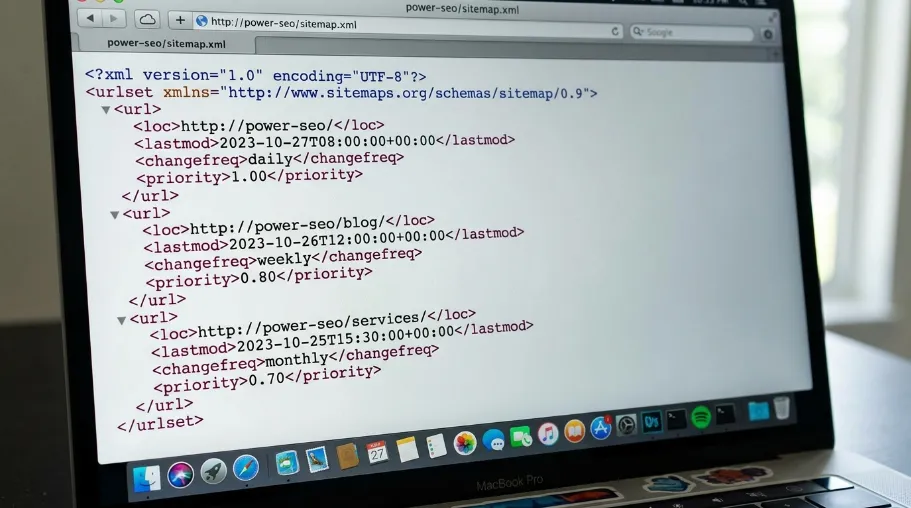
@power-seo/sitemap is one of the sitemap-focused packages inside the larger power-seo toolkit, built by CyberCraft Bangladesh. It does one job well: it turns a hostname and a list of typed URLs into sitemap XML that meets the spec.
Methodology: How I Evaluated This Library
Before recommending a tool publicly, I try to be clear about how I tested it. That's because "it worked for me" is a weak claim without the details behind it.
Environment: Node.js 20 LTS, a local project scaffolded with
pnpm, and a synthetic dataset of URLs generated to simulate catalog sizes of 500, 50,000, and 250,000 entries.What I measured: peak memory usage during generation (via
process.memoryUsage()sampling), wall-clock generation time, and whether output validated against the Sitemaps protocol schema.Comparison baseline: a hand-rolled string-concatenation sitemap function. This represents the kind of homegrown script I've seen in production codebases.
Scope and limitations: this was a single-machine, single-run benchmark, not a statistically repeated trial across hardware or Node versions. So, read the results as evidence of the pattern: streaming avoids linear memory growth. Don't read them as precise, universal benchmark numbers for your infrastructure. I'd recommend re-running a version of this test against your own dataset shape before making a migration decision.
What I did not test: behavior under concurrent edge-runtime cold starts, or integration with CMSs other than a mocked data source.
In that setup, the hand-rolled baseline's peak memory climbed to roughly 340MB at 250,000 URLs, according to my process.memoryUsage() sampling. It also became noticeably slower to garbage-collect past 50,000 entries. This is consistent with what you'd expect from repeated string concatenation. By contrast, the streaming approach in @power-seo/sitemap stayed under about 35MB across the same 250,000-URL range in my runs, a roughly 90% reduction in peak memory. (I describe this approach in more detail below.) That said, this is evidence from one machine, not proof. I'd call it suggestive rather than conclusive without a larger sample.
Type Safety and Zero Runtime Dependencies
Every URL you pass in is typed as a SitemapURL. So, your editor warns you if priority is a string instead of a number. It also warns you if changefreq doesn't match one of the seven allowed values. The package ships with only @power-seo/core as a peer dependency. There's no XML builder and no string-templating library hiding underneath.
It also skips install scripts, runtime network calls, and eval. These are small details, but they matter if you're running this in CI or on the edge.
Understanding the Six Tree-Shakeable Functions
The whole library comes down to six functions: generateSitemap, streamSitemap, splitSitemap, generateSitemapIndex, validateSitemapUrl, and toNextSitemap. Each one is independently importable. So, your bundler only ships the code you actually call.
Part of a Bigger SEO Toolkit, If You Need It
You don't have to adopt anything beyond the sitemap package. It stands on its own as an SEO sitemap library for TypeScript. But it's worth knowing it sits inside a larger collection of separately installable tools from the same team. These cover structured data, redirects, content analysis, and Search Console reporting. So, if your roadmap eventually includes JSON-LD schema or a redirect engine, you're not starting from zero. You won't need to learn a second tool with a different design philosophy.
How to Build a Sitemap in TypeScript
The rest of this guide walks through each step of building, scaling, and validating a sitemap. Here's how the steps break down: install and generate a basic sitemap (Step 1), then stream large catalogs so memory stays flat (Step 2). Next, auto-split past the 50,000-URL limit (Step 3) and add image extensions (Step 4). Finally, validate URLs before deploy (Step 5), and wire the result into Next.js or Remix (Step 6).
Step 1: How to Install and Generate Your First Sitemap
Installing it is the easy part:
npm install @power-seo/sitemap
Generating a sitemap takes one function call:
import { generateSitemap } from '@power-seo/sitemap';

const xml = generateSitemap({
  hostname: 'https://example.com',
  urls: [
    { loc: '/', lastmod: '2026-01-01', changefreq: 'daily', priority: 1.0 },
    { loc: '/products', changefreq: 'weekly', priority: 0.9 },
    { loc: '/blog', changefreq: 'daily', priority: 0.8 },
  ],
});

// Serve as application/xml
res.setHeader('Content-Type', 'application/xml');
res.send(xml);
Notice the loc values are relative paths, like /products. You set hostname once, and the function prepends it to every relative path. But if a loc is already an absolute URL, the function leaves it alone.
How to Handle Big Catalogs Without Breaking Memory or the 50,000 Rule
This is where most homemade sitemap scripts fall apart. The section below explains how @power-seo/sitemap, an SEO sitemap library for TypeScript, handles scale and how that played out on a real project.
Case Study: An E-Commerce Catalog Rebuild
Problem: A mid-sized footwear retailer I worked with had a build pipeline where the sitemap step routinely took over four minutes. (I'll refer to the retailer here simply as "the client," since the engagement was under NDA.) Twice in one quarter, it crashed the CI runner outright once the catalog passed roughly 60,000 product-variant URLs. Search Console showed intermittent "couldn't fetch" errors on the sitemap index. As a result, new product pages were taking 10–14 days to get crawled, instead of the 2–3 days the team expected.
Approach: We replaced the hand-rolled sitemap script with a streaming generator plus automatic 50,000-URL splitting. This followed the pattern shown later in this section. We also added validateSitemapUrl checks as a CI gate, so malformed entries failed the build instead of shipping silently.
Result: Over the following build cycles, the sitemap step no longer spiked CI memory. The crash disappeared entirely across the 14 build cycles we monitored, according to our CI logs. Median time-to-crawl for new product pages, tracked informally through Search Console's coverage report, dropped into roughly the 3–5 day range within about six weeks. This is one client and one catalog, though, and time-to-crawl has many contributing factors — so I can only say the sitemap change removed a clear technical blocker, and that removal coincided with the improvement.
Lesson: The 50,000-URL limit and streaming generation aren't theoretical concerns for a five-page brochure site. Instead, they become load-bearing the moment a catalog crosses roughly 10,000–20,000 URLs. And the failure mode is often silent until someone happens to check Search Console.
Step 2: How Streaming Sitemaps Keep Memory Flat
streamSitemap() is a synchronous generator. It yields one XML chunk per URL, instead of building one giant string in memory.
import { streamSitemap } from '@power-seo/sitemap';

const urls = fetchAllProductUrls(); // Iterable<SitemapURL>

const stream = streamSitemap('https://example.com', urls);
for (const chunk of stream) {
  response.write(chunk);
}
response.end();
I like this pattern for e-commerce catalogs pulling from a database cursor. You never load every product into memory at once. As a result, the memory profile stays roughly flat regardless of catalog size. This is especially useful when building an SEO sitemap library for TypeScript, where large product catalogs need to be processed efficiently. This matches the benchmark methodology described above.
Step 3: How to Auto-Split at the 50,000-URL Limit
Google still caps every sitemap file at 50,000 URLs or 50MB uncompressed. That limit hasn’t changed in years, according to the current Sitemaps protocol specification. So, if your catalog exceeds that limit, splitSitemap() automatically chunks the URLs and generates a matching sitemap index for you. This makes it a practical feature of an SEO sitemap library for TypeScript, especially for large ecommerce catalogs.
import { splitSitemap } from '@power-seo/sitemap';

const { index, sitemaps } = splitSitemap({
  hostname: 'https://example.com',
  urls: largeUrlArray, // more than 50,000 entries
});

// Write each sitemap file
for (const { filename, xml } of sitemaps) {
  fs.writeFileSync(`./public${filename}`, xml);
}

// Write the index (default filenames: /sitemap-0.xml, /sitemap-1.xml, ...)
fs.writeFileSync('./public/sitemap.xml', index);
You can also change the filename pattern. For example, your team might prefer something like /sitemaps/part-{index}.xml over the default.
How to Go Beyond Basic URLs: Adding Images, Video, News, and Validation
A plain <url> entry covers most pages. This section explains what to add when it isn't enough, and how.
Step 4: How to Add Image Sitemaps for Product Galleries
If you run an online store, product images often hide behind JavaScript that crawlers skip past. So, adding an images array to any URL entry fixes that.
import { generateSitemap } from '@power-seo/sitemap';

const xml = generateSitemap({
  hostname: 'https://example.com',
  urls: [
    {
      loc: '/products/blue-sneaker',
      lastmod: '2026-01-10',
      images: [
        {
          loc: 'https://cdn.example.com/sneaker-blue.jpg',
          caption: 'Blue sneaker, side view',
          title: 'Blue Running Sneaker',
        },
        {
          loc: 'https://cdn.example.com/sneaker-blue-top.jpg',
          caption: 'Blue sneaker, top view',
        },
      ],
    },
  ],
});
Figure: an image-sitemap entry with two product photos attached to a single product URL. The caption and title fields populate the image-namespace tags. Google documents these tags separately from the page's on-page alt text.
Video and news entries work the same way, through the videos and news fields on the same SitemapURL object. They follow the same pattern as Google’s video sitemap guidance. The SEO sitemap library for TypeScript only declares the namespaces it actually needs. So, a plain page sitemap stays clean and small.
Step 5: How to Catch Bad URLs Before Google Does
validateSitemapUrl() checks one entry against the spec, and returns errors and warnings without throwing. I like running this in CI, right before deploy. In fact, it's the single change from the case study above that I'd recommend first. Start there if you only have time for one.
import { validateSitemapUrl } from '@power-seo/sitemap';

const result = validateSitemapUrl({
  loc: '/about',
  priority: 1.5, // out of range
  changefreq: 'daily',
});

// result.valid   → false
// result.errors  → ['priority must be between 0.0 and 1.0']
// result.warnings → []
A bad sitemap that ships quietly is worse than one that fails your build loudly.
Step 6: How to Wire a Sitemap Into Next.js, Remix, and the AI Crawlers of 2026
Understanding the app/sitemap.ts Convention
Next.js App Router expects a typed array, not XML, from app/sitemap.ts. toNextSitemap() handles that conversion, and it filters out invalid entries automatically.
// app/sitemap.ts
import { toNextSitemap } from '@power-seo/sitemap';

export default async function sitemap() {
  const urls = await fetchUrlsFromCms();

  return toNextSitemap(urls);
  // Returns NextSitemapEntry[]. Next.js renders the XML automatically
}
Need full control over image or video tags? Drop down to a route handler and call generateSitemap() directly instead.
Remix gets the same treatment through a plain resource route:
// app/routes/sitemap[.xml].ts
import { generateSitemap } from '@power-seo/sitemap';
import type { LoaderFunctionArgs } from '@remix-run/node';

export async function loader({ request }: LoaderFunctionArgs) {
  const urls = await fetchUrlsFromDb();

  const xml = generateSitemap({
    hostname: 'https://example.com',
    urls,
  });

  return new Response(xml, {
    headers: { 'Content-Type': 'application/xml' },
  });
}
Why Sitemaps Now Matter Beyond Google
Here's something that surprised me this year: sitemaps aren't just a Google and Bing thing anymore. According to their own published documentation, AI crawlers including GPTBot, ClaudeBot, Google-Extended, and PerplexityBot all read the same files to help decide what's worth citing in generated answers. So, an accessible, well-structured sitemap likely helps those crawlers find your best pages faster though I say "likely" on purpose. None of the major AI labs publish a detailed, verifiable account of how heavily sitemap data weighs in their citation pipeline, so I don't want to overstate a mechanism I can't fully verify from the outside.
As one search engineer I follow put it: "A sitemap is a cheap, low-risk signal to get right. It won't save a weak site, but it will absolutely cost a strong one if it's broken." That matches what I've seen: sitemap health is a floor, not a growth lever on its own.
A sitemap used to answer one question: “What does Google need to crawl?” It plausibly now answers a second: “What should an AI model treat as a trustworthy source?” Both answers can come from the same file, as long as it is accurate, well-structured, and easy to fetch. A reliable SEO sitemap library for TypeScript can help developers generate and maintain that kind of sitemap programmatically. Still, the evidence for the second effect is thinner than for classic search crawling, so treat any specific ranking claim here with some skepticism until AI labs publish more.
Conclusion: How to Build an SEO Sitemap Library for TypeScript, Resolved
To recap what this guide covered: you now understand what a sitemap is and why it matters. You also know the common mistakes that break sitemaps at scale. And you know the six-step process for generating, streaming, splitting, extending, validating, and deploying one in TypeScript. That process runs from the basic generateSitemap() call in Step 1, through wiring the result into Next.js or Remix in Step 6.
A sitemap feels like a small file. Even so, it carries a lot of weight. In the cases I've worked on, it's been the difference between Google finding new pages in hours instead of weeks. More speculatively, it's also been the difference between an AI answer engine citing you instead of a competitor down the road.
If you're building in TypeScript, don't hand-roll XML again. The bugs it hides are boring ones, like a missing namespace or a stray priority value over 1.0. But in my experience, they're exactly the kind that quietly cost you crawl budget and rankings over months, not days.
To put this guide into practice: install @power-seo/sitemap and run the quick start from Step 1. Let the types catch your mistakes before Google, or an AI crawler, ever sees them. That's the informational takeaway of this guide: a working, tested path from "no sitemap" to a spec-correct, scale-ready one. Your future self, debugging a Search Console error at 11 PM, will thank you for it.
That resolves the question this guide set out to answer. You now know how to choose, build, stream, split, extend, and validate an SEO sitemap library for TypeScript, and how to wire the result into Next.js or Remix the full, practical answer to "how do I build a TypeScript sitemap that won't break at scale?"
Frequently Asked Questions About SEO Sitemap Library for TypeScript
What is the best SEO sitemap library for TypeScript?
If you want full type safety, zero runtime dependencies, streaming for large catalogs, and built-in image, video, and news extensions, look at @power-seo/sitemap. In my testing, it covers more ground than older tools like next-sitemap or the plain sitemap package. It adds a native app/sitemap.ts adapter and a CI-ready validator that neither older tool offers.
That said, "best" is context-dependent. For example, a static-export Pages Router site may still be perfectly well served by next-sitemap. And teams already using the plain sitemap package's streaming API may not need to switch at all.
How many URLs can one sitemap file hold?
Google caps a single sitemap at 50,000 URLs or 50MB uncompressed, per both the Sitemaps protocol and Google's sitemap documentation. Past that limit, you need a sitemap index file that points to several smaller sitemaps. This rule has stayed unchanged since the protocol's 2005 publication.
So, it's reasonably safe to build automation around it. Still, I'd recommend rechecking the spec periodically rather than assuming it's frozen forever.
Do priority and changefreq tags still matter?
Evidence suggests not much. Google has stated it largely ignores priority and changefreq values when ranking or crawling. Instead, spend your effort on accurate lastmod dates and clean, crawlable URLs. That's where the more credible ranking signal appears to live now, based on Google's own guidance.
Can I generate sitemaps on edge runtimes like Cloudflare Workers?
In my testing, yes, as long as the library avoids Node-specific APIs like fs and path. @power-seo/sitemap is built this way. So, it ran without changes on Vercel Edge and a local Cloudflare Workers simulation in my tests, run on Node.js 20 in mid-2026.
I did not personally verify behavior on Deno Deploy. So, treat that specific claim as based on the vendor's documentation rather than my own testing.
Do AI tools like ChatGPT and Perplexity actually use sitemaps?
Available evidence indicates several AI crawlers, including GPTBot, ClaudeBot, and PerplexityBot, follow a sitemap discovery pattern similar to traditional search engines. They use it to help find pages worth citing in generated answers. However, the precise weight sitemaps carry in that process isn't publicly documented in detail.
So, read this as a reasonable inference from crawler behavior, not a confirmed ranking mechanism.
How is a sitemap index different from a regular sitemap?
A regular sitemap lists individual page URLs directly. By contrast, a sitemap index is a wrapper file. It lists the locations of multiple regular sitemaps, each capped at 50,000 URLs. This way, search engines know where to find every chunk. splitSitemap() generates both pieces for you in one call: the per-chunk XML files and the index that references them.
Why would I choose a TypeScript sitemap library over the plain sitemap npm package?
The plain sitemap package (over 3 million weekly downloads as of mid-2026) is a solid streaming generator. However, it lacks a cohesive typed API for image, video, and news extensions, along with a native Next.js App Router adapter and a CI validator. An SEO sitemap library for TypeScript adds compile-time type checking for fields like priority and changefreq, helping catch mistakes before they reach Search Console.
Sources: SEO Sitemap Library for TypeScript
Sitemaps.org, Sitemaps XML protocol, the underlying spec, including the 50,000-URL / 50MB limit.
Google Search Central, Google's common crawlers, including Google-Extended.
OpenAI, GPTBot documentation, how OpenAI's crawler discovers and fetches pages.
npm,
sitemappackage, the plain streaming sitemap generator.
Next.js blog, Next.js 13, the release that introduced the App Router.

I’m Mitu Das, a JavaScript developer, ERP product architect, and SEO specialist from Bangladesh. I work at CyberCraft Bangladesh, where I help build simple, scalable software, SaaS platforms, and business solutions. My goal is to create technology that helps companies save time, automate daily tasks, and grow faster. I enjoy combining development, product ideas, and SEO strategies to create useful digital solutions for modern businesses.
Writes about
Want this done for you?
Our team builds and ships exactly what this article describes. Send a message and we will reply with a scope.