
React App Not Indexing Google: The Real Reason (And How I Fixed It)

Your React app is not indexing on Google because it depends on client-side JavaScript to load content, and Googlebot may not render that JavaScript quickly enough, or sometimes not at all, to discover your text. The solution is implementing server-side rendering, static generation, or prerendering so Google receives complete HTML instead of an empty page. This is a key part of effective React SEO and can make a major difference in how search engines understand your website.
Now let me explain how I discovered this problem the hard way and the exact process I used to fix it.
I remember the exact moment I started to panic. I had just launched a React app for a client. The design was clean. The loading speed was impressive. The content was valuable. Everything looked perfect.
A week later, I searched the brand name on Google. Nothing, not even the homepage, appeared.
If you're reading this, you might know that same frustrating feeling. You built something you're proud of, but Google seems to completely ignore it. You're not alone. A React app not indexing on Google is one of the most common challenges developers face today, and the reason behind it is usually clear and fixable.
In this guide, I'll explain why this happens, how Googlebot views a React application, and the exact steps I followed (verified in Google Search Console) to get my website to appear in search results again. No unnecessary theory. Just practical, React SEO solutions that work.
Key Takeaways
- Main cause: React apps use client-side rendering, so Googlebot first sees an empty HTML shell, not your real content.
- Fastest test: Use the URL Inspection Tool in Google Search Console to see exactly what Googlebot renders.
- Best long-term fix: Server-side rendering (SSR) or static site generation (SSG), for example with Next.js.
- Fastest short-term fix: Prerendering, which serves Googlebot a saved HTML snapshot of your page.
- Don't skip: Sitemap, robots.txt, and canonical tag checks. Sometimes the fix is simpler than a full rewrite.
Why React Apps Struggle With Google Indexing
React builds pages using JavaScript in the browser. Google has to run that JavaScript before it can see your content. That extra step causes delays, errors, and sometimes total failure to index your pages.
Let me explain it in plain words.
A normal HTML website sends full content the moment Googlebot asks for it. A React single page application (SPA) often sends an almost empty HTML file first. The real content loads later, after JavaScript runs. This is called client-side rendering, and it's the root of most React app SEO indexing issues. It's also one of the biggest reasons developers search for solutions when their React app not indexing Google becomes a serious problem.
Google's own Search Central documentation confirms this. Google states that JavaScript rendering happens as a separate step after crawling, and pages get queued for rendering "as resources allow." In plain words, rendering is not instant. It's a queue, and your page waits in line. This creates delays that can stretch from days to months, making it much more likely that you'll wonder why your React app not indexing Google even though the site appears to work perfectly for users.
The Two-Wave Indexing Process
Google actually crawls modern websites in two stages:
- First wave: Googlebot fetches the raw HTML. If your React app shows a blank div here, Google sees almost nothing useful.
- Second wave: Google's rendering service loads the JavaScript, similar to how a browser would. This step is slower and gets queued.
If anything breaks between these two waves, your page may never get indexed properly. This explains why so many people search for react app blank page googlebot as a specific symptom.
Common Signs Your React Site Has an SEO Indexing Problem
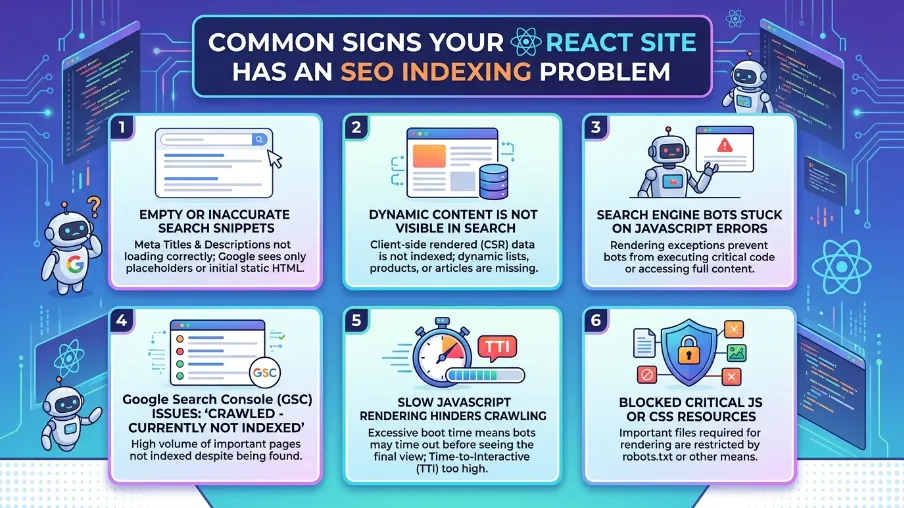
Before fixing anything, let's confirm you actually have this issue. Here are the clearest signs:
- Your homepage doesn't show up when you search your brand name
- Google Search Console shows "Discovered - currently not indexed"
- Pages show "Crawled - currently not indexed" for weeks
- View-source shows an empty or near-empty HTML body
- Meta tags don't appear correctly in search results
- Social media link previews look broken or generic
If you check your page source and see just a <div id="root"></div> with no visible text, that's a big red flag. That's your react app meta tags not showing google issue in action, and it usually means your content depends entirely on JavaScript to appear.
How To Check If Googlebot Sees Your Content
I always recommend doing this test first. It takes two minutes and tells you everything.
- Go to Google Search Console
- Use the URL Inspection Tool
- Enter your page URL
- Click "Test Live URL"
- View the rendered HTML and screenshot
If the screenshot shows a blank page or missing sections, you've confirmed the googlebot not crawling react app problem. This single test saves hours of guessing.
Why Client-Side Rendering Creates SEO Problems
I want to be honest with you here. Client side rendering isn't "bad" for users. It feels fast and smooth. The problem is purely how search engines process it.
Search engines were built around a simple idea: send a request, get back readable content. React changed that model. Now search engines need a browser-like environment just to see your words. This adds cost, time, and risk of failure on Google's end.
This is exactly why the client side rendering seo problem became such a big topic among developers over the past few years. It's not that React is a bad framework. It's that SEO and JavaScript frameworks were never designed with each other in mind from day one.
JavaScript Rendering Delays and Crawl Budget
Every website gets a limited "crawl budget," meaning Google only spends so much time and resources crawling your site. Since JavaScript rendering takes more computing power, Google may choose to render fewer of your pages, especially if your site is large.
This creates a frustrating cycle. Your pages get discovered but not rendered. Not rendered means not indexed. Not indexed means no rankings. No rankings means no traffic, and no reason for Google to prioritize your site next time either.
Proven Fixes for React App SEO Indexing Issues
Now let's get to what actually works. I've tested these approaches myself and with client projects.
1. Server-Side Rendering (SSR)
This is the strongest fix. Instead of sending an empty HTML shell, your server sends fully rendered HTML with all the content already inside it. Googlebot doesn't need to run JavaScript at all for the first wave.
Frameworks like Next.js make this much easier for React developers. This leads many people to compare next js vs react seo indexing, and the results usually favor Next.js for SEO-heavy projects because SSR comes built in.
2. Static Site Generation (SSG)
If your content doesn't change often, static generation is even better. Pages are built once, in advance, as plain HTML files. There's zero rendering delay for Google because the content is already there.
This works great for blogs, documentation sites, and marketing pages built with React.
3. Prerendering for SEO
Can't switch your whole app to SSR right now? Prerendering is a solid middle-ground fix. A prerendering service visits your pages, runs the JavaScript once, and saves the final HTML. When Googlebot visits, it gets that saved HTML instead of the raw JavaScript version.
This is called "React prerendering for seo, and it's often the fastest fix for existing apps without a full rewrite.
4. Dynamic Rendering
Google once recommended dynamic rendering as an official workaround. It detects if a visitor is a bot or a real user. Bots get pre-rendered HTML. Real users get the normal React experience. Google has since said this should be a temporary solution, not a permanent one, but it still helps many sites recover quickly while a bigger fix gets built.
5. Fix Your Sitemap and Robots.txt
Sometimes the issue isn't rendering at all. It's basic technical setup. Check these:
- Is your sitemap.xml submitted in Search Console?
- Does robots.txt accidentally block important pages?
- Are your canonical tags pointing to the right URLs?
I've seen a react app sitemap not indexed issue turn out to be a single blocked folder in robots.txt. Always check the simple stuff first.
React SEO Best Practices To Follow Going Forward
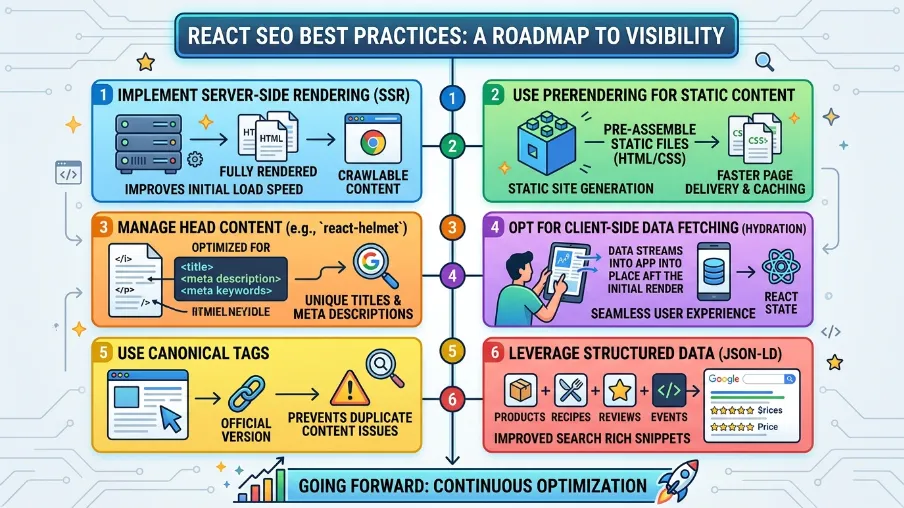
Fixing the current problem is step one. Preventing it from happening again is step two. Here's what I follow on every React project now.
Use Semantic HTML and Proper Meta Tags
React apps often generate meta tags dynamically with JavaScript. Make sure title tags, meta descriptions, and Open Graph tags render on the server, not just the client. Otherwise, search engines and social platforms may show blank previews.
Set Up Structured Data Early
Adding schema markup helps Google understand your content faster and can support featured snippets. It also feeds into answer engines and AI search tools, which is becoming a bigger part of how people find websites today.
Monitor Core Web Vitals
Google uses page experience signals as part of ranking. Slow JavaScript execution can hurt your Core Web Vitals scores, which indirectly affects your react js seo problem even after indexing improves.
Test Regularly With Search Console
Don't just fix it once and forget it. Check the Coverage report weekly. Watch for new "Discovered - currently not indexed" pages after every deployment. New JavaScript bundles can accidentally break rendering again.
Build an Internal Linking Structure
Internal links help Google discover and understand your pages faster. Link your important React pages from your homepage, blog posts, and navigation menu. Strong internal linking often speeds up indexing even before deeper technical fixes are complete.
Single Page Application SEO Indexing: What Actually Works Long-Term
If you're running a full single page application, here's my honest take after years of doing this work.
SPA architecture and SEO can work together, but only with the right setup. You need either SSR, SSG, or reliable prerendering. Skipping this step and hoping Google "figures it out" almost always leads to poor rankings, even if your content is genuinely great.
Google has improved a lot at rendering JavaScript. But "improved" doesn't mean "perfect" or "fast." Treat JavaScript SEO as something you actively manage, not something you assume works by default.
This is exactly the gap tools like Power SEO were built to close. It's an open-source SEO toolkit made specifically for JavaScript-heavy apps like React, helping you handle meta tags, structured data, and rendering issues without rebuilding your entire app from scratch.
Final Thoughts
I know how frustrating this feels. You build something good, and it's like shouting into an empty room. But this problem has clear causes and clear fixes. Once you understand how Googlebot handles JavaScript, the fog starts to clear.
Start with the URL Inspection Tool today. Confirm what Google actually sees. Then pick the fix that matches your situation, whether that's SSR, prerendering, or fixing basic technical settings like your sitemap.
If you want a faster path forward, check out Power SEO, an open-source SEO toolkit built specifically for JavaScript apps like React. It's designed to solve exactly the problems covered in this article, so your hard work finally gets the visibility it deserves.
Your content deserves to be found. Let's make sure Google sees it too.
Frequently Asked Questions About React App Not Indexing Google
Why is my React app not showing up on Google at all?
This usually happens because Googlebot sees an empty HTML page before JavaScript loads your content. Fix this with server-side rendering, static generation, or a prerendering service so Google receives fully-loaded HTML.
How long does it take for a React app to get indexed?
Plain HTML sites often get indexed within days. React apps relying on client-side rendering can take weeks or months, since JavaScript pages go through a slower, separate rendering queue in Google's system.
Is Next.js better than React for SEO?
Next.js includes built-in server-side rendering and static generation, which solves most indexing problems automatically. Plain React apps need extra setup to achieve the same SEO results, so many developers choose Next.js specifically for SEO-heavy projects.
Do I need to rebuild my whole app to fix React SEO issues?
Not always. Prerendering services and dynamic rendering can fix indexing problems without a full rewrite. A complete migration to SSR or SSG offers the strongest long-term results, but it's not always necessary for smaller sites.
How do I check if Googlebot can see my React content?
Use the URL Inspection Tool in Google Search Console. Test the live URL, then check the rendered screenshot and HTML. If your content is missing there, Google isn't seeing it either.

I’m Mitu Das, a JavaScript developer, ERP product architect, and SEO specialist from Bangladesh. I work at CyberCraft Bangladesh, where I help build simple, scalable software, SaaS platforms, and business solutions. My goal is to create technology that helps companies save time, automate daily tasks, and grow faster. I enjoy combining development, product ideas, and SEO strategies to create useful digital solutions for modern businesses.
Writes about
Want this done for you?
Our team builds and ships exactly what this article describes. Send a message and we will reply with a scope.