How to Start an Online Store in 9 Steps (Beginner's Guide 2026)

I still remember the night I stayed up googling "how to start an online store" at 1 a.m. I had a product idea, a laptop, and zero clue where to begin. Sound familiar?
Good news. Starting an online store is easier than it was five years ago. You don't need a warehouse. You don't need a big budget. You don't even need coding skills. Whether you choose a DIY platform or invest in affordable ecommerce website development, you just need the right steps, in the right order.
In this guide, I'll walk you through exactly how to start an e-commerce business from scratch. We'll cover picking a niche, choosing a business structure, finding affordable ecommerce website development options, selecting the best ecommerce platform for beginners, and getting your first sale. By the end, you'll know how to sell products online with confidence, not confusion. Let's get into it.
What Does It Really Take to Start an Online Store
Here's the direct answer, since I know you're busy: to start an online store, you need a product, a target audience, a legal business structure, an ecommerce platform, and a plan to get traffic. That's it. Everything else is detail.
Most people overthink this. They worry about logos before they even have a product that sells. Don't do that. Focus on the basics first. The polish comes later.
The online store industry is huge and still growing fast. The global ecommerce market crossed $4.4 trillion in 2025 and keeps climbing every year. There's room for you in it. But you need a plan that fits your budget and goals, not someone else's. Understanding the e-commerce website development process early on can also help you make smarter decisions, avoid costly mistakes, and build a store that's ready to grow with your business.
How to Start an Online Store in 9 Steps
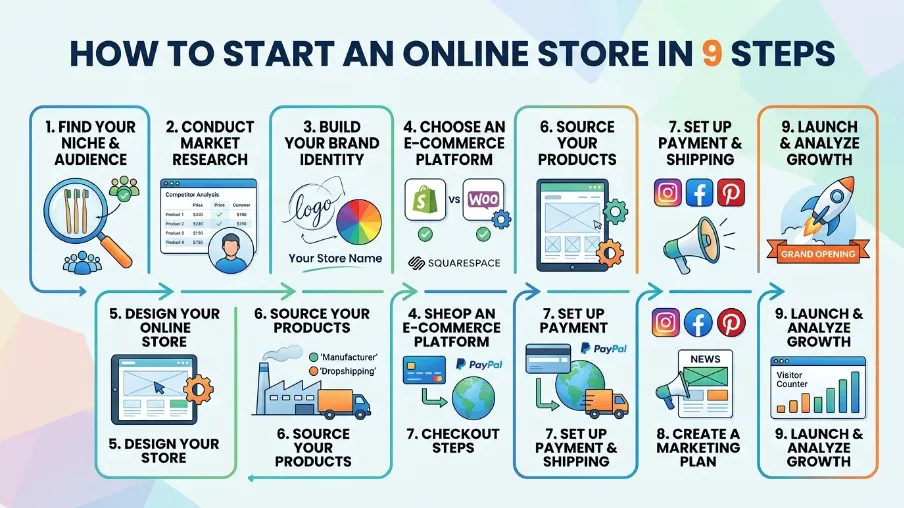
Here's the full roadmap. I'll break down each step so you actually know what to do, not just what to think about.
1. Find Your Product and Niche
Every online store starts with one question: what will you sell?
You have three broad options:
- Physical products : Clothing, home goods, beauty items, anything you ship
- Digital products: ebooks, templates, courses, software
- Services: Coaching, design work, consulting, sold through an online storefront
Pick something you understand well or feel excited about. Passion won't guarantee sales, but it keeps you going when things get slow. Check demand before you commit. Search the product name on Google Trends. Look at Etsy or Amazon to see if similar items already sell well. If nobody is buying anything like it, that's a warning sign, not an opportunity.
If you want to start an online boutique or start an online clothing store, look closely at your local competitors first. Clothing is a crowded space, so a clear style or niche angle helps you stand out.
2. Research Your Target Audience
Your online store target audience is the group of people most likely to buy from you. Not "everyone." Not "women aged 18 to 65." Get specific.
Ask yourself:
- What problem does my product solve?
- Who has that problem right now?
- Where do they spend time online?
- What price feels fair to them?
I know this step feels slow when you just want to launch. But skipping it is the number one reason new stores fail to get traction. A clear audience makes every other decision easier, from your website design to your ad copy.
3. Choose Your Online Business Structure
Before you sell a single item, you need a legal structure. This protects you and keeps your taxes clean.
The most common debate here is LLC vs sole proprietorship.
Sole proprietorship: This is the default if you do nothing else. It's free and simple. But there's a catch: your personal assets and business assets are the same in the eyes of the law. If your business gets sued or racks up debt, your personal savings could be at risk.
LLC (Limited Liability Company): An LLC separates you from your business legally. If something goes wrong, your personal assets usually stay protected. It costs more to set up, and every state charges different fees, but many online sellers see it as worth the cost once sales start growing.
If you're just testing an idea with a few products, a sole proprietorship might be fine to start. If you're serious about scaling, an LLC gives you more protection. Either way, this is one part of your online business structure worth getting right early, since changing it later means more paperwork.
4. Handle Your Business License and Taxes
This step gets skipped a lot, and it shouldn't be.
Depending on where you live and what you sell, you may need an online store business license, a seller's permit, or a sales tax ID. Requirements change by state and country, so check your local government's business website before you launch.
Here's what usually applies:
- Sales tax permit: Needed in most US states if you sell taxable goods
- General business license: Required by many cities and counties
- Home occupation permit : Sometimes needed if you run the store from home
- EIN (Employer Identification Number): Free from the IRS, useful even if you have no employees
I know taxes aren't exciting. But getting this right from day one saves you from fines and headaches later. If you're unsure, a quick call with a local accountant is worth the small cost.
5. Pick the Right Ecommerce Platform
This is the step most beginners stress about, so let's simplify it.
There are three main types of ecommerce platforms.
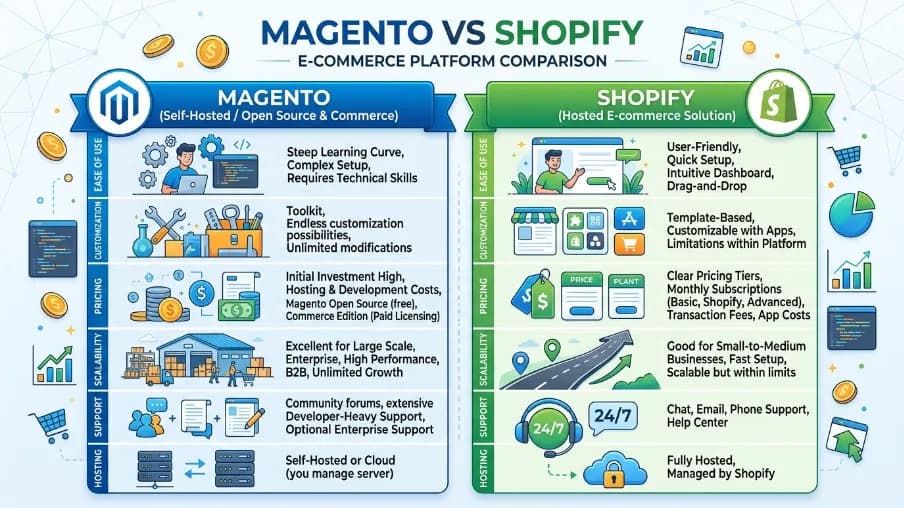
All-in-One Hosted Platforms: Shopify is the most popular example. These platforms bundle hosting, security, and design tools together. You don't manage servers or code. You just add products and start selling. Shopify's plans run from around $39 to $399 a month, and every plan includes hosting, security, and support built in.
Self-Hosted Platforms: WooCommerce is the top example here. It's a free plugin that turns a WordPress site into a store. You control everything, but you also manage your own hosting, security updates, and backups. Costs vary a lot depending on your hosting and plugins, often somewhere between $20 and $100 a month once you add extensions.
No-Cost Builders: Some platforms let you start selling with zero upfront cost, using free plans or marketplace listings. Great for testing an idea before you invest money.
So, WooCommerce vs Shopify: which one should you pick? If you want the fastest setup with less technical work, Shopify is the easier choice for most beginners. If you're comfortable with WordPress and want full control over design and SEO, WooCommerce gives you more flexibility, often at a lower starting cost. There's no single winner here. It depends on your comfort with tech and how much time you want to spend on setup versus selling.
Whatever you pick, this decision shapes your entire business, so don't rush it. If you'd rather have a professional build it right the first time, working with a development team that specializes in ecommerce website development can save you weeks of trial and error.
6. Decide How You'll Sell: Marketplace, Website, or Both
There are two main paths to sell products online: an ecommerce marketplace or your own website.
Marketplaces like Amazon and Etsy already have built-in traffic. People are searching there right now, ready to buy. You don't need to build an audience from scratch. But you're competing with thousands of other sellers, and the platform controls the rules, fees, and customer relationship.
Thinking about Amazon vs Etsy? Amazon works well for a huge range of products and buyers looking for convenience and fast shipping. Etsy fits better for handmade, vintage, or craft-style goods, where buyers want something unique.
Your own website gives you full control over branding, pricing, and customer data. You keep more profit per sale since there's no marketplace commission. The tradeoff is you have to drive your own traffic through SEO, social media, or ads.
Many successful sellers do both. This is called multichannel selling, and it's one of the smartest moves you can make. You list on a marketplace for quick visibility, while building your own website for long-term brand growth. If one channel slows down, the other keeps sales coming in.
7. Set Up Inventory and Fulfillment
How will products get from you to your customer? This comes down to a key choice: dropshipping vs physical products you hold yourself.
Dropshipping: You list products, but a supplier ships them directly to your customer. You never touch the inventory. This lowers your upfront cost a lot, which makes it appealing for beginners. The downside is thinner profit margins and less control over shipping times and quality.
Holding your own inventory: You buy stock upfront and ship it yourself, or use a fulfillment service. This costs more to start, but you control quality, packaging, and delivery speed. Customers tend to trust stores with faster, more reliable shipping.
Whichever route you choose, online store inventory management matters from day one. Even a simple spreadsheet is better than guessing. Most ecommerce platforms include basic inventory tools that track stock levels and alert you before you run out, so use those built-in tools instead of building your own system.
8. Build Your Online Store
Now the fun part. Time to build the ecommerce website itself.
Keep your first version simple. You need:
- A clean homepage that explains what you sell
- Clear product pages with good photos and honest descriptions
- An easy checkout process
- Contact information customers can trust
Don't chase a perfect design before launch. A simple, fast, mobile-friendly store beats a fancy one that takes six months to finish. You can always improve the design after you start getting real customer feedback.
9. Launch and Start Selling Across Channels
Launch day isn't the finish line. It's the start line.
Once your store is live, focus on getting your first sales. Share it with your existing network. Post on social media. List a few items on a marketplace to test demand. Ask early customers for honest feedback and reviews.
Track what's working. Double down on the channels bringing in real traffic and sales. Cut what isn't working. This is how small stores grow into real businesses.
Can You Start an Online Store With No Money
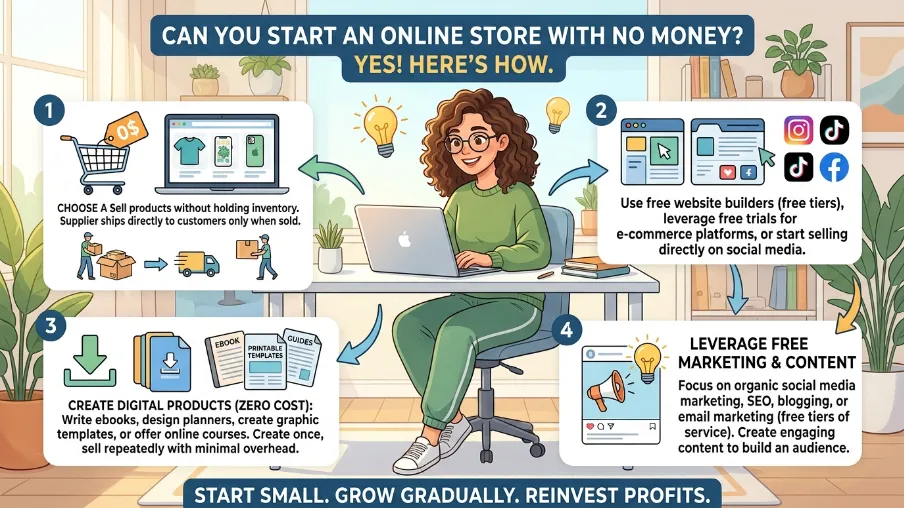
Yes, mostly. You can start a business with no money for platform fees by using free store builders, listing on marketplaces with no monthly cost, or starting with dropshipping so you skip inventory costs. You'll still likely pay small transaction fees or basic hosting costs, but you can genuinely test an idea before spending much at all.
That said, "free" isn't the same as "no effort." You'll trade money for time. Expect to do more manual work, more marketing yourself, and more learning as you go. It's a fair trade if your budget is tight right now.
Which Ecommerce Platform Should Beginners Choose
If you want the single best ecommerce platform to sell online as a true beginner, most experts point to Shopify for its ease of setup and built-in support. If budget and customization matter more to you, and you're comfortable with WordPress, WooCommerce is the stronger pick.
There's no universal answer. Match the platform to your comfort level, your budget, and how much control you want over your store's design and data.
Common Mistakes New Store Owners Make
I've seen these mistakes over and over, so let's name them clearly:
- Picking a product with no real demand
- Skipping the business license and tax setup
- Choosing a platform based on hype instead of fit
- Ignoring mobile shoppers, who make up most online traffic
- Launching with no plan to drive traffic
Avoid these, and you're already ahead of most first-time sellers.
Your Online Store Starts With One Step
Starting an online store isn't about having everything figured out on day one. It's about taking the next right step, then the one after that. Pick your product. Choose your structure. Set up your platform. Launch. Learn. Repeat.
If you want your store built right the first time, without the trial and error, our team at CyberCraft Bangladesh builds custom ecommerce websites designed to convert visitors into customers. Reach out, and let's build your online store together.
Frequently Asked Questions About How to Start an Online Store
How much does it cost to start an online store?
Costs range from nearly free with basic builders and marketplace listings to a few thousand dollars in the first year once you add hosting, apps, and marketing. Your total depends heavily on the platform and products you choose.
What is the easiest way to start an online store?
The easiest way is to pick an all-in-one hosted platform, choose one product to test, and list it while you learn. This lowers the learning curve compared to building a self-hosted website from scratch.
Do I need an LLC to sell online?
No, you can start as a sole proprietor. But an LLC gives you legal protection for your personal assets, which becomes more valuable as your sales grow.
Is dropshipping a good way to start an online store?
Dropshipping is a low-cost way to test product ideas without holding inventory. It works well for beginners, though profit margins are usually thinner than selling your own stock.
Should I sell on a marketplace or my own website?
Many sellers do both. Marketplaces like Amazon and Etsy bring instant traffic. Your own website builds long-term brand value and keeps more profit per sale.

I’m Mitu Das, a JavaScript developer, ERP product architect, and SEO specialist from Bangladesh. I work at CyberCraft Bangladesh, where I help build simple, scalable software, SaaS platforms, and business solutions. My goal is to create technology that helps companies save time, automate daily tasks, and grow faster. I enjoy combining development, product ideas, and SEO strategies to create useful digital solutions for modern businesses.
Writes about
Want this done for you?
Our team builds and ships exactly what this article describes. Send a message and we will reply with a scope.