React vs WordPress for SEO in 2026: A Complete Developer's Guide

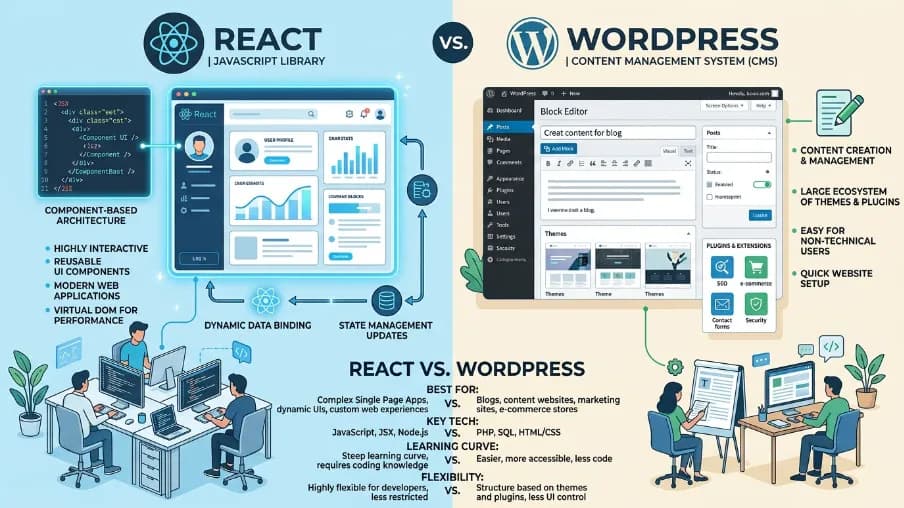
When comparing React vs WordPress, the better choice depends on the type of project you’re building and who will manage it long term. WordPress is better for content-heavy websites managed by non-developers because it offers an easy publishing workflow, thousands of plugins, and minimal technical overhead. On the other hand, React (through frameworks like Next.js or Gatsby) is better suited for custom web apps, SaaS platforms, and development teams that need full control over performance, scalability, and SEO pipelines. In the React vs WordPress debate, neither option is universally superior; the right choice depends on your team’s technical expertise, content volume, customization needs, and long-term growth strategy. Businesses building modern web applications often also rely on a React SEO tool to improve metadata management, server-side rendering, structured data, and search engine visibility for React-based websites.
What Is React (and Why Developers Love It)
React is a JavaScript library built by Meta in 2013. It doesn't build entire websites on its own it powers the user interface layer. To get a full production site, you pair React with a framework:
- Next.js the most popular choice; handles SSR, SSG, routing, and API routes
- Gatsby optimized for static sites and content-heavy blogs
- Remix newer, edge-first alternative with full-stack routing
React's component model means you write a <ProductCard /> once and reuse it across 1,000 pages. That's its superpower. The tradeoff: there's no built-in content editor, no default SEO layer, and no GUI for marketers. Everything has to be built or configured.
What Is WordPress (and Why It Still Powers 43% of the Web)
WordPress is a PHP-based Content Management System released in 2003. It started as a blogging platform and evolved into a full publishing and e-commerce engine. In 2026, it powers roughly 835 million websites from personal blogs to enterprise news platforms.
What makes WordPress sticky:
- Zero-code publishing editors create, edit, and schedule content without touching code
- 54,000+ plugins SEO, e-commerce, forms, analytics, all available in one click
- Themes thousands of visual templates that work out of the box
- WooCommerce a complete e-commerce layer built on top of WordPress
- Yoast SEO / RankMath GUI-driven SEO tools that non-developers can operate on day one
The tradeoff: PHP rendering, plugin conflicts, and increasing performance debt as sites age.
React vs WordPress Side-by-Side Comparison (2026)
| Factor | React (Next.js) | WordPress | Winner |
|---|---|---|---|
| Setup time | Days to weeks | Hours to days | WordPress |
| Content editing | Custom admin UI required | Built-in Gutenberg editor | WordPress |
| SEO out of the box | Manual setup (excellent ceiling) | Yoast/RankMath (easy floor) | Tie |
| TypeScript support | Native | No | React |
| Performance (TTFB) | 50–80ms (Vercel Edge) | 100–800ms | React |
| Core Web Vitals | Consistently green | Varies (plugin-dependent) | React |
| Security | Minimal attack surface | 90%+ of CMS hacks target WP | React |
| Plugins / ecosystem | npm (1M+ packages) | 54,000+ WP plugins | WordPress |
| Hosting cost (3 yr) | ~$0–$50/mo (Vercel/Netlify) | $20–$200/mo + maintenance | React |
| Non-dev friendly | Requires developer | Anyone can manage | WordPress |
| Scalability | Virtually unlimited | Requires caching + tuning | React |
| Best for | SaaS, apps, custom stores | Blogs, news, SMB sites | Depends |
React vs WordPress for SEO The Honest Breakdown
Rendering: The #1 SEO Factor
Google can crawl JavaScript, but it takes longer sometimes days. Here's how each approach stacks up:
| Rendering Method | Googlebot Sees HTML? | Indexing Speed | Recommendation |
|---|---|---|---|
| WordPress (PHP) | Immediately | Fast | Good baseline |
| Next.js SSR | Immediately | Fast | Best of both worlds |
| Next.js SSG | Pre-built HTML | Fastest | Best for content sites |
| Client-side React (CRA) | Blank page initially | Slow/Inconsistent | Avoid for SEO |
| Gatsby | Pre-built HTML | Fastest | Strong for blogs |
The key takeaway: React can be an SEO disaster or an SEO powerhouse it depends entirely on your rendering strategy. WordPress renders server-side by default, so it has a safer floor. Next.js with SSR/SSG matches or exceeds that ceiling.
Core Web Vitals: Where React Wins
Google's Core Web Vitals (LCP, INP, CLS) are confirmed ranking signals. Here's what real-world data shows:
- Next.js on Vercel Edge: LCP under 1.2s, INP under 100ms in most configurations
- WordPress (optimized, WP Engine/Kinsta): LCP 1.5–2.5s with heavy caching
- WordPress (unoptimized/shared hosting): LCP 3–6s a guaranteed rankings penalty
Plugin bloat is the silent killer. Every additional WordPress plugin adds HTTP requests, JavaScript, and CSS. After 30+ plugins (common for mature sites), even well-cached WordPress sites struggle to reach green CWV scores.
Meta Tags & Structured Data
WordPress + Yoast/RankMath:
- GUI-driven marketers set title templates, meta descriptions, and focus keywords without developer help
- Auto-generates sitemaps on publish
- Injects Article, Product, and Organization schema automatically
- Risk: two active SEO plugins = duplicate meta tags in production
React + @power-seo/react:
- TypeScript-first: compile-time errors catch malformed robots directives before they ship
- Environment-driven noindex (one env variable, every page inherits)
- JSON-LD breadcrumbs, hreflang alternates, Open Graph all from a single declarative API
- Risk: no GUI means developers must build or maintain the SEO layer
The Verdict on SEO
React (Next.js) has a higher SEO ceiling. WordPress has a safer floor. For developer-owned projects, React + a structured SEO library is the better long-term bet. For teams where marketers own the content pipeline, WordPress + Yoast/RankMath gets you 80% of the way there with zero developer involvement.
React vs WordPress Security Comparison
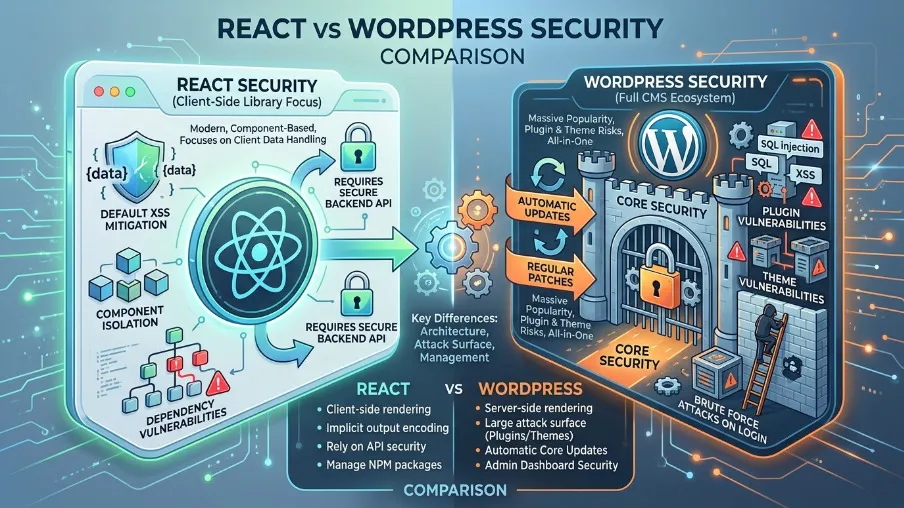
This is one of the most under-discussed differences between the two platforms.
WordPress Security Reality:
- WordPress-based sites account for over 90% of all CMS-based hacks, according to Sucuri's annual report
- The attack surface is large: PHP core + plugins + themes + database + wp-admin login
- Common vulnerabilities: outdated plugins, nulled themes, brute-force login attacks, SQL injection
- Mitigation: security plugins (Wordfence, Solid Security), 2FA, WAF, regular updates all require active maintenance
React / Next.js Security Reality:
- No PHP, no wp-admin, no database exposed to the front end
- Static builds have virtually zero runtime attack surface there's no server to compromise
- API routes in Next.js need proper authentication (same as any backend)
- Secrets managed via environment variables, not
.htaccessfiles
Practical implication: If you're running a WordPress site with WooCommerce and storing customer data, your security maintenance burden is ongoing and significant. A Next.js frontend talking to a headless CMS or custom API dramatically reduces that surface area.
Total Cost of Ownership React vs WordPress Over 3 Years
Sticker price comparisons miss the point. Here's what things actually cost:
WordPress (Mid-size Business Site):
| Cost Item | Annual Estimate |
|---|---|
| Managed hosting (WP Engine/Kinsta) | $300–$1,800 |
| Premium plugins & themes | $200–$600 |
| Developer maintenance retainer | $600–$2,400 |
| Security incident (average) | $500–$3,000 (once every 2–3 yrs) |
| 3-year total | $3,000–$15,000+ |
Next.js (Developer-Built Site):
| Cost Item | Annual Estimate |
|---|---|
| Vercel/Netlify hosting | $0–$240 |
| Headless CMS (Sanity, Contentful) | $0–$600 |
| Initial build (one-time) | $3,000–$8,000 |
| Maintenance (minimal) | $0–$600 |
| 3-year total | $3,000–$11,000 |
React has higher upfront build costs but lower ongoing costs. WordPress is cheap to start but accumulates maintenance debt. At the 3-year mark, the total cost is often similar but the React site typically performs faster and requires less babysitting.
The Headless WordPress Option Best of Both Worlds
Here's a decision most guides ignore: you don't have to choose one or the other.
Headless WordPress uses WordPress purely as a backend CMS (for its excellent editing UI and plugin ecosystem) while serving the front end via a React/Next.js application. Your editors get the familiar WordPress dashboard. Your users get a blazing-fast React frontend.
How it works:
- WordPress runs on your server, invisible to end users
- Content is served via the WordPress REST API or GraphQL (WPGraphQL plugin)
- Next.js fetches content at build time (SSG) or request time (SSR)
- Your domain serves the Next.js app React performance, WordPress editorial workflow
When headless WordPress makes sense:
- Your marketing team is deeply invested in the WordPress editing experience
- You need React performance and custom UI components
- Your site has significant content velocity (10+ posts/week)
- You need custom integrations that WordPress plugins handle well (WooCommerce, ACF, Gravity Forms)
Tradeoffs:
- Significantly more complex to set up and maintain
- Some plugins (live preview, page builders) don't work seamlessly headless
- Requires both a WordPress developer and a React developer
- Hosting costs double (WordPress server + Next.js hosting)
Best tools for headless WordPress in 2026: WPGraphQL, Faust.js, Frontity (deprecated but worth knowing), Next.js App Router with @wordpress/blocks
Use Case Decision Guide Which One Is Right for You
Choose React (Next.js/Gatsby) if:
You're building a SaaS application or web app with user authentication
Your team has React/TypeScript expertise and can maintain the codebase
You need multi-locale support with programmatic hreflang management
Performance is non-negotiable e-commerce conversion rates, PWA requirements
You want CI/CD-native SEO robots directives in pull requests, not admin panels
Your content is data-driven (pulled from APIs, databases, or custom back ends)
You're building a design-system-driven site where every pixel is custom
Choose WordPress if:
Your team includes non-technical content editors who publish frequently
You need to launch fast with a limited budget (theme + plugins beats custom build)
You're running a blog, news site, or marketing site with standard content types
You rely on WooCommerce for e-commerce and want plugin interoperability
You need readability scoring, SEO audits, and schema injection without writing code
Your organization doesn't have a React developer on staff or retainer
Choose Headless WordPress if:
You have editors who love WordPress but your site needs React performance
You're migrating an existing WordPress site and can't retrain the team
You need WooCommerce + custom React UI for a high-conversion store
Migrating from WordPress to React: What to Know Before You Start

If you're considering migration, here are the critical checkpoints:
1. Audit your content dependencies first.
List every plugin your site uses. Some (contact forms, membership systems, WooCommerce) have no direct React equivalent and require custom rebuilds.
2. Export your SEO data before touching the site.
Use Screaming Frog or your sitemap to catalog all indexed URLs, title tags, meta descriptions, and canonical URLs. These must be replicated exactly in your React app during migration.
3. Implement redirects systematically.
If your URL structure changes, every redirect you miss is a lost ranking. Use a tool like Ahrefs or SEMrush to identify which URLs have external backlinks those need 301 redirects, not 404s.
4. Plan for content editor retraining (or use headless).
If you move to a pure React stack, your editors need a headless CMS. Options: Sanity (excellent developer experience), Contentful (enterprise-grade), Payload CMS (open-source, self-hosted), or Ghost (ideal for content-focused publications).
5. Expect 3–6 months for full ranking stabilization.
Even a perfect technical migration temporarily disrupts rankings. Google re-evaluates page quality signals when content moves. This is normal don't panic at month 2.
Bottom Line React vs WordPress in 2026
There is no universally correct answer. Here's the honest verdict by team type:
If you're a solo developer or small dev team building a product: React + Next.js. The performance ceiling, TypeScript safety, and CI/CD-native workflow will save you significant time and headaches over 2–3 years. The upfront investment in setup pays dividends in speed, security, and scalability.
If you're a marketing team or content-led business: WordPress with Yoast or RankMath. The no-code SEO tooling, familiar editing interface, and massive plugin ecosystem let you move fast without developer bottlenecks. You'll trade some performance headroom for operational efficiency a reasonable trade for most content businesses.
If you're an enterprise with both priorities: Headless WordPress. It's complex, but it's the architecture that major media companies and large e-commerce brands converge on precisely because it solves the "editorial experience vs. frontend performance" tension directly.
The worst thing you can do is pick based on developer preference or marketing hype alone. Map your team's skills, your content workflow, your budget horizon, and your performance requirements the right answer will emerge from those four constraints, not from which framework is trending on Twitter.
Frequently Asked Questions About React vs WordPress
Is WordPress still relevant in 2026?
Yes. WordPress powers over 43% of all websites on the internet as of 2026 and remains the dominant CMS for content-driven sites. While React/Next.js has grown significantly in enterprise adoption, WordPress remains the clear choice for teams that need fast deployment and non-developer content management. "WordPress is dead" is a developer opinion, not a market reality.
Can React rank on Google as well as WordPress?
Yes but only with the right rendering strategy. Client-side-only React (a plain Vite or CRA app) can underperform because Googlebot may receive a blank HTML page on first crawl. Next.js with SSR or SSG solves this completely: Googlebot receives fully-rendered HTML, exactly like WordPress. With a proper SEO library, React sites can outperform WordPress on Core Web Vitals and TTFB.
Is WordPress faster than React?
No. React (Next.js) consistently outperforms WordPress on speed metrics. Next.js on Vercel Edge achieves 50–80ms TTFB. WordPress on managed hosting (WP Engine, Kinsta) achieves 100–200ms with heavy caching. WordPress on shared hosting can be 400–800ms a guaranteed Core Web Vitals failure. React has the clear performance ceiling.
Which is better for e-commerce React or WordPress?
It depends on scale. For most small-to-mid-size stores, WooCommerce (WordPress) is faster to launch and has a massive plugin ecosystem for payments, shipping, and tax. For high-traffic, high-conversion stores where milliseconds matter, Next.js with a headless commerce solution (Shopify Hydrogen, CommerceJS, or custom) delivers better performance and more flexibility. Many large brands run headless WooCommerce the best of both.
Does React hurt SEO?
Client-side-only React can hurt SEO. Next.js with SSR or SSG does not. The confusion comes from early React apps (pre-Next.js) that relied entirely on client-side JavaScript rendering, which Googlebot handled inconsistently. In 2026, Next.js is the standard choice for React sites where SEO matters and it renders server-side by default.
How much does it cost to build a React site vs WordPress site?
A WordPress site with a premium theme and plugins: $500–$3,000 to launch. A custom Next.js site: $5,000–$25,000+ depending on complexity. However, over 3 years the total cost of ownership converges React's lower hosting and maintenance costs offset the higher initial build investment. For sites with heavy content velocity or complex marketing workflows, WordPress often costs less overall.
What is headless WordPress?
Headless WordPress means using WordPress as a backend CMS (for its editor, plugins, and database) while serving the frontend via a separate React/Next.js application. Editors use the familiar WordPress dashboard. Users see a React-powered frontend. Content is delivered via the WordPress REST API or GraphQL. It's a popular middle-ground for teams who want WordPress usability with React performance.

I’m Mitu Das, a JavaScript developer, ERP product architect, and SEO specialist from Bangladesh. I work at CyberCraft Bangladesh, where I help build simple, scalable software, SaaS platforms, and business solutions. My goal is to create technology that helps companies save time, automate daily tasks, and grow faster. I enjoy combining development, product ideas, and SEO strategies to create useful digital solutions for modern businesses.
Writes about