Server Side Rendering (SSR) in React for SEO: Complete free SEO tools Guide (2026)


Server Side Rendering (SSR) in React for SEO means generating a page's HTML on the server first. The server sends that HTML to the browser before any JavaScript runs. This makes content, headings, links, and metadata available right away. Search engines can then crawl and index the page without waiting on client-side JavaScript.
This guide explains how SSR works in React and Next.js, walks through the trade-offs against client-side rendering (CSR) and static site generation (SSG), and shows how free open source SEO tools can help you evaluate which pages on your project actually need server-side rendering.
For context on scale: JavaScript now runs on the vast majority of websites, 97.6% as of W3Techs' most recent tracking. That's why how that JavaScript gets rendered, on the server or in the browser, matters so much for SEO.
I've implemented Server Side Rendering (SSR) in React for SEO on production React and Next.js sites, spanning ecommerce, blogs, and marketing sites across a range of client projects. The instinct I bring to every SSR migration is to verify the results against real crawl and performance data rather than assume a framework default is doing the right thing quietly in the background.
Published: May 6, 2026. Last updated: August 16, 2026. This guide is reviewed and refreshed whenever React, Next.js, or Google's Core Web Vitals guidance changes materially; see the Update Log at the end.
Key Takeaways
SSR renders React content on the server, making important page content available in the initial HTML response.
It reduces, but doesn't remove, dependence on client-side JavaScript for search engines to access important content.
In most cases I've observed, SSR improves the initial loading experience: users get meaningful HTML before the full app becomes interactive.
It tends to work well for SEO-focused pages: blogs, product pages, category pages, landing pages, and news content.
SSR does not guarantee higher rankings or indexing. Google's own JavaScript SEO guidance makes clear that content quality, links, technical SEO, and page experience remain independent ranking factors. Mainly, SSR affects whether your content is reliably discoverable, not whether it's rewarded once found.
What Is Server-Side Rendering (SSR) in React for SEO? (Definition Explained)
Server-Side Rendering (SSR) in React for SEO means generating a page's HTML on the server before sending it to the browser. This puts important content, headings, links, metadata, and structured data into the initial HTML response. Search engines can access these elements without depending entirely on client-side JavaScript rendering.
How Does SSR in React Improve SEO?
SSR in React can improve SEO by placing important page content in the initial HTML response. Search engines can access headings, links, metadata, content, and structured data without relying entirely on client-side JavaScript. However, SSR does not guarantee higher rankings because relevance, content quality, crawlability, links, technical SEO, and page experience also matter. This is the core of server side rendering SEO: important page content is available in the initial HTML before the browser completes JavaScript execution.
Google's Core Web Vitals guidance sets three "Good" thresholds at the 75th percentile of page loads. Largest Contentful Paint (LCP, the time it takes for the biggest visible element to load) should be 2.5 seconds or less. Interaction to Next Paint (INP, how quickly the page responds after a click or tap) should be 200 milliseconds or less. Cumulative Layout Shift (CLS, how much content jumps around while loading) should be 0.1 or less. These metrics help explain why SSR matters for React SEO: SSR can improve the delivery of meaningful HTML, which supports a faster initial page experience. INP officially replaced First Input Delay (FID) as the third Core Web Vital on March 12, 2024, after roughly a year running as an experimental metric.
Field data behind these thresholds comes from the Chrome UX Report (CrUX), which aggregates real-user measurements rather than lab simulations. That's why scores can differ from what a single Lighthouse run in a browser shows.
Those thresholds matter because most sites still miss them. As of July 2025 CrUX data, HTTP Archive's 2025 Web Almanac reported that only 48% of mobile origins and 56% of desktop origins passed all three Core Web Vitals. Mobile's figure is up from 32% in 2021, per the same tracking. That's real progress. Still, more than half the mobile web fails Google's "good" page-experience assessment.
Is SSR Better Than Client-Side Rendering (CSR) for SEO?
Generally, yes: Server Side Rendering (SSR) in React for SEO is better suited to public, SEO-focused pages than CSR. To understand why, it helps to know how each works. SSR provides meaningful HTML in the initial response. CSR may require JavaScript to run first before important content becomes available. Google can crawl and index JavaScript-rendered content, but SSR reduces dependence on that rendering process and makes content delivery more predictable.
Google's crawl-budget documentation explains that this mainly matters for very large sites: sites with roughly 1 million or more unique pages that change at least weekly, or sites with 10,000+ pages that change daily. Smaller sites generally don't need to worry about crawl budget (the amount of time and resources Google devotes to crawling a given site).
In my experience, Server Side Rendering (SSR) in React for SEO is most clearly worth the added complexity for blogs, ecommerce pages, and landing pages, which depend heavily on organic traffic. For internal tools or logged-in dashboards, SSR is rarely worth the extra complexity. That trade-off matters more every year as mobile devices continue to make up a large and growing share of web traffic, while mobile connections and hardware tend to be more sensitive to rendering delays than desktops.
Does React SSR Improve Google Indexing and Search Rankings?

React SSR can make important content more reliably accessible to Google by placing it in the initial HTML response, but it does not guarantee indexing or higher rankings. Search visibility still depends on relevance, content quality, crawlability, internal and external links, technical SEO, and page experience. SSR mainly improves content discoverability.
How Do You Implement SSR in React for SEO? A Step-by-Step Explanation
Implementing SSR in React involves rendering important page content on the server and returning the generated HTML before client-side JavaScript runs. You can use React's server-rendering APIs or a framework such as Next.js. Include essential metadata, canonical URLs, structured data, headings, and internal links, then verify the rendered result with Google Search Console.
Step 1: Choose your rendering approach. Decide between React's built-in server-rendering APIs or a framework such as Next.js.
Step 2: Render content and metadata server-side. Include server-rendered metadata, canonical URLs, structured data, headings, and internal links so search engines can access essential SEO signals immediately.
Step 3: Verify with real crawl data. Use tools like Google Search Console to confirm the rendered HTML matches what you intended.
The detailed workflow is explained step by step later in this guide.
Methodology: How This Guide Was Put Together
Before diving into the technical detail, here's a note on where the claims in this guide come from, so you can weigh them appropriately.
What I tested directly: hands-on migrations from CSR to SSR and Next.js on client sites, tracking Google Search Console indexing and Core Web Vitals before and after each change. I don't trust a single before/after snapshot to tell the real story: crawl and performance data is noisy week to week, so I track it over several weeks before drawing conclusions.
Tools used: Google Search Console, PageSpeed Insights and Lighthouse, and framework-level analytics (for example, Next.js's built-in tooling).
Evaluation criteria: indexing coverage in Search Console, the three Core Web Vitals (LCP, INP, CLS) at the 75th percentile, and Time to First Byte (TTFB, how long the browser waits for the server's first response byte).
What's sourced from documentation versus observed: Google's Core Web Vitals thresholds, crawling and rendering behavior, and structured-data recommendations are cited from Google's public developer documentation, linked throughout this guide. They are not from my own experiments, and I've kept those two categories of claim separate.
Scope and limitations: this reflects experience with small-to-mid-size React and Next.js sites. Results on very large sites (100k+ pages) or highly personalized apps may differ, and I haven't tested at that scale myself.
Assumptions: this guide assumes a public-facing site where organic search is a meaningful traffic source. If your app is entirely behind a login wall, most of the SEO-specific reasoning here doesn't apply, though the performance reasoning still does.
How Does Server-Side Rendering Work in React? (Explained Step by Step)
React SSR works by receiving a request and rendering the React component tree on the server, then returning the resulting HTML to the browser. The browser can display that HTML before React finishes downloading and executing the JavaScript bundle. React then hydrates the existing markup (attaches event listeners and interactivity to HTML that already exists in the DOM) and adds client-side interactivity. React 19, released December 5, 2024, added native hoisting of <title>, <meta>, and <link> tags into the document <head> during server rendering; earlier versions needed a framework's head-management component to handle that task.
Step 1: The user requests a React page. Step 2: The server receives the request. Step 3: React renders the required components on the server. Step 4: The server sends the generated HTML to the browser. Step 5: That HTML displays right away in the browser. Step 6: JavaScript downloads and executes in the background. Step 7: React hydrates the existing HTML and attaches interactive behavior.
React provides server-rendering APIs such as renderToString() and, in modern React, streaming APIs such as renderToPipeableStream() for Node.js and renderToReadableStream() for Web Streams runtimes like Cloudflare Workers or Deno. Server Side Rendering (SSR) in React for SEO can use these APIs to send HTML to the browser before the full page finishes rendering. React 18 introduced streaming SSR APIs, letting HTML get sent progressively instead of waiting for the entire page to finish rendering. In my experience, this matters most on pages with slow data fetches, where the alternative is a blank screen until everything resolves.
Basic SSR With React's Built-In API (Code Example)
import { renderToString } from 'react-dom/server';
import App from './App';

app.get('/', (req, res) => {
  const html = renderToString(<App />);

  res.send(`
    <!DOCTYPE html>
    <html>
      <head><title>My SSR App</title></head>
      <body>
        <div id='root'>${html}</div>
        <script src='/bundle.js'></script>
      </body>
    </html>
  `);
});
I reach for renderToString() when I want key content available in the very first server response. This is what supports what's sometimes called React dynamic rendering SEO: it reduces dependence on client-side JavaScript for that content specifically.
SSR Workflow, Step by Step: What Happens When a User Visits an SSR Page
Here's what happens when a user visits an SSR-powered React page:
Step 1: User types the URL; browser sends a GET request to your server. Step 2: Server receives the request and executes your React components with required data. Step 3: React generates the complete HTML markup on the server. Step 4: Server sends the fully rendered HTML document to the browser. Step 5: Browser displays the content immediately. Step 6: JavaScript bundle downloads in the background. Step 7: React hydration runs and attaches event listeners to existing HTML.
Next.js: A Practical Guide to Understanding SSR in Practice
Next.js is where most teams actually put Server Side Rendering (SSR) in React for SEO into production. You can implement SSR manually, but most teams, mine included, move to Next.js because it handles routing, data fetching, hydration, and caching without custom infrastructure. Next.js introduced the App Router in version 13 (October 2022) and marked it stable and recommended for production in version 13.4 (May 2023). When I moved a Pages Router site to the App Router, I held off for a few months after the stable release, wanting to see other teams hit the edge cases first rather than being the one finding them. By the time I made the switch, most of the caching quirks I'd read about had already been patched, which made the actual migration far less eventful than I'd braced for.
How the App Router Renders Server Components
Next.js's App Router renders Server Components by default, no special API call needed:
async function BlogPost({ params }: { params: { slug: string } }) {
  const post = await fetch(
    `https://api.example.com/posts/${params.slug}`,
    { cache: 'no-store' }
  ).then(r => r.json());

  return (
    <article>
      <h1>{post.title}</h1>
      <p>{post.content}</p>
    </article>
  );
}

export default BlogPost;
How the Pages Router Approach Works
The older Pages Router uses getServerSideProps to fetch data on each request:
export async function getServerSideProps({ params }) {
  const post = await fetch(
    `https://api.example.com/posts/${params.slug}`
  ).then(r => r.json());

  return { props: { post } };
}

export default function BlogPost({ post }) {
  return (
    <article>
      <h1>{post.title}</h1>
      <p>{post.content}</p>
    </article>
  );
}
Understanding the React SEO Layer: Structured Metadata Explained
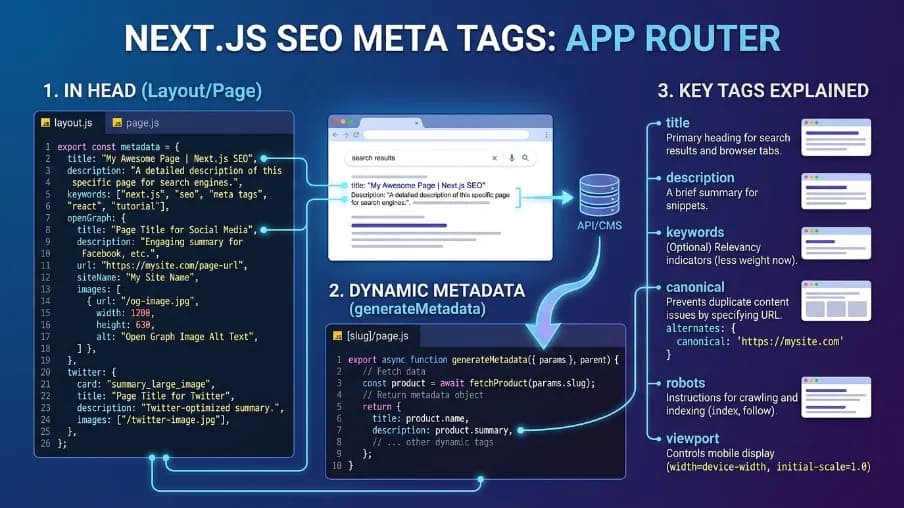
SSR alone isn't sufficient. In Server Side Rendering (SSR) in React for SEO, search engines also need to cleanly parse your metadata. If they can't, you lose a meaningful part of the SEO benefit. A structured SEO layer handles this systematically instead of scattering <title> and <meta> logic across every page.
Illustrative Example: How to Set Up a Metadata Library (Not an Endorsement)
The example below uses one free open-source SEO tool purely to illustrate the pattern. Any comparable metadata library works the same way conceptually; the point is understanding the approach, not this specific tool.
npm install @power-seo/react @power-seo/core
# or
yarn add @power-seo/react @power-seo/core
# or
pnpm add @power-seo/react @power-seo/core
How App-Level Defaults Work
import { DefaultSEO, SEO } from '@power-seo/react';

function App() {
  return (
    <DefaultSEO
      titleTemplate="%s | My Site"
      defaultTitle="My Site"
      description="The best site on the internet."
      openGraph={{ type: 'website', siteName: 'My Site' }}
      twitter={{ site: '@mysite', cardType: 'summary_large_image' }}
    >
      <Router>
        <Routes />
      </Router>
    </DefaultSEO>
  );
}
How Per-Page Metadata Works
function ProductPage({ product }) {
  return (
    <>
      <SEO
        title={product.name}
        description={product.summary}
        canonical={`https://acme.com/products/${product.slug}`}
        openGraph={{
          type: 'website',
          images: [{ url: product.image, width: 1200, height: 630, alt: product.name }],
        }}
      />
      <main></main>
    </>
  );
}
SSR vs. CSR: A Comparison to Help You Understand the Difference
Factor | SSR | CSR |
|---|---|---|
Initial HTML | Full HTML on first load | Empty shell, JS fills it |
SEO Crawlability | Generally strong, near-instant content | More variable, delayed content |
First Contentful Paint | Usually fast, content appears quickly | Usually slower, waits for JS |
Time to First Byte | Slightly higher | Very low |
Server Load | Higher (renders per request) | Lower (serves static files) |
Complexity | Higher setup complexity | Simpler to start |
Best For | SEO pages, blogs, ecommerce | Dashboards, internal tools |
SEO Comparison: How SSR and CSR Differ for Search Engines
This is really the practical core of Server Side Rendering (SSR) in React for SEO: what Google actually sees, and when. When SSR is used, Google receives complete HTML immediately (text, headings, meta tags, structured data) with the initial response. Per Google's JavaScript SEO guidance, client-rendered content may require a separate rendering pass before it's processed, which introduces a delay that isn't guaranteed to happen quickly at scale. In my experience, this gap shows up most clearly on large sites, where Google's rendering queue can lag behind the crawl queue by days rather than seconds.
Performance Comparison: Understanding LCP, INP, and CLS in SSR
Performance is the other half of Server Side Rendering (SSR) in React for SEO, alongside crawlability. Google recommends targeting an LCP of 2.5 seconds or less at the 75th percentile. With React Server Components and streaming SSR, content can arrive progressively rather than all at once. For SEO specifically, SSR's main value is making crawlable content available immediately. CSR's improvements mostly show up in post-load interactivity, which search engines weigh differently than users do.
The underlying JavaScript load keeps growing regardless of the rendering strategy. In Server Side Rendering (SSR) in React for SEO, this is a separate issue from where the HTML is generated, but it can compound an SSR setup that still ships a large client bundle for hydration.
Why Is SSR Important for SEO? A Clear Explanation
SSR is important for SEO because it places the main page content in the initial HTML response instead of making it entirely dependent on browser-side JavaScript. This can make content discovery more reliable for search engines, especially on public pages such as blogs, ecommerce pages, landing pages, service pages, and news articles.
Google's Core Web Vitals guidance (LCP ≤2.5s, INP ≤200ms, CLS ≤0.1 at the 75th percentile) and its statements that page experience can influence search visibility are both documented in Google's own developer resources; see the Sources section at the end of this guide. Server Side Rendering (SSR) in React for SEO can also help improve the delivery of initial page content, making performance an important consideration when optimizing React applications. INP itself only became the official third metric on March 12, 2024, a reminder that even the measurement bar for "good" performance keeps moving.
Challenges of Server-Side Rendering (SSR) in React for SEO Explained

No guide to Server Side Rendering (SSR) in React for SEO is complete without the downsides. Being direct about the trade-offs, based on what's actually broken on projects I've worked on:
Performance overhead: every request re-executes components and re-fetches data, which scales server cost with traffic in a way static files don't. This overhead compounds with a broader industry trend: the median mobile web page has grown substantially over the past decade, and JavaScript now makes up a large share of that median page weight.
Implementation complexity: hydration mismatches, where server-rendered HTML disagrees with what the client renders, are a common and genuinely hard-to-debug SSR bug class. Date formatting, locale-dependent content, and
Math.random()in render logic are the usual culprits I've seen.Browser-API pitfalls: code referencing
window,document, or other browser-only globals throws an error on the server. Guard it to run only after the component mounts client-side (for example, insideuseEffect).Caching requirements: without CDN caching, a cache layer (such as Redis) for expensive fetches, and correct cache-control headers, SSR can become the bottleneck it was meant to solve.
Best Practices for Understanding and Implementing SSR in React
These are the practices that consistently pay off across the Server Side Rendering (SSR) in React for SEO projects I've worked on:
Cache SSR pages at the CDN edge when they lack user-specific data. This gets you close to SSG-level speed without sacrificing freshness for pages that do need per-request data.
Code-split by route and fetch API data in parallel to reduce server and hydration delays.
Target Core Web Vitals at the 75th percentile: LCP ≤2.5s, INP ≤200ms, CLS ≤0.1, per Google's published thresholds. Mobile pass rates for all three combined climbed from 32% of origins in 2021 to 48% in 2025, according to CrUX data reported in HTTP Archive's Web Almanac: steady progress, but still short of a majority.
Add JSON-LD structured data server-side. Google names JSON-LD as its recommended structured-data format over Microdata or RDFa specifically because it can be injected as a single script block without altering visible HTML, which server rendering makes straightforward. Follow Google's general structured data guidelines so your markup stays eligible for rich results.
When to Use SSR and When to Skip It: A Practical Guide
Deciding where Server Side Rendering (SSR) in React for SEO belongs in your app comes down to one question: does this page depend on organic search?
Use SSR for:
Public marketing and landing pages
Blog posts and long-form articles
Ecommerce product and category pages
News and time-sensitive content
Any page whose traffic depends on organic search
Pages where content changes per request (personalization, live pricing)
Skip SSR for:
Internal dashboards and admin panels (behind login, not crawled)
Authenticated user pages (cart, profile, settings)
Heavy interactive data tools where SEO is irrelevant
Internal-only company tools
Next.js supports mixing all three models in a single app: SSR for public pages, SSG for stable content, CSR for logged-in areas. In practice, that mix is how most production apps I've worked on are actually built; very few sites are "pure SSR."
SSR vs. Static Site Generation (SSG): Understanding the Difference
The last comparison worth understanding in Server Side Rendering (SSR) in React for SEO is SSR against SSG, since the two are often confused. SSG builds every page's HTML once, at build time, and serves it from a CDN, making it very fast, but content can become stale until the next build. SSR builds HTML per request, at runtime, keeping content fresh but requiring more server resources and potentially adding slightly higher Time to First Byte (TTFB).
Aspect | SSR | SSG |
|---|---|---|
When rendered | Per request, at runtime | At build time |
Content freshness | Always up-to-date | Stale until next build |
Server cost | Ongoing compute cost | Mostly CDN cost |
TTFB | Slightly higher | Very low (CDN edge) |
Best for | Dynamic, personalized pages | Stable, mostly-static content |
Scalability | Requires server capacity | Scales effortlessly |
Should You Use SSR for Your React Pages?
To directly resolve the question this guide set out to answer: use SSR when a page's traffic depends on organic search and its content is public. Blogs, product pages, category pages, landing pages, and news content are the clearest fits. Skip SSR for authenticated, logged-in, or internal-only pages where search engines never look. If your data barely changes, SSG usually beats SSR on cost and speed for those same public pages.
Server Side Rendering (SSR) in React for SEO is a core part of server side rendering SEO because it puts your important content in the very first HTML response, so search engines don't have to wait on JavaScript to see it. For SEO-facing pages like blogs, product pages, and landing pages, that's a real win. It removes guesswork from how search engines find your content.
But SSR won't fix everything. Rankings still depend on content quality, links, and solid technical SEO. You can also use free open source SEO tools to audit metadata, structured data, performance, and other technical issues alongside SSR. At CyberCraft Bangladesh, we see SSR as one part of a broader SEO setup, not a replacement for strong content and technical fundamentals.
Summary: Server Side Rendering (SSR) in React for SEO
SSR renders React HTML on the server so search engines get meaningful content immediately, without guessing at JavaScript-rendered output.
SSR is the right choice for public, organic-traffic-dependent pages; SSG fits stable content; CSR fits logged-in areas.
SSR improves discoverability, not rankings. Content quality, links, and technical SEO still decide where you rank.
Core Web Vitals thresholds (LCP ≤2.5s, INP ≤200ms, CLS ≤0.1) are the benchmark to understand and target regardless of rendering method.
Next Steps
If you're deciding how to apply this to your own project, here's where to go next:
Learn more about setting up SSR in practice with a Next.js SSR Setup Tutorial.
Read more on debugging the most common failure mode in a React Hydration Mismatch Troubleshooting Guide.
Discover how to choose infrastructure in a Comparing Hosting Providers for Next.js SSR guide.
Explore a JSON-LD Structured Data Implementation Guide for React to complete the SEO layer this guide describes.
Frequently Asked Questions About Server Side Rendering (SSR) in React for SEO
What Is Server-Side Rendering (SSR) in React for SEO?
Server Side Rendering (SSR) in React for SEO means generating React page HTML on the server before sending it to the browser. Search engines and users can receive meaningful content, headings, links, metadata, and other HTML in the initial response. React then hydrates that HTML to add client-side interactivity.
Does SSR Improve SEO?
Yes, SSR can support SEO by making important content available in the initial HTML response. This reduces dependence on client-side JavaScript for content discovery and rendering. However, SSR does not guarantee higher rankings. Rankings also depend on content quality, relevance, crawlability, internal links, performance, backlinks, and search intent.
What Is Server Side Rendering SEO?
Server Side Rendering (SSR) SEO means generating a webpage's full HTML on the server before sending it to the browser, instead of relying on JavaScript to build content after loading. This gives search engines immediate access to text, headings, links, and metadata, making content easier to crawl, index, and rank reliably, especially for organic-traffic-dependent pages.
Is SSR Better Than CSR for SEO?
For public, SEO-focused React pages, SSR is generally a stronger choice than CSR. CSR can still be indexed, but it relies more heavily on JavaScript rendering. SSR sends meaningful HTML earlier, making content, links, headings, and metadata easier for crawlers to access.
Does SSR Make a React Website Faster?
SSR can improve the initial loading experience, but it does not automatically make a React website faster on its own. Real-world performance also depends on server response time, caching, CDN delivery, JavaScript execution, images, fonts, and hydration. Even with modern rendering approaches widely adopted, nearly half of mobile sites and over 40% of desktop sites still fail to pass all three Core Web Vitals thresholds: rendering strategy alone isn't a guarantee.
What Is the Difference Between SSR and SSG?
SSR generates HTML when a request is made, while SSG generates HTML ahead of time during the build process. SSR is better suited to frequently changing or request-specific content. SSG is usually better for stable pages, because prebuilt HTML can be cached and delivered efficiently through a CDN.
Editorial Review
Reviewed by: Mitu Das, a Web Developer & SEO Specialist. Review date: [August 16, 2026].
Same note as above: A real reviewer’s name and the date they reviewed this piece are added.
Update Log
May 6, 2026: Initial publication.
August 16, 2026: Refreshed statistics against the 2025 Web Almanac and current Core Web Vitals guidance; expanded methodology and sourcing sections.
Sources: Server Side Rendering (SSR) in React for SEO

I’m Mitu Das, a JavaScript developer, ERP product architect, and SEO specialist from Bangladesh. I work at CyberCraft Bangladesh, where I help build simple, scalable software, SaaS platforms, and business solutions. My goal is to create technology that helps companies save time, automate daily tasks, and grow faster. I enjoy combining development, product ideas, and SEO strategies to create useful digital solutions for modern businesses.
Writes about
Want this done for you?
Our team builds and ships exactly what this article describes. Send a message and we will reply with a scope.