Custom ERP Development for Small Business: Complete Guide (2026)

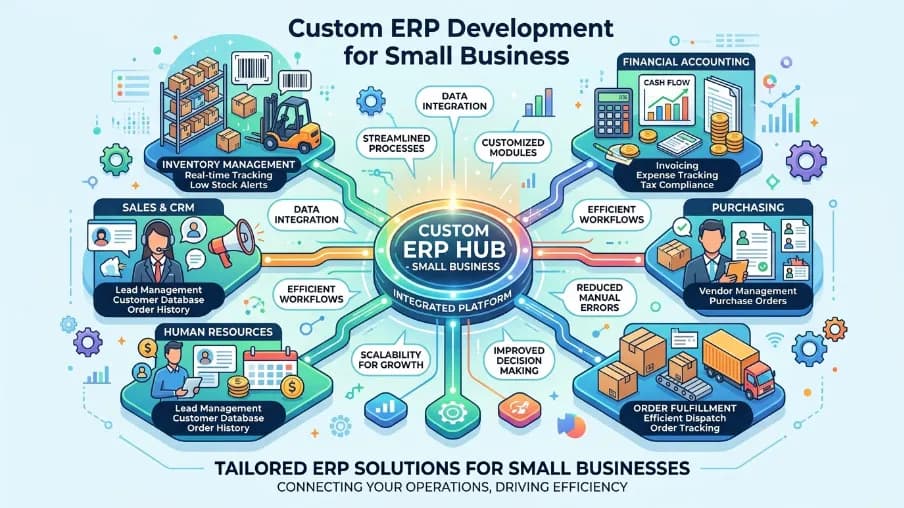
I've sat in meetings where a small business owner opens five different spreadsheets just to answer one question: "How much stock do we have left?" It's frustrating. It's slow. And it's a clear sign the business has outgrown its old tools.
This guide is written from experience, not theory. Our team at CyberCraft Bangladesh has planned, designed, and built custom ERP systems for small businesses across finance, retail, manufacturing, and government-linked projects. We've seen what works, what wastes money, and what actually saves a business time. This article shares that experience with you.
Custom ERP development for small business isn't just a buzzword for big companies anymore. Small teams use it too, to bring finance, inventory, HR, and sales into one place, without paying for enterprise-level bloat.
In this guide, you'll learn:
- What custom ERP software actually is, and how it differs from off-the-shelf tools
- Real, proven benefits of custom ERP software for small business
- The core modules every small business ERP should have
- How ERP implementation actually works, step by step
- What custom ERP development costs, and what changes the price
- How to choose a trustworthy ERP software development company
Let's get into it.
Key Takeaway
Custom ERP development for small business means building a single, connected system for finance, HR, inventory, and sales that fits your exact workflow, instead of forcing your team to adapt to a generic, off-the-shelf tool. It costs more upfront than ready-made software, but it removes ongoing license fees, unused features, and workflow friction, which usually pays off within one to two years for growing teams.
What Is Custom ERP Software Development
Enterprise Resource Planning, or ERP, is one system that connects the different parts of your business. Finance, HR, inventory, sales, and customer management all live in one place instead of scattered across apps and spreadsheets.
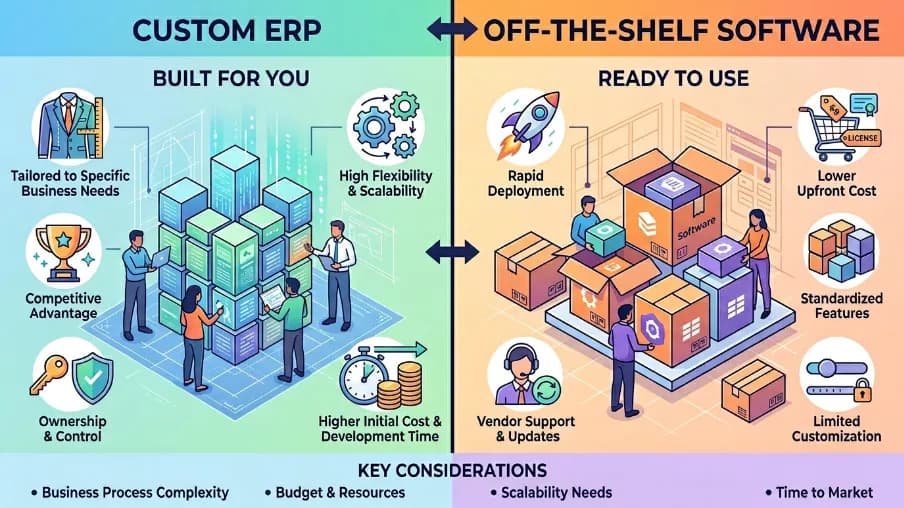
Custom ERP software development means building that system around your business, not the other way around. Off-the-shelf ERP tools force you to change your workflow to match the software. A custom ERP system does the opposite. It's planned, designed, and built around how your team already works.
Think of it like a suit. You can buy one off the rack, or you can get one tailored to fit. Both cover the basics. Only one actually fits right.
Custom ERP vs. Off-the-Shelf ERP
Choosing the right ERP solution is a key decision for any growing business. The table below compares off-the-shelf ERP and custom ERP software across the factors that matter most.
| Factor | Off-the-Shelf ERP | Custom ERP Software |
| Setup speed | Fast | Moderate (phased rollout) |
| Fit to your workflow | Generic, needs adjustment | Built around your process |
| Ongoing cost | Recurring license/seat fees | One-time build, lower long-term cost |
| Unused features | Common | None, you build what you need |
| Ownership | Vendor-controlled | You own the system |
| Scalability | Limited by vendor's roadmap | Grows with your business |
Small businesses used to avoid custom ERP because it felt expensive and slow. That's changing. Cloud infrastructure, modern development frameworks, and AI-assisted coding have made custom ERP development for small business faster and more affordable than it was even two years ago.
Benefits of Custom ERP Software for Small Business
This is the part most business owners actually care about, so let's be direct and specific.
1. It Fits Your Exact Workflow
No unnecessary buttons. No extra tabs you never open. A custom ERP system reflects the targeted plan, design, and technology your business actually needs, not a generic template built for thousands of unrelated companies.
2. It Saves Money Over Time
Off-the-shelf tools charge per user, per module, per year, forever. A custom ERP system is a one-time investment. You own it outright. You're not stuck paying rising subscription fees as your team grows.
3. It Scales With You
As your business grows, so does your data and your team size. A well-designed custom ERP system handles that growth without breaking. You can add HR, manufacturing, or CRM modules whenever you're ready, not when a vendor allows it.
4. It Connects With Your Existing Tools
Modern custom ERP platforms support ERP integration with APIs and legacy systems. That means your ERP can talk to your payment gateway, accounting software, and e-commerce store, all without manual data entry.
5. It Gives You Real-Time Visibility
You see your numbers as they happen: inventory levels, cash flow, sales performance, all in one dashboard. No more waiting for someone to update a spreadsheet at month-end.
6. It's Built With Security in Mind From Day One
Small businesses rarely have a full-time IT security team. A custom-built system lets you bake in role-based access control, audit logs, and data encryption from the start, instead of retrofitting security onto a rigid, third-party product.
7. It Reduces Manual, Repetitive Work
Custom ERP automates the boring but critical stuff: invoice processing, stock updates, payroll runs, so your team spends time on work that actually grows the business.
Key Modules Every Small Business ERP Should Have
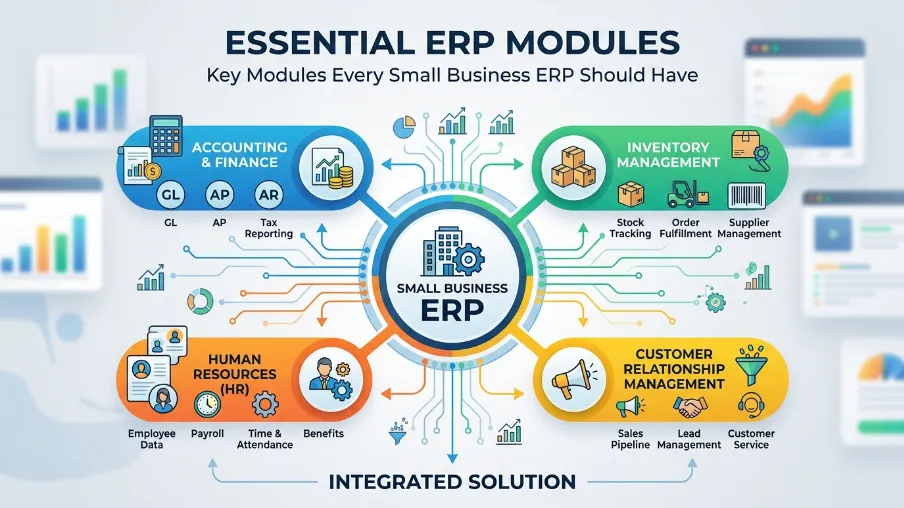
Not every business needs every module. But most benefit from these core pieces of enterprise resource planning software.
Finance & Accounting ERP
This is the heart of the system. It tracks income, expenses, invoicing, and financial reporting in real time. No more reconciling three different tools at month-end.
HR & Payroll ERP
Employee records, attendance, payroll, and leave management, all connected in one place. This matters more than people expect once a team grows past ten or fifteen people.
Inventory & Supply Chain ERP
For product-based businesses, this module tracks stock levels, purchase orders, and supplier data. It's especially valuable for retail, distribution, and manufacturing companies.
CRM & Customer Management ERP
Sales pipelines, customer history, and support tickets live in one place. Your sales team gets a full view of every customer relationship without switching tools.
Manufacturing ERP
For manufacturers, this covers production planning, quality control, and supply chain coordination. It connects the shop floor to the front office in real time.
Industries We Serve With ERP Solutions
Custom ERP isn't one-size-fits-all across industries either. Here's how it plays out in a few sectors we've worked in directly.
ERP for Manufacturing & Supply Chain
Manufacturers need real-time tracking of raw materials, production stages, and logistics. A custom ERP system connects sensors, machines, and staff into one live view of the production floor, cutting delays and reducing waste.
ERP for Government & Public Sector
Public sector organizations deal with strict compliance rules, budgeting cycles, and citizen services. Custom-built ERP for government gives full control over data handling and reporting, something off-the-shelf software often can't match due to rigid, one-size-fits-all compliance frameworks.
SME ERP Solutions
Small and medium businesses need something lighter and more affordable than enterprise-grade platforms, but still powerful enough to manage finance, HR, and inventory together. This is exactly the gap custom ERP software development fills.
ERP Implementation: How the Process Actually Works
A lot of people fear ERP implementation because it sounds complicated. It doesn't have to be. Here's the process we actually follow with clients, step by step.
Step 1: Map Your Business Processes
We sit down with your team and map out how work actually happens today, not how it's "supposed to" happen on paper, but how it really flows. This discovery stage prevents the single biggest cause of failed ERP projects: building the wrong thing.
Step 2: Design the Architecture
Next comes planning, designing, and technology decisions. Which modules do you need first? Cloud or on-premise? What integrations matter most? This stage sets the foundation for everything else.
Step 3: Develop, Test, and Deploy in Phases
Good ERP system development doesn't happen in one giant launch. We build and release in phases, testing each module before moving to the next. This lowers risk and lets your team adjust as they go, instead of facing a disruptive, all-at-once rollout.
Step 4: Train Your Team
The best ERP software development company won't just hand you a system and walk away. Training makes sure your team actually adopts the tool instead of quietly going back to spreadsheets.
Step 5: Ongoing Support
After launch, you'll need updates, bug fixes, and new features as your business changes. Ongoing support is what keeps an ERP system useful for years, not just months.
How Much Does Custom ERP Development Cost
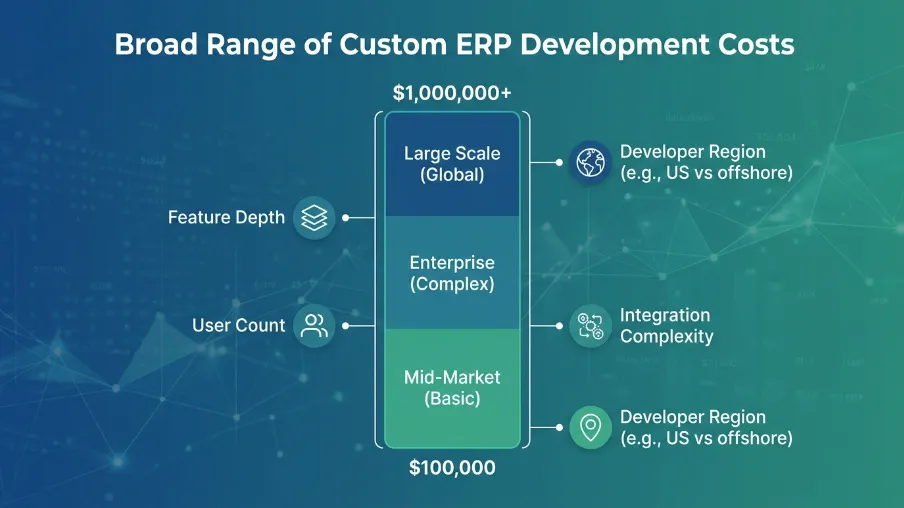
This is the question every small business owner asks first, and honestly, they should. Costs vary based on:
- Number of modules: a single finance module costs far less than a full multi-department platform
- Integration complexity: connecting to five existing tools costs more than connecting to one
- Cloud vs. on-premise hosting: cloud generally lowers upfront infrastructure costs
- User count and access levels: more roles and permission tiers add development time
A good ERP software development company will scope your project before quoting a price, rather than offering a flat number without understanding your workflow. Be cautious of any vendor who quotes a fixed price without a discovery phase first. That's usually a sign of a template, not a custom build.
Cloud ERP and Mobile ERP: What's Changing in 2026
The ERP world is moving fast. A few shifts matter most for small businesses right now.
Cloud ERP solutions are now the default choice for most small businesses. You get lower upfront costs, automatic updates, and access from anywhere, without expensive on-site servers to maintain.
Mobile ERP applications let owners and managers check numbers from their phone. Approve a purchase order from the field. Check stock while visiting a supplier. It's a small feature that makes a big difference day to day.
AI is becoming a built-in feature, not an add-on. Modern ERP systems now flag supply chain risks, predict demand, and catch unusual transactions automatically. According to Grand View Research, the global ERP software market was valued near $65 billion in 2024 and is projected to more than double by the early 2030s. That growth is being driven largely by small and mid-sized businesses adopting smarter, cloud-based systems.
Composable ERP is another trend worth watching. Instead of one giant rigid system, businesses now build their ERP from smaller connected modules and add what they need, when they need it, instead of buying a massive platform on day one.
None of this means small businesses need to chase every trend. It just means the barrier to entry has dropped. Custom ERP development for small business is genuinely more achievable today than it was a few years ago.
How to Choose the Best ERP Software Development Company
This decision matters more than people realize. A bad partner can leave you with a half-built system and a drained budget. Here's what to actually check, based on what separates good ERP partners from risky ones.
- Portfolio and experience: Ask to see real ERP projects they've delivered, not just a list of services. Ask what problem each project solved.
- Industry understanding: A company that's built ERP for manufacturing understands different problems than one focused on retail or services.
- Technology approach: Do they build cloud-native, scalable systems? Can they handle ERP integration with your existing tools?
- Communication style: You'll work closely with this team for months. Clear, honest communication matters as much as technical skill.
- Post-launch support: Ask directly what happens after launch. The best enterprise solution providers stick around for updates and fixes, not just the initial handoff.
- References you can actually call: A trustworthy custom ERP software development company will let you speak with a past client, not just show you a case study PDF.
If you're comparing custom ERP software development companies, don't just look at price. Look at how well they understand your actual business, not ERP as a general concept.
Building Smarter ERP Systems Starts With the Right Plan
Custom ERP development for small business isn't about chasing the newest technology. It's about giving your team one clear system instead of five disconnected tools. It's about spending less time on manual work and more time growing the business.
At CyberCraft Bangladesh, we plan, design, and build custom ERP systems for small and growing businesses, from single finance modules to full multi-department platforms with real-time dashboards and role-based access control. We map your process first, then build around it, not the other way around.
If your team is still juggling spreadsheets and disconnected apps, it might be time for a system that actually fits. Talk to our ERP development team and let's map out what a custom ERP system could look like for your business.
Frequently Asked Questions About Custom ERP Development for Small Business
What is custom ERP software development?
Custom ERP software development is building an enterprise resource planning system designed specifically around your business processes, instead of using a generic, one-size-fits-all product.
How much does custom ERP development cost for a small business?
Cost depends on the number of modules, integrations, and complexity of your workflows. Simple systems with one or two modules cost far less than a full enterprise-wide platform. A good ERP development company will scope this out with you before quoting a price.
How long does ERP implementation take?
Most small business ERP projects take anywhere from two to five months, depending on scope. Complex systems with many integrations take longer. Phased rollouts help you start using core features sooner rather than waiting for one big launch.
Is cloud ERP better than on-premise ERP for small business?
For most small businesses, yes. Cloud ERP solutions cost less upfront, update automatically, and can be accessed from anywhere. On-premise systems still make sense for businesses with strict data residency requirements, such as some government and regulated sectors.
Can a custom ERP system integrate with the tools I already use?
Yes. Modern custom ERP platforms are built with ERP integration in mind, connecting with payment gateways, accounting tools, e-commerce platforms, and other APIs and legacy systems.
Is custom ERP development worth it for a small business, or should I just buy off-the-shelf software?
If your workflow is simple and standard, off-the-shelf software may be enough for now. If you're paying for features you don't use, hitting limits on customization, or juggling multiple disconnected tools, custom ERP development usually pays for itself within one to two years.

I’m Mitu Das, a JavaScript developer, ERP product architect, and SEO specialist from Bangladesh. I work at CyberCraft Bangladesh, where I help build simple, scalable software, SaaS platforms, and business solutions. My goal is to create technology that helps companies save time, automate daily tasks, and grow faster. I enjoy combining development, product ideas, and SEO strategies to create useful digital solutions for modern businesses.
Writes about
Want this done for you?
Our team builds and ships exactly what this article describes. Send a message and we will reply with a scope.