
Difference Between UI and UX Design: A Simple Guide Anyone Can Understand

.webp&w=3840&q=75)
Have you ever used an app that looked amazing but felt like a maze? Or one that was ugly but somehow easy to use? That mix of feelings is exactly why people ask about the difference between UI and UX design.
I get this question a lot. Clients mix up the two terms. New designers mix them up too. Even job posts mix them up, asking for a "UI/UX designer" like it's one single job.
It's not one job. UI and UX are two different skills. They work together, but they solve different problems.
In this article, I'll walk you through what UI design is, what UX design is, and where they overlap. You'll also get real steps, tools, templates, and examples. By the end, you'll know exactly how to explain the difference between UI and UX design to anyone, including your boss.
Let's get into it.
What Is UI Design
UI stands for user interface. UI design is about the look and feel of a screen.
Think of every button, icon, color, and font you see on an app or website. That's UI. It's the part you touch, tap, and click.
A UI designer picks the colors. They choose the fonts. They decide where buttons go and how big they should be. Their job is to make a product look clean and feel good to use.
Here's a simple way to remember it: UI is the paint, the furniture, and the light switches in a house. It's what you see and touch every day.
What Is UX Design
UX stands for user experience. UX design is about how a product works, not just how it looks.
A UX designer asks bigger questions. Can users find what they need? Does the checkout process make sense? Do people feel confused, frustrated, or happy while using the app?
UX design covers the full journey. It starts before someone opens your app and continues after they close it. It includes how easy it is to sign up, how fast pages load, and whether the product actually solves a real problem.
Going back to the house example: UX is the floor plan. It's where the rooms go, how the doors connect, and whether the layout actually makes sense for daily life. You can paint a house any color you want, but if the layout is bad, people won't enjoy living there.
UI vs UX: The Core Difference in One Sentence
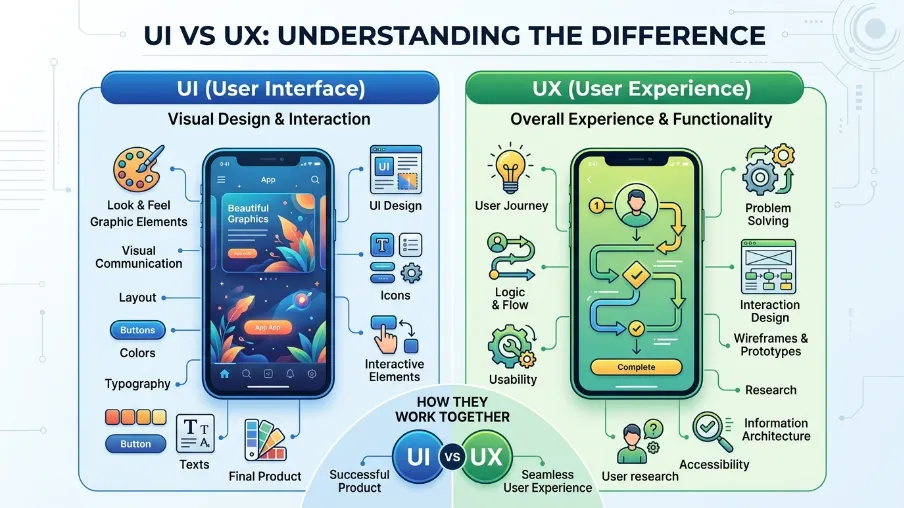
If you only remember one line from this whole article, remember this: UI is how a product looks. UX is how a product works and feels.
A product can have great UI and terrible UX. Picture a beautiful app with bright colors and smooth animations. But the sign-up form asks for 12 fields, and half the buttons don't do what you expect. That's bad UX hiding behind good UI.
The opposite happens too. A plain, boring-looking app can have excellent UX. Every button works. Every step makes sense. Users get things done fast, even if the design isn't flashy.
The best products get both right. Good UI/UX design combines attractive visuals with intuitive, user-friendly experiences. UI and UX design work as a team, not as rivals.
UI Design vs UX Design: Key Considerations for Each
Let's break this down further, because "look vs feel" is still a bit vague. Here's what each discipline actually focuses on day to day.
4 Key UI Design Considerations
When I think about UI design, four things always come up first.
- Page layout: Where things sit on the screen matters. Good layout guides the eye and makes a screen feel natural to scan, not messy.
- Color scheme and font selection: Colors set the mood. Fonts affect how easy text is to read. Both also carry your brand's personality.
- Interactive elements: Buttons, sliders, drop-downs, and toggles all need to feel responsive. A button should look clickable. A field should look fillable.
- Wireframe and prototype fidelity: UI designers often take a rough wireframe from a UX designer and turn it into a polished, clickable prototype that looks close to the final product.
These four points shape what is called visual hierarchy. That's just a fancy term for guiding a user's eyes to the most important thing first, then the next, then the next.
5 Steps to UX Design
The UX design process is less about visuals and more about strategy. Here's a simple five-step version I use.
- Consumer and competitor research: Before designing anything, learn who your users are and what your competitors are doing right or wrong. A SWOT analysis template helps here, since it lays out strengths, weaknesses, opportunities, and threats in one clean view.
- User personas: Turn your research into a user persona template, sometimes called a buyer persona. This is a made-up but realistic profile of your typical user, including their goals and frustrations.
- Information architecture: This is the map of your product. UX designers often use a flowchart template to show how screens connect and where users might get stuck.
- Wireframes and prototypes: Simple sketches turn into clickable mockups. This is where product mockup tools come in handy, letting teams test ideas before writing a single line of code.
- UX research and testing: After launch, the job isn't done. UX designers keep testing, watching how real users behave, and fixing pain points like confusing checkout flows or slow loading pages.
Notice how UX starts way before a screen even exists, while UI usually starts once the structure is already in place. That's the biggest gap people miss when they ask about UI design vs UX design.
Where Do UX and UI Overlap
Here's something most articles skip: UI and UX aren't separate boxes. They blend together constantly.
Take wireframes, for example. A UX designer sketches the basic structure. A UI designer then adds color, spacing, and detail to turn it into a working design. Neither person can do their job well without talking to the other.
Testing is another shared space. Both UI and UX designers care about how real users react. A UI designer wants to know if a button color is confusing. A UX designer wants to know if the whole flow makes sense. They often run tests together.
This overlap is exactly why so many job posts say "UX/UI designer" as one title, especially at small companies or startups. One person wears both hats. In bigger companies, the roles usually split into separate jobs with separate skill sets.
Do You Need a UI Designer
Some startups skip hiring a UI designer early on. They build a basic product using only UX principles, then worry about visuals later.
This can work for a short time, but it has limits. A graphic designer is not the same as a UI designer. Graphic designers are trained for static work like posters, logos, and print materials. UI designers understand things graphic designers usually don't touch, like responsive design, accessibility, and how a layout changes across screen sizes.
If your product is simple and low-stakes, you might survive without a dedicated UI designer for a while. But if you're asking users to trust you with money, health data, or daily habits, a skilled UI designer pays for itself. First impressions happen in seconds, and a messy interface loses trust fast.
How to Recognize Successful UX Design
You don't need a design degree to spot good UX. Ask yourself these questions the next time you use an app:
- Can I find what I'm looking for without thinking too hard?
- Do buttons and links do what I expect them to do?
- Does the product feel fast and responsive?
- Do I feel confident, not confused, while using it?
- Would I come back and use this again?
If you answer yes to most of these, that's successful UX design in action. If you're constantly backtracking, guessing, or getting frustrated, that's a sign the UX process missed something important.
UI Design Tools vs UX Design Tools
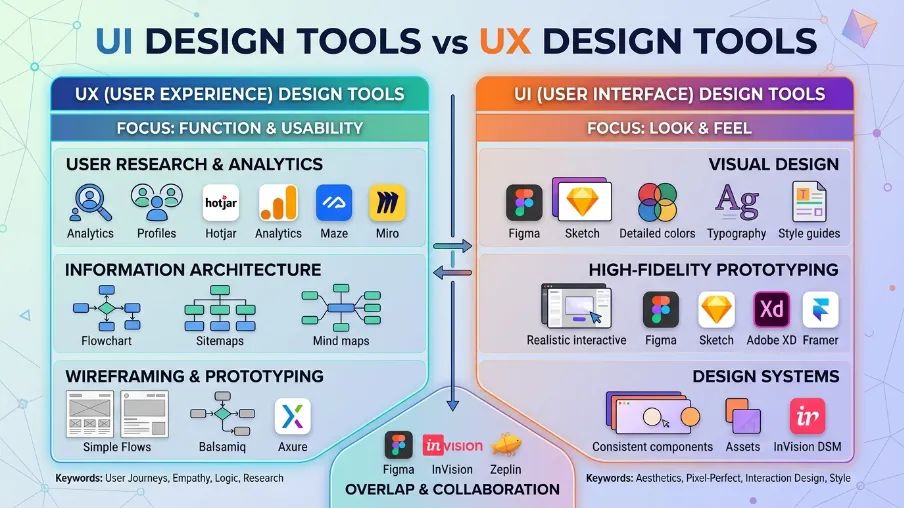
Tools have blurred the line between UI and UX even more, especially Figma.
Figma is now the go-to tool for both UI and UX designers. It lets teams build wireframes, create high-fidelity mockups, and even test interactive prototypes in one place. A Figma design system stores reusable UI pieces, like buttons and color styles, so a whole team stays consistent.
Here's how the tools generally split:
- UX design tools focus on flowcharts, wireframes, and user flow mapping. Think of tools for building personas, journey maps, and low-fidelity sketches.
- UI design tools focus on visual polish. Figma prototyping features let UI designers show exactly how a screen transitions, animates, and responds to taps.
- Figma templates speed up both jobs. Instead of starting from a blank page, teams can grab pre-built layouts and adjust them.
Most modern design teams don't split tools by role anymore. They just use Figma for the whole journey, from the first rough sketch to the final interactive prototype.
UI vs UX Designer: What Does Each Job Actually Look Like
Let's put this in job terms, since that's often why people search for this topic in the first place.
A UI designer spends their day inside design software. They're picking fonts, adjusting spacing, building component libraries, and making sure every screen matches the brand. Their output is usually a set of polished screens ready to hand off to developers.
A UX designer spends more time on research and strategy. They run user interviews, study analytics, sketch flows, and write reports on what's working and what isn't. Their output is usually a wireframe, a user flow map, or a research summary that guides the whole team.
A UX/UI designer does a bit of both. This title shows up a lot at smaller companies where budgets don't allow for two separate hires. If you see this title in a job post, ask what percentage of the role leans toward research versus visual design. That tells you what the company actually needs.
Wrapping It Up
So, what's the real difference between UI and UX design?UI is the look. UX is the feel and function.One focuses on buttons, colors, typography, and layout. The other focuses on research, user flows, usability, and the overall experience from start to finish.Neither one works well on its own.
The best digital products come from UI and UX design working together, not competing for attention. If you're building a website, app, or any digital product, don't overlook either one. Now it's your turn. Open your own website or app and look at it with fresh eyes. Is the UI clean? Is the UX smooth? If something feels off, that's your starting point.
A simple UI UX design audit checklist can help you spot usability issues, visual inconsistencies, and friction points before they affect your users. Need help figuring out where your product's UI or UX is falling short? Reach out, and let's map out a fix together.
Common Questions About Difference Between UI and UX Design
What is the difference between UI and UX?
UI is about how a product looks and feels to touch. UX is about how the whole experience works, from finding the product to using it daily. UI is one piece of the bigger UX picture.
How do I design UI and UX for a new product?
Start with UX. Research your users, map out their journey, and build wireframes. Once the structure is solid, bring in UI design to add color, typography, and interactive polish. Test both together before launch.
Is UI/UX one job or two?
It depends on the company. Startups often combine both into one role. Larger companies usually hire separate UI and UX designers who work closely as a team.
Which pays more, UI or UX design?
Salaries shift year to year and vary by company size and location, but both fields pay well and often land in similar ranges. Rather than picking based on pay alone, pick based on which work excites you more: research and strategy, or visual craft.
Do small businesses need both UI and UX designers?
Not always right away. Many small businesses start with someone who handles both roles, often using tools like Figma. As the product grows and user numbers increase, splitting into dedicated UI and UX roles usually improves the product faster.

I’m Mitu Das, a JavaScript developer, ERP product architect, and SEO specialist from Bangladesh. I work at CyberCraft Bangladesh, where I help build simple, scalable software, SaaS platforms, and business solutions. My goal is to create technology that helps companies save time, automate daily tasks, and grow faster. I enjoy combining development, product ideas, and SEO strategies to create useful digital solutions for modern businesses.
Writes about
Want this done for you?
Our team builds and ships exactly what this article describes. Send a message and we will reply with a scope.


.webp&w=3840&q=75)