How to Automate Email Routing AI and Data Entry


I used to spend nearly two hours every morning just sorting emails and copying data into spreadsheets. Sales inquiries here. Support tickets here. Invoice details going into the accounting system. It was exhausting and a complete waste of time.
Then I learned how to automate email routing AI. Everything changed.
If your team handles more than 50 emails a day, you are losing real money and real hours doing work that a machine can handle in seconds. Research from McKinsey shows that knowledge workers spend 28% of their workweek on email alone. That is over 11 hours per person, every single week.
This guide will show you exactly how AI workflow automation works for email and data entry. You will learn which tools to use, how to set them up, and how to build custom AI solutions that fit your business perfectly.
The Real Cost of Manual Email and Data Entry Work
Before we talk solutions, let me show you what you are actually losing right now.
Time: A 5-person team spending 2 hours daily on email sorting and data entry loses 50-plus hours every week. That is more than a full-time employee's working time, gone.
Accuracy: People make mistakes when they are tired or rushing. A single typo in a customer record or invoice creates problems that take far longer to fix than the original task.
Speed: Emails sitting in a shared inbox for hours frustrate customers. Slow response times cost you deals and damage trust.
Visibility: High-priority leads buried inside a cluttered inbox get missed entirely. You never know what you lost because you never saw it.
AI automation solves every one of these problems at once.
How AI Email Routing Works

Here is the simple version of how it works.
When an email arrives in your inbox, an AI model reads the full message. It understands the subject line, the body text, and the sender's intent. It then classifies the email and takes a predefined action.
That action could be any of the following:
- Forwarding the email to the right person or team inbox
- Creating a ticket in your helpdesk system like Zendesk or Freshdesk
- Sending an automatic acknowledgment back to the customer
- Extracting key data from the email and entering it into your CRM
- Flagging urgent emails so nothing slips through
Modern AI tools can do all of this with very little setup. You do not need to write a single line of code.
Tools like Zapier, Make (formerly Integromat), n8n, and dedicated platforms like Gmelius, Missive, and Front all support AI-powered email routing today.
For more advanced setups, you can build truly custom AI solutions using OpenAI's API or Anthropic's Claude API, tailored to your exact business logic.
Step-by-Step: How to Set Up AI Workflow Automation for Email
Let me walk you through the exact process. I will keep every step practical.
Step 1: List Every Type of Email Your Business Receives
Start by writing down all the email categories that come into your inbox. Be as specific as possible.
For example: customer refund request, new order notification, vendor invoice, job application, press inquiry, technical support question, billing dispute, partnership request.
This category list is the foundation everything else is built on.
Step 2: Choose the Right Automation Platform
For most businesses, start with Zapier or Make. Both connect to hundreds of apps and have native AI steps built in. No coding is needed.
If you want full control and prefer to self-host, n8n is a powerful open-source option. It is free to run on your own server and gives you complete data privacy.
For teams that work mostly inside their inbox, Missive and Gmelius offer built-in AI routing and shared inbox management without needing a separate tool.
Step 3: Add an AI Classification Step
This is where the real automation magic happens.
Inside Zapier or Make, you add an AI step that calls a language model like GPT-4 or Claude with a simple instruction:
"Read the following email. Classify it into one of these categories: [your list]. Return only the category name."
The AI reads each incoming email and returns one clean label. Your automation uses that label to decide what happens next.
Step 4: Build Your Routing Rules
Connect each category to a specific action. Here are some examples:
- Refund request: Create a support ticket in Zendesk, assign to customer service team
- Wholesale inquiry: Forward to your sales team inbox
- Job application: Add applicant details to your Airtable recruiting tracker
- Invoice received: Extract the data and log it in QuickBooks
Each rule is a simple if-then condition. No technical skills needed.
Step 5: Add AI Data Extraction for Zero Manual Entry
Here is where you take this further than just routing.
Instead of only classifying the email, ask the AI to also pull out specific information:
"Extract the customer name, order number, product, and issue from this email. Return the result as JSON."
That structured data then flows directly into your CRM, your spreadsheet, your ERP, or your helpdesk system. You have just eliminated data entry completely.
AI Data Entry Automation: What Else Can You Automate Beyond Email
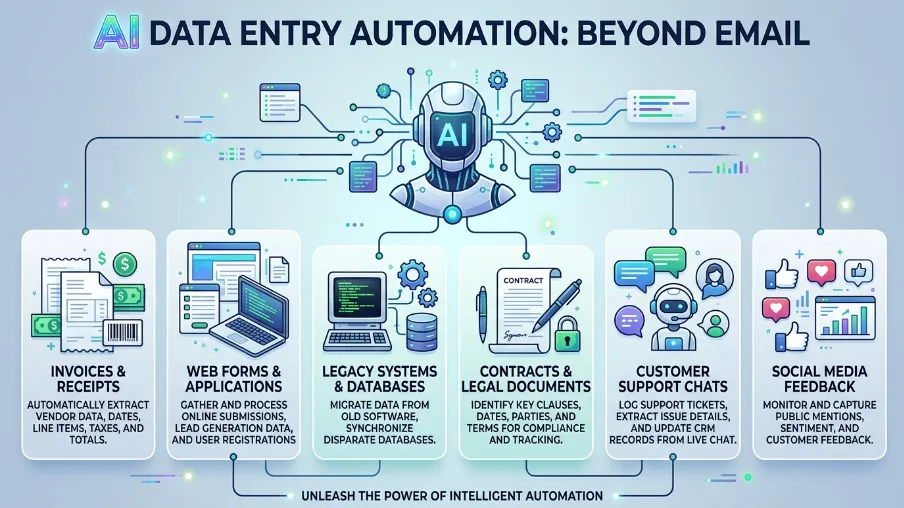
Email is just the beginning. Here is what AI automation can handle across your whole operation.
Invoice processing: Tools like Docsumo, Rossum, and Nanonets read PDF invoices, pull out vendor name, line items, totals, and due dates, then push that data into your accounting software. No more manual invoice entry.
Web form submissions: When someone fills out a contact or lead form, AI can enrich the data by looking up company size, industry, and location, score the lead, and enter it into your CRM within seconds.
Document parsing: Contracts, purchase orders, delivery notes AI can extract key fields from any structured document and route them to the right place.
Support chat transcripts: AI can read every finished chat session, summarize it, tag it by topic, and update the customer record. Your team gets full context without touching a single transcript manually.
All of this works through the same AI workflow automation logic. Read the content, extract the data, take the action.
Custom AI Solutions vs. Off-the-Shelf Tools: Which Is Right for You
This is the question I get asked the most. Here is my honest answer.
Start with off-the-shelf tools: Zapier, Make, Missive, and Gmelius give you 80% of the value for 20% of the effort. If they solve your problem, use them. There is no reason to build something custom until you have outgrown what these platforms offer.
Go custom when your needs are specific: If your routing logic is complex, such as handling multiple languages, industry-specific terminology, strict compliance requirements, or unusual data structures, then custom AI solutions built on APIs like Claude or GPT-4 are worth the investment.
Custom solutions also make sense when you need to keep sensitive data off third-party platforms, integrate with legacy systems, or build something that becomes a real business advantage no competitor can copy.
The good news is that the cost of building custom AI solutions has dropped dramatically. What used to take a team of developers and months of work now often takes one skilled automation specialist a few days. Many agencies now specialize in exactly this kind of build.
Real-World Example: A Law Firm That Saved 20 Hours Per Week
Let me share a real story with you. A client of mine runs a small legal services firm. They were drowning in intake emails from potential clients describing their situations, asking about fees, and requesting consultations.
Every email had to be read, categorized, and responded to by hand. Their paralegal was spending nearly three hours a day just on this task.
We built a simple AI workflow automation together:
- A new email arrives in the firm's shared Gmail inbox
- The AI reads the email and classifies it: consultation request, existing client question, billing issue, or general inquiry
- For consultation requests, the AI extracts the sender's name, contact details, and case type, then creates a new intake record in their case management system
- The AI drafts a personalized acknowledgment email based on the specific case type
- The paralegal reviews the draft and sends it with one click
The result: that three-hour daily task now takes around 30 minutes. The paralegal now focuses on work that actually requires human judgment.
This is what good AI automation looks like. It does not replace the human. It removes the repetitive parts so the human can do more meaningful, higher-value work.
Best Tools to Automate Email Routing AI in 2026
Here is a quick reference list of the best tools available right now:
| Tool | Best For | Starting Price |
|---|---|---|
| Zapier | General automation, no-code | $20/month |
| Make (Integromat) | Complex multi-step workflows | $9/month |
| n8n | Self-hosted, data privacy | Free (self-hosted) |
| Gmelius | Shared Gmail inbox + AI routing | $19/seat/month |
| Missive | Team inbox with built-in AI | $14/user/month |
| Front | Enterprise shared inbox | $19/seat/month |
| Nanonets | AI data extraction from documents | $499/month |
| Docsumo | Invoice and document processing | Custom pricing |
For building fully custom AI solutions, the Anthropic Claude API and OpenAI API are the two leading options for developers and automation specialists.
Conclusion: Start with One Workflow, Scale from There
If you are still sorting emails by hand or retyping data into spreadsheets, you are spending time your business cannot afford to waste.
AI workflow automation is affordable, accessible, and genuinely transformative. The technology that used to take a full development team to build is now available to any business with a $20-per-month subscription.
Here is my advice: start small.
Pick the one email type that wastes the most time in your business right now. Map out exactly what should happen when that email arrives. Then build a simple AI automation to handle it.
Once you see hours coming back in your week, you will want to automate everything else.
FAQs About Automating Email Routing AI
Do I need coding skills to automate email routing AI?
No. Platforms like Zapier, Make, and Gmelius let you build AI email routing workflows using a visual drag-and-drop interface. No coding is required. For custom-built solutions, you may want to work with an automation consultant, but many setups require no developer at all.
How accurate is AI email routing?
Modern AI language models classify email intent with very high accuracy, typically between 90% and 95% on clearly defined categories. For any edge cases, you can set up a fallback queue where low-confidence emails go to a human reviewer. In practice, only a small percentage of emails ever need that review.
What happens when the AI cannot classify an email?
You always define a fallback route. Usually this means unclassified emails go to a general team inbox or are flagged for a human reviewer. A well-built automation system always has this safety net so nothing gets lost.
How much does it cost to automate email routing with AI?
A basic setup using Zapier or Make typically costs between $20 and $100 per month for most small businesses. Custom solutions built on AI APIs usually cost a few hundred to a few thousand dollars to build, with low ongoing usage fees. In almost every case, the time saved pays back the investment within the first month.
Can AI automation handle emails in different languages?
Yes. Leading AI models including GPT-4 and Claude handle dozens of languages natively. You can classify and extract data from emails written in any major language without any extra configuration.
Is AI email routing safe for sensitive business data?
It depends on the tool you choose. Cloud-based tools like Zapier process data on their servers. If you handle sensitive or regulated data, consider a self-hosted option like n8n or a custom API setup where you control where data flows. Always review the privacy policy and compliance certifications of any tool you use.

I am Mitu Rani Das, an SEO Executive at CyberCraft Bangladesh. I help improve website ranking and increase online visibility through simple and effective SEO strategies.