How to Implement Breadcrumb Schema in React Using Power SEO

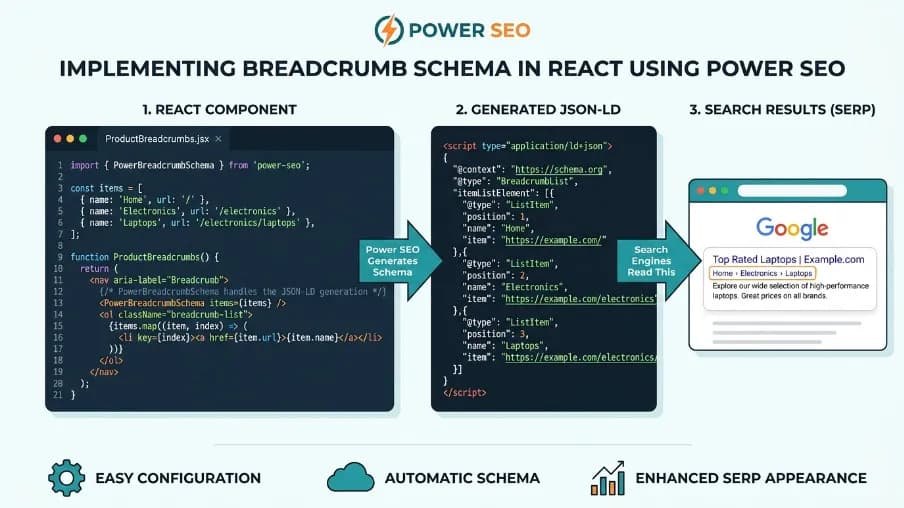
Breadcrumb Schema in React is JSON-LD structured data. It is based on the schema.org BreadcrumbList type. It tells search engines the hierarchical path of a page (e.g., Home › Blog › Post). In React, it's added via a component or builder function. That function outputs a <script type="application/ld+json"> tag. Ideally, it's server-rendered, so search engines see it right away. This kind of breadcrumb structured data is also called breadcrumb markup or breadcrumb JSON-LD. It's one of the most common forms of schema markup in React. Getting your React breadcrumb schema right is a foundational piece of React structured data and React SEO best practices.
Breadcrumb Schema in React is structured data. It's JSON-LD, and it follows the schema.org BreadcrumbList type. It tells Google and other search engines the hierarchical path of a page, for example, Home › Blog › Post. Because of this, it can be shown as a clean trail in search results instead of a raw URL. In React apps, it's typically added with a small component or builder function. That function outputs a <script type="application/ld+json"> tag. Ideally, it's rendered server-side, so it's present in the first HTML response. You can implement it with @power-seo/schema, a package from the Power-SEO free SEO tools collection.
Key Takeaways
Breadcrumb schema replaces raw URLs in search results with a readable path (e.g.,
example.com › Tools › Image Converter), which can improve click-through rate.Google requires a minimum of two
ListItementries in aBreadcrumbList; a single-item breadcrumb is invalid per the schema.org spec.Positions must be sequential starting at 1, and every URL in the trail must resolve, gaps or broken links are common causes of silent failures.
Client-side rendering can delay indexing. For reliable results, generate the JSON-LD server-side (Next.js App Router, Remix, or pre-rendering) so it's in the initial HTML response.
Combining schemas in a single
@graph(Breadcrumb + Article + Organization, etc.) is Google's recommended pattern for pages with multiple schema types.
How to Implement Breadcrumb Schema in React in 4 Steps
Install the package: Run
npm install @power-seo/schema(or the yarn/pnpm equivalent) in your project.Add the schema: Use the
<BreadcrumbJsonLd>component for client-rendered pages, or thebreadcrumbList()+toJsonLdString()builder functions for SSR frameworks like Next.js or Remix.Combine with other schemas (optional): Wrap
breadcrumbList()together witharticle(),organization(), or other schema builders inschemaGraph()to output a single@graphdocument.Validate before deploying: Run
validateSchema()on every page schema, ideally in CI, and confirm with Google's Rich Results Test before you ship.
I talk to React developers every week. Smart people. They build beautiful apps. Fast components. Clean code. After running this exact audit on client sites for the past several months, I've seen the same gap show up again and again, regardless of how polished the app itself is.
But then I look at their Google Search Console and I feel a little sad. No breadcrumb trails in the SERP. No rich results. Just a raw, ugly URL sitting below their page title. The fix? It takes about 10 minutes. And it can noticeably change how Google displays your pages.
In this article, I'll show you exactly how to implement Breadcrumb Schema in React using @power-seo/schema. We'll go from zero to a fully typed, validated, SSR-ready breadcrumb implementation without the usual copy-paste JSON mess.
If you care about React SEO, this is one of those small technical upgrades that can quietly improve visibility, click-through rate, and how polished your pages look in search.
Here's what you'll learn:
What breadcrumb schema actually does for your SEO
Why most React implementations miss a critical step
How to use @power-seo/schema with zero boilerplate
How to combine it with other schemas using schemaGraph()
How to validate it before your site goes live
Let's get into it.
Discover how @power-seo/schema turns this into a 10-minute fix below.
What Is Breadcrumb Schema and Why Does It Matter in 2026?

Breadcrumb Schema in React is JSON-LD structured data that uses the schema.org BreadcrumbList type to describe a page's hierarchy. It helps search engines understand the relationship between pages and can provide a breadcrumb path in search results. In React applications, you can generate it with a component or builder function and preferably server-render the JSON-LD. Breadcrumbs are those little navigation paths you see on websites. Home › Blog › My Post. Simple, right?
Handled well, SEO breadcrumbs and breadcrumb navigation SEO go hand in hand: the visible trail helps users, and the structured data version helps search engines. But there are actually two layers to breadcrumbs. One is what users see on your page. The other is what you tell Google using structured data. The second one is what most people skip. Below your page title in a search result, Google shows either a raw URL or a clean path like example.com › Tools › Image Converter. That clean path version comes directly from breadcrumb schema markup.
That visual difference matters. Clean paths look more trustworthy. They tell users exactly where they are before they even click. For SEO, breadcrumbs clarify site structure. They strengthen internal linking. They often replace messy URLs in search results. That's especially important for sites offering a React developer tool for SEO. Clear hierarchy helps both users and search engines navigate technical content more efficiently.
And here's something most articles don't mention: properly implemented JSON-LD schema is now the standard for communicating site hierarchy to AI Overviews and Large Language Models (LLMs). In other words, breadcrumb schema isn't just a Google thing anymore. It's also part of how AI-powered search systems understand and organize your site. Google's own intro to structured data covers this shift in more depth.
What's the Problem with Breadcrumb Schema in React?
The main problem with Breadcrumb Schema in React is that developers often build the visible breadcrumb navigation but forget the JSON-LD structured data. Manual JSON-LD can also introduce missing fields, incorrect positions, or invalid items. These errors may not affect the React UI, but they can prevent search engines from correctly processing the breadcrumb markup.
They show you how to build a visual breadcrumb component in React. Clicks, styles, React Router. That part is usually fine. But they forget to add the JSON-LD structured data that tells Google about your hierarchy. Or they add it manually with raw JSON strings inside dangerouslySetInnerHTML. No types. No validation. No way to know if Google will even accept it. (The JSON-LD spec itself is permissive; the strict part is what Google's structured data rules require on top of it.)
The position field needs to be sequential with no gaps. Every URL needs to resolve. You need a minimum of two items. A single-item breadcrumb is invalid per spec. These aren't complicated rules, but they're some of the most common React SEO mistakes developers make because the failures are silent. Nothing breaks in the browser. Your UI works. Your routes work. But Google never shows your breadcrumb trail in search results.
When I've walked through this with teams, the pattern is always the same. I open DevTools and confirm the component rendered fine. Then I open Search Console and find nothing there. That gap between "it works" and "Google sees it" is what usually gets missed. That's exactly the gap @power-seo/schema fills. Getting this right is what stands between a raw URL and Google breadcrumb rich results actually showing up in the SERP.
According to Google's own Search Central structured data documentation, missing required fields and invalid formatting are among the most common reasons. A valid-looking BreadcrumbList can still fail to produce a rich result. This matches what shows up when auditing real sites.
Manual JSON-LD vs. @power-seo/schema: What's the Difference?
Manual JSON-LD requires developers to create and maintain the breadcrumb object themselves, including fields, positions, and formatting. @power-seo/schema provides typed builder functions, automatic JSON-LD serialization, schema validation, and schemaGraph() support. This reduces repetitive code and lets developers identify schema errors before deployment or during a CI build.
Manual JSON-LD ( | @power-seo/schema | |
|---|---|---|
Type safety | None, plain objects/strings | Fully typed builder functions |
Validation before deploy | None, errors are silent |
|
Minimum-items / position rules | Manually tracked, easy to break | Enforced by the builder |
Escaping special characters ( | Manual, easy to miss | Automatic via |
Combining multiple schemas | Hand-built |
|
SSR support (Next.js, Remix) | Works, but boilerplate-heavy | Works out of the box |
CI/build pipeline integration | Not built in |
|
How to Install @power-seo/schema
Let's start with the setup. It's quick.
npm install @power-seo/schema
# or
yarn add @power-seo/schema
# or
pnpm add @power-seo/schema
Zero runtime dependencies beyond @power-seo/core as a peer. It ships both ESM and CJS. Works in Next.js, Remix, Edge runtimes, and plain Node.js. Because it's framework-agnostic, it also works well as general structured data for React, not just for breadcrumbs. The BreadcrumbList schema is usually the first piece of JSON-LD in React that teams add.
That's it. You're ready to start building Breadcrumb Schema in React.
How to Create Your First Breadcrumb Schema in React Using the React Component
If you're using React, this is the fastest path. Import BreadcrumbJsonLd from the /react subpath and drop it into your page head. (If you're new to React components generally, its docs are the best starting point.)
import { BreadcrumbJsonLd } from '@power-seo/schema/react';

function BlogPostPage() {
  return (
    <>
      <BreadcrumbJsonLd
        items={[
          { name: 'Home', url: 'https://example.com' },
          { name: 'Blog', url: 'https://example.com/blog' },
          { name: 'How to Implement Breadcrumb Schema' },
        ]}
      />
      <article>{/* your page content */}</article>
    </>
  );
}
That single component renders a <script type="application/ld+json"> tag with properly structured JSON-LD. No boilerplate. No manual JSON. Notice the last item has no url. That's intentional the current page doesn't need a link in the breadcrumb trail.
How to Use the Builder Function for Breadcrumb Schema
If you need more control, or you're not using React everywhere, use the builder function directly.
import { breadcrumbList, toJsonLdString } from '@power-seo/schema';

const breadcrumb = breadcrumbList([
  { name: 'Home', url: 'https://example.com' },
  { name: 'Blog', url: 'https://example.com/blog' },
  { name: 'How to Implement Breadcrumb Schema' },
]);

const jsonString = toJsonLdString(breadcrumb);
// → '{"@context":"https://schema.org","@type":"BreadcrumbList","itemListElement":[...]}'
You can use this in Express, Remix loaders, Cloudflare Workers, anywhere JavaScript runs. That makes it a flexible way to generate Breadcrumb Schema in React outside of a purely component-based setup.
Next.js App Router: What's the Right Way to Do SSR Breadcrumbs?
For Next.js App Router, generate the BreadcrumbList on the server and render the resulting JSON-LD in the page component. This places the structured data in the initial HTML response instead of adding it only after client-side hydration. With @power-seo/schema, breadcrumbList() and toJsonLdString() can generate the SSR-ready markup. This is where things get interesting. And where most React apps get it wrong.
If breadcrumbs are injected via client-side JavaScript, Googlebot might not see them right away on the initial crawl. Google's ability to render JavaScript has improved. But relying on Client-Side Rendering (CSR) can still lead to indexing delays. For best performance, handle breadcrumb schema via Server-Side Rendering (SSR) instead. This ensures the JSON-LD is present in the initial HTML response.
With Next.js App Router, you can fix this completely. Generate the schema on the server, render it in <head> or directly in the page component.
// app/blog/[slug]/page.tsx
import { breadcrumbList, toJsonLdString } from '@power-seo/schema';

export default function BlogPost({ post }: { post: Post }) {
  const breadcrumb = breadcrumbList([
    { name: 'Home', url: 'https://example.com' },
    { name: 'Blog', url: 'https://example.com/blog' },
    { name: post.title },
  ]);

  return (
    <>
      <script
        type="application/ld+json"
        dangerouslySetInnerHTML={{ __html: toJsonLdString(breadcrumb) }}
      />
      <article>
        <h1>{post.title}</h1>
        {/* rest of your content */}
      </article>
    </>
  );
}
The JSON-LD is server-rendered. Google sees it on the first crawl. No delays. This SSR pattern is the most reliable way to ship Breadcrumb Schema in React on any App Router page. And notice you don't need to sanitize the output yourself. toJsonLdString() automatically escapes <, >, and & to their Unicode equivalents. So a field value like </script> can't break out of your script tag.
How Do You Combine Breadcrumbs With Other Schemas Using schemaGraph()?
Use schemaGraph() to combine BreadcrumbList with related schemas such as Article and Organization in one JSON-LD @graph. Create each schema separately, pass them to schemaGraph(), and serialize the result with toJsonLdString(). This produces one structured-data document containing multiple related schema types for the same page.
Here's a feature I love and that I almost never see mentioned in other tutorials. (See schema.org's own Article and Organization types for the full set of fields each supports.)
import {
  article,
  breadcrumbList,
  organization,
  schemaGraph,
  toJsonLdString,
} from '@power-seo/schema';

const graph = schemaGraph([
  article({
    headline: 'How to Implement Breadcrumb Schema in React',
    datePublished: '2026-01-15',
    author: { name: 'Your Name' },
  }),
  breadcrumbList([
    { name: 'Home', url: 'https://example.com' },
    { name: 'Blog', url: 'https://example.com/blog' },
    { name: 'How to Implement Breadcrumb Schema in React' },
  ]),
  organization({
    name: 'Your Company',
    url: 'https://example.com',
  }),
]);

const script = toJsonLdString(graph);
// → '{"@context":"https://schema.org","@graph":[{...},{...},{...}]}'
One <script> tag. Three schemas. Google parses all of them. This is especially powerful for blog posts and product pages, where you want Article + Breadcrumb + Organization all understood together, alongside your core Breadcrumb Schema in React.
How Do You Validate Breadcrumb Schema Before You Deploy?
Validate Breadcrumb Schema before deployment by passing the schema object to validateSchema(). The validator returns a valid value and a list of issues, allowing you to identify missing fields or invalid breadcrumb structures. You can also run it in CI and stop a deployment when error-level schema issues are detected before production.
This is my favorite part of @power-seo/schema, and honestly, this alone is worth using the library.
import { breadcrumbList, validateSchema } from '@power-seo/schema';

// Simulate a mistake: only one item (invalid per spec)
const broken = breadcrumbList([
  { name: 'Home', url: 'https://example.com' },
]);

const result = validateSchema(broken);

if (!result.valid) {
  result.issues.forEach((issue) => {
    console.error(`[${issue.severity}] ${issue.field}: ${issue.message}`);
  });
}
You catch the problem before Google does. No silent failures, and no guessing about whether your Breadcrumb Schema in React is actually valid. For teams, this is a game-changer. Add validateSchema() to your build pipeline and block deploys when required fields are missing.
// In your CI pipeline
for (const schema of allPageSchemas) {
  const result = validateSchema(schema);
  const errors = result.issues.filter((i) => i.severity === 'error');
  if (errors.length > 0) {
    errors.forEach((i) => console.error(` ✗ [${i.field}] ${i.message}`));
    process.exit(1);
  }
}
This is the kind of professional-grade tooling that separates high-quality SEO implementations from the rest.
What Are the Best Practices for Breadcrumb Schema?
Let me share a few things I've learned the hard way. After about six months of implementing and auditing breadcrumb schema across a mix of blogs, docs sites, and e-commerce pages, these are the mistakes I keep running into most often with Breadcrumb Schema in React.
How Deep Should Your Breadcrumb Trail Be?
A practical breadcrumb trail should usually contain about 3 to 5 levels when that structure matches the site's actual hierarchy. Keep the trail focused on meaningful categories and pages rather than adding unnecessary levels. The important requirement is that the breadcrumb accurately represents the canonical path users and search engines should understand.
Why Should Breadcrumb Labels Be Descriptive and Keyword-Rich?
Breadcrumb labels should be descriptive because they tell users and search engines what each level of the site hierarchy represents. Use clear names that match the destination page instead of vague labels such as "Category 2." Relevant wording can describe the content accurately, but labels should remain natural and consistent with the actual page structure.
Why Should You Always Use Absolute URLs?
Use absolute URLs in Breadcrumb Schema, including the protocol and complete domain, such as https://example.com/blog. Absolute URLs clearly identify each breadcrumb destination and avoid ambiguity when structured data is processed outside the page's immediate URL context. Every URL should resolve to the corresponding page represented by that breadcrumb item.
Why Must On-Page and Schema Breadcrumbs Match?
On-page breadcrumbs and Breadcrumb Schema should describe the same canonical path so users and search engines receive consistent hierarchy information. If the visible trail says Home › Blog › Post, the JSON-LD should represent that same sequence. Keep the names, order, and destinations aligned and avoid adding unrelated query parameters or temporary facets.
What Features Does @power-seo/schema Include?
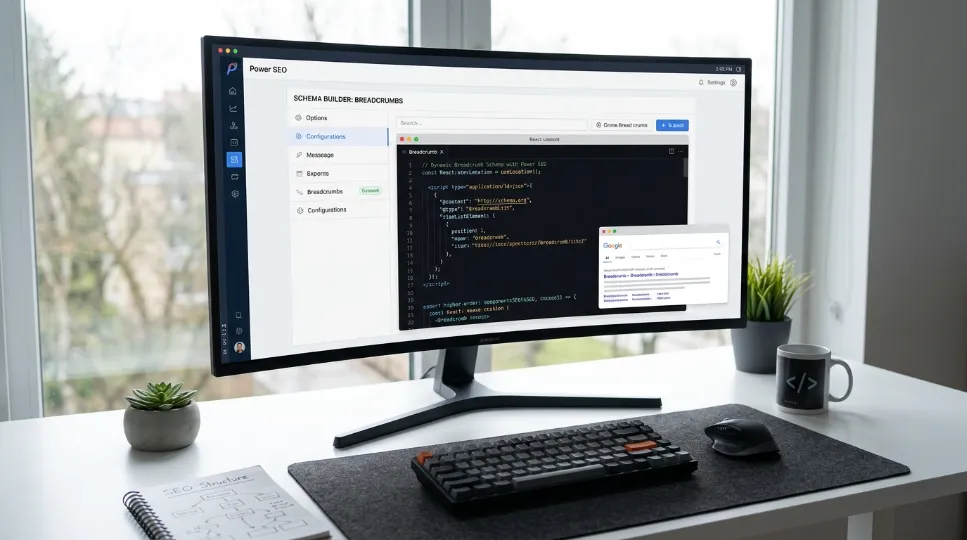
Typed builder functions,
breadcrumbList(),article(),organization(), and 22+ other schema types with full type checking.Pre-built React component,
<BreadcrumbJsonLd>for zero-boilerplate client or server rendering.Automatic escaping,
toJsonLdString()escapes<,>, and&so field values can't break out of the<script>tag.Multi-schema graphs,
schemaGraph()combines multiple schema objects into a single@graphdocument, as Google recommends.Built-in validation,
validateSchema()catches missing required fields and spec violations before deploy, with CI-friendly structured output.Framework-agnostic, works in Next.js, Remix, Edge runtimes, plain Node.js, Express, and Cloudflare Workers.
Zero extra runtime dependencies, only
@power-seo/coreas a peer dependency; ships both ESM and CJS.
Examples in This Guide
Each of the following examples shows a different way to implement Breadcrumb Schema in React, from simplest to most advanced:
React component example, using
<BreadcrumbJsonLd>to render breadcrumb JSON-LD with zero boilerplate.Builder function example, using
breadcrumbList()andtoJsonLdString()directly for non-React or framework-agnostic code.Next.js App Router SSR example, server-rendering breadcrumb JSON-LD inside a page component so it's present in the first HTML response.
schemaGraph() example, combining
article(),breadcrumbList(), andorganization()into a single@graphdocument.validateSchema() example, catching an invalid, single-item breadcrumb before it reaches production.
Conclusion: What Do You Now Know About Breadcrumb Schema in React?
Most React developers I know handle SEO the same way last minute, manual JSON, and a lot of hoping for the best. In the sites where I've actually implemented this validate-before-deploy workflow, the breadcrumb rich result has consistently shown up in Search Console within a couple of weeks of the fix going live. But breadcrumb schema is one of those things where a small, focused effort creates real, measurable results. Clean breadcrumb trails in Google. Better site structure for AI search. Richer, more trustworthy search results.
@power-seo/schema gives you typed builder functions, a pre-built <BreadcrumbJsonLd> component, schemaGraph() for multi-schema pages, and validateSchema() to catch errors before they become invisible problems. Install it, implement your breadcrumbs, run the validator, and deploy with confidence. If you found this helpful, check out the full @power-seo/schema docs. Explore the other 22 schema types: Product, Article, FAQ, LocalBusiness, and more. Each one is as easy as breadcrumbs. Each one is another chance for your React app to show up better in search.
Learn more about @power-seo/schema's other 22 schema types in the full docs before you deploy. If you're exploring Power SEO free SEO tools for React and JavaScript SEO, you can also use Power SEO's open-source packages for structured data, metadata, sitemaps, and technical SEO workflows.
Install @power-seo/schema today → npm install @power-seo/schema
In short: Breadcrumb schema in React means adding a valid, server-rendered BreadcrumbList JSON-LD block. Use at least two sequential items. Match your on-page breadcrumbs. Confirm it with validateSchema() before you ship. Follow the steps above, and you'll have a fully working, spec-compliant breadcrumb implementation. It will be ready to show up as a clean path in Google's search results instead of a raw URL.
Next Steps
Once your Breadcrumb Schema in React is live and validated, here's where to go next:
Compare the other 22 @power-seo/schema types: Product, Article, FAQ, LocalBusiness, and more. See which ones fit your other page templates.
See options for combining schemas: revisit the
schemaGraph()section above if your pages also need Article or Organization markup.Run
validateSchema()across your existing pages to find breadcrumbs that are already broken.Test a live page with Google's Rich Results Test to confirm the rich result actually appears.
Which one should you add next? If your site has product or category pages, Product schema is typically the highest-impact schema type to pair with breadcrumbs.
Frequently Asked Questions About Breadcrumb Schema in React
What is breadcrumb schema in React?
Breadcrumb schema in React is JSON-LD structured data that uses the schema.org BreadcrumbList type to describe a page's position within a site's hierarchy. It is typically rendered through a <script type="application/ld+json"> tag and can be generated with a React component or schema builder.
Does breadcrumb schema work in client-side React apps?
Yes, breadcrumb schema can work in client-side React apps, but rendering it before search engines process JavaScript is preferable. With pure client-side rendering, use pre-rendering or SSR when possible. Next.js or Remix can render the JSON-LD on the server, helping crawlers access the structured data more reliably.
How many items do I need in a breadcrumb list?
A breadcrumb list should contain at least two ListItem objects to represent a meaningful hierarchy. Each item should identify a breadcrumb level with its position, name, and, where applicable, item URL. For example, Home > Blog > Article contains three breadcrumb items.
Can I use breadcrumb schema with other schemas on the same page?
Yes. Breadcrumb schema can be combined with other structured data such as Article, Organization, or WebPage. Using schemaGraph() from @power-seo/schema lets you combine multiple schema types into one JSON-LD @graph, making related entities easier to represent within the same page markup.
Do I still need breadcrumb schema if Google removed visual breadcrumbs from mobile SERPs?
Breadcrumb schema can still provide structured information about a page's hierarchy, even when Google does not display a visual breadcrumb in a particular search result. It helps describe relationships between pages and should accurately match the site's visible breadcrumb trail and canonical URLs.
How do I know if my breadcrumb schema is valid?
You can validate breadcrumb schema with validateSchema() from @power-seo/schema before deployment. After publishing, test the JSON-LD with Google's Rich Results Test and monitor relevant structured-data reports in Google Search Console. Check that required properties, positions, names, and URLs are correctly formatted.
What's the difference between breadcrumbs shown on the page and breadcrumb schema?
Visible breadcrumbs are the clickable navigation trail users see on a page, such as Home > Blog > Article. Breadcrumb schema is JSON-LD structured data that describes the same hierarchy to search engines. The structured data should accurately represent the visible breadcrumb path and use the appropriate URLs.
Should breadcrumb positions start at 0 or 1?
Breadcrumb positions should start at 1 and increase sequentially, such as 1, 2, 3. Each ListItem should have a unique position representing its place in the hierarchy. Using 0, skipping numbers, or assigning duplicate positions can make the BreadcrumbList markup invalid or incorrectly structured.
How deep should a breadcrumb trail go?
There is no universal requirement for a specific breadcrumb depth. Use enough levels to clearly represent the page's actual site hierarchy without adding unnecessary steps. For example, Home > Blog > SEO > Breadcrumb Schema can describe four meaningful levels when those categories genuinely exist in the site's navigation structure.

I’m Mitu Das, a JavaScript developer, ERP product architect, and SEO specialist from Bangladesh. I work at CyberCraft Bangladesh, where I help build simple, scalable software, SaaS platforms, and business solutions. My goal is to create technology that helps companies save time, automate daily tasks, and grow faster. I enjoy combining development, product ideas, and SEO strategies to create useful digital solutions for modern businesses.
Writes about
Want this done for you?
Our team builds and ships exactly what this article describes. Send a message and we will reply with a scope.