Website Maintenance Checklist: Keep Your Site Fast, Secure & Ranking

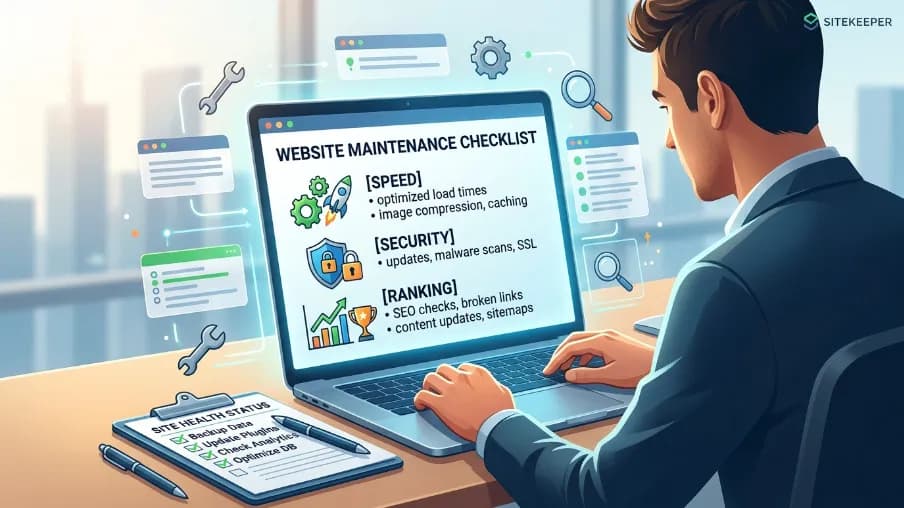
I’ve seen beautiful websites fall apart not because of bad design, but because of neglect. One day the site loads fast. Six months later, it crawls. Links are broken, plugins are outdated, and Google quietly starts pushing it down in rankings. The owner usually only notices when traffic has already dropped.
That’s exactly why maintenance matters just as much as initial website development. A site isn’t “finished” when it goes live. It’s a living system that needs regular care to stay fast, secure, and visible.
This website maintenance checklist is the exact guide I use with my clients. It covers everything: security, speed, SEO, content, and compliance. Whether you are a business owner, developer, or marketer, follow this system and nothing will slip through the cracks.
Why Website Maintenance Is Not Optional Anymore
People treat website maintenance like an optional upgrade. It is not. It is the baseline for staying online, staying ranked, and staying trusted.
Think of it like a car. You can buy a great car, but if you never change the oil or check the tires, it will break down. The same thing happens to websites left unattended.
Here is exactly what happens when you skip regular website maintenance:
- Search engines penalize slow or broken pages and quietly drop your rankings.
- Hackers exploit outdated plugins and old CMS versions in automated attacks.
- Users bounce immediately when forms stop working or pages return errors.
- Your brand looks untrustworthy, and customers go to your competitor instead.
- Revenue declines while competitors with well-maintained sites pull ahead.
A structured website maintenance checklist makes all of this manageable. You do not need to do everything every day. You just need a rhythm.
Complete Website Maintenance Schedule at a Glance
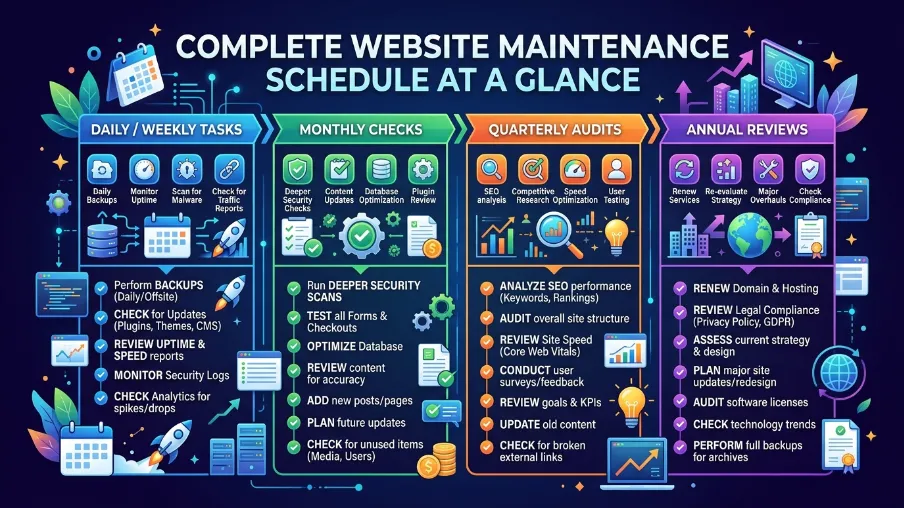
Here is the full picture, organized by frequency so nothing gets missed:
Daily
- Uptime monitoring
- Security alert review
- Backup verification
- Core metrics check
Weekly
- Plugin & CMS updates
- Broken link scan
- Analytics review
- Form testing
Monthly
- Speed performance test
- SEO audit
- Content refresh
- Mobile UX check
Quarterly
- SEO strategy review
- Conversion rate audit
- Compliance check
- Integrations review
Annual
- Full site audit
- Design refresh
- Tech stack review
- Goal realignment
Now let me go deeper into each area. Practical, actionable, and free of jargon.
Security Maintenance: Protect What You Built
Security is the one area where being late costs you everything. I have seen a client lose an entire e-commerce site because they delayed a WordPress update for 'just a few weeks.' The recovery was costly financially and reputationally.
Do not let that be your story.
Daily Security Tasks
Monitor uptime: Use UptimeRobot or Pingdom (both have free tiers). Get an alert the moment your site goes down before customers notice.
Verify backups ran successfully: Your backup system is only useful if it actually works. Automate it, then check it daily.
Review security alerts: Check your security plugin dashboard for unusual logins, file changes, or firewall triggers.
Weekly Security Tasks
Update your CMS (WordPress, Drupal, etc.): Every update patches known vulnerabilities. Skipping updates is leaving your door unlocked.
Update all plugins and themes: Outdated plugins are the #1 entry point for automated hacking scripts. Remove any you do not actively use.
Run a malware scan: Use Sucuri, Wordfence, or iThemes Security. Catch infections early before they damage rankings or get you flagged by Google.
Check SSL certificate status: An expired SSL shows 'Not Secure' in the browser. Visitors leave instantly. Set a renewal reminder well in advance.
Audit admin user accounts: Remove inactive accounts. Enforce strong, unique passwords and two-factor authentication for all admins.
Speed & Performance: The Hidden Ranking Factor
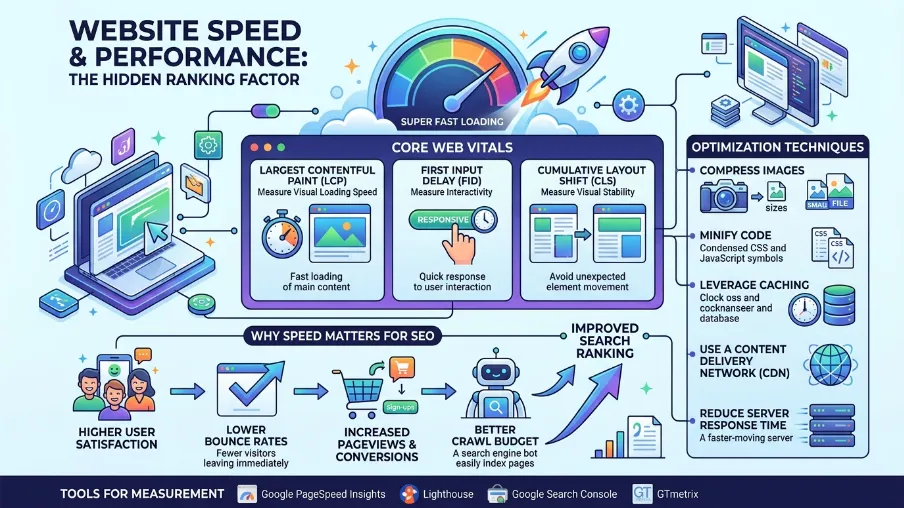
If your page takes more than 3 seconds to load, you lose over half your visitors before they see a single word. Speed is not just user experience; it is a direct Google ranking signal. Faster sites rank higher. It is that straightforward.
Monthly Performance Checklist
Test with Google PageSpeed Insights: Run both desktop and mobile versions. Target a score above 80. Fix every flagged issue because they directly affect rankings.
Compress and optimize all images: Images are the #1 cause of slow pages. Convert to WebP format, compress before upload, and enable lazy loading.
Audit your caching configuration: Proper caching dramatically reduces server load and speeds up every single page for every visitor.
Minify CSS, JavaScript, and HTML: Strip unnecessary whitespace and characters from code files. Most caching plugins handle this automatically.
Review your hosting environment: Sometimes the server is simply too slow for your traffic. Growing businesses need managed or VPS hosting, not basic shared plans.
Check Core Web Vitals in Google Search Console: Monitor your LCP, INP, and CLS scores. These are official Google ranking signals and a critical part of any website maintenance checklist.
"Speed is not a feature. It is a requirement. Users expect pages to load in under 2 seconds, especially on mobile. Miss that window, and they are gone to your competitor."
SEO Maintenance: Keep Your Rankings Climbing
SEO is not a "set it and forget it" discipline. Algorithms change, competitors improve, and content goes stale. Regular SEO maintenance is the only way to stay visible when your customers search for what you offer.
Monthly SEO Checklist
Fix broken links (404 errors): Use Screaming Frog or Ahrefs to find broken internal and external links. Every broken link wastes crawl budget and damages user trust.
Review crawl errors in Google Search Console: Check the Coverage report. Fix indexing issues immediately and resubmit your sitemap after major changes.
Refresh page titles and meta descriptions: Stale meta tags miss click-through opportunities. Update them with current keywords and compelling calls to action.
Strengthen internal linking: Find orphan pages, which are pages with no internal links. Connect them to related content to pass authority and improve crawlability.
Check for duplicate content: Duplicate pages split ranking power and confuse crawlers. Use canonical tags to consolidate signals to the correct URL.
Verify mobile-friendliness: Google uses mobile-first indexing. A broken mobile experience directly hurts your desktop rankings too.
Monitor keyword rankings weekly: Track primary keywords. Sudden ranking drops need fast investigation. Possible causes include an algorithm update, a technical issue, or competitor activity.
Quarterly SEO Tasks
Full content audit: Which pages drive traffic? Which are dead weight? Refresh high-potential pages and redirect or remove thin, low-value content.
Backlink profile review: Audit with Ahrefs or SEMrush. Disavow clearly toxic links. Identify fresh link-building opportunities in your niche.
Update your XML sitemap: Confirm new pages are included and deleted or redirected URLs are removed from your sitemap.
Schema markup audit: Add or update structured data. Schema markup helps Google understand your content and can unlock rich snippets in search results.
Featured Snippet Tip: To rank in Google's answer boxes, answer common questions directly and clearly using short sentences and a clean structure. Start answers with the term being defined, then expand. Specificity wins.
Content Updates: Fresh Content Wins Every Time
Old content is like old bread. It goes stale, and search engines notice. I have personally seen pages jump from position 14 to position 3 just by updating statistics, adding new sections, and fixing outdated examples. A content refresh is one of the highest-ROI tasks on any website maintenance checklist.
Monthly Content Maintenance Checklist
Identify pages needing a refresh: Use Google Search Console to find pages with declining impressions or click-through rates. Those pages have the most to gain from updates.
Update all statistics and data points: Citing a 2021 study in 2026 destroys credibility. Replace every outdated number with current, authoritative sources.
Expand high-traffic posts: Go deeper. Add FAQ sections, new case studies, comparison tables, or video embeds to content that already ranks.
Fix grammar, typos, and outdated product info: Run a grammar check quarterly. Small errors quietly erode trust and professionalism over time.
Update visuals and screenshots: A screenshot from three software versions ago signals neglect. Fresh visuals improve time on page and perceived credibility.
Audit all calls to action: Are CTAs pointing to live pages? Is the offer still relevant? Is the landing page still converting? Broken CTAs are wasted traffic.
Compliance, UX & Legal: The Tasks Most People Ignore
Skip this section and you risk fines, lawsuits, accessibility violations, and permanent loss of user trust. This is not optional, even for small sites.
Quarterly Compliance and UX Checklist
Update Privacy Policy and Terms of Service: Laws change. Your documents must reflect exactly what you do with user data today, not what you did two years ago.
Review GDPR/CCPA Cookie Consent: Mandatory if you have visitors from the EU or California. Confirm your cookie banner is accurate, functional, and compliant.
Audit WCAG 2.1 Accessibility: Use WAVE or axe DevTools to check for accessibility failures. Accessibility is both a legal requirement and an SEO signal.
Test All Forms and Checkout Flows End-to-End: Submit every form on your site manually. Confirm data arrives, confirmations are sent, and automations fire correctly.
Improve Your 404 Error Page: A well-designed 404 page keeps users on your site. Add navigation links, a search bar, and your most popular content.
Check Cross-Browser Compatibility: Test in Chrome, Firefox, Safari, and Edge. What looks perfect in one browser can break completely in another.
For businesses serving customers in Bangladesh and South Asia, if you accept payments or handle personal data, ensure your site also aligns with local digital commerce guidelines alongside international standards such as GDPR.
Annual Site Overhaul: The Big Picture Review
Once a year, step back from the daily and weekly rhythm and look at your website as a whole business asset. Ask yourself: is this site still serving your business goals or is it just surviving?
Run a full technical SEO audit: Use a professional crawl tool (Screaming Frog + Ahrefs). Uncover structural issues that monthly checks miss like duplicate H1s, redirect chains, orphan pages at scale.
Reassess your keyword strategy: Are you still targeting the right terms? Markets shift. New keywords emerge. Run a fresh competitive keyword gap analysis every year.
Review site design and UI: Does the design still represent your brand well? Are there UX friction points driving bounce rates? Sometimes a redesign pays for itself in conversions.
Audit your entire tech stack: Hosting, CMS, plugins, integrations, CDN are they still the right choices for your traffic and business size?
Realign website goals with business objectives: Your site should reflect where your business is going, not where it was two years ago. Update messaging, landing pages, and lead flows accordingly.
Here’s your cleaned version with the punctuation removed and formatting smoothed out:
Best Tools for Your Website Maintenance Checklist
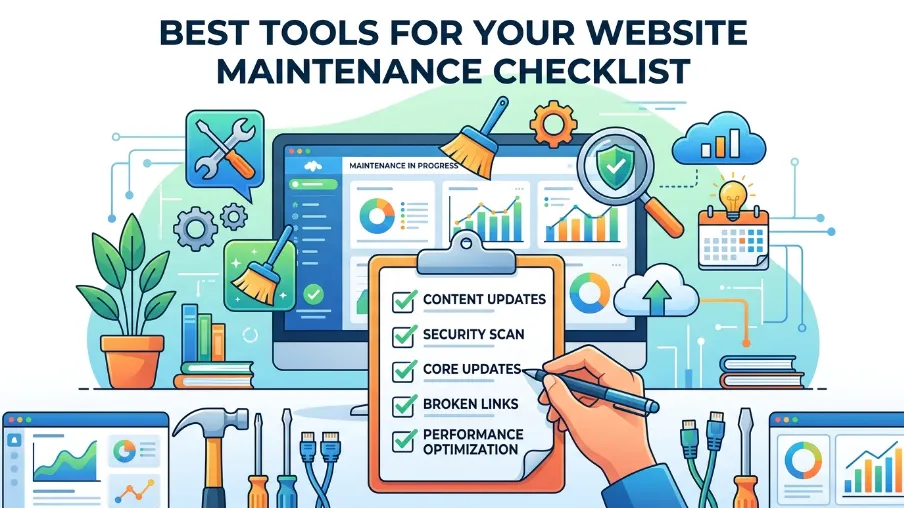
You do not need expensive software to maintain a site well. Here is exactly what I recommend organized by budget:
Free Essential Tools
Google Search Console: Crawl errors, keyword rankings, Core Web Vitals, index coverage
Google Analytics 4: Traffic analysis, user behavior, conversion tracking
Google PageSpeed Insights: Speed scoring and Core Web Vitals for desktop and mobile
UptimeRobot: Free uptime monitoring with email and SMS alerts
Screaming Frog (free tier): Broken links and SEO crawls up to 500 URLs
Paid Worth the Investment
Ahrefs or SEMrush: Keyword tracking, backlink analysis, automated site audits
Sucuri or Wordfence: Security scanning, malware removal, Web Application Firewall
GTmetrix: Detailed performance reports with historical waterfall charts
ManageWP or MainWP: Manage multiple WordPress sites from one dashboard
Final Thoughts: Consistency Beats Perfection
You do not need to implement all of this perfectly on day one. Just start. Pick five tasks from this website maintenance checklist and do them this week. Add five more next month.
The websites that rank, convert, and grow are not the ones built perfectly. They are the ones maintained consistently. Your website is a living asset, it needs regular care to keep delivering traffic, leads, and trust.
If you found this guide useful, save it, bookmark it, and share it with someone managing a site. And if you need help with the technical SEO or website development side of things, that is exactly what I do.
Frequently Asked Questions About Website Maintenance Checklist
1. How often should I maintain my website?
At minimum, do weekly updates and monthly audits, with deeper quarterly and annual reviews.
2. What is the most important website maintenance task?
Security updates (CMS, plugins, and themes) are the most critical to prevent hacking and data loss.
3. Why is website speed important?
Slow websites increase bounce rates and reduce Google rankings, especially if load time exceeds 3 seconds.
4. What happens if I don’t update plugins?
Outdated plugins can create security vulnerabilities and are a common entry point for hackers.
5. How do I know if my SEO is failing?
Watch for drops in rankings, traffic decline in Google Analytics, or crawl errors in Google Search Console.
6. Do I need technical skills for website maintenance?
Not always. Many tasks can be handled with tools, but advanced fixes may require a developer.

I’m Mitu Das, a JavaScript developer, ERP product architect, and SEO specialist from Bangladesh. I work at CyberCraft Bangladesh, where I help build simple, scalable software, SaaS platforms, and business solutions. My goal is to create technology that helps companies save time, automate daily tasks, and grow faster. I enjoy combining development, product ideas, and SEO strategies to create useful digital solutions for modern businesses.
Writes about
Want this done for you?
Our team builds and ships exactly what this article describes. Send a message and we will reply with a scope.