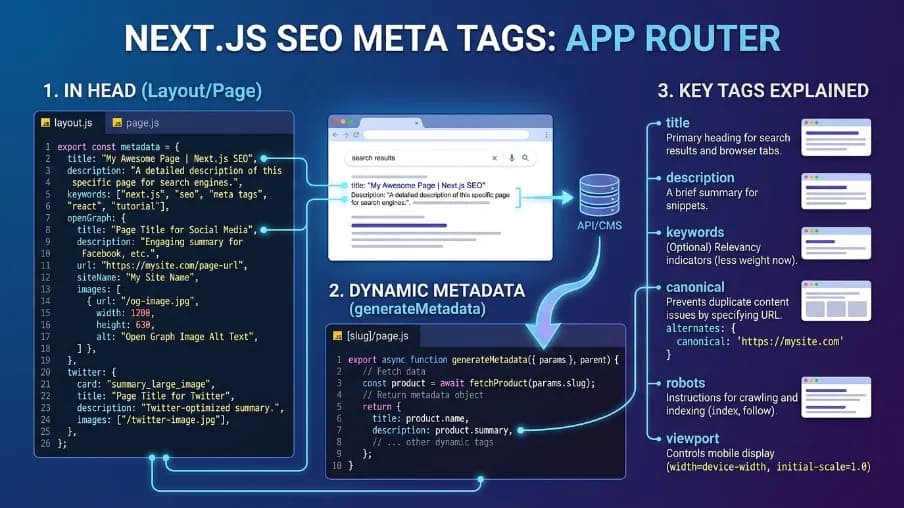
Power SEO Audit vs Next SEO: Which TypeScript SEO Audit Tool Should You Actually Use in 2026?
You pushed a Next.js update on a Friday. Monday morning, Google Search Console shows a ranking drop, broken canonical tags, missing meta descriptions, three product pages indexed with duplicate titles. Nobody caught it before it shipped. That's not a hypothetical. I've watched this happen to production teams more times than I'd like to admit.
When it does, the question is always the same: which tool should I have been using? That's what this comparison is really about. Power SEO Audit vs Next SEO both live in the Next.js SEO world, but they don't do the same job. Confusing one for the other is exactly where most teams get stuck.
I'll break down both tools honestly, with working code you can copy directly, so you can make the right call before you need to.
Power SEO Audit vs Next SEO Quick Overview
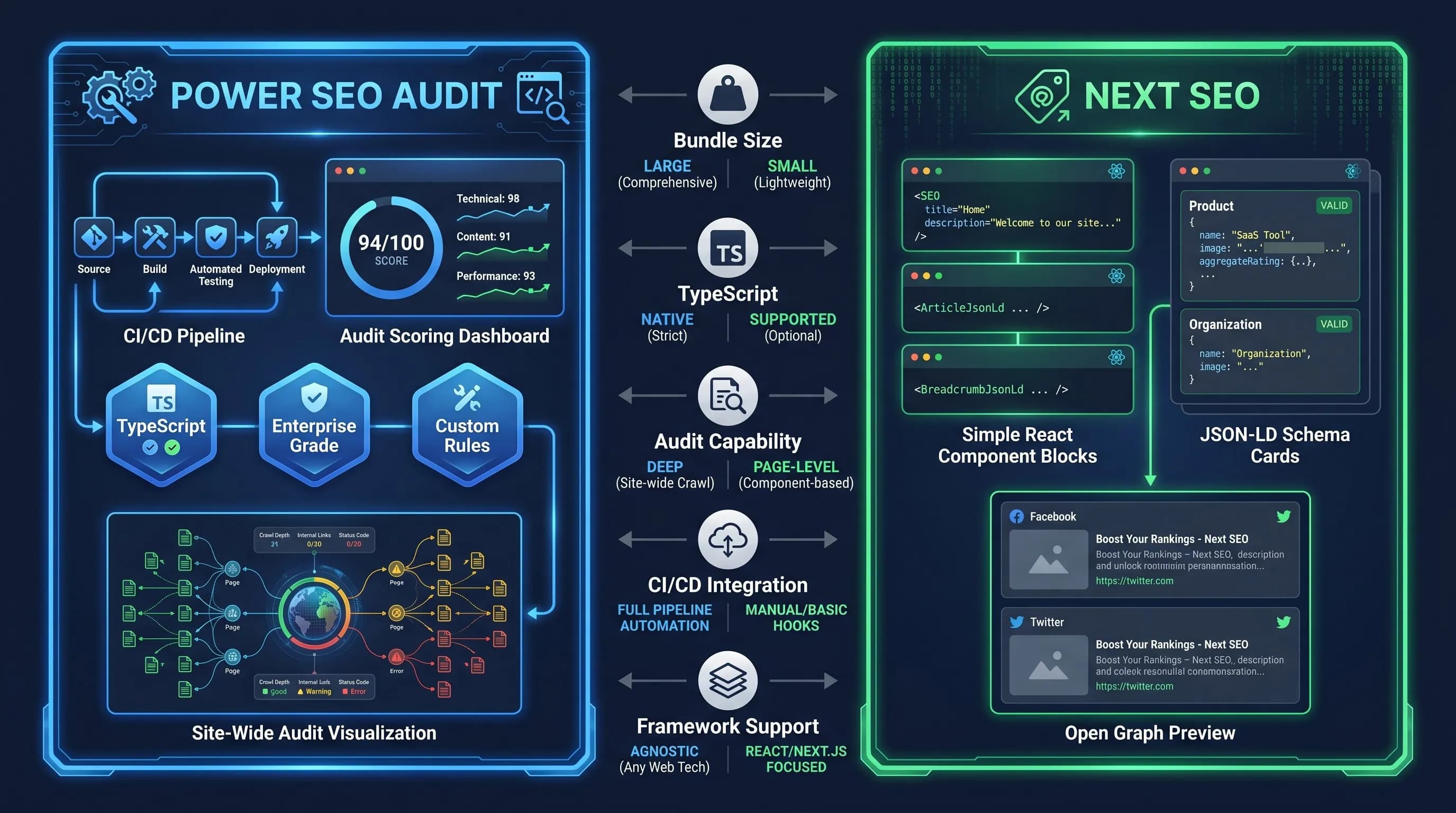
Feature | Power SEO Audit | Next SEO |
| Primary Purpose | SEO audit & scoring engine | Metadata & structured data implementation |
| Bundle Size | Tree-shakeable — import only what you need | ~11–12 KB minified + gzipped |
| SSR Support | ✅ Native (Next.js, Remix, Node, Edge) | ✅ Yes |
| TypeScript Support | ✅ Full TypeScript-first, typed inputs/outputs | ⚠️ Good but partial typing on JSON-LD |
| Learning Curve | Moderate — structured input model | Very Easy — drop-in React components |
| Documentation Quality | Growing ecosystem docs | Mature, years of community answers |
| Community Size | Small but actively expanding | Large (300k+ weekly downloads) |
| npm Weekly Downloads | Growing | ~300,000+ |
| Framework Support | Next.js, Remix, Node.js, Edge runtimes | Primarily Next.js / React |
| CI/CD Integration | ✅ Score threshold gates — blocks bad deploys | ❌ Not applicable |
| Site-Wide Audit | ✅ auditSite() — aggregate + per-page results | ❌ No audit capability |
| Zero Network Calls | ✅ Fully local, synchronous computation | ✅ Yes |
Power SEO Audit Deep Dive
Power SEO Audit is a production-grade SEO audit engine that evaluates pages against a structured rule set and returns 0–100 scored, actionable reports. It covers four categories: meta tags, content quality, structural correctness, and performance optimization. It's part of the broader power seo ecosystem — 17 modular TypeScript-first packages covering everything from schema generation to redirects, sitemaps, and analytics.
Installation
npm i @power-seo/auditWorking Code Example
Here's a real audit script you can drop directly into a Next.js API route, a CI pipeline, or an admin dashboard:
import { auditPage } from '@power-seo/audit';
import type { PageAuditInput, PageAuditResult } from '@power-seo/audit';

const input: PageAuditInput = {
  url: 'https://example.com/products/wireless-headphones',
  title: 'Best Wireless Headphones 2026 — Free Shipping | Example',
  metaDescription:
    'Shop the best wireless headphones with noise cancellation. Free shipping on orders over $50. Trusted by 50,000+ customers.',
  canonical: 'https://example.com/products/wireless-headphones',
  robots: 'index, follow',
  openGraph: {
    title: 'Best Wireless Headphones 2026',
    description: 'Shop with free shipping and easy returns.',
    image: 'https://example.com/images/headphones-og.jpg',
  },
  content: '<h1>Best Wireless Headphones</h1><p>Our top-rated noise-cancelling headphones...</p>',
  headings: ['h1:Best Wireless Headphones', 'h2:Key Features', 'h2:Customer Reviews'],
  images: [
    { src: '/images/headphones.webp', alt: 'Wireless headphones product photo' },
    { src: '/images/headphones-side.jpg', alt: '' }, // missing alt — will flag as error
  ],
  internalLinks: ['/products', '/cart', '/about'],
  externalLinks: ['https://developers.google.com/search'],
  focusKeyphrase: 'wireless headphones',
  wordCount: 820,
};

const result: PageAuditResult = auditPage(input);

// Overall score + per-category breakdown
console.log(`Overall Score: ${result.score}/100`);
console.log(result.categories);
// {
//   meta:        { score: 90, passed: 9, warnings: 1, errors: 0 },
//   content:     { score: 78, passed: 6, warnings: 2, errors: 0 },
//   structure:   { score: 65, passed: 5, warnings: 1, errors: 1 }, // ← alt text error
//   performance: { score: 80, passed: 7, warnings: 1, errors: 0 },
// }

// Surface only actionable issues
const errors   = result.rules.filter((r) => r.severity === 'error');
const warnings = result.rules.filter((r) => r.severity === 'warning');
console.log(`Errors: ${errors.length}, Warnings: ${warnings.length}`);

// Human-readable fix list
result.recommendations.forEach((rec) => console.log('→', rec));
Strongest Advantages of Power SEO Audit
1. Four Scored Rule Categories with Granular Severity
Every audit produces a 0–100 score per category — meta tags, content quality, document structure, and performance. Every issue gets tagged as error, warning, info, or pass. You know exactly which area is dragging your score down and how urgently it needs a fix. That's something no manual review process can match at scale.
2. CI/CD Quality Gates That Block Bad Deploys
You can run auditSite() inside a GitHub Actions workflow and call process.exit(1) when scores fall below a threshold. No other Next.js SEO library offers this natively. This is the difference between discovering an SEO regression in Search Console three weeks after it shipped — versus catching it before the pull request merges.
3. Site-Wide Aggregation with auditSite()
Pass an array of page inputs and get back an average site score, top recurring issues by frequency, and individual page results — all in one synchronous function call. For teams managing 50, 500, or 5,000 pages, this transforms SEO from a manual audit into an automated pipeline.
Power SEO Audit Honest Limitations
1. It Diagnoses — It Doesn't Fix
Power SEO Audit tells you exactly what's broken. It will not write your meta tags or inject your canonical links. You still need an implementation library, Next SEO or Power SEO Meta, to actually apply the fixes it surfaces.
2. You Build the Data Extraction Layer
The library requires structured input. It doesn't crawl URLs on its own. If you're auditing a 200-page blog, you'll write the script that pulls title, content, headings, and images from your CMS or build output before passing it to auditSite(). That's an extra setup step that Next SEO never asks for.
Next SEO Deep Dive
Next SEO is a well-established open-source library for managing metadata, Open Graph tags, Twitter Cards, and JSON-LD structured data in Next.js applications. Its design philosophy is maximum simplicity, drop in a component, configure your tags, done. For developers who want SEO working without reading schema specs or building audit pipelines, it delivers exactly that.
Installation
npm i next-seoWorking Code Example
Here's the same product page scenario with Next SEO — the same SEO goal, a different approach:
import { NextSeo, ProductJsonLd } from 'next-seo';

type Props = {
  title: string;
  description: string;
  slug: string;
};

export default function ProductPage({ title, description, slug }: Props) {
  const url = `https://example.com/products/${slug}`;

  return (
    <>
      <NextSeo
        title={title}
        description={description}
        canonical={url}
        openGraph={{
          url,
          title,
          description,
          type: 'website',
          images: [
            {
              url: 'https://example.com/images/headphones-og.jpg',
              width: 1200,
              height: 630,
              alt: title,
            },
          ],
        }}
        robotsProps={{ nosnippet: false, noindex: false }}
      />
      <ProductJsonLd
        productName={title}
        images={['https://example.com/images/headphones-og.jpg']}
        description={description}
        offers={[
          {
            price: '79.99',
            priceCurrency: 'USD',
            availability: 'https://schema.org/InStock',
            url,
            seller: { name: 'Example Store' },
          },
        ]}
      />
      <main>{/* product content */}</main>
    </>
  );
}
Notice how little ceremony this requires. If your mental model is "React component = SEO tag," Next SEO clicks immediately.
Strongest Advantages of Next SEO
1. The Simplest API in the Next.js SEO Space
One component — <nextseo/> — handles title, description, canonical, Open Graph, and robots directives. Most pages are production-ready in under ten lines of JSX. For small teams and solo developers, that speed matters more than architectural elegance.
2. A Decade of Community Knowledge
Stack Overflow answers, GitHub issues, YouTube tutorials, blog posts, Next SEO has years of documented solutions behind it. When something breaks at 11pm before a launch, that community depth is worth more than any feature list.
3. Ready-Made JSON-LD Components
Next SEO ships pre-built structured data components for Article, Product, Recipe, FAQ, BreadcrumbList, Event, and more. You don't need to read the Schema.org spec or worry about required fields, the component handles the structure.
Next SEO Honest Limitations
1. Zero Audit Capability — Anywhere
Next SEO renders whatever you tell it to. If you accidentally omit a canonical tag, it renders without one — silently, with no warning, no error, no score. You'll find out when Search Console tells you two weeks later. There's no built-in way to validate, score, or report on the SEO health of your pages.
2. Partial TypeScript on Structured Data
Most JSON-LD components accept plain object properties without compile-time schema validation. A missing datePublished on an Article schema won't cause a TypeScript error — it'll produce structurally invalid JSON-LD that Google's Rich Results Test will reject. You carry that correctness burden yourself.
Real-World Scenario 1: Catching Broken Meta Tags Before They Kill Your Rankings
-blocking-failed-deployments-on-pull-request.webp)
Here's a scenario I've seen happen to real Next.js teams. A developer refactors the shared layout component. Somewhere in the diff, the canonical prop gets dropped. The meta description character limit check is removed. Fifteen product pages now ship without canonical tags and with titles truncated to 80+ characters.
Nobody catches it. The PR passes review. It deploys on Thursday. By Monday, Google has re-crawled those pages and rankings start sliding.
With Power SEO Audit: Block It in CI Before It Ships
Create a file at scripts/seo-gate.ts:
// scripts/seo-gate.ts — add this to your CI pipeline
import { auditSite } from '@power-seo/audit';
import type { PageAuditInput } from '@power-seo/audit';

// Pull this data from your CMS, build output, or test fixtures
const pages: PageAuditInput[] = [
  {
    url: 'https://example.com/products/headphones',
    title: 'Best Wireless Headphones 2026 — Free Shipping | Example Store',
    metaDescription: 'Shop noise-cancelling headphones with free shipping over $50.',
    // canonical accidentally removed during refactor — no value passed here
    robots: 'index, follow',
    wordCount: 820,
  },
  {
    url: 'https://example.com/products/speakers',
    // title is 82 characters — exceeds the 60-char guideline
    title: 'Bluetooth Speakers For Home Studio Use — Best Picks For Audio Engineers In 2026',
    metaDescription: 'Find the best Bluetooth speakers for studio and home use.',
    canonical: 'https://example.com/products/speakers',
    robots: 'index, follow',
    wordCount: 740,
  },
];

const report = auditSite({ pages });

const SCORE_THRESHOLD = 75;
const totalErrors = report.pageResults
  .flatMap((p) => p.rules.filter((r) => r.severity === 'error'))
  .length;

if (report.score < SCORE_THRESHOLD || totalErrors > 0) {
  console.error(`\n[FAIL] SEO audit FAILED — deploy blocked`);
  console.error(`   Site score: ${report.score}/100 (minimum: ${SCORE_THRESHOLD})`);
  console.error(`   Critical errors: ${totalErrors}`);
  report.topIssues.forEach((i) => console.error(`   -> [${i.severity}] ${i.title}`));
  process.exit(1);
}

console.log(`\n[PASS] SEO audit PASSED — score: ${report.score}/100`);
Then wire it into GitHub Actions in .github/workflows/seo-check.yml:
name: SEO Quality Gate
on: [pull_request]
jobs:
  seo-audit:
    runs-on: ubuntu-latest
    steps:
      - uses: actions/checkout@v4
      - uses: actions/setup-node@v4
        with:
          node-version: '20'
      - run: npm ci
      - run: npx tsx scripts/seo-gate.ts
The missing canonical flags as error severity. The 82-character title fires a warning. process.exit(1) blocks the deploy. The broken pages never reach Google.
With Next SEO: No Detection Capability
// next-seo implements — it does not audit or validate
<NextSeo
  title="Best Wireless Headphones 2026"
  // canonical accidentally omitted — next-seo renders without it, no warning
/>
Next SEO renders exactly what you pass it. It has no mechanism to detect omissions, validate lengths, or compare output against SEO best practices. The broken canonical ships silently.
Winner: Power SEO Audit, and it's not close. This is the entire reason the library exists. Next SEO has no equivalent answer here.
Real-World Scenario 2: Auditing 100+ Pages to Find Your Worst SEO Offenders

You've been publishing content for two years. You have 130 blog posts and 40 product pages. Some early posts were written before your team understood SEO properly — thin word counts, missing OG images, no focus keyphrase, heading levels that skip from H1 to H3.
You have no idea which pages are the worst offenders. Manually auditing 170 pages isn't realistic. And Search Console shows ranking data, not root causes.
With Power SEO Audit: Full Site Report in One Function Call
// lib/seo-report.ts — run this on demand or on a schedule
import { auditSite } from '@power-seo/audit';
import type { PageAuditInput } from '@power-seo/audit';

// Build this from your CMS (Contentful, Sanity, MDX frontmatter, etc.)
async function runSiteAudit(posts: BlogPost[]) {
  const pages: PageAuditInput[] = posts.map((post) => ({
    url: `https://example.com/blog/${post.slug}`,
    title: post.seoTitle || post.title,
    metaDescription: post.excerpt,
    canonical: `https://example.com/blog/${post.slug}`,
    content: post.htmlContent,
    headings: post.headings,       // ['h1:Title', 'h2:Section One', 'h3:Sub']
    images: post.images,           // [{ src: '/img.webp', alt: 'desc' }]
    internalLinks: post.internalLinks,
    focusKeyphrase: post.focusKeyword,
    wordCount: post.wordCount,
    openGraph: {
      title: post.seoTitle,
      description: post.excerpt,
      image: post.ogImage,
    },
  }));

  const report = auditSite({ pages });

  // Rank worst-performing pages first — these are your quick wins
  const ranked = [...report.pageResults].sort((a, b) => a.score - b.score);

  console.log(`\n[REPORT] Site SEO Health Report`);
  console.log(`   Average Score : ${report.score}/100`);
  console.log(`   Pages Audited : ${report.totalPages}`);

  console.log(`\n[WORST] Bottom 10 Pages (highest ROI to fix):`);
  ranked.slice(0, 10).forEach(({ url, score, rules }) => {
    const issues = rules.filter((r) => r.severity === 'error' || r.severity === 'warning');
    console.log(`\n   ${score}/100 — ${url}`);
    issues.slice(0, 3).forEach((r) => console.log(`      -> [${r.severity}] ${r.title}`));
  });

  console.log(`\n[RECURRING] Top Recurring Issues Across All Pages:`);
  report.topIssues.forEach(({ id, title, severity }) =>
    console.log(`   [${severity}] ${id}: ${title}`)
  );

  return report;
}
Sample output:
[REPORT] Site SEO Health Report
   Average Score : 61/100
   Pages Audited : 170

[WORST] Bottom 10 Pages (highest ROI to fix):

   34/100 — /blog/old-post-2022
      -> [error] meta-description-missing
      -> [error] heading-single-h1-violation
      -> [warning] content-word-count-thin

   41/100 — /blog/quick-tip-2023
      -> [error] og-image-missing
      -> [warning] meta-title-length
      -> [warning] content-keyphrase-missing

[RECURRING] Top Recurring Issues Across All Pages:
   [error]   og-image-missing: Open Graph image not found
   [warning] meta-description-length: Exceeds 158 characters
   [warning] content-keyphrase-missing: Focus keyphrase not in first paragraph
In one command, you have a prioritized fix list for your entire site. You know which pages to touch first, which issues are most widespread, and exactly what to fix on each one.
With Next SEO: No Site-Wide Visibility
Next SEO has no auditSite(), no scoring, and no issue detection. It renders what you configure — nothing more. To find problems across 170 pages you'd need a separate crawl tool (Screaming Frog, Ahrefs, Semrush), which adds cost, breaks your TypeScript workflow, and gives you no CI integration.
For a free TypeScript-native alternative, see our breakdown of the best free JavaScript SEO audit tools.
Winner: Power SEO Audit — decisively. auditSite() is what makes this scenario tractable. Next SEO cannot participate in it at all.
Performance Comparison
Bundle Size
Next SEO ships as a single package at roughly 11–12 KB gzipped — reasonable for what it covers.
Power SEO Audit ships with "sideEffects": false and named exports per rule runner. If you only need runMetaRules and runStructureRules, your bundle reflects that — you're not carrying content analysis or performance rules you don't use.
Runtime Speed
Both libraries execute synchronously on the server with zero client-side overhead. Power SEO Audit makes zero network calls and has zero runtime dependencies. That design makes it safe for Edge runtimes (Cloudflare Workers, Vercel Edge, Deno Deploy) where network calls would add latency or fail entirely.
Here's how to benchmark it in your own environment:
// benchmark.ts
import { auditPage } from '@power-seo/audit';

const input = {
  url: 'https://example.com/test',
  title: 'Performance Benchmark Page',
  metaDescription: 'Testing audit execution speed across 1,000 iterations.',
  wordCount: 650,
};

const start = performance.now();
for (let i = 0; i < 1000; i++) {
  auditPage(input);
}
const end = performance.now();
console.log(`1,000 page audits: ${(end - start).toFixed(2)}ms`);
// Typically: < 200ms on modern hardware
If you're building a React app outside Next.js, see how Power SEO React compares to React Helmet.
Lighthouse Score Impact
Both tools, when correctly implemented, can achieve a 100/100 Lighthouse SEO score. The practical difference: Power SEO Audit tells you when your implementation is falling short of that score, and at what severity. Next SEO only provides the implementation. Whether that implementation is correct is entirely up to you.
Migration Guide
Option A: Add Power SEO Audit Alongside Next SEO (Recommended)
These two tools are not mutually exclusive. The most effective production setup uses both — Next SEO for implementation, Power SEO Audit as a CI quality gate on top. This is zero-risk because it doesn't touch your existing code.
Step 1: Install Power SEO Audit package:
npm i @power-seo/audittsx is a TypeScript runner needed to execute the audit script. Install it as a dev dependency if you don't already have it:
npm i -D tsxStep 2: Create your audit script and add a package.json entry:
{
  "scripts": {
    "dev": "next dev",
    "build": "next build",
    "seo:audit": "tsx scripts/seo-gate.ts"
  }
}
Step 3: Hook it into your CI pipeline by adding .github/workflows/seo-check.yml:
name: SEO Audit Gate
on: [pull_request]
jobs:
  audit:
    runs-on: ubuntu-latest
    steps:
      - uses: actions/checkout@v4
      - uses: actions/setup-node@v4
        with:
          node-version: '20'
      - run: npm ci
      - run: npm run seo:audit
Your existing next seo components stay completely untouched. You're layering a quality gate on top of your existing implementation, no breaking changes, no migration risk.
Option B: Full Migration from Next SEO → Power SEO Meta
If you want to move to the Power SEO ecosystem entirely and use the App Router's native generateMetadata API:
npm uninstall next-seo

npm install @power-seo/meta @power-seo/schema
Before (Next SEO — Pages Router or client component):
import { NextSeo } from 'next-seo';

export default function BlogPost() {
  return (
    <>
      <NextSeo
        title="How to Optimize Next.js for Technical SEO"
        description="A practical guide to meta tags, canonical URLs, and structured data."
        canonical="https://example.com/blog/nextjs-technical-seo"
        openGraph={{
          title: 'How to Optimize Next.js for Technical SEO',
          description: 'A practical guide for developers.',
          images: [{ url: 'https://example.com/og/nextjs-seo.jpg' }],
        }}
      />
      <article>{/* content */}</article>
    </>
  );
}
After (Power SEO Meta — App Router, server-side):
import { createMetadata } from '@power-seo/meta';

// generateMetadata runs server-side — keeps SEO out of client bundles
export function generateMetadata() {
  return createMetadata({
    title: 'How to Optimize Next.js for Technical SEO',
    description: 'A practical guide to meta tags, canonical URLs, and structured data.',
    canonical: 'https://example.com/blog/nextjs-technical-seo',
    openGraph: {
      type: 'article',
      images: [{ url: 'https://example.com/og/nextjs-seo.jpg', width: 1200, height: 630 }],
    },
    robots: { index: true, follow: true },
  });
}

export default function BlogPost() {
  return <article>{/* content */}</article>;
}
What changes: SEO logic moves from client-side JSX into a server-side generateMetadata export, the pattern Next.js App Router was designed for. Your components get cleaner, your bundle gets lighter, and TypeScript catches schema errors at compile time instead of runtime.
My Verdict: Which Should You Choose?
These two tools are not competitors, they're colleagues. Next SEO handles implementation: it writes your meta tags, Open Graph properties, and JSON-LD. Power SEO Audit handles validation: it scores your pages and catches what's broken before Google does.
Use Next SEO if you're building a blog, portfolio, or marketing site and want metadata working with minimal setup. Use Power SEO Audit if you manage a large site, run CI/CD pipelines, or need measurable SEO quality standards across a team.
My personal recommendation: Run both. One tool writes your tags. The other makes sure those tags are actually correct before they ship.
Frequently Asked Questions
What is the difference between Power SEO Audit and Next SEO?
Next SEO implements meta tags and structured data. Power SEO Audit scores and validates your SEO across four rule categories. One writes tags; the other checks if they're correct.
Can I use Power SEO Audit and Next SEO at the same time?
Yes — this is the recommended setup. Use Next SEO for implementation and Power SEO Audit in your CI pipeline as a quality gate. They don't conflict.
Is Next SEO still a solid choice in 2026?
Yes, for straightforward projects. It's well-maintained, has a large community, and gets metadata working fast — ideal for blogs, portfolios, and marketing sites.
Does Power SEO Audit automatically crawl my website?
No. It requires structured input — you extract page data from your CMS or build output and pass it to the library. It makes zero network calls and runs entirely offline.
Which is better for technical SEO at scale — Power SEO Audit or Next SEO?
Power SEO Audit is clearly stronger at scale. auditSite() scores and ranks your entire page inventory in one call. Next SEO has no audit capability whatsoever.
Does Power SEO Audit support the Next.js App Router?
Yes, fully. It uses no browser-specific APIs and makes no network calls, so it runs in App Router, Pages Router, Edge runtimes, and standard Node.js scripts without any configuration.
What is the best next-seo alternative for programmatic SEO auditing in Next.js?
Power SEO Audit is the strongest TypeScript-native option, zero dependencies, fully local, CI-ready. For metadata implementation only, Power SEO Meta is a direct Next SEO alternative with native App Router support.
Written by the engineering team at CyberCraft Bangladesh — a Bangladesh-based software development company specializing in Next.js applications, full-stack SEO services, and enterprise SaaS platforms.
Want this done for you?
Our team builds and ships exactly what this article describes. Send a message and we will reply with a scope.