Reduce Manual Work With AI Tools: A Practical Guide That Actually Works


Let me guess. Your inbox is full. Your spreadsheet has three tabs you're afraid to touch. And you spent an hour today copying data from one system to another, again.
You're not alone. Studies show employees lose over 60% of their week to repetitive, low-value work instead of the job they were actually hired to do. That's not a small leak. That's most of your workweek, gone to busywork.
We've spent years helping teams fix this exact problem, building automation systems and testing AI tools hands-on for clients across finance, HR, and customer service. In this guide, I'll walk you through how to reduce manual work with AI tools, which tools actually help, and how to start without breaking anything. No jargon. No fluff. Just practical strategies that save time, improve efficiency, and support digital growth across your business.
By the end, you'll know:
- Why manual work quietly costs your business so much
- Which tasks to automate first (and which to leave alone)
- The best AI tools to automate manual tasks in 2026
- A simple step-by-step plan to get started this month
- Answers to the questions people ask me most
Let's get into it.
Why Manual Work Is Costing You More Than You Think
Here's a number that should worry every business owner: employees spend around 60% of their time on "work about work" (Asana's Anatomy of Work Index). Not the actual job. Just moving information around, copying data, checking status, and fixing small errors.
Another study, from Smartsheet, found that over 40% of workers spend at least a quarter of their week on manual, repetitive tasks. Email. Data entry. File searching. None of it grows the business. All of it drains people.
And here's the part nobody talks about enough: manual work isn't just slow. It's risky. Spreadsheets alone carry an error rate of up to 30%, and nearly 9 out of 10 business spreadsheets contain at least one mistake. One wrong number in a report. One missed follow-up email. One duplicate entry in your CRM. Small errors, big consequences.
This is exactly why business owners are working to reduce manual work with automation instead of treating it as a "nice to have." It's how businesses stay accurate, stay fast, and keep good people from quitting out of sheer boredom. Yes, boredom. Nearly a quarter of workers say wasting time on meaningless tasks is a top reason they'd leave a job.
So the real question isn't "should we reduce manual work with AI tools?" It's "where do we start?"
What Does It Mean to Reduce Manual Work With AI Tools
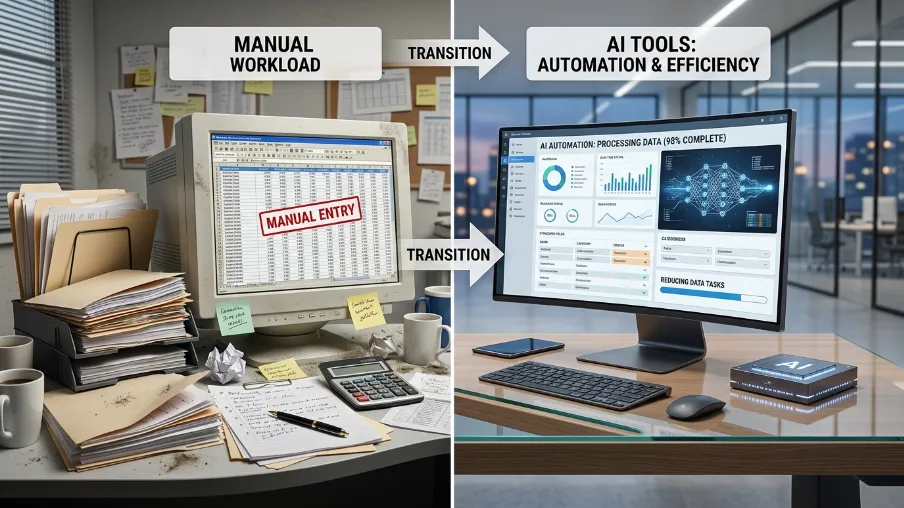
Reducing manual work with AI tools means using software that can read, decide, and act on information without a person doing it step by step. Instead of you copying data, checking rules, and clicking through five systems, the AI tool does it, and only asks for your input when something truly needs a human judgment call.
We test this distinction constantly when we build automations for clients. The businesses that get real results treat AI as a coworker that handles the repeatable steps, not a magic button that fixes a messy process on its own.
Think of it like this. Old-school automation follows fixed rules. "If this happens, do that." It's useful, but rigid. The moment something unexpected shows up, it breaks.
AI-powered workflow automation is different. It can read messy data, understand context, and make small decisions on its own. It can read an invoice that isn't formatted the same as the last one and still pull the right numbers. That's the real shift happening in 2026, tools have moved from simple task automation to what's called intelligent process automation, where the software actually understands what it's looking at.
Robotic Process Automation vs AI: What's the Difference
People mix these up all the time, so let's clear it up.
Robotic Process Automation (RPA) copies human clicks. It follows a script. Click here, type this, move there. It's fast but breaks easily if anything changes on screen.
AI automation understands content, not just clicks. It reads an email, figures out the intent, and responds or routes it correctly, even if the wording is different every time.
Here's the simple way to remember it: RPA does what you tell it. AI figures out what you meant.
Most modern platforms now blend both. That combination is what people mean when they say "intelligent process automation" or "AI-powered workflow automation." You get the speed of RPA with the judgment of AI.
Where to Start: The Tasks You Should Automate First
Not every task is worth automating right away. I always tell teams to start with tasks that are:
- Repetitive - done the same way, often
- Rule-based - there's a clear pattern to follow
- Time-consuming - it eats real hours every week
- Error-prone - mistakes cost money or trust
Here are the areas where AI tools reduce manual work the fastest.
AI Tools for Data Entry Automation
Manual data entry is one of the biggest time sinks in any office. Workers spend hours a week doing pure copy-paste work between systems, sometimes over a thousand copy-paste actions a week per person. AI-powered data entry tools can read forms, invoices, and spreadsheets, then enter the data into your CRM or ERP automatically. No more retyping the same numbers twice.
AI for Document Processing Automation
Contracts, invoices, receipts, applications, these all take time to read and process by hand. AI document tools can extract key details, flag missing information, and route documents to the right person. What used to take 20 minutes per document can take seconds.
AI-Powered Customer Service Automation
AI chatbots for manual work reduction have come a long way. Instead of scripted responses, modern AI support tools can understand a customer's question, pull the right answer from your knowledge base, and only escalate to a human when it's truly needed. This cuts response time and frees your support team for harder problems.
AI Tools for HR Process Automation
Onboarding new hires, screening resumes, answering policy questions, these are all repetitive by nature. AI in HR automation can screen applications against your criteria, schedule interviews, and answer common employee questions, saving your HR team real hours every week.
AI in Accounting and Finance Automation
Invoice matching, expense approval, reconciliation, these tasks are rule-based and perfect for automation. AI accounting tools can catch mismatched numbers, flag duplicate payments, and route approvals automatically, reducing human error in a place where mistakes are costly.
AI for Inventory Management Automation
For any business selling physical products, tracking stock manually leads to overselling, understocking, or wasted spend. AI inventory tools can predict demand, reorder stock, and flag issues before they become a real problem.
AI Tools for Email Automation
The average worker spends over 6 hours a week just on email. AI email tools can sort your inbox, draft replies, and even follow up automatically, so you're not starting from zero every morning.
Email Marketing Automation and Sales Funnel Automation
Marketing teams deal with their own version of manual overload. Building newsletters by hand, segmenting lists one by one, chasing leads that went quiet, it adds up fast. Email marketing automation fixes this by sending the right message to the right person at the right time, based on what they actually did, like opening an email or visiting a pricing page.
Sales funnel automation takes this further. Instead of a rep manually tracking every lead through each stage, AI tools score leads, trigger follow-ups, and move prospects through the funnel on their own. A lead who downloads a guide gets a different follow-up than one who requested a demo, and the system handles that split automatically. This is one of the fastest wins for growing businesses, because it directly connects to revenue, not just internal time savings.
Some platforms now go a step further with automated branding, using AI to keep visual and messaging consistency across emails, landing pages, and social posts without a designer touching every asset by hand. It's not a replacement for a brand strategy, but it does cut the manual work of resizing, reformatting, and rewriting the same content for every channel.
Best AI Tools for Task Automation in 2026

There's no single "best" tool. It depends on your team size, budget, and how technical you are. Here's an honest breakdown based on current market options, covering both general AI workflow automation platforms and tools built for specific tasks.
For no-code, fast setup: Tools like Zapier remain the easiest way to connect apps without writing code. Great if you want a quick win this week.
For more complex, multi-step workflows: Platforms like Make and n8n give you more control and flexibility, better suited for teams with some technical comfort.
For AI agents that make decisions, not just move data: Newer agentic platforms can read unstructured data, make judgment calls, and complete multi-step tasks end to end, closer to having a digital employee than a simple trigger-action tool.
For meetings and internal coordination: AI meeting assistants can turn conversations into summaries and action items automatically, cutting the "who's doing what" confusion that eats up so much team time.
A good rule of thumb: growing businesses usually see the fastest return by starting with their highest-volume, most repeatable task, then expanding from there. Don't try to automate everything on day one.
If you're not sure which tool fits your workflow, our AI automation solutions team can map your processes and recommend a stack built around your actual tasks, not a generic template.
No-Code AI Automation Tools: Automation Without a Developer
Here's the good news. You don't need a development team to start. No-code AI automation tools let you build workflows using simple drag-and-drop builders and plain language instructions. If you can describe a task in a sentence, you can usually automate it.
This matters a lot for small businesses. You don't need to hire an engineer just to stop copy-pasting data between two apps. Many small teams get an automation live in an afternoon, not a quarter.
How AI Reduces Manual Work: The Real Mechanics
So how does this actually work under the hood? In plain terms:
- It reads: AI tools can read text, images, forms, and speech, not just structured data in neat columns.
- It understands: Using language models, the tool figures out intent and context, not just keywords.
- It decides: Based on rules and patterns, it chooses the right next action.
- It acts: It updates a system, sends a message, or completes a task, without waiting for a person to click a button.
- It learns: Over time, many tools improve based on feedback and corrections.
This is why AI automation feels different from old software macros. It's not just fast. It's adaptable.
The Real Business Benefits (Beyond "Saving Time")
Yes, automation saves time. But that's only part of the story.
- Cut operational costs with AI automation: Fewer hours spent on manual work means lower labor cost per task, and fewer costly mistakes to fix.
- Reduce human error with AI automation: Automated workflows follow the same steps every time, cutting the errors that come from tired hands and rushed days. Some processes see error reduction of up to 90% after automation.
- Boost productivity using AI: Teams report meaningfully higher productivity after adopting workflow automation, and most organizations expect a return on their investment within six months.
- Better employee morale: People didn't take a job to do copy-paste all day. Removing tedious tasks gives your team room for the work that actually needs a human brain, and employees report higher satisfaction when automation handles the boring stuff.
AI Automation for Small Business: Where to Realistically Begin
If you run a small business, here's a simple path I recommend to clients:
- Pick one painful task: Something you or your team dread every week. Invoice entry, follow-up emails, appointment scheduling, pick one.
- Map the steps: Write down exactly what happens today, step by step. This becomes your automation blueprint.
- Choose a simple tool: Start with a no-code platform. Don't overbuild on day one.
- Test small: Run it alongside your manual process for a week. Compare results.
- Expand slowly: Once one workflow works well, move to the next task.
This slow, steady approach beats trying to automate your whole business overnight. Most automation failures come from trying to do too much too fast, not from the technology itself.
Common Mistakes to Avoid
I've seen these mistakes trip up otherwise smart teams:
- Automating a broken process: If your current workflow is messy, automation just makes the mess move faster. Fix the process first.
- Skipping the human check: Some decisions still need a person. Don't remove all oversight, especially early on.
- Ignoring your team: The people doing the manual work today know where the real pain points are. Ask them before you build anything.
- Choosing tools before goals: Pick the outcome you want first, then find the tool that fits. Not the other way around.
One of the most common marketing automation mistakes I see is treating every lead the same way. Sending one generic email sequence to everyone, instead of branching based on behavior, kills the whole point of automation. Another is going all in without testing. Teams launch a full email marketing automation sequence or sales funnel automation flow across every list at once, then get surprised when open rates drop or leads unsubscribe. Test on a small segment first, check the numbers, then roll it out wider.
Final Thoughts
Manual work quietly eats your time, your money, and your team's patience. The fix isn't complicated. Pick one task. Automate it well. Then move to the next.
We've walked dozens of businesses through this exact process, and the ones who reduce manual work with AI tools successfully all do the same thing: they start small, measure results, and expand only once something works. AI tools have gotten good enough, and simple enough, that you don't need a tech team to get real results. You just need to start.
If you want help figuring out exactly where your business is losing the most time, and building an automation plan that actually fits how your team works, that's exactly what we do at CyberCraft Bangladesh. Talk to our AI automation team and let's find your first quick win together.
Frequently Asked Questions About Reduce Manual Work With AI Tools
How does AI reduce manual work exactly?
AI reads data, understands context, and completes tasks that used to need a person clicking through steps by hand. It handles the repetitive part so people can focus on decisions and judgment calls.
Is AI automation expensive for a small business?
Not anymore. Many no-code AI automation tools start at a low monthly cost, and businesses often recover that cost within weeks through saved hours and reduced errors.
Will AI automation replace my employees?
Not in most cases. It replaces tedious tasks, not judgment, relationships, or creative problem-solving. Most teams use the time saved to focus on higher-value work, not fewer people.
What's the difference between RPA and AI automation?
RPA follows fixed, rule-based steps and breaks when things change. AI automation understands context and adapts, even when the input looks a little different each time.
Which task should I automate first?
Start with the task that's repetitive, time-consuming, and prone to human error. Data entry, email follow-ups, and invoice processing are usually the easiest wins.
What's the biggest marketing automation mistake to avoid?
Treating every contact the same way. Sending one generic sequence to your whole list wastes the benefit of email marketing automation and sales funnel automation, which work best when messages branch based on real behavior, like what someone clicked or downloaded.

I’m Mitu Das, a JavaScript developer, ERP product architect, and SEO specialist from Bangladesh. I work at CyberCraft Bangladesh, where I help build simple, scalable software, SaaS platforms, and business solutions. My goal is to create technology that helps companies save time, automate daily tasks, and grow faster. I enjoy combining development, product ideas, and SEO strategies to create useful digital solutions for modern businesses.
Writes about