
UI/UX Design Process Explained: The Complete Step-by-Step Guide

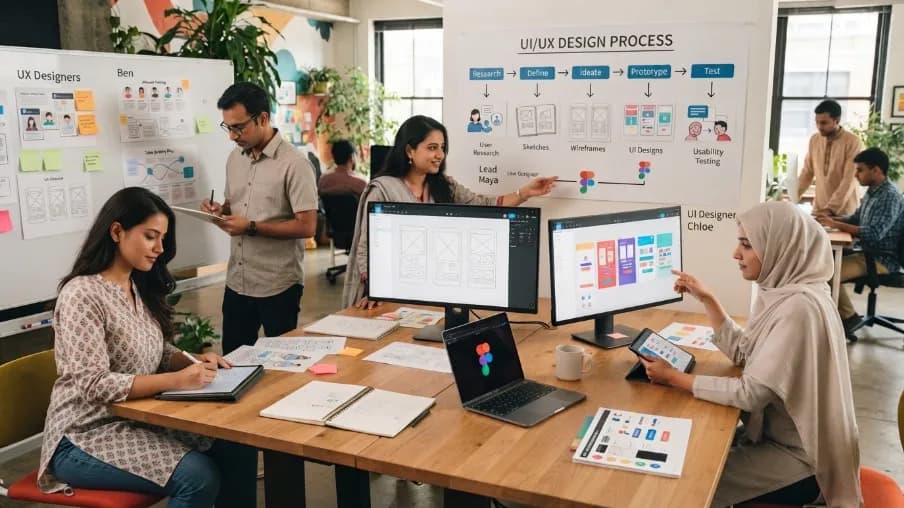
Have you ever opened an app and left in ten seconds flat? I have. We all have. That's the power of bad UI/UX design. And it's also why good design is no longer a "nice to have." It's the reason some products win while others quietly disappear.
I've spent years working inside real design projects, sitting in user interviews, watching people struggle with wireframes, and shipping products that either took off or flopped. I've seen founders spend months building great technology, only to watch users leave because the experience was confusing. It's a painful thing to see, and it's completely avoidable.
Great UI/UX design isn't just about making a product look good. It's about creating intuitive experiences that improve customer satisfaction, increase conversions, and support long-term digital growth. When users can accomplish their goals effortlessly, businesses grow faster.
This is the UI/UX design process explained the way we actually run it with clients, not the textbook version. No jargon. No fluff. Just the real workflow that professional design teams use, from the first user interview to the final handoff.
By the end, you'll know:
- What UI and UX design actually mean, and how they differ
- Every step in the UI/UX design process, explained simply
- Real examples from brands you already know
- Common mistakes that kill good products
- How this process connects to business growth and brand identity
Let's get into it.
UI/UX Design Process Explained: The Basics
The UI/UX design process is a set of steps that turns an idea into a usable, likable digital product. It covers research, design, testing, and launch.
Think of it like building a house. You don't start with paint colors. You start with a plan. You check the land. You draw a blueprint. Then you build, test the doors and windows, and finally decorate. UI/UX design works the same way.
UX (User Experience) design is the blueprint. It's about how the product works, how easy it is to use, and how it makes people feel.
UI (User Interface) design is the decoration. It's the buttons, colors, fonts, and layout users actually see and touch.
You need both. A product can look stunning (great UI) but still confuse users (poor UX). Or it can be simple to use (great UX) but look outdated (poor UI). The best products get both right.
Difference Between UI and UX Design
UX design focuses on function and flow. It answers: "Does this make sense to the user?" UI design focuses on look and feel. It answers: "Does this look good and match the brand?"
UX comes first. UI builds on top of it.
Why UI/UX Design Matters for Business Growth

Here's the truth: design is not just art. It's a business decision.
A confusing checkout page loses sales. A cluttered dashboard drives users to a competitor. A slow, unclear sign-up form kills conversions before they even start. This is exactly why UI/UX design matters for business growth: it sits right next to pricing and marketing as a driver of revenue, not below it.
For SaaS companies and tech startups, brand identity and product design work together. Your logo and visual identity build recognition. Your UI/UX design builds trust and daily use. One without the other leaves money on the table.
It helps to separate two ideas here: brand identity and brand image. Brand identity is what you control: your logo, colors, typography, and voice. Brand image is what's left in the user's head after they use your product. Good UI/UX design is the bridge between the two. You can have a sharp corporate brand identity on paper, but if the product feels clunky to use, the brand image users actually remember will be a frustrating one.
This is why good UI/UX design always shows up twice: once in how the product looks (matching your visual identity), and once in how it works (matching your brand promise). Get both right, and users trust the product before they even trust the company.
Good UI/UX design also saves money in the long run. Fixing a design flaw after launch costs far more than catching it during the wireframe stage. That's why smart teams invest in the process early, not after users start complaining.
If you're also thinking about your logo, visual identity, and overall corporate brand identity alongside your product design, it's worth reading our guide on brand identity for SaaS and tech startups, the two go hand in hand.
The UI/UX Design Process Step by Step
Now let's break down the full UI/UX design process, step by step. Different teams may name these steps slightly differently. But the core flow stays the same everywhere, from small startups to big enterprises.
Step 1: Discovery and Research
Every good design starts with questions, not screens.
In this stage, you figure out:
- Who is the user?
- What problem are they trying to solve?
- What does success look like for the business?
This is the UX research process. It includes user interviews, surveys, competitor analysis, and reviewing analytics data. The goal is to understand real behavior, not guesses.
I always tell teams this: never skip user research to save time. It feels faster in the short term. But it almost always costs more later, when you have to redesign a feature nobody asked for.
We learned this the hard way on a client dashboard project. The client wanted a feature built fast, without talking to users first. We pushed for two weeks of interviews instead. Those interviews showed the client's real problem was different from what they assumed. That single research step changed the whole project scope, and saved a redesign later.
Big brands take this seriously. Airbnb's early growth, for example, came from research that uncovered trust as the biggest concern for users booking a stranger's home. That insight led the team to build features like secure payments and verified profiles, which became core to the platform's success.
Step 2: Define the Problem and Build User Personas
Once research is done, you organize what you learned. This step turns raw data into clear direction.
Here, teams create:
- User personas – fictional profiles that represent your real user groups
- Problem statements – a clear sentence describing the user's pain point
- Goals and success metrics – how you'll know the design worked
This step keeps everyone aligned. Designers, developers, and stakeholders all work from the same understanding of the user.
Step 3: Information Architecture and User Flow
This is where structure comes in.
Information architecture is how you organize content and features so users can find what they need without thinking hard. It's like the table of contents of your app.
User flow maps out the path a user takes to complete a task. For example, the steps from "open app" to "complete purchase."
Get this step wrong, and users get lost. Get it right, and the product feels effortless.
Step 4: Wireframing
Wireframes are simple sketches of your screens. No colors. No fancy fonts. Just boxes and lines showing where things go.
Think of wireframes as the skeleton of your product. They let you test layout and flow before spending time on visual details. This step is fast, cheap, and saves huge rework later.
Most design teams today build wireframes in Figma, then move quickly into low-fidelity mockups to review with stakeholders.
Step 5: Prototyping
Once wireframes are approved, it's time to build an interactive prototype. This is a clickable version of your design that behaves like the real product.
Prototyping lets you test the experience before a single line of code is written. Users can click, scroll, and move through the flow. You catch confusing steps early, when they're cheap to fix.
This is one of the biggest reasons the UI/UX design process saves money. A fix during prototyping might take an hour. The same fix after development can take days.
Step 6: Visual Design and Design Systems
Now comes the part most people think of first: the actual look. Colors, typography, icons, spacing, and imagery all come together here.
This step also builds your design system, a library of reusable components like buttons, forms, and cards. A design system keeps your product consistent across every screen, and it makes future updates much faster.
Good visual design isn't about trends. It's about clarity, consistency, and matching your brand identity. This is also where corporate brand identity elements, your logo, color palette, and typography, get built into real screens instead of just a style guide. A strong design system also supports responsive UI design, so your product looks and works well on phones, tablets, and desktops alike. All of this is what separates good UI/UX design from design that just looks nice in a presentation.
Step 7: Usability Testing
Before launch, real users test the product. This is usability testing, and it's non-negotiable.
You watch real people try to complete tasks. Where do they pause? Where do they get confused? Where do they give up? These answers are gold. No amount of internal review replaces watching a real user struggle with a button you thought was obvious.
Testing isn't a one-time event either. Many teams run smaller usability tests throughout the process, not just at the end. This is called iterative design: testing, learning, and improving in small loops instead of one big reveal.
Step 8: Development Handoff and Launch
Once the design is tested and approved, it's handed off to developers. Good handoff includes clear specs, assets, and the design system so developers can build it accurately.
This is often where UI and UX work meets engineering. Clear documentation here prevents miscommunication and keeps the final product true to the design.
Step 9: Post-Launch Review and Iteration
The process doesn't stop at launch. Real usage always reveals things testing missed.
Smart teams track data like conversion rates, drop-off points, and user feedback after launch. Then they update the product based on real behavior. Instagram, for example, regularly updates its interface based on user feedback gathered after launch, which helps keep satisfaction and retention high.
This step turns the UI/UX design process into a cycle, not a one-time project. Good products keep improving long after day one.
A Simple UI/UX Design Process Checklist
If you want a quick reference, here's the full UI/UX design lifecycle in one list:
- Research users and business goals
- Define personas and problem statements
- Map information architecture and user flow
- Create wireframes
- Build interactive prototypes
- Design the visual system
- Run usability testing
- Hand off to development
- Launch and gather feedback
- Iterate based on real data
Keep this checklist nearby. Whether you're a solo founder or leading a design team, it works as a simple guide for any project size.
Design Thinking vs. UI/UX Design Process: What's the Difference
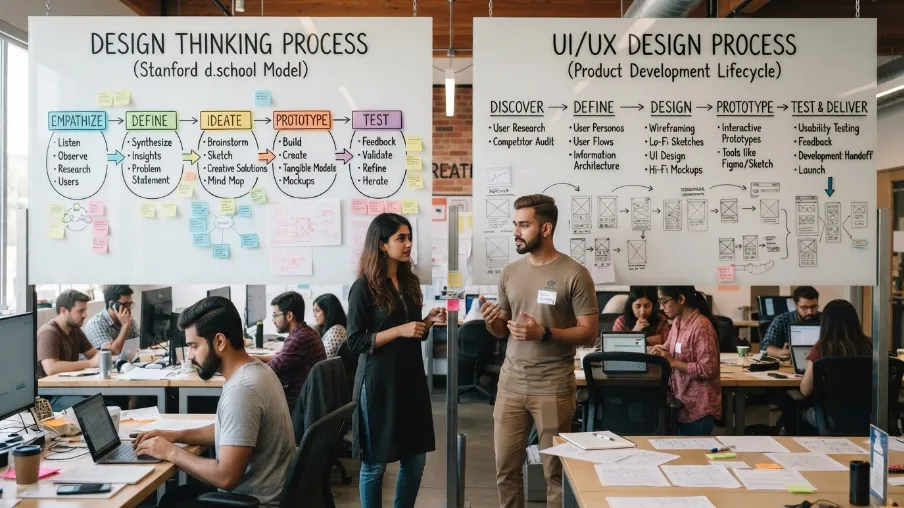
People often mix these up.
Design thinking is a broader, human-centered mindset. It has five phases: Empathize, Define, Ideate, Prototype, and Test. It applies to solving any kind of problem, not just digital products.
The UI/UX design process is more specific. It applies design thinking principles directly to building software, apps, and websites. It includes practical, production-focused steps like design systems, developer handoff, and post-launch tracking that design thinking alone doesn't cover.
In short: design thinking is the philosophy. The UI/UX design process is how you apply it to real products.
Common Mistakes in the UI/UX Design Workflow
I've seen these mistakes cost teams months of wasted work:
- Skipping research: Designing based on assumptions instead of real users.
- Jumping straight to visuals: Picking colors before understanding the user flow.
- Testing too late: Waiting until after launch to get real feedback.
- No design system: Rebuilding the same button five different ways across screens.
- Ignoring accessibility: Forgetting users with disabilities, which shuts out real customers and can create legal risk too.
Avoiding these mistakes is often more valuable than any single design trick.
How Long Does the UI/UX Design Process Take
This depends on the project. A small feature update might take two to four weeks. A full product design, from research to launch, can take three to six months.
Timelines also depend on team size, how much research already exists, and how many rounds of testing and revisions you need. Rushing this process almost always costs more time later, through rework and user complaints.
Final Thoughts
The UI/UX design process isn't a fancy formula. It's simply a way to build with the user in mind, step by step, instead of guessing.
Every strong product you use today, from your banking app to your favorite ecommerce site, followed some version of this process. Research first. Structure second. Design third. Test always.
This is how we run the UI/UX design process for our own clients at CyberCraft Bangladesh, across SaaS dashboards, ecommerce stores, and startup MVPs. It's not theory. It's the same workflow behind every project we ship.
If you're building a product, a website, or a SaaS platform and want a design process that actually drives results, our team can help. We handle everything from user research and wireframing to full visual design systems and usability testing.
Ready to build a product users love? Explore our UI/UX design services and let's talk about your next project.
FAQs About UI/UX Design Process Explained
What is the difference between UI and UX design?
UX design focuses on how a product works and feels to use. UI design focuses on how it looks: colors, layout, and visual style. UX comes first, then UI builds on it.
What are the main steps in the UI/UX design process?
The core steps are research, defining the problem, information architecture, wireframing, prototyping, visual design, usability testing, development handoff, and post-launch iteration.
How do I start learning UI/UX design as a beginner?
Start with the basics of user research and wireframing. Learn a tool like Figma. Then practice by redesigning an app you already use. Study real UX case studies to see how the process works in practice.
Why is usability testing so important?
Usability testing shows you how real users actually behave, not how you assume they'll behave. It catches confusing steps before launch, when fixes are cheap and fast.
Does a good UI/UX design process really affect business growth?
Yes. Clear, easy-to-use design increases conversions, reduces support requests, and builds trust in your brand. It's one of the highest-return investments a digital product can make.
What does "UI/UX design process explained" actually mean in practice?
It means breaking the design work into clear stages, so nothing gets built on guesswork. In practice, that's research first, structure second, design third, and testing at every stage after. Teams that skip stages usually end up redoing work later.

I’m Mitu Das, a JavaScript developer, ERP product architect, and SEO specialist from Bangladesh. I work at CyberCraft Bangladesh, where I help build simple, scalable software, SaaS platforms, and business solutions. My goal is to create technology that helps companies save time, automate daily tasks, and grow faster. I enjoy combining development, product ideas, and SEO strategies to create useful digital solutions for modern businesses.
Writes about
Want this done for you?
Our team builds and ships exactly what this article describes. Send a message and we will reply with a scope.

.webp&w=3840&q=75)
.webp&w=3840&q=75)