
How to Fix SEO Issues in React Apps: A Step-by-Step Guide


I've audited enough React apps to know the pattern by heart. The site looks great. The build is clean. Then someone opens Google Search Console and finds half the pages aren't indexed. That's usually the moment teams start asking how to fix SEO issues in React apps, because a polished frontend doesn't always translate into search visibility.
"My React app is not indexing on Google" is one of the most common messages I get from developers. If that's you right now, take a breath. This is fixable. React SEO is one of the most common problems in modern web development, and it has a clear cause: React renders content in the browser, not on the server, unless you tell it to do otherwise.
In this guide, I'll walk you through exactly how to fix SEO issues in React apps. I'll show you what breaks, why it breaks, and the real code I use to fix it. This isn't theory. Every code sample here comes straight from a published package README, not a guess. By the end, you'll have a working checklist to make your React app SEO friendly, from rendering to meta tags to structured data.
Let's start with why this happens in the first place.
Why React Apps Have SEO Problems
Here's the core issue. Traditional websites send full HTML to the browser. A crawler reads that HTML immediately and understands the page right away.
React apps usually don't work that way. By default, the server sends a nearly empty shell:
<div id="root"></div>
The real content gets built afterward, inside the browser, using JavaScript. This is called client-side rendering, or CSR, and it's the default rendering model for most single-page applications.
Google's crawler can run JavaScript. But it does this in two passes. The first pass reads raw HTML. The second pass, which renders JavaScript, can take days. Other crawlers, including Bing and many AI search tools, often skip JavaScript rendering entirely.
So your content is real. It just arrives too late, or not at all, for a lot of the systems trying to read it. This is exactly why SEO for single page applications needs a different playbook than a traditional multi-page site built with plain HTML.
The most common React SEO issues are client-side-only rendering, missing or inconsistent meta tags, broken canonical and hreflang tags, no structured data, and slow Core Web Vitals from heavy JavaScript bundles.
Now let's fix each one, in the order that actually matters.
Step 1: Fix Rendering First (SSR vs CSR)
I always start here, because every other fix depends on it. If your content isn't in the first HTML response, better meta tags won't save you.
React SSR vs CSR for SEO
Server-side rendering (SSR) in React for SEO means the server builds the full HTML page before it ever reaches the browser, so crawlers see real content immediately instead of an empty shell. With client-side rendering, the browser downloads JavaScript first, then builds the page.
- CSR: Simple to build. Slow for crawlers. Common in plain Vite or Create React App projects.
- SSR: More setup upfront. Crawlers see full content right away. Built into Next.js and Remix.
When to Migrate to a Meta-Framework
If your React app depends on organic search traffic, migrating to Next.js or Remix is often the most effective answer for how to fix SEO issues in React apps. Both provide server-side rendering and static generation without requiring you to build a custom rendering pipeline.
If a full migration isn't realistic yet, pre-rendering is a solid interim fix. It generates static HTML snapshots ahead of time, so crawlers get real content while your users still get the full React experience after hydration.
Step 2: Fix Missing or Inconsistent Meta Tags
This is where I find the most damage on real audits. Even when content renders correctly, meta tags are often missing, duplicated, or just wrong across pages.
Here's the tricky part specific to React: your components render inside <div id="root">. Dropping a <title> tag inside your component tree doesn't reliably update the actual document head. You need a dedicated tool built for this.
Site-Wide Defaults With DefaultSEO
I set global defaults once, at the app root, using @power-seo/react. It's an SEO npm package for React that's open-source, TypeScript-first, and built specifically for this problem. Think of it as a React developer tool for SEO. Instead of hand-coding raw meta strings, you get typed components. Every code example below is copied directly from its published documentation.
import { DefaultSEO } from '@power-seo/react';

function App({ children }) {
  return (
    <DefaultSEO
      titleTemplate="%s | Acme Corp"
      defaultTitle="Acme Corp"
      description="Enterprise software built for scale."
      openGraph={{
        type: 'website',
        siteName: 'Acme Corp',
        images: [{ url: 'https://acme.com/og-default.jpg', width: 1200, height: 630 }],
      }}
      twitter={{ site: '@acmecorp', cardType: 'summary_large_image' }}
    >
      {children}
    </DefaultSEO>
  );
}
<DefaultSEO> stores this config in React context. Every page below it inherits these defaults automatically, so you only override what's different per page.
Per-Page Overrides With SEO
import { SEO } from '@power-seo/react';

function ProductPage({ product }) {
  return (
    <>
      <SEO
        title={product.name}
        description={product.summary}
        canonical={`https://acme.com/products/${product.slug}`}
        openGraph={{
          type: 'website',
          images: [{ url: product.image, width: 1200, height: 630, alt: product.name }],
        }}
      />
      <main>{/* page content */}</main>
    </>
  );
}
This one pattern solves three real problems at once. You stop repeating tags on every page. You stop forgetting tags on new pages. And your brand information stays consistent across the whole site.
Step 3: Fix Canonical URLs and Duplicate Content
Canonical tags tell Google which version of a page is the real one. Skip this, and Google may index several near-duplicate URLs, splitting your ranking signals across all of them instead of one strong page.
import { Canonical } from '@power-seo/react';

// Absolute URL
<Canonical url="https://example.com/blog/react-seo" />

// With base URL resolution
<Canonical url="/blog/react-seo" baseUrl="https://example.com" />
The <SEO> component also accepts a canonical prop directly, so most pages won't even need this component on its own. Just make sure every dynamic route passes its full, absolute URL, not a relative path.
Step 4: Fix Robots Directives
This is one of the most damaging mistakes I see in production. Someone writes no-index instead of noindex in a raw string, Google reads it as nothing, and a page that should rank quietly disappears. Or worse, a staging environment gets fully indexed because nobody added a robots tag at all.
Typed props remove this entire category of error:
import { Robots } from '@power-seo/react';

// Noindex a staging page
<Robots index={false} follow={true} />
// → <meta name="robots" content="noindex, follow" />

// Advanced directives
<Robots
  index={true}
  follow={true}
  maxSnippet={150}
  maxImagePreview="large"
  unavailableAfter="2026-12-31T00:00:00Z"
/>
// → <meta name="robots" content="index, follow, max-snippet:150, max-image-preview:large, unavailable_after:2026-12-31T00:00:00Z" />
You can also noindex an entire environment in one place, which is the cleanest fix I know for the "staging got indexed" problem:
<DefaultSEO
  robots={{ index: false, follow: false }}
  titleTemplate="%s | Staging"
  defaultTitle="Staging"
>
  {children}
</DefaultSEO>
Step 5: Fix Hreflang for Multi-Language React Apps
If you run a multi-language site, hreflang tags tell Google which language and region each URL is meant for. Writing these by hand across hundreds of product pages, in multiple locales, is exactly where typos creep in and quietly break international SEO.
import { Hreflang } from '@power-seo/react';

<Hreflang
  alternates={[
    { hrefLang: 'en', href: 'https://example.com/en/page' },
    { hrefLang: 'fr', href: 'https://example.com/fr/page' },
    { hrefLang: 'de', href: 'https://example.com/de/page' },
  ]}
  xDefault="https://example.com/en/page"
/>;
One component call replaces a page full of manual <link> tags, and reduces the chance of a mismatched locale slipping through review.
Step 6: Add Structured Data With Breadcrumb JSON-LD
Structured data helps search engines, and increasingly AI answer engines, understand what's actually on your page. Breadcrumb structured data is one of the easiest wins here, since it earns visible breadcrumb trails in search results.
import { Breadcrumb } from '@power-seo/react';

<Breadcrumb
  items={[{ name: 'Home', url: '/' }, { name: 'Blog', url: '/blog' }, { name: 'React SEO Guide' }]}
/>;
This renders both a visible <nav> element for your users and an embedded application/ld+json BreadcrumbList script for Google, in one call. You can customize the separator and styling too:
<Breadcrumb
  items={breadcrumbItems}
  separator=" › "
  className="breadcrumb-nav"
  linkClassName="breadcrumb-link"
  activeClassName="breadcrumb-active"
  includeJsonLd={true}
/>
Step 7: Fix Open Graph and Twitter Card Tags
Meta tags don't just affect rankings. They control how your page looks when someone shares it on social media. A missing Open Graph image is a small technical bug with a very visible, very embarrassing result.
import { OpenGraph } from '@power-seo/react';

<OpenGraph
  type="article"
  title="How to Build a React SEO Pipeline"
  description="A step-by-step guide to SEO in React applications."
  url="https://example.com/blog/react-seo"
  images={[
    { url: 'https://example.com/react-seo-og.jpg', width: 1200, height: 630, alt: 'React SEO' },
  ]}
  article={{
    publishedTime: '2026-01-15T00:00:00Z',
    authors: ['https://example.com/author/jane'],
    tags: ['react', 'seo', 'typescript'],
  }}
/>;
And for Twitter/X specifically:
import { TwitterCard } from '@power-seo/react';

<TwitterCard
  cardType="summary_large_image"
  site="@mysite"
  creator="@author"
  title="How to Build a React SEO Pipeline"
  description="A step-by-step guide to SEO in React applications."
  image="https://example.com/twitter-card.jpg"
  imageAlt="React SEO guide"
/>;
Most of the time, you won't call these components directly. Passing openGraph and twitter objects to <SEO> or <DefaultSEO> handles both automatically. I only reach for the standalone components when I need to render a card outside the normal page flow.
Step 8: Fix Performance Issues That Hurt Rankings
Google uses Core Web Vitals as a direct ranking signal. Heavy, unoptimized React bundles hurt you two ways: users bounce, and Google notices the slow load.
A few checks I run on every audit:
- Confirm above-the-fold images are not lazy-loaded. Lazy-loading your hero image delays Largest Contentful Paint, one of the three Core Web Vitals metrics.
- Code-split routes so users only download JavaScript for the page they're actually on.
- Compress images and serve modern formats like WebP or AVIF.
- Re-check your bundle size regularly. A bloated bundle slows down every page on the site, not just one.
Common React SEO Mistakes: How to Fix SEO Issues in React Apps
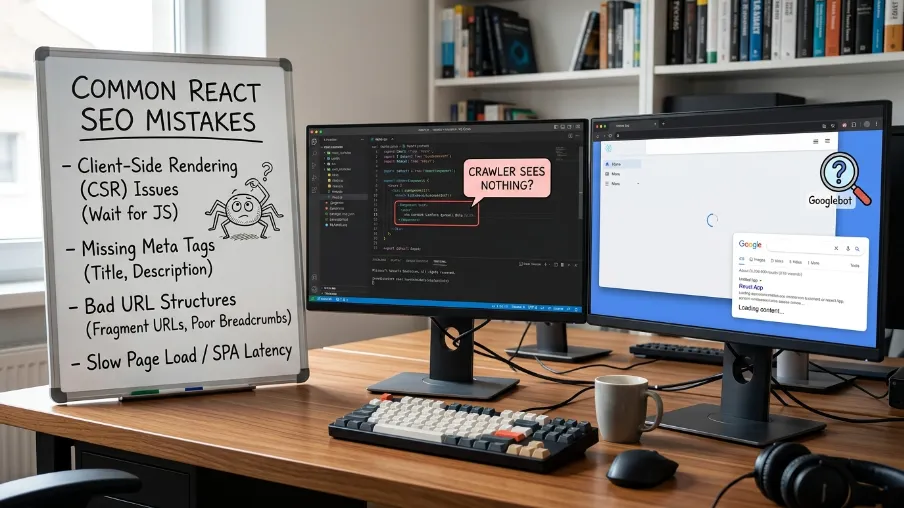
Before the checklist, here's a quick recap of the React SEO mistakes that show up in almost every audit I run:
- Shipping a client-side-only app with no SSR or pre-rendering plan.
- Hard-coding
<title>tags inside components, which never reach the actual document head. - Typo'd robots strings that silently noindex a live page.
- Missing canonical tags on paginated or filtered product pages, creating duplicate content.
- Forgetting hreflang on multi-language sites, or setting it up once and never updating it.
- No structured data at all, even though breadcrumb JSON-LD takes minutes to add.
- Lazy-loading the hero image, which quietly wrecks Largest Contentful Paint.
If you want to check where your own app stands, it's worth running your pages through a free React SEO tracking tool before and after these fixes. Seeing the before-and-after indexing and Core Web Vitals numbers is the fastest way to confirm a fix actually worked, rather than assuming it did.
React SEO Checklist
When I audit a React app, I work through these in this exact sequence, because each step builds on the last:
- Rendering: Confirm content is in the first HTML response (SSR, SSG, or pre-rendering).
- Meta tags: Title, description, canonical, Open Graph, and robots directives on every page, ideally via
<DefaultSEO>and<SEO>. - Canonical and hreflang: No duplicate content, no locale mismatches.
- Robots directives: No accidental noindex, no accidentally indexed staging environments.
- Structured data: Breadcrumb JSON-LD at minimum, expanded from there.
- Performance: Core Web Vitals, image optimization, correct lazy-loading rules.
Skipping to structured data while your app still renders an empty <div> won't move the needle. Fix the foundation first, every time.
Final Thoughts
Every React SEO problem in this guide is fixable, and none of them require rewriting your whole app. Fix rendering first. Then meta tags. Then canonical, hreflang, and robots directives. Add structured data. Tune performance last. That order matters more than trying to fix everything at once.
I use Power-SEO for this exact workflow. It's an open-source SEO toolkit built for JavaScript and React, with typed components for meta tags, Open Graph, Twitter Cards, canonical URLs, hreflang, and breadcrumb structured data, all in one composable API.
Install the pieces your app actually needs, work through the checklist above, and turn your React SEO audit into pages that actually get indexed and rank.
Frequently Asked Questions About How to Fix SEO Issues in React Apps
Does React hurt SEO by default?
Not automatically, but a plain client-side-rendered React app makes SEO harder. Google can index JavaScript, but rendering happens in a delayed second pass, and other crawlers may skip it entirely. Server-side rendering or pre-rendering solves this directly.
How do I add dynamic meta tags in React?
Placing a <title> tag inside your component tree doesn't reliably update the document head, since React renders into a single root <div>. Use a dedicated library like @power-seo/react, which manages head tags directly and supports per-page overrides through context.
What's the single biggest React SEO mistake you see in audits?
Client-side-only rendering combined with inconsistent meta tags. Together, they mean crawlers either can't see your content quickly, or see wrong and duplicated tags when they finally do.
Is Next.js required to fix React SEO issues?
No, but it helps significantly. Next.js and Remix include SSR and static generation without a custom setup. If migrating isn't possible right now, pre-rendering plus solid meta tag and robots management covers most of the gap.
Do I need hreflang if my site only has one language?
No. Hreflang only matters once you serve the same content in more than one language or region. For single-language sites, focus your effort on canonical tags, meta tags, and structured data instead.

I’m Mitu Das, a JavaScript developer, ERP product architect, and SEO specialist from Bangladesh. I work at CyberCraft Bangladesh, where I help build simple, scalable software, SaaS platforms, and business solutions. My goal is to create technology that helps companies save time, automate daily tasks, and grow faster. I enjoy combining development, product ideas, and SEO strategies to create useful digital solutions for modern businesses.
Writes about